





 Shopify
 Stripe
 Slack
Slack Notion
 Google Workspace
 Confluence

What Is the Best Customer Support Software in 2026? 9 Tools Scored With Real Prices


Customer support software splits into five categories: live chat, shared inbox, ticketing help desk, ecommerce support and CRM-unified service. We score nine tools on a published 30-point rubric and compare what each one bills for and what its AI can do to a ticket.
Key takeaways
- Intercom and Gorgias score highest on the 30-point customer support software scorecard at 26 each, or 87%, and nine tools clear the 18-point cut-off.
- Freshdesk scores 24 out of 30 and has the cheapest paid ticketing seat at $19 per agent a month billed annually, though its pricing page lists no free plan.
- HubSpot Service Hub Professional costs $90 per seat a month plus a one-time $1,500 onboarding fee, the fee that drops its entry-cost score to 1.
- Gorgias prices on ticket volume instead of per agent, from $10 a month for 50 tickets or $40 with AI Agent, and its AI Actions can cancel orders from Basic up.
- Macha, an AI agent layer for existing help desks, found 59 of 119 live customer agents could post an internal note but only 19 could post a public reply.

The best customer support software in 2026 depends on the category you need, but on our 30-point scorecard Intercom and Gorgias score highest at 26, and nine tools clear the 18-point cut-off. Behind them come Freshdesk at 24, Zendesk and Tidio at 23, Zoho Desk and Front at 22, and Help Scout and HubSpot Service Hub at 21. The total is a floor, not a ranking, because these are five different kinds of product: take Zendesk or Freshdesk for a ticket queue, Help Scout or Front for a shared inbox, Intercom or Tidio for chat-led support, Gorgias for Shopify, and HubSpot Service Hub if support has to sit on the same CRM as sales.
Macha publishes this page and Macha is not a help desk, so it is deliberately absent from the ranking below. It appears once, in a clearly marked section about keeping the software you already have. Every price here was read on the vendor's own live page in September 2026 and re-checked on 24 September 2026, with one labeled exception we explain.
How do the nine tools compare on price and AI?
Legend: ✅ native · ➕ configurable, you build it · ✖ not a focus.
| Tool | Category | Priced per | Entry price (September 2026) | AI: resolves, drafts or triages | Write actions |
|---|---|---|---|---|---|
| Zendesk | Ticketing help desk | Agent seat, plus per resolution | $55 per agent/mo annual | Resolves and drafts | ✅ |
| Freshdesk | Ticketing help desk | Agent seat, plus per AI session | $19 per agent/mo annual | Resolves and drafts | ✅ |
| Zoho Desk | Ticketing help desk | User seat | Free for 3 agents; $7 per user/mo | Resolves and drafts | ➕ |
| Intercom | Conversational, chat-led | Seat, plus per Fin outcome | $85 per seat/mo annual (Advanced) | Resolves | ✅ |
| Tidio | Live chat, SMB | Billable conversations | Free for 50 conversations/mo | Resolves | ➕ |
| Help Scout | Shared inbox | User seat, plus per AI resolution | Free for 5 users; $25 per user/mo | Resolves and drafts | ✖ |
| Front | Shared inbox, collaborative | Seat, plus per conversation for AI | $25 per seat/mo annual | Drafts, resolves on Autopilot | ➕ |
| Gorgias | Ecommerce support | Ticket volume, never per agent | $10/mo for 50 tickets; $40 with AI Agent | Resolves | ✅ |
| HubSpot Service Hub | CRM-unified service | Seat, plus credits per resolution | $90 per seat/mo (Professional) plus $1,500 onboarding | Resolves | ✅ |
Two columns do most of the work here. "Priced per" is the one nobody else compares: eight of the nine charge for people, and Gorgias charges for tickets, which inverts the whole calculation for a small team handling a lot of volume. And "write actions" tells you whether the AI can change an order or only describe one, which is the difference between deflecting a WISMO ticket and answering it.
How were the tools scored, and what score do they need?
Most pages ranking for this search are published by someone selling one of the products on them, ours included. The only way to make that useful instead of worthless is to publish the scoring and let you check it.
Six criteria, each scored 0 to 5, for a maximum of 30. A product needs 18 out of 30, or 60%, to be listed. Anything below the line is named at the end with its score.
| Criterion | 5 points | 0 points |
|---|---|---|
| Published pricing | Every seat and AI rate is on the vendor's own page | Nothing public |
| Entry cost for a small team | A free plan with real volume, or under $25 a seat | Over $150 a seat, or a mandatory onboarding fee |
| AI that resolves | Built in, with a rate you can calculate | No AI that answers a customer |
| Write actions | Documented actions that change an order, refund or address | Answers only |
| Independent review base | 1,000 or more ratings on G2 or Gartner Peer Insights | None |
| Channel coverage | Email, chat, social, messaging and voice | One channel |
| Product | Pricing (September 2026) | Entry cost (September 2026) | AI resolves | Write actions | Reviews | Channels | Total | Score |
|---|---|---|---|---|---|---|---|---|
| Intercom | 5 | 1 | 5 | 5 | 5 | 5 | 26 | 87% |
| Gorgias | 4 | 4 | 5 | 5 | 4 | 4 | 26 | 87% |
| Freshdesk | 4 | 4 | 4 | 3 | 5 | 4 | 24 | 80% |
| Zendesk | 3 | 2 | 4 | 4 | 5 | 5 | 23 | 77% |
| Tidio | 5 | 5 | 3 | 2 | 5 | 3 | 23 | 77% |
| Zoho Desk | 3 | 5 | 3 | 2 | 5 | 4 | 22 | 73% |
| Front | 5 | 3 | 3 | 3 | 4 | 4 | 22 | 73% |
| Help Scout | 5 | 4 | 4 | 2 | 3 | 3 | 21 | 70% |
| HubSpot Service Hub | 4 | 1 | 4 | 3 | 5 | 4 | 21 | 70% |
Three scores worth explaining, because they will look wrong at a glance. Zendesk gets 3 for published pricing despite publishing more than most: its pricing page lists the AI agent rate ($1.50 per committed automated resolution, $2.00 pay-as-you-go), but an allowance described two ways (included resolutions per agent in the plan table, a dollar amount per seat in the help center) nets against it, so working out next month's bill takes a spreadsheet. Zoho Desk also gets 3, not because Zoho hides anything but because we could not read its US dollar prices at all: zoho.com serves our location in rupees from a script and from a browser, so the figures on this page come from G2's pricing tab and are labeled. And HubSpot gets 1 for entry cost because of the $1,500 onboarding fee on Professional, the tier we scored, which is real money that never appears in a seat-price comparison. Front now gets 5 for published pricing, up from 4 in September, because as of October 2026 its help center publishes the full Autopilot rate card ($0.89 a resolution, $0.39 a handoff, $0.05 for triage) rather than only the $0.05 floor on its pricing page.
Macha is not scored here. It is not a help desk, and scoring a product on a rubric its category cannot meet would rig the table in one direction or the other.
Which category of support software fits your team?
| Your situation | Category | Start with |
|---|---|---|
| Most volume arrives by email, one shared address | Shared inbox | Help Scout, or Front if several people work one thread |
| Most volume arrives in a website chat widget | Live chat | Tidio for SMB, Intercom for SaaS |
| You need queues, SLAs, routing and reporting | Ticketing help desk | Zendesk for depth, Freshdesk or Zoho Desk for value |
| You sell on Shopify and most tickets are about orders | Ecommerce support | Gorgias |
| Sales, marketing and support should share one record | CRM-unified | HubSpot Service Hub |
| Your tool is fine, the AI on top of it is the problem | Keep the tool, add an agent | See the section below |
Two notes on the boundaries. Help desk software is the ticketing branch of customer support software, so if you have already decided you want a ticket queue, our best help desk software roundup is the tighter list. And if what you actually want is the AI, not the software underneath it, our AI help desk guide compares the AI cost on each platform directly.
Which chat-led tool is best: Intercom or Tidio?
Intercom
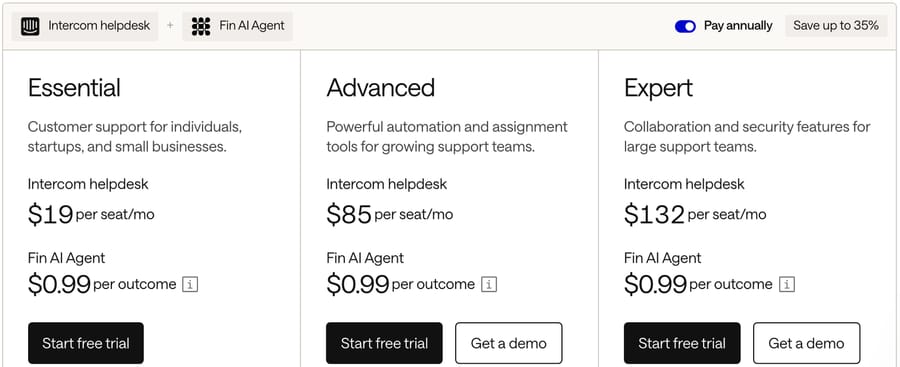
Best for: SaaS and product-led teams whose support happens in-app, and who want the AI agent to be the front line.
Intercom is the chat-led platform with the strongest AI attached: Fin. The company renamed itself Fin on 12 May 2026, and Salesforce completed its acquisition on 10 September 2026, though the help desk is still sold as Intercom. Our Fin explainer covers the agent.
Key features: messenger with product tours and in-app messaging; Fin across chat, email, voice and social; Procedures for multi-step workflows; a help center; strong reporting.
Pros: the best AI on this page by a distance, with a rate you can calculate before you sign. 4.5 from 3,912 G2 ratings. And on Intercom itself, Fin carries no monthly minimum.
Where it falls short: it is the most expensive entry here. Advanced is $85 a seat a month billed annually and Expert is $132, with Fin's $0.99 per outcome on top. The 50-outcome monthly minimum applies only when Fin runs on a help desk other than Intercom. The entry plan, Essential, is $29 a seat billed annually; Intercom has also shown $19 in a pricing test, so check what your account is shown. And email-first teams pay for a lot of messenger they will never use.
Pricing: Essential $29 a seat billed annually (Intercom has also shown $19 in a pricing test); Advanced $85; Expert $132, billed annually. Fin $0.99 per outcome, $9.99 per qualification, 14-day trial.
Tidio
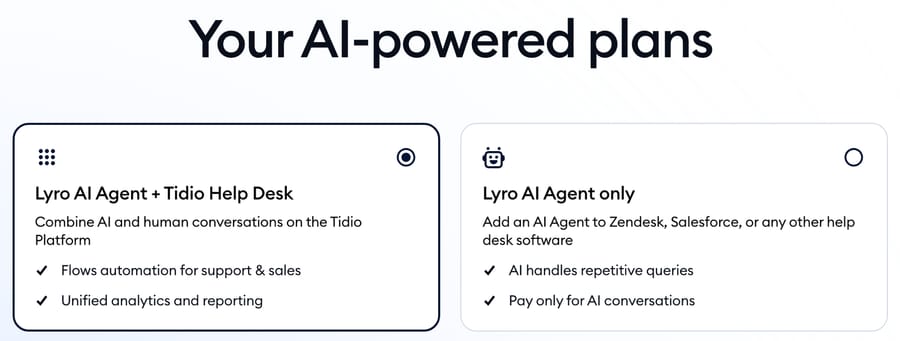
Best for: small stores and small websites that want chat and an AI agent live today, free.
Tidio is the cheapest credible entry on this page and the only one with a free plan carrying real conversation volume.
Key features: live chat widget; the Lyro AI agent; Flows, a visual automation builder; a Lyro plan that attaches to another help desk such as Zendesk or Salesforce.
Pros: the free plan is genuinely usable, 50 billable conversations a month for up to 10 seats, and 4.6 from 1,962 G2 ratings is a large evidence base for something this cheap.
Where it falls short: three different limits get confused constantly, and Tidio's own page does not separate them well. The 50 billable conversations on Free is not the 100 unique visitors a month that cap Flows, and neither is the 50 Lyro AI conversations, which are a one-off lifetime allowance rather than a monthly one. Cost is also the loudest theme in its G2 con tags. And email ticketing is thin next to anything in the ticketing branch.
Pricing: Free, 50 billable conversations a month, up to 10 seats; Starter $24.17 a month for 100 billable conversations; Growth from $49.17; Lyro add-on from $32.50 a month for 50 Lyro conversations; 7-day trial.
Our live chat roundup goes deeper on this branch.
Which shared inbox is best: Help Scout or Front?
Help Scout
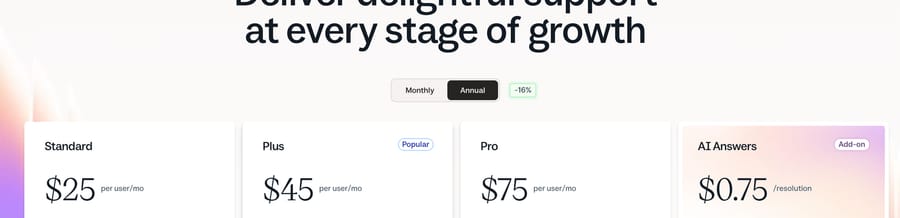
Best for: small teams whose support is mostly email and who want none of the ticketing furniture. Wrong fit if you need queues, SLAs and routing.
Help Scout is the simplest tool here and deliberately so: conversations rather than tickets, with a Docs knowledge base attached.
Key features: shared inbox with saved replies and workflows; Docs knowledge base; an embeddable support widget; AI Assist, Drafts and Summarize included on Standard and Plus; AI Answers as a metered agent.
Pros: the pricing page is the clearest on this page, the free plan covers 5 users, one inbox and one Docs site, and AI Answers is $0.75 per resolution, the cheapest published resolution rate among the help desks here.
Where it falls short: the independent evidence base is thin next to its rivals, 4.4 from 431 G2 ratings against Zendesk's 7,075. There is no meaningful catalog of write actions, so an AI answer is an answer rather than an order change. And the simplicity that makes it good at 5 agents is what makes it wrong at 50: routing, SLAs and reporting are all lighter than the ticketing branch.
Pricing: Free for 5 users, 1 inbox and 1 Docs site; Standard $25, Plus $45, Pro $75 per user a month as displayed; AI Answers $0.75 per resolution with a 3-month free trial.
Front
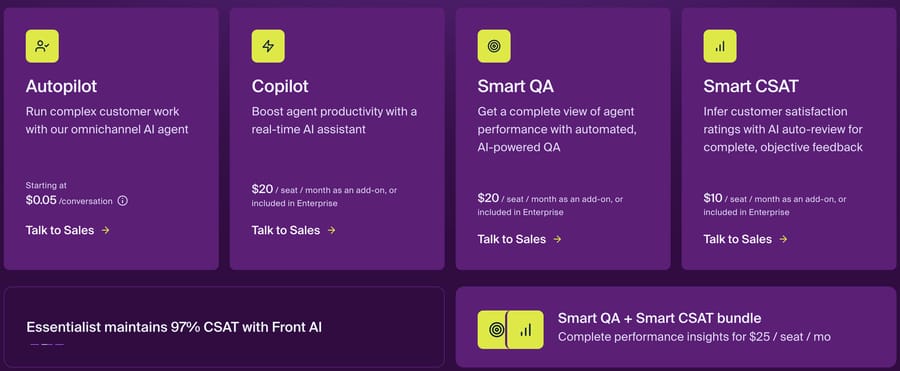
Best for: teams where several people work the same thread and internal comments matter more than ticket fields.
Front is a shared inbox built for collaboration: drafts, comments and assignments sit inside the email thread rather than beside it.
Key features: shared inboxes across email, SMS and social; internal comments and shared drafts; rules; Copilot for drafting; Autopilot as the AI agent; Smart QA and Smart CSAT.
Pros: the highest satisfaction score on this page, 4.7 from 2,511 G2 ratings, and Autopilot publishes its outcome rates: $0.89 a resolution, $0.39 a handoff and $0.05 for triage alone, each conversation billed once (as of October 2026, per Front's Autopilot pricing).
Where it falls short: the AI add-ons stack up fast. Copilot is $20 a seat a month below Enterprise, and as of October 2026 Smart QA and Smart CSAT are Enterprise only rather than add-ons; Autopilot is the one AI product sold separately on every plan. Starter at $25 a seat is single-channel, so omnichannel really starts at $65.
Pricing: Starter $25 a seat a month up to 10 seats, Professional $65 up to 50 seats, Enterprise $105, billed annually. Copilot $20 a seat (included in Enterprise); Smart QA and Smart CSAT Enterprise only; Autopilot $0.05 triage, $0.39 handoff or $0.89 resolution per conversation, billed once (as of October 2026).
Our shared inbox roundup covers this branch in more depth.
Which ticketing help desk is best: Zendesk, Freshdesk or Zoho Desk?
Zendesk
Best for: support organizations past about 50 agents that need routing, SLAs, governance and reporting to be someone else's problem.
Zendesk is the default enterprise answer and has been for a decade. Our Zendesk AI explainer and AI pricing breakdown cover the AI half.
Key features: omnichannel ticketing; the deepest routing and business rules here; AI agents for messaging, email and voice; Copilot for drafting; a large app marketplace.
Pros: nothing else has this much independent review evidence, 4.3 from 7,075 G2 ratings, and the ecosystem means almost every tool you already use has a Zendesk integration.
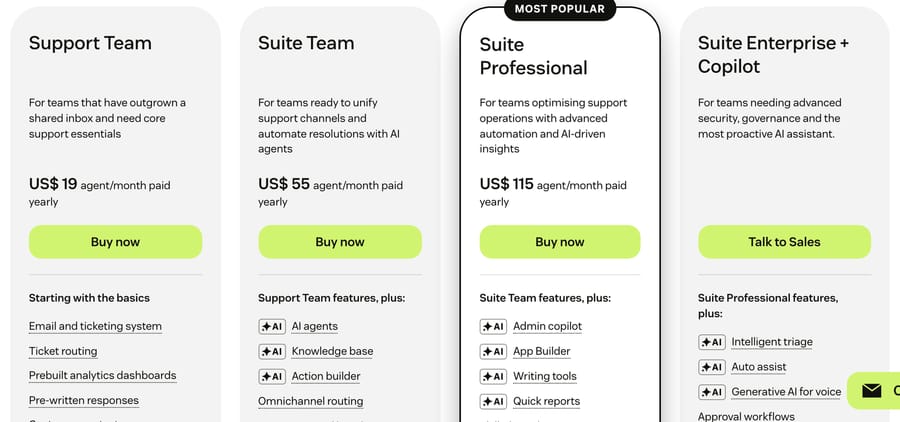
Where it falls short: it is expensive and the AI arithmetic is genuinely confusing. Zendesk's pricing page says AI agents are included and billed per automated resolution, and lists the rate: $1.50 committed and $2.00 pay-as-you-go. Its plan table includes 5 automated resolutions per agent a month on Support Team and Suite Team and 10 on Suite Professional, and Zendesk's help center describes that allowance as a monthly dollar amount per seat since 18 May 2026 ($2 Suite Team, $5 Growth and Professional, $10 Enterprise, capped at $5,000 a year) that nets against that bill. Copilot is a further $50 an agent on Suite Professional and above. Only verified resolutions bill, which helps, but it is another variable.
Pricing: Suite Team $55, Growth $89, Professional $115 per agent a month billed annually; Copilot $50 per agent; automated resolutions $1.50 committed or $2.00 pay-as-you-go, minus your allowance.
Freshdesk
Best for: teams that want most of Zendesk's shape at a third of the seat price.
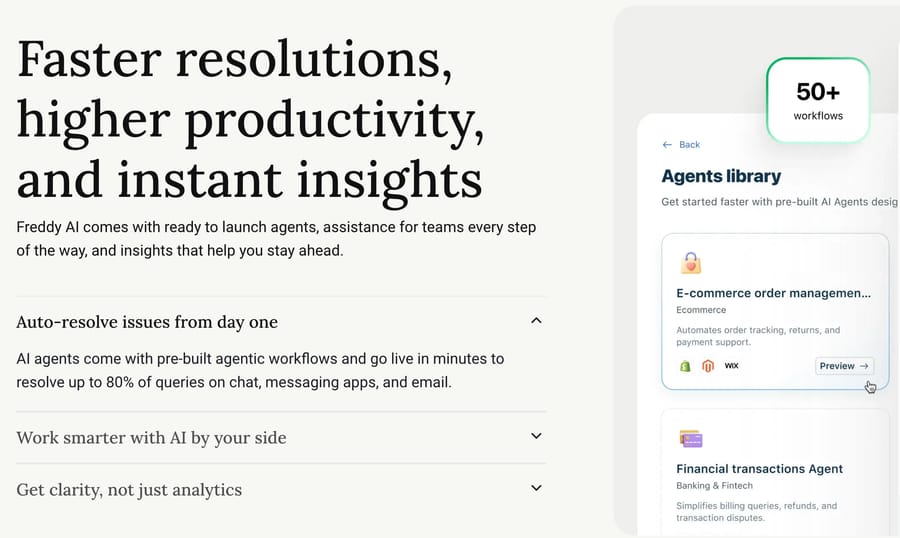
Freshdesk is the value-led generalist, and its AI is split into Freddy Copilot, which drafts for your agents, and Freddy AI Agent, which answers customers. Our Freddy explainer separates them.
Key features: omnichannel ticketing, automations and SLAs; Freddy Copilot on Pro and Enterprise; Freddy AI Agent across chat and email; a large pre-built agent library.
Pros: $19 a seat is the cheapest ticketing entry here, and the AI meter is simple arithmetic: 1,200 sessions a month is $588.
Where it falls short: Freshdesk has no free plan on its pricing page. The old "up to 10 agents, free forever" plan is gone; what remains is a Free program that covers up to 2 agents for 6 months, and otherwise a 14-day trial. The 500 complimentary Freddy AI Agent sessions are once per account rather than monthly, Copilot is $29 an agent on Pro and above only, and day passes for occasional agents are $2 to $12 depending on plan.
Pricing: Growth $19, Pro $55, Enterprise $89 per agent a month billed annually; Freddy AI Copilot $29 per agent; Freddy AI Agent 500 free sessions once per account, then $49 per 100 sessions.
Zoho Desk
Best for: budget-conscious teams, and a natural fit if you already run other Zoho products.
Zoho Desk is the cheapest full ticketing help desk here and one of the most widely reviewed products in the category.
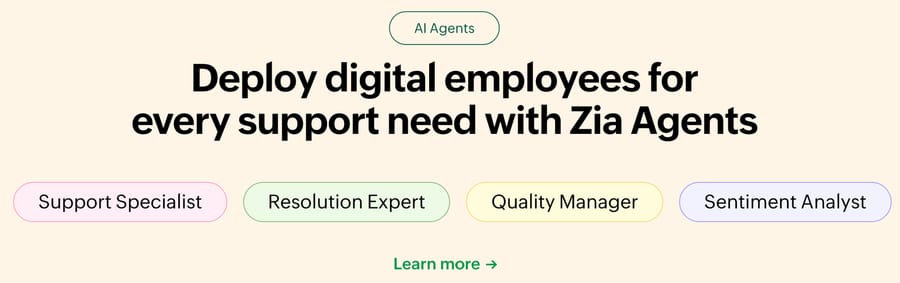
Key features: multichannel ticketing; Blueprints for process automation; Zia AI agents and an answer bot on higher tiers; a free tier with three agents.
Pros: 4.4 from 7,947 G2 ratings is the largest review base on this page, and the free plan covers 3 agents with email ticketing, a knowledge base and SLAs.
Where it falls short: we could not read Zoho's US dollar prices. zoho.com serves our location in rupees from both a scripted fetch and a real browser, so the figures below come from G2's pricing tab, read on 22 September 2026, which G2 itself says was last updated on 29 April 2026. Treat them as indicative and check your own currency on Zoho's page. Zia is also gated: the answer bot arrives on Standard and Zia's generative features on Professional and above, so the $7 Express plan is a thinner product than the price suggests.
Pricing (from G2's pricing tab, not Zoho's own page): Free for up to 3 agents; Express $7, Standard $14, Professional $23, Enterprise $40 per user a month. 15-day free trial.
What is the best support software for ecommerce?
Gorgias
Best for: Shopify and DTC brands where most tickets are about an order.
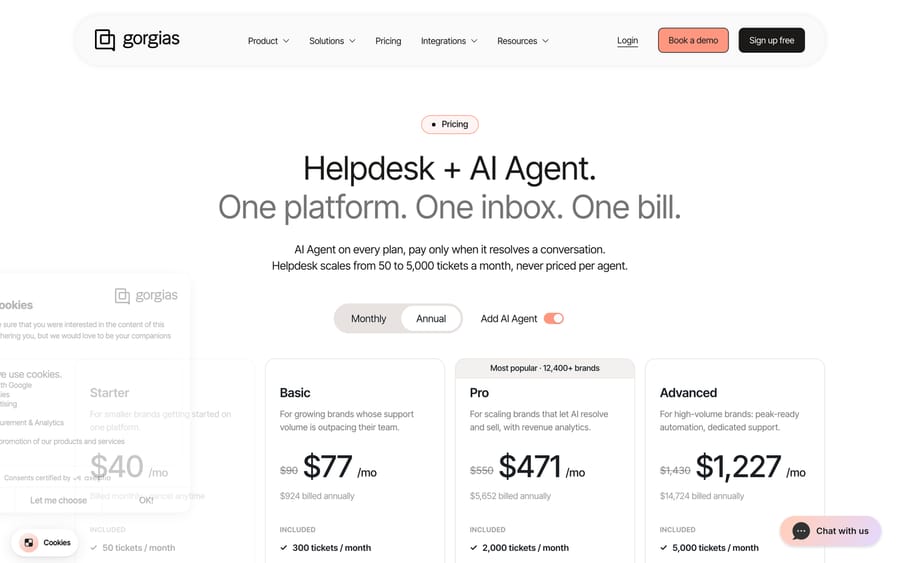
Gorgias is the one product here that does not charge per agent. Its own pricing page says so: "Helpdesk scales from 50 to 5,000 tickets a month, never priced per agent." Our Gorgias AI Agent explainer covers the AI.
Key features: native Shopify and WooCommerce on every plan, BigCommerce from Basic and Magento from Pro, with order data inside the ticket; AI Agent on every plan; Actions that cancel orders and apply discounts from Basic up; revenue attribution from Pro; Voice and SMS add-ons from Basic.
Pros: the pricing model suits the shape of ecommerce support, where a three-person team handles thousands of tickets, and the write-action catalog is the richest you can buy self-serve.
Where it falls short: the AI is billed in layers. Included automated interactions are priced at $1.00 on Starter, $0.90 on Basic and Pro and $0.85 on Advanced; past your allowance each one costs $1.50; and Gorgias's own FAQ says each AI Agent interaction also counts as a helpdesk ticket. The included AI allowances are thin against the ticket counts: Pro bundles 2,000 tickets and only 190 automated interactions. And outside ecommerce it makes little sense.
Pricing (re-read 24 September 2026): help desk alone is $10, $60, $360 and $900 a month on monthly billing for 50, 300, 2,000 and 5,000 tickets, with overage at $0.40 or $0.36 a ticket. With AI Agent included: Starter $40 a month (50 tickets, 30 automated interactions); Basic $90 monthly or $77 annual (300 tickets, 30 interactions); Pro $550 / $471 (2,000 tickets, 190 interactions); Advanced $1,430 / $1,227 (5,000 tickets, 530 interactions).
When does HubSpot Service Hub make sense?
HubSpot Service Hub
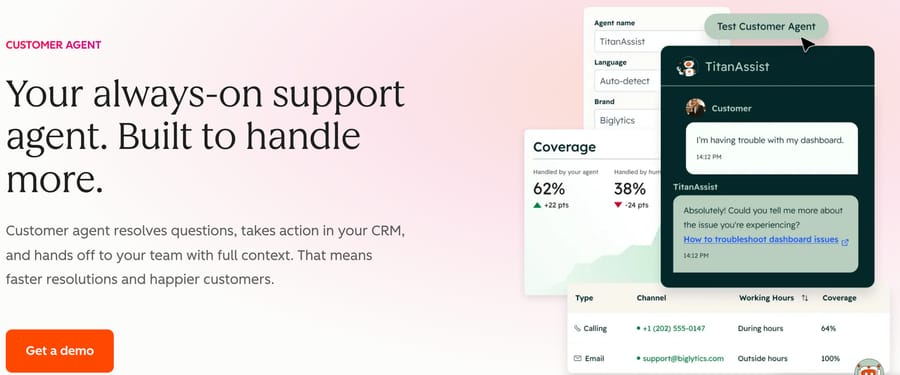
Best for: teams already standardized on HubSpot who want support, sales and marketing on one customer record.
Service Hub is the support half of the HubSpot platform, with the Customer Agent billed out of the same credit pool as everything else.
Key features: tickets, a help desk workspace and a knowledge base on the HubSpot CRM record; Customer Agent for resolution; Breeze AI across the platform; 14 days of unlimited Customer Agent use with a paid Professional or Enterprise seat.
Pros: the AI arithmetic is public and simple. Customer Agent costs 50 credits per conversation resolved, and extra credits are $0.009 each bought annually, so a resolution lands at about $0.45, the cheapest published per-resolution figure among the help desks on this page.
Where it falls short: the entry cost. A Starter tier exists from $7 a seat a month on annual billing with 500 credits, but it is a lighter product, and the scorecard uses Professional, which starts at $90 a seat a month and carries a one-time $1,500 onboarding fee; Enterprise starts at $150 with $3,500. Professional includes 3,000 credits a month, which is 60 resolved conversations before you buy more. And it only makes sense if HubSpot is already your CRM.
Pricing: Free up to 2 users; Starter from $7 a seat a month annual ($20 monthly); Professional from $90 a seat a month annual ($100 monthly) plus $1,500 one-time onboarding; Enterprise from $150 plus $3,500. Customer Agent 50 credits per resolved conversation; extra credits $0.009 each on annual.
What do the AI agents on these platforms cost?
Half the buying decision in 2026 is not the support software but the AI on top of it, and the best-known agents are mostly not help desks at all. Here is what each of the names you will hear actually costs and runs on, checked in September 2026.
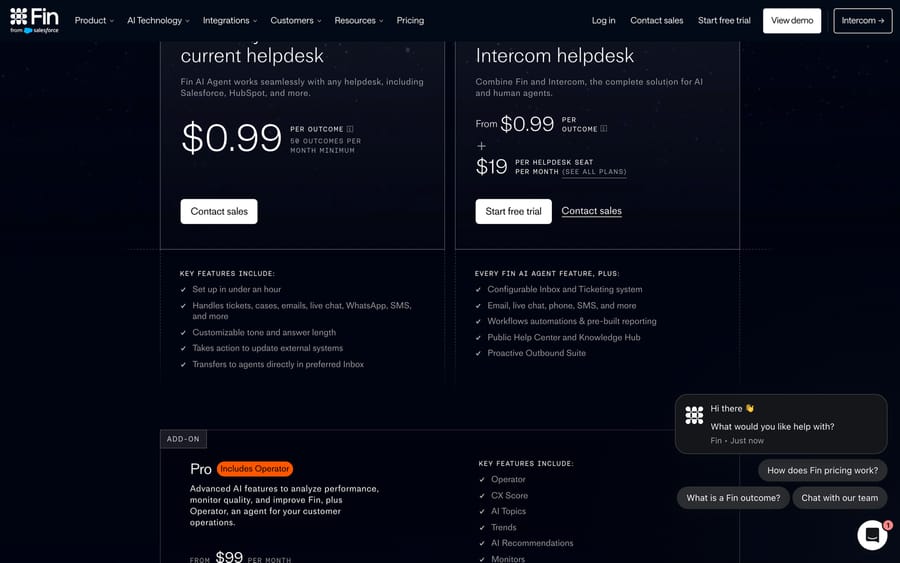
| Agent | Runs on | Billing unit | Price (September 2026) | Where it falls short |
|---|---|---|---|---|
| Intercom Fin | Intercom, Zendesk, Salesforce, Freshworks, HubSpot | Per outcome | $0.99; 50-outcome minimum off Intercom | A Procedure handoff bills in full even though a human finishes the work |
| Zendesk AI agents | Zendesk | Per verified resolution | $1.50 committed / $2.00 pay-as-you-go (Zendesk pricing page) | An allowance described two ways (resolutions per agent, dollars per seat) makes a month hard to cost |
| Ada | Zendesk, Salesforce, Front | Per conversation, annual | Not on ada.cx; from $30,000 a year on Salesforce AgentExchange | Nothing on Ada's own site; Vendr's middle 80% runs $36,211 to $286,200 (13 Oct 2026) |
| Forethought | Zendesk, Salesforce | Platform fee plus outcomes | Not published | Now owned by Zendesk (acquisition completed 26 March 2026); no public numbers, no trial |
| Sierra | API and connectors | Per outcome, annual | Not published; no pricing page | sierra.ai/pricing returns a 404; every circulating figure comes from a competitor |
| Decagon | API and connectors | Per conversation, annual | Not published; no pricing page | decagon.ai/pricing returns a 404; Vendr's median buyer pays $432,750 a year |
| eesel AI | Zendesk, Freshdesk, Intercom, Gorgias | Per credit (a ticket or chat) | From $299/mo for 500 credits | 20 G2 ratings; Enterprise is custom-priced |
Four of those seven will not tell you what they cost, which is worth knowing before you spend three weeks in their sales process. Our guides to Ada, Forethought, Sierra, Decagon and eesel go through each one.
Can you keep your support software and add an AI agent instead?
This is the part we make, and we have kept it out of the ranking above because it is not a help desk and cannot be compared to one.
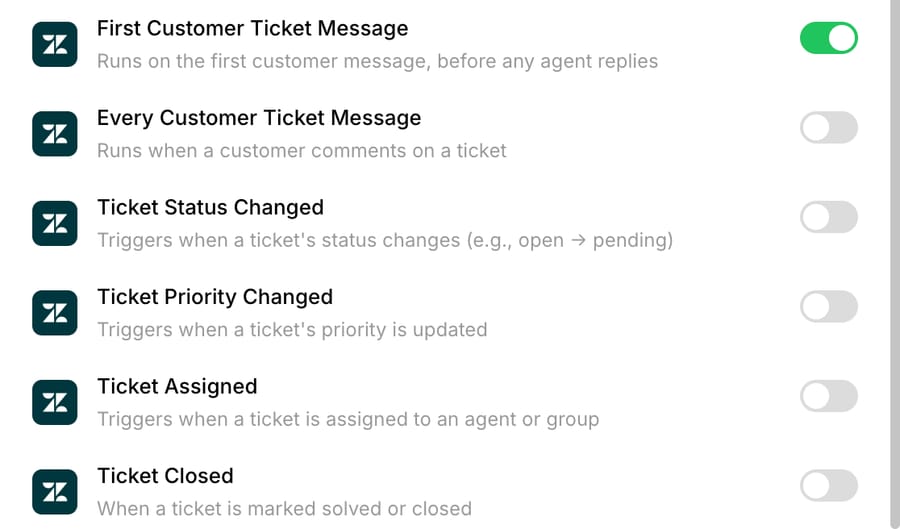
If your support software is fine and the problem is the AI attached to it, you can add an agent layer instead of migrating. Macha runs on Zendesk, Freshdesk, Gorgias and Front, and on Intercom and HubSpot, and each agent is set by you to reply to the customer, write an internal note for a human, or only change fields on a ticket. It is priced on monthly ticket volume, from $299 a month for 750 tickets, about $0.40 a ticket at every tier, with setup and monitoring by our team included on every plan. A ticket is one thread with one person, charged once however many replies it takes. Full detail is on our pricing page.
Where it falls short, in the same terms we used above: no independent review base at all (zero G2 reviews as of 22 September 2026), no voice and no social channel, and it only works on the help desks it connects to (the integrations page has the current list), so Help Scout, Zoho Desk and Kustomer customers cannot use it. Our piece on adding an AI layer instead of rip-and-replace makes the case and the counter-case.
One first-party number, because it is the thing we can add that nobody else in this list can. On 22 September 2026 we read the configuration of every agent running live on a customer's help desk in our own platform: 119 agents across 62 customer organizations. 59 can post an internal note and only 19 can post a public reply, with 40 able to draft but not to answer. Whichever software you choose, expect drafting to be where you start. These are aggregate counts from our own database, with no customer named and no ticket content involved, and they describe our own customers rather than the market.
What do real users complain about?
Ratings cluster between 4.3 and 4.7 across this whole page, which makes them nearly useless for choosing. The con tags and the individual reviews are more informative, and the same three themes recur.
Depth costs a learning curve. Zendesk's two loudest con tags on G2 are "Missing Features" (216 mentions) and "Learning Curve" (179), which is the usual shape for a product that can be configured into almost anything. If nobody on your team owns the configuration, that depth becomes a liability rather than an asset.
Price is the loudest complaint on the cheap tools, not the expensive ones. Tidio's leading con tags are "Expensive" (76) and "Cost" (56), on a product that starts free. That reads as a comment on how fast the conversation meter climbs once a site gets traffic, and it is worth modeling your real volume before choosing a conversation-priced tool.
The AI is still moving under customers' feet. A VP of customer experience at a small business wrote of Gorgias that "They are building the plane while they fly it, especially with the AI tools they are building" (G2, August 14, 2026). A customer support specialist at a mid-market company said of Fin that "Sometimes Fin can be repetitive in the way it handles a conversation" (G2, September 11, 2026). Both are fair, and both describe a category where the product you buy in January is not the one you run in June.
One structural warning about the ratings themselves: these are buyer reviews. The people writing them are the admins who chose and configured the tool, not the customers who talked to it. Admin-facing G2 scores in this category run consistently higher than end-user sentiment on Trustpilot, where the complaints cluster around loops and not being able to reach a person. If you are evaluating the AI rather than the ticketing, weight the end-user side too.
How should you choose customer support software?
Pick the category before the product. Each of these suits a different team, and the wrong branch is a more expensive mistake than the wrong vendor inside it. If most of your volume arrives by email and a shared address is already working, a shared inbox is a smaller change than a help desk and Help Scout is the least disruptive thing on this page. If you need queues, SLAs and reporting, you are in the ticketing branch and the real question is Zendesk's depth against Freshdesk's and Zoho's price. If you sell on Shopify, Gorgias's ticket-volume pricing will almost certainly beat per-seat pricing.
Then work out whose incentive you are buying into, because each billing unit optimizes for something different. A per-seat price earns the vendor more as you hire, so nothing in it rewards them for deflecting tickets. A per-resolution meter earns more when the AI closes conversations, which is why the definition of "resolved" is written by the vendor and worth reading twice. Gorgias's ticket-volume model earns more as your store grows, which is at least the same direction as your own business. None of these is dishonest; they just point the vendor's effort in different places.
Then model a real month rather than comparing seat prices. Seats, plus the AI meter, plus onboarding. HubSpot's $1,500 fee is three months of a $500 AI bill. Front's $25 Starter seat is single-channel, so omnichannel actually starts at $65. Freshdesk's $19 seat is genuinely the cheapest, and it is cheap because you do the configuration yourself.
Then check what the AI is allowed to do. Our automation guide covers which tickets are worth automating at all, and our explainer on what deflection rate really measures is the background reading before you sign anything priced per resolution.
How we researched this
Every price here was read on the vendor's own live page between 18 and 22 September 2026, and the Intercom, Zendesk, Freshdesk, Gorgias and HubSpot figures were re-checked on 24 September 2026, with one exception that is labeled on the page: Zoho Desk's US dollar figures come from G2's pricing tab, because zoho.com serves our location in rupees from both a script and a browser, and we would rather print a labeled third-party number than a converted one we invented. Front's AI add-on rates are only visible in a browser, so they were read that way. Ratings were read in Chrome on 22 September 2026 for Zoho Desk, Forethought, eesel, Ada and Macha, and on 18 and 19 September 2026 for the rest.
We did not build a production agent on any of these platforms for this guide, and we are not quoting benchmark results we did not run. The first-party numbers above are aggregate configuration counts read from our own database on 22 September 2026, with no customer named and no ticket content used.
Macha publishes this page. It is not in the ranking because it is not a help desk, it is not scored because the rubric does not fit it, and the section about it lists a zero on independent reviews and two channels it does not cover.
Frequently asked questions
What is the best customer support software in 2026? There is no single winner, because the categories solve different problems. On our scorecard, Intercom and Gorgias tie at 26 out of 30, but they suit opposite teams: Intercom for chat-led SaaS with budget, Gorgias for Shopify brands with volume. Freshdesk scores 24 and is the best value in the ticketing branch. Pick the category first.
What are the categories of customer support software? Five, and they overlap. Conversational and live chat (Tidio, Intercom), shared inbox (Help Scout, Front), ticketing help desk (Zendesk, Freshdesk, Zoho Desk), ecommerce support (Gorgias) and CRM-unified service (HubSpot Service Hub). Help desk software is the ticketing branch, which is one type of customer support software rather than the whole thing.
What is the difference between customer support software and help desk software? Help desk software is the ticketing-centric branch of customer support software. The broader term also covers live chat tools, shared inboxes, ecommerce support and CRM-unified service. For the ticketing-first ranking, see our best help desk software roundup.
What is the cheapest customer support software? Tidio and Zoho Desk have the lowest real entry points: Tidio is free for 50 billable conversations a month up to 10 seats, and Zoho Desk is free for up to 3 agents. Help Scout's free plan covers 5 users, one inbox and one Docs site. Freshdesk is the cheapest paid ticketing seat at $19. Freshdesk has no free plan on its pricing page, though its Free program covers up to 2 agents for 6 months.
Which customer support software is best for ecommerce? Gorgias, because it prices on ticket volume instead of agents and its AI ships with order actions rather than only answers. Tidio is a cheaper live chat starter for smaller stores. Watch the AI allowance on Gorgias: Pro includes 2,000 tickets but only 190 automated interactions, and each automated interaction past the limit costs $1.50.
Which one has the cheapest AI? Per resolution, HubSpot at about $0.45 a resolved conversation via credits, then Help Scout at $0.75, then Front's Autopilot at $0.89 (as of October 2026; its $0.05 rate covers triage only, such as tagging and routing), then Fin at $0.99 an outcome and Zendesk at $1.50 committed to $2.00 pay-as-you-go. The unit is not comparable across vendors, though, which is why the "priced per" column matters more than the number.
Do I have to replace my support software to get better AI? No. If the tool is fine and the AI attached to it is the problem, you can add an agent layer on top. That works on Zendesk, Freshdesk, Gorgias, Front, HubSpot or Intercom today. If the ticketing or chat itself is what frustrates you, one of the tools above is the better move.
Is Macha a Zendesk or Freshdesk alternative? No. Macha is not a help desk and does not replace one, which is why it is not in the ranking on this page. It is an AI agent layer that runs on top of the help desk you already run, including Zendesk, Freshdesk, Gorgias, Front, Intercom and HubSpot.
Which tool should you start with?
The best customer support software is the strongest tool on the branch that matches your channel mix. Chat-led teams should start conversational, with Tidio at the small end and Intercom at the top. Email-led teams should look at Help Scout for simplicity and Front for collaboration. Teams that need queues and SLAs are in the ticketing branch, where Zendesk has the depth and Freshdesk and Zoho Desk have the price. Gorgias owns ecommerce on a pricing model nobody else uses, and HubSpot Service Hub makes sense when the CRM is already HubSpot.
Whichever you pick, model the AI meter and the onboarding fee alongside the seat price, because that is where the difference between these tools actually is. And if your support software is not the problem, you can add an agent to the one you have instead, from a $50 trial with no credit card and no time limit.
Sources: Zendesk pricing · Zendesk: managing resolution allowances · Freshdesk pricing · Help Scout pricing · Front pricing · gorgias.com/pricing · HubSpot Service Hub pricing · tidio.com/pricing · fin.ai/pricing · Intercom pricing · eesel.ai/pricing · forethought.ai/pricing · Macha pricing






