





 Shopify
 Stripe
 Slack
Slack Notion
 Google Workspace
 Confluence

How Do You Build a Support Agent by Describing It? Macha's AI Agent Builder


Macha's AI Agent Builder turns a one-sentence brief into a configured support agent, with instructions, tools from your connected integrations, triggers, sub-agents and a model already set. Here is how the build and edit flow works, where it differs from horizontal builders like n8n, Gumloop and Glean, and when a description isn't enough.
Key takeaways
- Macha's AI Agent Builder, launched April 3, 2026, turns a plain-English description into a support agent with instructions, tools, triggers, sub-agents and a model already configured.
- Since the Sidekick v2 release on June 25, 2026, the describe-and-build flow runs inside Sidekick, which also recommends tools, debugs custom API tools and audits agent conversations.
- Macha's AI Tool Builder, shipped March 30, 2026, connects any REST API using an API key, bearer token or basic auth by discovering and testing the endpoints itself.
- Relay.app, a general-purpose agent builder often listed beside n8n and Gumloop, shut down in September 2026 and permanently deleted all accounts, workflows and run history.
- Macha's Agent Builder is included in its one plan from $299 a month for 750 tickets (about $0.40 a ticket), which also includes setup by the Macha team and a dedicated success manager; the trial is $50 of usage with no credit card.

The Macha AI Agent Builder: Build a Support Agent Just by Describing It
You build a support agent in Macha by typing one sentence about the job, such as "triage incoming Zendesk tickets, tag billing issues, and draft a reply for the rest", and the AI Agent Builder writes the instructions, wires tools from your connected integrations, sets the triggers and sub-agents, and picks the model. It launched on April 3, 2026, and the same describe-and-build flow now runs inside Sidekick, the admin copilot you open with ⌘K (Ctrl K on Windows and Linux).
| Question | Answer |
|---|---|
| What it configures | Instructions, tools, triggers, sub-agents (up to 3 levels deep) and the model |
| Where you use it | Sidekick, plus the AI editor on any agent's configuration page |
| Output | An ordinary Macha agent you can test and edit by hand |
| Companion tool | AI Tool Builder: any REST API with API key, bearer token or basic auth |
| Price | Included in Macha's one plan, from $299 a month for 750 tickets |
Most "AI agent builders" you'll find this year are horizontal automation canvases: drag a trigger node, wire it to an LLM block, connect a few APIs, and debug the flow until it holds. They're capable, and they're also a project. If you run a support team, you don't want to build software. You want a working agent that reads your tickets, knows your tools, and does the job by Friday. Macha's builder skips the flow chart, the node graph and the glue code, and gives you a real, fully configured agent you can run, inspect and edit.
What does the AI Agent Builder actually do?
The Builder is a conversation that ends in a configured agent. The April 3, 2026 launch put it plainly: describe what you want in plain language and the AI creates a fully configured agent with the right tools, instructions, triggers, and sub-agents. The April 9 refinement added one more thing it sets for you automatically, model selection, so the output isn't a stub you finish by hand; it's an agent that's ready to test. Since the Sidekick v2 release on June 25, 2026, the builder sits alongside tool recommendations, custom API tool debugging, scheduled trigger setup and conversation audits in one admin chat.
What makes that more than a fancy text box is that the Builder is context-aware. It already knows which integrations your org has connected (your Zendesk, your Notion, your Stripe, your custom API tools) and it suggests configurations that use those tools, not a generic catalogue you don't have. Hover a suggestion pill and it previews the prompt it'll run. So when you ask for a "refund triage agent," it reaches for the connectors you actually have wired up rather than inventing capabilities you'll have to go set up later.

This is the part that separates a support-native builder from a general-purpose one. A horizontal tool can give you a blank canvas and a thousand integrations; it can't know that your helpdesk is Zendesk, that your refund logic lives in Stripe, and that you already indexed your policy docs in Notion. Macha's Builder starts from your account, so its first draft is already shaped to your stack.
How does the build flow work, step by step?
1. Describe the agent
You type what you want the way you'd brief a teammate. Not a spec, a sentence. "Watch new tickets, identify the ones about delivery delays, look up the order, and draft a status update for the customer." The more concrete you are about the trigger ("on new ticket"), the actions ("look up the order," "draft a reply"), and the boundaries ("don't send, just draft"), the closer the first pass lands.

2. Macha builds and shows its work
The Builder doesn't just dump a config; it narrates what it created and surfaces each piece as an artifact card. Created and updated agents, triggers, and tools appear as interactive, clickable cards right in the chat. Click an agent card and you jump straight to its configuration page. It's the difference between "here's a wall of YAML" and "here's the agent, here's the trigger I set up, here's the tool I wired; click any of them."

Under the hood, a single description can produce a fair amount of structure. If your brief implies delegation (say, a triage agent that should hand specialist work to a billing agent) the Builder can assign sub-agents as it goes, with automatic circular-dependency checks so you don't accidentally wire an agent to call itself in a loop. Multi-agent setups that would take real care to assemble by hand come out wired correctly on the first pass.
3. The typed result is a real, editable agent
This is the important bit: what you get is not a black box. It's an ordinary Macha agent on an ordinary configuration page: name, handle, instructions, tools, data sources, triggers, model, every field populated and every field yours to change. The Builder is a head start, not a cage.
Because it's a normal agent, everything else in Macha applies to it: you can run a Test Run against a real ticket from the config page, scope which data sources it can see, give it a scheduled trigger, or hand-tune the instructions. The Builder got you to a working draft in a minute; the rest is the same configuration surface you'd use anyway.
Can the Builder edit an agent you already have?
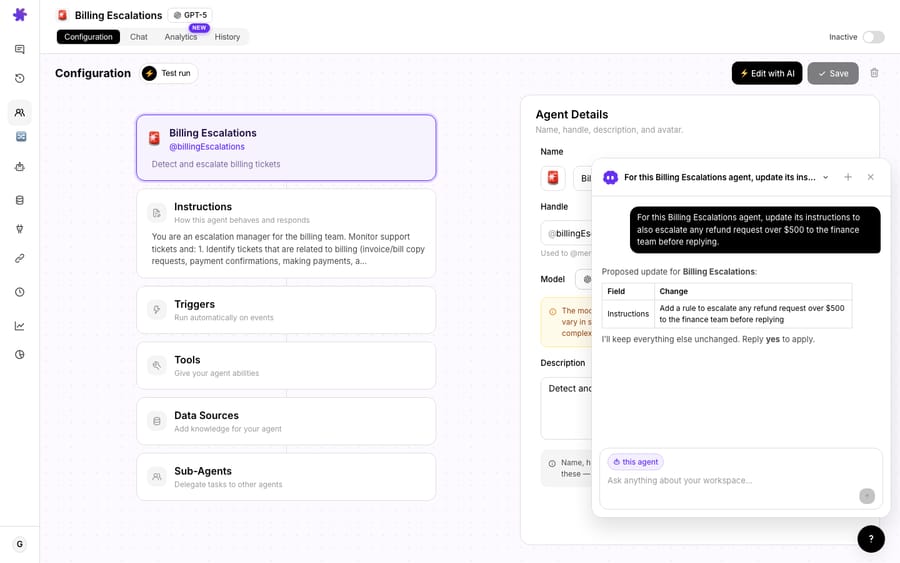
The same conversational interface works on agents you already have. Open the AI editor from any agent's configuration page and change anything: rewrite the instructions, add a tool, set up a trigger, wire in a sub-agent, by describing the change instead of clicking through forms.
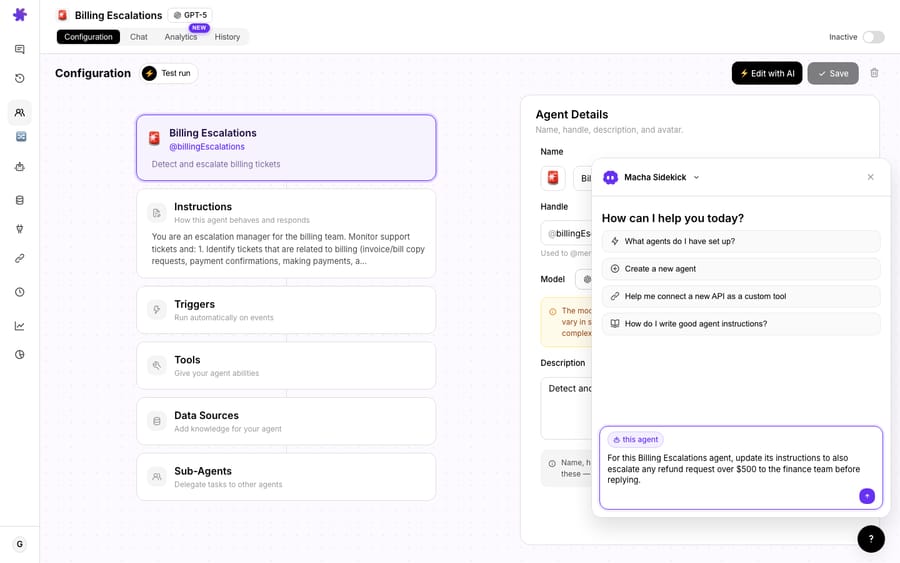
In practice this is how most teams will actually use it after week one. You rarely build agents from scratch; you tweak the ones you have. "Also escalate anything mentioning a chargeback to the billing sub-agent." "Stop auto-drafting for VIP accounts; flag those for a human." The editor applies the change and shows it back to you as an artifact card, so you can confirm what moved before you save.
A small but meaningful guardrail sits behind all of this: Macha's save flow grays out the save button when there are no changes and warns you before you navigate away from unsaved edits, so an AI-suggested change never silently overwrites your config; you always get the last word.
What if the agent needs a tool that doesn't exist yet?
Describing an agent is only half the story if the agent needs a tool that doesn't exist yet. That's what the AI Tool Builder is for (it shipped on March 30, 2026). Describe the API you want to connect, paste your credentials, and the AI discovers the endpoints, tests them, and creates the tools automatically, for any REST API using API key, bearer token, or basic auth. The tools get grouped under a named connector with its own icon and color, and POST/PUT/PATCH/DELETE methods are automatically flagged as write operations that require confirmation.
The two builders compose: describe a tool to connect your internal order-status API, then describe an agent that uses it. You go from "we have an API and a queue of tickets" to "we have an agent that answers them" without writing an integration or an agent definition by hand. (For the catalogue of connectors that already ship with tools: Zendesk, Notion, Confluence, Stripe, Google Workspace, Slack and more; see the integrations page.)
How does Macha's builder compare with n8n, Gumloop and Glean?
Search ai agent builder and you'll mostly find horizontal automation platforms. They're capable and they overlap, so the real question isn't "which is best" but "best for what." We grade builders on seven criteria: ease of use, human-in-the-loop controls, AI model quality and flexibility, integrations, multi-agent orchestration, security and governance, and trust and reliability. Here's how the most-cited tools land against that lens, with each one's strongest fit.
The horizontal contenders
- n8n: best for developers who want code-level control. A node-based workflow builder with an AI Agent node, native model connectors, and the freedom to drop into JavaScript anywhere. G2 reviewers praise the visual workflow builder (G2 reviews), and debugging a complex multi-node flow is still your job. Capable, and very much an engineering tool.
- Gumloop: best for a visual multi-agent canvas. A drag-and-drop canvas for chaining agents and automations. Its review base is small, so treat any star rating you see as directional, and expect credit-based pricing and a learning curve.
- Glean: best for enterprise-wide knowledge agents. Glean's Agent Builder has a "Build with Natural Language" option that turns a plain-language purpose into steps, and its docs list sub-agents and schedule triggers (Glean docs). Built for IT-governed, company-wide deployment, not a support queue specifically.
Relay.app, which used to sit on most of these lists, shut down in September 2026, and its homepage now says all accounts, workflows and run history have been permanently deleted (relay.app). That's the vendor risk with any builder that holds your workflows: if it closes, the automations go with it.
For scale, G2's State of AI Agent Builders 2026, drawn from 770 verified reviews, puts the category average at 4.5/5 (G2), so the whole field is well-liked. The differentiator is fit, not raw quality.
Where does Macha sit among them?
Every tool above builds anything (marketing ops, data pipelines, internal automations) from a blank canvas. Macha's AI Agent Builder builds one thing: customer-support agents, on top of the helpdesk you already run. That's the trade. You give up general-purpose breadth; you gain a builder that already knows your tickets live in Zendesk, your refunds in Stripe, and your policies in Notion, so its first draft is shaped to your stack instead of a generic template. And on Macha you don't have to build the first agent at all. Macha is the done-for-you option: the Macha team analyzes your past tickets, builds the knowledge base and the agent on your existing help desk, and runs it in safe mode until the drafts are right. The Builder is there for the changes you want to make yourself.
Run Macha against those seven criteria and the support-native bias shows: ease of use (describe in plain English, no node graph), human-in-the-loop (draft-only postures, Test Runs, sub-agents read-only in chat), model flexibility (it sets the model for you; you can change it), integrations (your already-connected helpdesk and tools), multi-agent orchestration (sub-agent assignment with circular-dependency checks), plus the security and reliability of acting inside your existing helpdesk's permissions. A first working agent comes out of one conversation, on your stack rather than a blank canvas. And to be unambiguous: Macha is not a helpdesk and not a replacement for one. It's the AI agent layer that sits on top of Zendesk, Freshdesk, Gorgias, Front, HubSpot or Intercom and acts inside the queue you already have.
| Horizontal agent builders (n8n, Gumloop, Glean, Relay) | Macha AI Agent Builder | |
|---|---|---|
| What it builds | Any workflow / automation | Customer-support agents |
| Starting context | Blank canvas + integration catalogue | Your already-connected helpdesk + tools |
| Output | A flow / node graph | A typed agent (instructions, tools, triggers, sub-agents, model) |
| Editing | Re-open the canvas | Edit by hand or by describing the change |
| Best for | General automation, eng teams, company-wide knowledge | Support teams on Zendesk, Freshdesk, Gorgias, Front, HubSpot, Intercom |
| Sits relative to your helpdesk | Separate system | A layer on top of your existing helpdesk |
When isn't describing the agent enough?
The Builder is a fast first draft, not a substitute for judgment. A few honest caveats:
- Review before you let it write. The Builder will happily configure an agent that drafts and sends replies. For anything customer-facing, start the agent in a draft-only or read-only posture, run a Test Run against real tickets, and only then turn on autonomous writes. Sub-agents, for instance, run read-only during interactive chat and only gain write permissions when running via triggers; mirror that caution in your own rollout.
- A vague brief gives a vague agent. "Handle support" produces something generic. The quality of the configuration tracks the specificity of your description: name the trigger, the actions, and the boundaries.
- It can only reach for tools you've connected. Context-awareness is a strength, but it means an agent that needs Stripe won't have Stripe until you connect it (or build the tool). The Builder will tell you what it used; check that the tools it wired are the ones you intended.
- It's an AI building an AI. Read the instructions it wrote. The artifact cards exist precisely so you can click in and verify each piece rather than trust a paragraph of chat.
- Price doesn't gate it. Macha sells one plan priced by ticket volume, and every feature, the Builder included, is on it. The pricing page lists the tiers.
None of these are reasons not to use it; they're the difference between shipping a demo and shipping an agent that touches real customers.
What does the AI Agent Builder cost?
The Agent Builder runs on the same model as the rest of Macha: you're billed per ticket (one customer conversation, charged once however many messages, lookups and drafts it takes), not per agent created and not per ticket "deflected." Building an agent by describing it is setup, not a customer conversation, so what you pay is driven by what the agent then handles in production. Pricing starts at $299 a month for 750 tickets, about $0.40 each, and the model an agent runs on doesn't change that. That price also includes the setup: the Macha team builds your first agents for you, and a dedicated success manager who handles your changes after go-live, so the Builder is an option rather than a requirement. Start a free trial ($50 of usage, no credit card required, no time limit) and you can build your first agent before you spend anything; see pricing for the tiers.
FAQ
Do I need to know how to configure agents to use the Builder? No. You describe what you want in plain English and Macha produces a fully configured agent: instructions, tools, triggers, sub-agents, and model. You can edit it by hand afterward, but you don't have to start there.
What exactly does it configure? The agent's instructions, the tools it can call (wired to your connected integrations), any triggers, sub-agent delegation, and the AI model. Created agents, triggers, and tools appear as clickable artifact cards in the chat so you can jump straight to each one.
Can it modify an agent I already built? Yes. Open the AI editor from any agent's configuration page and describe the change: add a tool, rewrite instructions, set a trigger, wire a sub-agent. The change is applied and shown back as an artifact card before you save.
Does it work with my helpdesk? Macha sits on top of Zendesk, Freshdesk, Gorgias, Front, HubSpot or Intercom, and the Builder uses whatever you've connected. It's a layer on top of your helpdesk, not a replacement for it. See Macha on Zendesk for the Zendesk-specific setup.
What if the API I need isn't a built-in connector? Use the companion AI Tool Builder: describe the REST API, paste credentials, and Macha discovers and tests the endpoints and creates the tools, then describe an agent that uses them.
Which plans include it? All of them. Macha has one plan priced by ticket volume, from $299 a month for 750 tickets, and the Agent Builder, Sidekick and the AI Tool Builder are on every tier; see the pricing page.
Where should you start?
The reason "describe it and we'll build it" matters isn't novelty; it's that it collapses the distance between knowing what you want and having it running. For a support team, that distance has always been a backlog: a config someone needs to learn, a flow someone needs to wire, a launch that slips. Macha's AI Agent Builder turns the brief into the agent, on top of the helpdesk you already use, and then hands you the keys to edit it however you like. Read the docs for the full configuration surface, see how multi-agent delegation works once you have more than one agent, or start a free trial ($50 of usage, no credit card required) and build your first agent by describing it.
Written by Abbas (Customer Support & AI, Macha) · Reviewed by Ankeet Guha (Co-founder & CTO) · Published 2026-06-24 · Last updated 2026-09-24.






