





 Shopify
 Stripe
 Slack
Slack Notion
 Google Workspace
 Confluence

How Do Triggers Run AI Agents Automatically? Events, Webhooks and Schedules


An agent with perfect instructions and the right tools does nothing until something tells it to run, and in Macha that something is a trigger. There are three kinds: a help desk event, a webhook POST, or a schedule.
Key takeaways
- Macha agents run autonomously from three trigger types: event triggers from a connected help desk or Slack, webhook triggers fired by a signed URL, and scheduled triggers on a cron interval.
- Macha scheduled triggers need a minimum 1-hour interval, cap at 24 runs per trigger per day, and allow at most 3 simultaneous scheduled runs per organization.
- Macha event trigger debounce defaults to 15 seconds for Zendesk messaging and 10 seconds for Slack DMs, and a bucket force-fires at 25 events or 2 minutes.
- Macha event triggers now cover HubSpot and Intercom as well as Zendesk, Freshdesk, Gorgias, Front and Slack, including Intercom's First Customer Message and Every Customer Message.
- Macha bills per ticket, starting at $299 a month for 750 tickets, so trigger volume, not the number of steps in a run, sets the bill.

A Macha agent runs on its own when one of three trigger types fires it: an event trigger from a connected help desk or Slack, a webhook trigger fired by a POST to a signed URL, or a scheduled trigger that runs on a cron interval of at least one hour. No human clicks anything. The trigger is the moment; the agent reads the context and decides what to do: reply, look something up, tag and route, escalate, or stay quiet.
| Trigger type | What fires it | Main limits |
|---|---|---|
| Event | A native event in your help desk or Slack (a new ticket, a customer reply, a Slack mention) | Optional debounce per trigger; messaging defaults to 15 seconds, Slack DMs to 10 |
| Webhook | Any HTTP POST to a unique signed URL Macha generates | None beyond your own rules; debounce on keyed webhooks only |
| Scheduled | A recurring cron interval (every hour, every morning, every Monday) | 1-hour minimum, 24 runs a day, 3 concurrent runs per org |
The idea is the same in every product. Zendesk fires a trigger the instant a ticket is created or updated, iPaaS tools like Workato or Zapier start a "recipe" when a webhook lands, and schedulers kick off a job at a set time. Support triggers fall into the same three families: something happened (an event), something called in over HTTP (a webhook), or the clock struck (a schedule). What differs is the action that follows. In a traditional help desk the action is a fixed rule that sets a field or sends a macro. In Macha, the action is an AI agent.
Macha is an agent layer that sits on top of the help desk you already run (Zendesk, Freshdesk, Gorgias, Front, HubSpot or Intercom; see Zendesk for the most detailed example). Triggers don't replace your help desk's own automations. They hang off them, so the routing and SLAs you've already built keep working. Firing an AI agent at a live queue carries risk, so the guardrails and the cases where you should not use a trigger are covered below too.
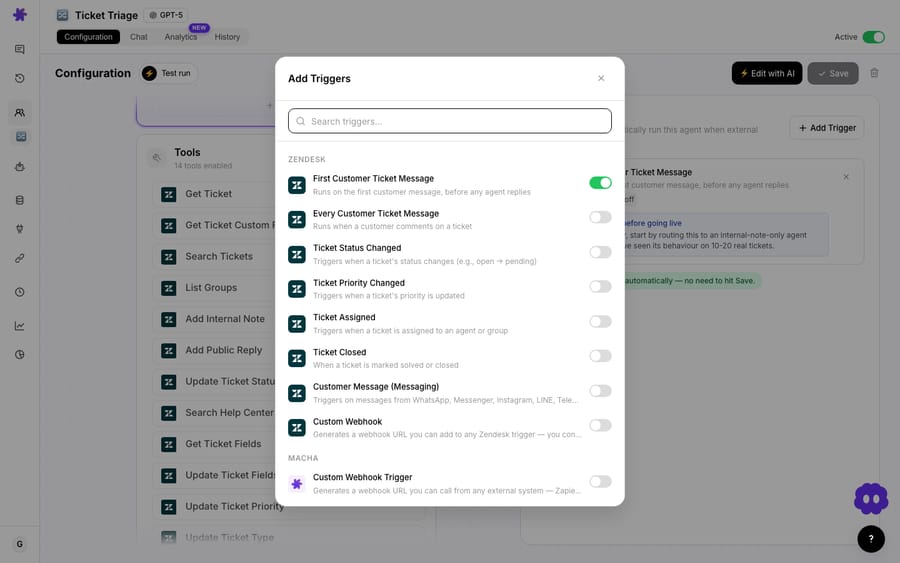
How is a trigger different from a help desk automation rule?
Most help desks already have automations: if-this-then-exactly-that rules that set a field or send a canned macro. A Macha trigger fires an agent, not a fixed action. The trigger says "something happened," and the agent reads the full context, reasons about it against the instructions you wrote in plain language, and decides what to do. Moveworks describes the shift well: not "if this, then that," but "when this happens, here's what I want you to figure out and do."
So the trigger is deliberately dumb and the agent is smart. Your job when wiring automation is to pick the right moment, and that's the choice between the three types below.
Which help desk events can fire an agent?
Event triggers are the ones you'll use most. Each connector you've added publishes a set of native events, and you attach an agent to the ones that matter. When the event happens, Macha receives it (over a webhook it manages for you) and runs the agent against that record.
The events depend on the connector. From Macha's connector definitions, the current line-up is:
| Connector | Event triggers |
|---|---|
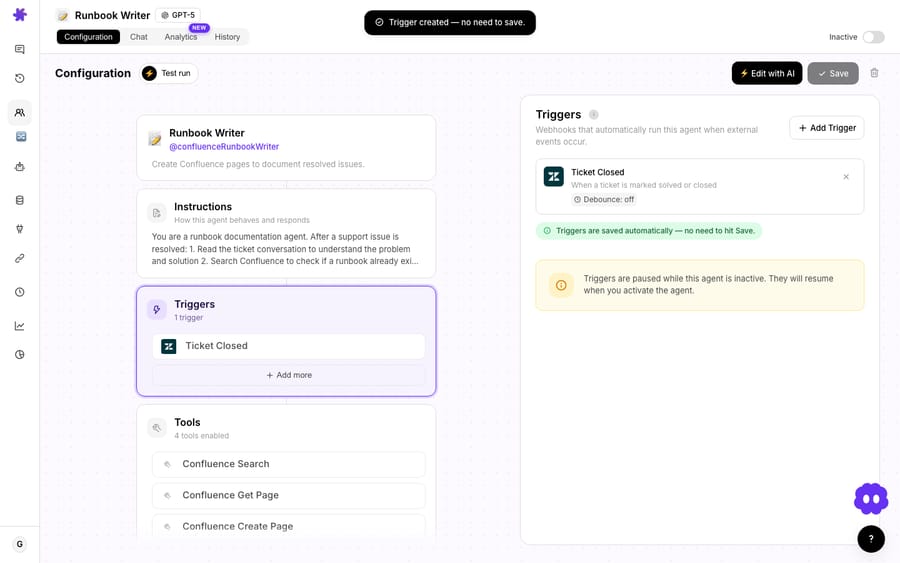
| Zendesk | New Ticket · Customer Reply · Status Changed · Priority Changed · Ticket Assigned · Ticket Closed · Messaging (WhatsApp, Messenger, Instagram, LINE, Telegram, web chat) · Custom Webhook |
| Freshdesk | Ticket Created · Ticket Updated · Custom Webhook |
| Gorgias | Ticket Created · Ticket Updated · New Message Added · Custom Webhook |
| Front | Conversation Created · New Message Added · Conversation Assigned · Custom Webhook |
| HubSpot | New Ticket Created · Ticket Updated (with a property filter) · New Contact Created |
| Intercom | First Customer Message · Every Customer Message · Conversation Assigned · Conversation Closed |
| Slack | App Mention · Direct Message |
The two you'll reach for first on Zendesk are New Ticket, which fires on the first customer message before any agent has replied, and Customer Reply, which fires on every later customer comment. Intercom's equivalents are First Customer Message and Every Customer Message.
Example: run an agent on every new ticket. This is the standard autonomous flow. A front-line agent is attached to Zendesk's New Ticket trigger. Every time a customer opens a ticket, the agent reads the subject and body, checks the knowledge base, and either drafts a reply for a human to approve or, if you've enabled the write tools, posts the answer and sets the status itself. Triage agents wire to the same event with a different job: read the ticket, apply a category and priority, and route it to the right group. Most of Macha's 60 published use cases hang off this one event.
How does debounce stop an agent firing five times in a row?
High-velocity events can fire an agent several times in a few seconds (think of a customer pasting three messages in a row). Every event-driven trigger therefore has a Debounce setting: set a delay in seconds and Macha collapses a burst of events into a single run once the queue goes quiet. Zendesk messaging defaults to 15 seconds and Slack DMs to 10; everything else defaults to 0 (off), so you opt in deliberately. As a safety net, a debounce bucket force-fires once it collects 25 events or waits 10 times its window (capped at 2 minutes), so a malformed event source can't hold an agent hostage.
When should you use a webhook trigger instead?
Event triggers only cover systems Macha has a connector for. The custom webhook trigger removes that limit: Macha generates a unique webhook URL with a signing secret, and any system that can send an HTTP POST can fire your agent. No connector required.
Webhooks are the standard real-time alternative to polling. Polling means repeatedly asking a system "anything new yet?", which is slow, wasteful and always a little stale. A webhook flips the model: the source system pushes the event to you the instant it happens. For support automation, that's the difference between reacting in seconds and reacting on your next poll cycle.
Two ways teams use it:
- Your own backend. A new signup hits your app, your order system flags a failed delivery, your monitoring tool detects an outage: POST to the Macha URL and an agent runs with that payload as context. The full raw payload is kept on the resulting conversation for audit, and for Zendesk and Freshdesk webhooks Macha pulls the
ticket_idand subject out of the payload, so the run shows a readable title in agent history instead of a bare "Custom Webhook." - Inside your help desk's own rules. Zendesk, Freshdesk, Gorgias and Front each expose a Custom Webhook trigger so you can drive the agent from native automation. You build a Zendesk trigger (or a Front rule, or a Gorgias HTTP integration) with whatever conditions you like, point its "send a webhook" action at Macha's URL, and you control exactly which tickets reach the agent: VIP tag only, one brand only, business hours only. The native trigger does the filtering; the Macha agent does the thinking.
The second pattern is the one most ops teams graduate to, because it keeps your existing, audited help desk logic in charge of which records flow to AI.
What can a scheduled trigger do, and what are its limits?
Not every job reacts to a single ticket. Some are recurring sweeps: a daily digest, a weekly report, a periodic sync. For those you want a clock, not an event. Scheduled triggers run an agent on a recurring cron interval.
Examples from Macha's use-case library:
- Daily support-metrics summary in Slack: every morning at 9:00, an agent pulls yesterday's ticket numbers and posts a digest to your team channel.
- Weekly refund report: Mondays at 9:00, an agent compiles the week's refunds through the Stripe connector and posts the breakdown.
- Keep knowledge sources synced: an agent re-checks source pages on a regular interval so the knowledge base your other agents answer from doesn't drift.
- Hourly trending-topics alert: every hour, an agent scans recent tickets and flags any emerging spike to the team.
A runaway clock-driven agent could chew through your month's tickets or hammer an API, so scheduled triggers have firm limits: a minimum 1-hour interval, a cap of 24 runs per trigger per day, and at most 3 simultaneous scheduled runs per organization. Any scheduled trigger that fails 5 times in a row disables itself and emails you rather than looping on a broken integration. Debounce doesn't apply to scheduled triggers: there's no event burst to collapse, because the cron is the cadence.
Scheduled triggers are included on Macha's single plan, like every other feature, so the tier you pick only changes your monthly ticket volume.
How do the three trigger types compare?
| Event | Webhook | Scheduled | |
|---|---|---|---|
| What fires it | A native help desk or Slack event | Any HTTP POST to a signed Macha URL | A recurring cron interval |
| Best for | Reacting to one ticket as it happens | Systems Macha has no connector for, or precise filtering with your own rules | Digests, reports, periodic syncs |
| Latency | Real-time | Real-time | On the schedule |
| Debounce | Yes (per trigger) | Keyed webhooks only | No (not applicable) |
| Typical job | Auto-reply, triage, route | Backend-driven runs, conditional ticket routing | Daily metrics, weekly report, KB sync |
Most production setups use all three: event triggers handle the live queue, a couple of webhook triggers cover the systems without connectors, and one or two scheduled triggers run the reporting.
What stops a triggered agent from doing damage?
A trigger means no human approves the run, so Macha builds the brakes in rather than assuming you'll remember them.
- Confirmation on high-impact triggers. Turning on a heavy trigger like New Ticket or Every Customer Message shows a confirmation explaining the blast radius before it goes live, and leaves an advisory card on the agent page so the risk stays visible.
- Draft before send. You don't have to give an agent write access on day one. Leave the reply tools off and the agent drafts for human approval; turn them on once you trust it. Sub-agents follow the same rule: they can write replies and updates when running from a trigger, but stay read-only in interactive chat.
- Pausing is non-destructive. Switching an agent off doesn't delete its Zendesk webhooks or triggers. It sets them to inactive on Zendesk's side with the same resource IDs, so any trigger you built in your own Admin Center that references Macha keeps working when you resume. Even deleting an agent only deactivates its triggers (keeping webhook secrets) and parks it in Trash for 30 days.
- Every autonomous run is auditable. The raw webhook payload is saved on each autonomous conversation, with the extracted ticket ID, subject and requester, so you can always reconstruct why an agent ran.
When should you not use a trigger?
Triggers remove the human check, which makes them the wrong tool for some jobs:
- You haven't tested the agent yet. Don't attach a live event trigger to an untested agent. Build it, run it in chat or test mode first, watch it reason on real tickets, then wire the trigger. With a trigger, nobody checks the output before it goes out.
- The job is a one-off analysis. If you want to read your whole ticket history once and pull out structure ("what share of last quarter was billing?"), that's a Study, not a trigger. Triggers are for ongoing automation; Studies are for bulk analysis.
- You need sub-hourly scheduling. The minimum scheduled interval is one hour. If you need something every five minutes, drive it from an event or an external webhook instead of the cron.
- The action is irreversible and high-stakes. Issuing refunds, deleting records, closing tickets en masse: keep a human in the loop (draft-only, or route to a person) until you've watched the agent handle the edge cases.
How do triggers affect what you pay?
Macha bills per ticket: one conversation, charged once, however many steps the agent takes inside it and whichever model it runs on. What moves your bill is how many tickets your triggers put in front of an agent, not how much work each run does. A debounced event trigger and a sensible schedule both keep that predictable; a chatty webhook with no debounce is the fastest way through your month's tickets. Pricing starts at $299 a month for 750 tickets, about $0.40 each, up to $3,999 for 10,000; see the pricing page for the tiers.
FAQ
What's the difference between an event trigger and a webhook trigger? An event trigger uses a native event Macha's connector already understands (a new Zendesk ticket, a Slack mention). A webhook trigger is a generic signed URL that any system can POST to. Use it when there's no connector for the source, or when you want your own help desk rules to decide which records reach the agent.
Can one agent have multiple triggers? Yes. A single agent can listen to several events at once, plus a webhook, plus a schedule. The agent reads the context of whatever fired it and acts on that.
Will a trigger reply to customers automatically? Only if you give the agent write tools. With those off, a triggered agent drafts internally for human approval. High-impact triggers also show a confirmation and a standing advisory before they go live.
How often can a scheduled trigger run? On a recurring cron interval down to a minimum of one hour, capped at 24 runs per day, with at most 3 scheduled runs executing at once across your org. Five consecutive failures disable it and email you.
What happens to my triggers if I pause an agent? They're set to inactive, not deleted. Webhook secrets and resource IDs are kept, so resuming the agent brings everything back as it was.
How many scheduled triggers do I get? Scheduled triggers are included on Macha's one plan at every ticket tier. The limits that apply are operational: a one-hour minimum interval, 24 runs a day, and at most 3 scheduled runs at once across your org. See the pricing page for current tiers.
How do you set up your first trigger?
Pick the moment (an event, an external signal, or the clock) and the agent does the rest. Start a free trial ($50 of usage, no credit card required), connect your help desk, and attach your first trigger; the Triggers docs have the full step-by-step.
Written by Abbas (Customer Support & AI, Macha) · Reviewed by Ankeet Guha (Co-founder & CTO) · Published 2026-06-24 · Last updated 2026-09-24.






