





 Shopify
 Stripe
 Slack
Slack Notion
 Google Workspace
 Confluence

What Is Freshdesk AI? Freddy Copilot, AI Agent and Insights Explained (2026)


Freshdesk's AI is Freddy, sold as three products with three meters: Copilot per agent seat, the AI Agent per session, and Insights on Enterprise. Each is good in its lane, and the limit shows up when a ticket needs a live record from another system.
Key takeaways
- Freddy AI in Freshdesk is three separately priced products: Freddy AI Copilot for human agents, the autonomous Freddy AI Agent, and Freddy AI Insights on the Enterprise plan only.
- Freddy AI Copilot costs $29 per agent per month billed annually and is sold only on the Freshdesk Pro and Enterprise plans.
- The Freddy AI Agent includes 500 sessions once per account on Growth, Pro and Enterprise, then costs $49 per 100 sessions on both classic Freshdesk and Freshdesk Omni.
- A Freddy Email AI Agent session is a 72-hour window from the customer's first email, so 3,000 email conversations cost 30 x $49 = $1,470 a month.
- Native Freddy answers from knowledge content, while an AI agent layer such as Macha calls order and billing systems through custom tools, priced per ticket from $299/month.

Freshdesk's AI is Freddy AI, and it is three separately priced products: Freddy AI Copilot at $29 per agent per month (billed annually, Pro and Enterprise only), the Freddy AI Agent at $49 per 100 sessions after a one-time allowance of 500, and Freddy AI Insights on the Enterprise plan only (Freshdesk pricing page, checked 24 September 2026). Freddy drafts, summarizes and deflects documented questions well. It stops short of reaching into your order, billing or subscription systems to take the action that closes a ticket.
| Freddy product | What it does | Price | Plan gate |
|---|---|---|---|
| Freddy AI Copilot | Helps human agents draft, summarize, triage and translate inside the ticket | $29/agent/month, billed annually | Pro ($55) and Enterprise ($89) |
| Freddy AI Agent | Answers customers on its own over chat, messaging and email | 500 sessions once per account, then $49 per 100 | Growth, Pro and Enterprise |
| Freddy AI Insights | Trends, root-cause analysis and conversational insights for team leads | No separate price listed | Enterprise only |
What is Freddy AI in Freshdesk?
"Freshdesk AI" is an umbrella. Per Freshworks' overview of Freddy AI for ticketing, the brand covers three distinct things:
- Freddy AI Copilot: an agent-assist layer that sits inside the ticket and helps your human agents work faster. It never talks to the customer on its own.
- Freddy AI Agent: an autonomous agent that does talk to customers directly, deflecting and resolving queries on email and chat without a human in the loop.
- Freddy AI Insights: an analytics layer that turns conversation data into trends, performance signals and CSAT drivers for team leads.
These are sold and metered separately, which is the source of most of the confusion. You can have Copilot without the AI Agent, or the AI Agent without Insights. Knowing which of the three someone means when they say "we have Freddy" changes the whole conversation.
What does Freddy AI Copilot do?
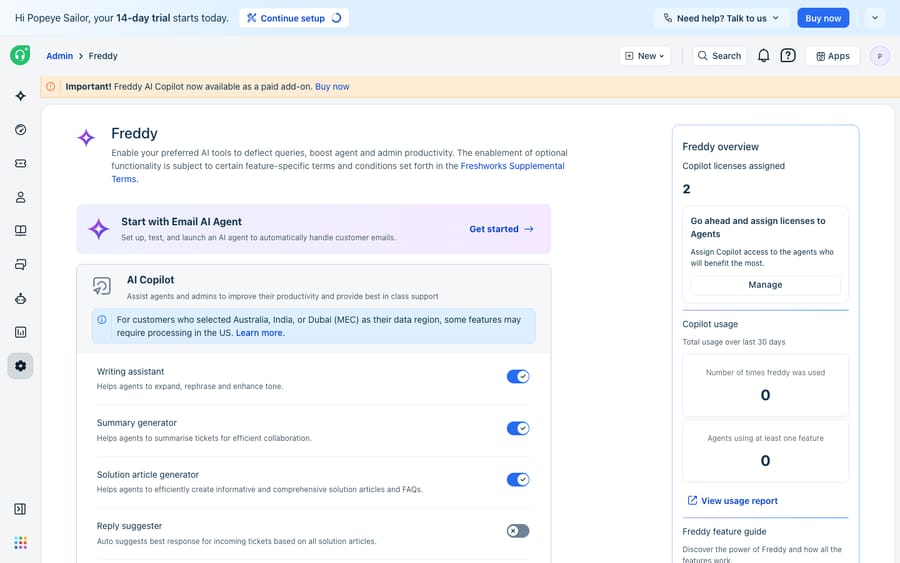
Copilot is a strong, well-integrated agent-assist tool. Because it lives natively inside the Freshdesk ticket, the agent stays in one pane. The Freshworks overview lists a deep feature set:
- Writing Assistant: expands, rephrases, adjusts tone and drafts replies from ticket context so agents don't start from a blank box.
- Summary Generator: condenses a long thread so a reassigned agent is caught up quickly.
- Reply Suggester, Solution Article Suggester and Canned Response Suggester: surface likely answers, relevant KB articles and saved replies as the agent works.
- Solution Article Generator: turns a resolved ticket into a draft knowledge base article.
- Sentiment Analysis: flags frustration or urgency in real time.
- Auto Triage: recommends priority, group and status field values on intake.
- Live Translate: real-time translation, so one agent can serve customers in their own language.
For a team that wants AI assisting people rather than replacing them, that's a good set. Copilot makes your existing agents faster and more consistent. It is not designed to remove the human: every reply still routes through a person who reviews and sends. You can't buy it on Growth, and Freshworks sells it per seat at $29 per agent per month billed annually.
How much does the Freddy AI Agent cost, and what is a session?
The Freddy AI Agent is the autonomous piece. Built on a no-code builder with pre-built agentic workflows, it can go live on chat, messaging and email to resolve common requests end to end.
The pricing and gating shape how far you can take it:
- 500 sessions, once. Growth, Pro and Enterprise each come with 500 free sessions to try the AI Agent, and Freshworks' pricing FAQ says this is "limited to once per account". It is not a monthly allowance.
- Then $49 per 100 sessions. A session is one interaction between a customer and the AI Agent. For the Email AI Agent, a session is a 72-hour window starting from the customer's first email; Freshworks' session FAQ gives chat a 24-hour window.
- Classic email and Omni chat cost the same. Older third-party guides quoted around $0.10 for chat and $0.49 for email sessions. Freshworks now lists one rate, $49 per 100, on both classic Freshdesk and Freshdesk Omni.
- Plan for the meter. Third-party guides say bought sessions don't roll over between billing cycles, so a heavy month pushes the bill up. Ask Freshworks how rollover works on your contract before you scale.
Session metering is a reasonable model. But "AI for support" on Freshdesk means paying for a base plan, plus a per-agent Copilot add-on, plus usage-based AI Agent sessions: three line items, not one. At 3,000 email conversations a month after the free 500 are gone, the AI Agent alone is 30 x $49 = $1,470.
Where does native Freddy stop?
Freddy Copilot is an assistant: it helps a human do the work faster, but a human still does it. The Freddy AI Agent can act autonomously, but it's largely bounded to answering from your knowledge base and pre-built workflows. Two limits show up in practice:
It answers from content, not from your systems. When a customer asks "where's my order #4471?" or "why was I charged twice?", the answer doesn't live in a help article. It lives in your order platform, your billing system or your internal API. Native Freddy is strong at deflection (pointing to the right article) and reasonable at resolution of documented questions, but weaker at automation: reaching into another system, fetching the live record and taking the action that closes the ticket.
Orchestration across specialized agents is limited. Real support isn't one agent; it's a triage step, a knowledge answer, an order lookup and an escalation path. Stitching those into a controllable flow, where one agent hands to another with your own instructions and tools, is where a purpose-built AI agent layer earns its place.
The three terms are worth keeping apart. Deflection stops a ticket from reaching a human. Resolution answers the question correctly. Automation takes the action (issuing the refund, updating the address, checking the shipment) that a documentation-bound bot can't. Native Freddy is good at the first two for documented questions; the third is where the ceiling sits.
How do you add an AI agent layer on top of Freshdesk?
This is the gap a dedicated AI agent for customer service is built to fill, and it's worth weighing the build-versus-buy tradeoff before adding anything. Macha is one such layer. It runs on top of the Freshdesk you already use through a native connector, and on Zendesk, Freshdesk, Gorgias, Front, HubSpot or Intercom as well. It is not a help desk replacement: you keep Freshdesk as your system of record, and Macha adds the reasoning-and-action layer.
The difference shows up in how you build. In Macha you compose named agents, each with its own instructions, triggers, tools and data sources: a Knowledge Base Agent that answers from your docs, an order agent that calls your systems, a triage agent that routes by intent. A parent agent can hand off to narrower sub-agents.
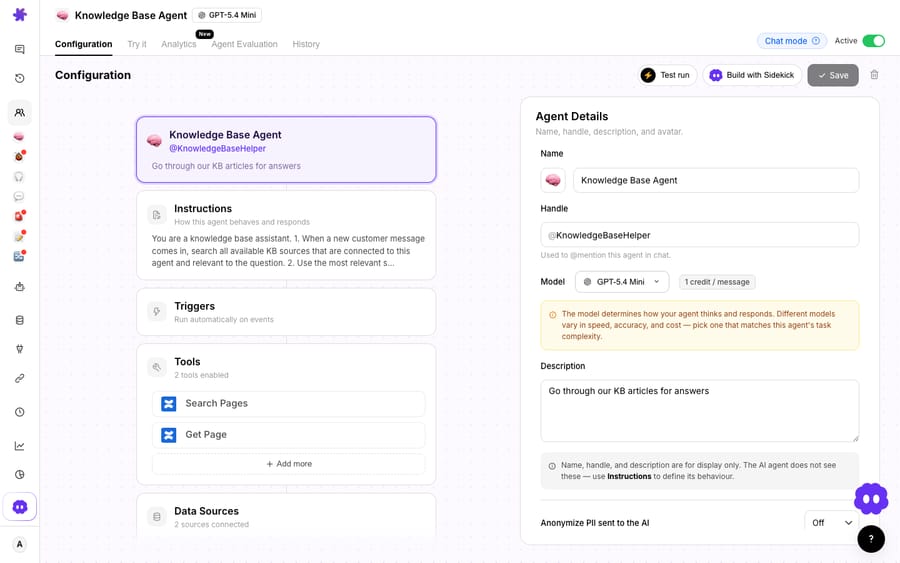
The key piece is custom tools: you wrap a REST endpoint from your order, billing or subscription system into something an agent can call mid-conversation. That's how a Macha agent goes from "here's a help article about refunds" to "I've located order #4471, confirmed it shipped, and posted the tracking link", the automation step native Freddy can't reach. We walk through the setup in how to automate Freshdesk with AI and the broader case in adding an AI agent to Freshdesk beyond Freddy.
Pricing works differently too. Macha is priced per ticket, not per session or per resolution: one plan from $299/month for up to 750 tickets, $1,199 for up to 3,000, with setup and monitoring by the Macha team included. A ticket is charged once however many messages or tool calls it takes. The full breakdown lives on the pricing page. (The Macha connector is for Freshdesk specifically, not Freshchat, Freshservice or Freshcaller.)
Should you use Freddy, an AI agent layer, or both?
Native Freddy is a capable product, three of them in fact. If you want AI that makes your existing agents faster (Copilot) and a competent bot that deflects documented questions (AI Agent), Freddy delivers, and it's tightly woven into the Freshdesk UI. The ceiling isn't quality; it's scope. Freddy assists and deflects; it's weaker at reaching into your other systems to automate the action that closes a ticket, and at orchestrating several specialized agents into one flow.
A clean division of labour: keep Freshdesk as your help desk and system of record, use Freddy where agent-assist is all you need, and add a dedicated AI agent layer on top when you need resolution and automation, the part where the bot stops answering and starts doing.
FAQ
What is Freshdesk AI (Freddy)? Freddy AI is Freshworks' umbrella brand for three separate AI products in Freshdesk: Copilot (an agent-assist tool that helps human agents draft, summarize and translate), the AI Agent (an autonomous bot that deflects and resolves queries on chat and email), and Insights (analytics on conversation trends and performance, Enterprise only). They're sold and metered separately.
How much does Freddy AI cost? Copilot is $29/agent/month billed annually and is available only on Pro and Enterprise. The AI Agent is session-based: Growth, Pro and Enterprise include 500 sessions once per account, then $49 per 100 sessions. Insights comes with Enterprise. Base seats are $19 (Growth), $55 (Pro) and $89 (Enterprise) per agent per month billed annually. Always confirm current numbers against Freshworks.
Is there a free plan for Freddy AI? No. Freshdesk's pricing page lists no free plan; new accounts get a 14-day trial, and the 500 AI Agent sessions are a one-time allowance to try the bot.
What can Freddy Copilot do? Copilot includes a Writing Assistant, Summary Generator, Reply, Solution Article and Canned Response Suggesters, a Solution Article Generator, Sentiment Analysis, Auto Triage and Live Translate, all inside the ticket. It assists the human agent; it doesn't reply to customers on its own.
Where does native Freddy stop? Freddy is strong at deflection and at resolving documented questions, but weaker at automation (reaching into your order, billing or subscription systems to fetch a live record and take the action that closes the ticket) and at orchestrating multiple specialized agents into one controllable flow.
Can I add AI to Freshdesk without replacing it? Yes. An AI agent layer like Macha connects to Freshdesk through a native connector and runs on top of your existing help desk. It adds custom tools and multi-agent orchestration so agents can automate actions, not just draft replies. It's priced per ticket, from $299/month for up to 750 tickets.
Ready to move from assisting to resolving? Start a free trial of Macha with $50 of free usage and no credit card, and connect it to your Freshdesk.






