





 Shopify
 Stripe
 Slack
Slack Notion
 Google Workspace
 Confluence

How Do You Add an AI Agent to Freshdesk Beyond Freddy? (2026)


Freshdesk gives you two ways to add an AI agent: switch on Freddy, or connect an external agent layer through the Freshdesk API and automation-rule webhooks. Here is what each costs, where Freddy stops, and how to roll an agent out on draft notes before it replies to customers.
Key takeaways
- Freshdesk supports two ways to add an AI agent: Freddy AI Agent, with 500 sessions included and then $49 per 100, or an external agent layer connected through the REST v2 API.
- Freddy AI Copilot is a $29 per agent per month add-on available only on the Freshdesk Pro and Enterprise plans.
- Freshdesk automation rules for Ticket Creation and Ticket Updates can call an external webhook, capped at 1,000 calls an hour, to trigger an outside AI agent layer.
- An external agent layer posts public replies through POST /api/v2/tickets/{id}/reply and private notes through POST /api/v2/tickets/{id}/notes, which is the safer way to start.
- The recommended Freshdesk rollout starts the agent on private notes, grades it against real past tickets, then lets it auto-send on one narrow topic such as order status; on Macha, the Macha team runs that rollout for you at about $0.40 a ticket, with a dedicated success manager included.

You add an AI agent to Freshdesk in one of two ways: switch on Freddy AI Agent, which includes 500 sessions and then costs $49 per 100 sessions, or connect an external agent layer that reads tickets through the Freshdesk REST v2 API and gets called by a webhook from a Ticket Creation automation rule. Either way you keep Freshdesk exactly as it is. Your tickets, fields, groups, SLAs and automations stay put. The only question is which brain you bolt on, and how carefully you test it before it touches a real customer.
| Freddy (native) | External AI agent layer | |
|---|---|---|
| What it is | Freddy AI Agent, Freddy AI Copilot, Freddy AI Insights | Named agents with scoped tools, built by you |
| Grounded on | Mainly your Freshdesk knowledge base | Knowledge base plus docs, order and billing systems, internal APIs |
| Model | Freddy's | Your choice |
| Pricing | 500 AI Agent sessions included, then $49 per 100; Copilot $29/agent/month on Pro and Enterprise | Set by the vendor (Macha bills about $0.40 per ticket, setup and a dedicated success manager included) |
| How it connects | Built in | REST v2 API plus automation-rule webhooks |
What are the two ways to add AI to Freshdesk?
There are really two layers to think about, and it helps to name them plainly.
Freddy is the native layer. It ships as part of Freshworks and comes in three pieces: Freddy AI Agent (the customer-facing bot), Freddy AI Copilot (agent-assist that drafts and summarizes for your human agents) and Freddy AI Insights (analytics). On the current Freshdesk pricing page, every plan includes the first 500 AI Agent sessions and extra sessions cost $49 per 100; that 500 is a one-time allowance per account, not a monthly one. Copilot is a $29 per agent per month add-on on Pro and Enterprise only, and the Insights features (proactive insights with root cause analysis, conversational insights) are Enterprise only. Freddy is grounded primarily in your Freshdesk knowledge base, it's low-friction to switch on, and for a lot of teams it's a good starting point. If your goal is "deflect common FAQs from the help center," Freddy is the path of least resistance.
An AI agent layer is the second option, and it runs on top of Freshdesk. Instead of one grounded bot, you build named agents with specific jobs and scoped tools, running on a model you choose rather than one you're handed. The layer connects to Freshdesk through its API, reads incoming tickets and acts on them, but it can also reason across knowledge and systems beyond Freshdesk (your public docs, your order or billing systems, an internal API) before it decides what to do. This is the "beyond Freddy" part of the title: not a replacement for Freshdesk, and not a knock on Freddy, but a more configurable brain for teams whose tickets need more than a KB lookup.
Worth saying up front, since we publish this: Macha sells an AI agent layer of exactly this kind, and it runs on top of Freshdesk as a native connector. We've kept the honest limits in here too.
What does an AI agent actually do in the Freshdesk queue?
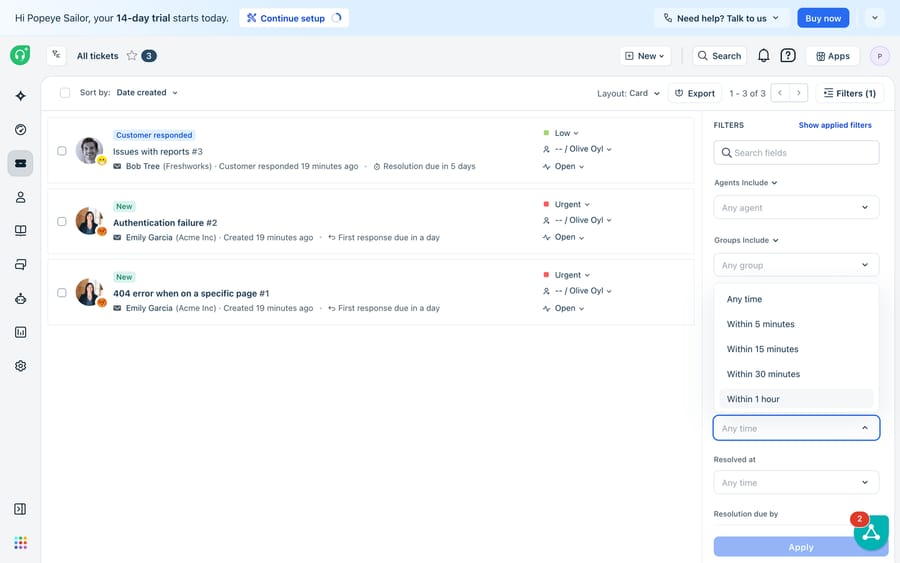
Everything an AI agent does starts from the view above. A Freshdesk queue is a stream of free-text tickets: a billing question, a "why is this failing to authenticate" report, a request that's really three requests in one message. An AI agent's job is to read each of those the way a good first responder would: understand intent, pull the right knowledge, decide whether it can resolve or should route, and either draft or post a reply. The queue is the input; a resolved (or cleanly triaged) ticket is the output. Nothing about this changes your Freshdesk setup. The agent works the same tickets your team already works.
How does an AI agent connect to Freshdesk?
Both native Freddy and an external agent layer plug into the same Freshdesk primitives. If you're wiring an AI agent layer yourself or with a platform, this is the shape of it, and every piece maps to a documented endpoint in the Freshdesk API:
- Read the ticket. The layer authenticates with the REST v2 API (Basic auth with an API key) and fetches tickets via
GET /api/v2/tickets, including subject, description, requester and status. This is the raw material the agent reasons over. - Ground the answer. Before drafting, the agent retrieves relevant knowledge (your help center, product docs or an internal source) so the reply is anchored to real content rather than the model's guess.
- Draft or send a reply. A public response goes out through
POST /api/v2/tickets/{id}/reply; the agent can also add a private, agent-only note (POST /api/v2/tickets/{id}/notes) with its reasoning or a suggested next step, which is the safest way to start. - Update and route. Using
PUT /api/v2/tickets/{id}, the agent can set status, priority, group or custom fields: the same triage a human would do, done in seconds. - Trigger the whole thing. Freshdesk's webhook action lives in the Ticket Creation and Ticket Updates automation rules (the rule types older docs call Dispatcher and Observer), so a new or changed ticket calls your external agent layer without you polling. Freshdesk caps webhooks at 1,000 calls an hour, buffers anything over the limit, and retries a failed callback every 30 minutes, up to 48 times. We cover the native-rules side in depth in how to automate Freshdesk with AI.
Because all of this runs through the API and automation rules rather than replacing them, "add an AI agent to Freshdesk" is a configuration project, not a migration.
Where does Freddy stop?
Freddy is capable, and for KB-grounded deflection it's often enough. But there are real edges where teams reach for more:
- It's grounded mostly in Freshdesk. Freddy answers best from your Freshdesk knowledge base. When the answer lives in a system Freshdesk doesn't know about (an order status, a subscription state, an internal tool), native grounding runs out of road.
- The model isn't yours to choose. You get Freddy's model, tuned Freddy's way. If you want to pick or swap the underlying model, that's not a native lever.
- The pieces are priced and scoped separately. AI Agent sessions, the $29 Copilot seat and the Enterprise-only Insights are distinct line items, so cost and capability stack up rather than composing into one agent you fully control. Session pricing also means Freshworks earns more as volume grows, whether or not a session ends with the customer's problem solved.
- "Answer from the KB" isn't the same as "do the task." Resolving the long tail often means calling an API, checking a record and taking an action, not just returning an article.
This is where an AI agent layer extends things. Here's the Macha view of that layer:

How does Macha extend an AI agent on Freshdesk?
A model-agnostic layer like Macha runs on top of Freshdesk as a native connector and closes those edges directly. The connector exposes the Freshdesk actions an agent needs: get and search tickets, add public replies or internal notes, update status and priority, and search contacts. Custom tools let you turn any REST API into something an agent can call, so a WISMO or refund agent can look up the real record before it answers instead of quoting the KB. Sources ground the agent on your help center and docs. Simulations replay your real historical tickets against an agent so you can see how it would have handled last month's queue before it touches a live one, continuous evaluation scores its output after launch, and analytics log every agent run so you can audit exactly what happened. On Freshdesk, Macha works through the API and webhook triggers. To be precise about scope, Macha connects to Freshdesk specifically, not Freshchat, Freshservice or Freshcaller. Pricing is one plan set by ticket volume, from $299 a month for 750 tickets, billed per ticket rather than per session or resolution, about $0.40 a ticket. You don't have to build it yourself: on the trial and every plan, the Macha team analyzes your past tickets, builds the knowledge base and the agent on Freshdesk, and runs the private-notes rollout below for you until the drafts are right. The price includes that setup and a dedicated success manager who handles your changes afterwards: new categories, instruction changes, new tools. The full picture is in Macha for Freshdesk.
If you're weighing "build it myself against the API" versus "use a platform," that trade-off deserves its own read: building an AI agent from scratch vs. using a platform. And for the broader landscape of what these agents do across a support org, see AI agents for customer service.
How do you roll out an AI agent on Freshdesk safely?
A safe sequence, whichever layer you choose:
- Start in draft mode. Have the agent post private notes or suggested replies, not public responses, for the first stretch. You get the speed with none of the exposure.
- Ground it well. Point it at your best knowledge: help center, docs and any system of record it needs via a tool. Ungrounded agents guess; grounded ones cite.
- Grade before you ship. Run the agent against a batch of real past tickets and read the outcomes. If it would have mishandled last month's queue, you learn that offline, not on a customer.
- Open the gate gradually. Let it auto-send on one narrow, well-understood topic first (say, order status), watch the analytics, then widen scope.
- Keep a clean escalation path. Every agent should have a defined "I'm not sure, hand to a human" behavior, wired to the right Freshdesk group.
Do this and the agent earns trust the same way a new hire does: supervised first, autonomous once it's proven. For who should do this work, and how long each route takes, see Freshdesk AI implementation: Freddy yourself, a Freshworks partner, or done for you.
FAQ
Can I add an AI agent to Freshdesk without switching helpdesks? Yes. Both Freddy and an external agent layer run on top of your existing Freshdesk, through its API and automation rules, so your tickets, fields, SLAs and macros stay exactly where they are. Adding AI is a configuration project, not a migration.
How is an AI agent layer different from Freddy? Freddy is Freshworks' native assistant, grounded mainly in your Freshdesk knowledge base, on a model you don't choose. An AI agent layer like Macha runs on top of Freshdesk as a native connector, lets you build named agents with scoped tools, is model-agnostic and can reason across systems beyond Freshdesk, then replays your real historical tickets against each agent before it goes live.
How much does Freddy AI Agent cost? Every Freshdesk plan includes the first 500 Freddy AI Agent sessions as a one-time allowance per account; after that, sessions cost $49 per 100. Freddy AI Copilot is a separate $29 per agent per month add-on on Pro and Enterprise.
Does Macha replace Freshdesk? No. Macha is not a helpdesk and not a Freshdesk alternative. It's an AI agent layer that runs on top of Freshdesk. You keep Freshdesk as your system of record; Macha reads, drafts and acts on tickets through the Freshdesk API. Note that Macha connects to Freshdesk specifically, not Freshchat, Freshservice or Freshcaller.
What do I need to connect an AI agent to Freshdesk? A Freshdesk account with API access (an API key for Basic auth), the endpoints for reading tickets and posting replies or notes from the Freshdesk API docs, and a Ticket Creation or Ticket Updates automation rule with a webhook action to trigger the agent. With a platform like Macha, you connect via the native Freshdesk connector and configure the agents in-app rather than wiring the API calls by hand.






