





 Shopify
 Stripe
 Slack
Slack Notion
 Google Workspace
 Confluence

Does Macha Work with Freshdesk? The 15-Tool AI Agent Connector Explained


Macha's Freshdesk connector lets AI agents you configure read, reply to, triage and route Freshdesk tickets through 15 API tools. Your tickets, SLAs and seats stay in Freshdesk, and you choose which tools, knowledge and guardrails each agent gets.
Key takeaways
- Macha's Freshdesk connector, live since the March 15, 2026 release, gives an AI agent 15 tools for ticket management plus reading PDF, DOCX, XLSX, CSV and TXT attachments.
- The Macha Freshdesk connector supports three trigger types, Ticket Created, Ticket Updated and Custom Webhook, each with a debounce control that batches rapid edits into one agent run.
- Macha bills per ticket rather than per session or resolution, starting at $299 a month for 750 tickets, about $0.40 each, however many steps the agent takes, with setup by the Macha team and a dedicated success manager included.
- Freshdesk's Freddy AI Agent costs $49 per 100 sessions, and its 500 free sessions are a one-time allowance limited to once per account.
- Freddy Copilot is agent-assist rather than autonomous, listed on Freshdesk's pricing page at $29 per agent per month billed annually.

Yes, Macha runs AI agents on Freshdesk: since the March 15, 2026 release, the Freshdesk connector gives an agent 15 tools for ticket management, reads PDF, DOCX, XLSX, CSV and TXT attachments, and starts on its own from three triggers (Ticket Created, Ticket Updated, Custom Webhook). It authenticates with one Freshdesk API key, and it's the same agent engine that runs on Zendesk, pointed at your Freshworks instance.
| Question | Answer |
|---|---|
| Live since | March 15, 2026 release |
| Authentication | Freshdesk API key, tested live before saving |
| Tools | 15 (read, search, reply, note, triage, assign) |
| Triggers | Ticket Created, Ticket Updated, Custom Webhook, each with debounce |
| Macha price | Per ticket, from $299 a month for 750 tickets (about $0.40 each), setup and a dedicated success manager included |
| Freddy AI Agent price | $49 per 100 sessions after a one-time 500-session allowance |
What does "an AI agent layer on top of Freshdesk" actually mean?
Macha is not a helpdesk and it is not trying to become one. Your tickets, your SLAs, your agent seats and your reporting all stay in Freshdesk. What Macha adds is an autonomous worker that can read a ticket the way one of your agents would, decide what to do, and then do it using real Freshdesk API actions: post a reply, leave an internal note, change priority, retag, reassign, look up a contact, or pull the matching solution article.
The distinction matters because it changes who is in charge. With Macha, the agent's instructions, its knowledge sources, and the specific tools it is allowed to touch are all yours to define. You can run it in draft-only mode (internal notes for a human to approve), graduate it to public replies on a narrow set of topics, and widen its scope as you build trust. Nothing happens that you did not explicitly enable.
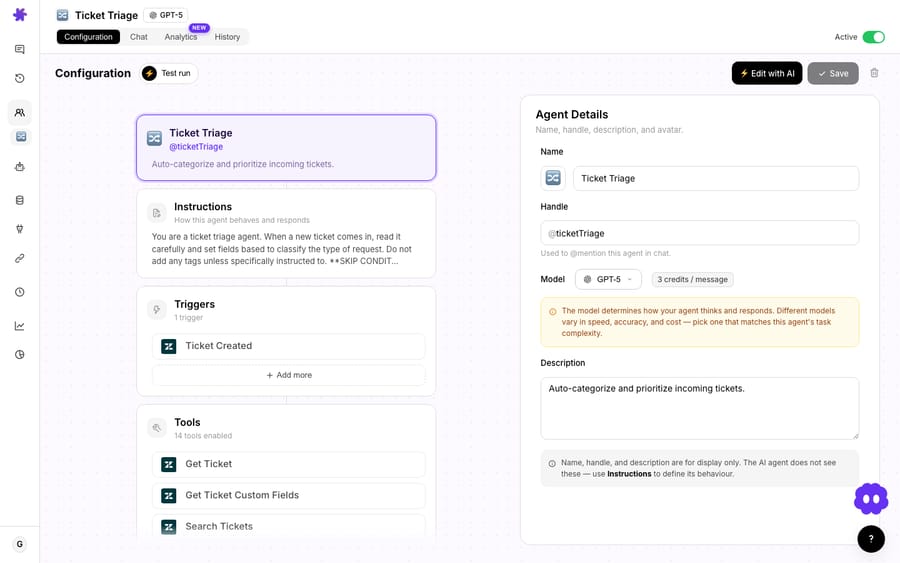
How is Macha different from Freddy AI Agent, Freddy Copilot and Freddy Insights?
If you searched "Freshdesk AI agent," you've probably hit three different things wearing similar names. They solve different problems, and Macha sits in a different spot again.
- Freddy AI Agent (the autopilot). Freshworks' customer-facing, autonomous bot. It answers end to end across channels, pulls from your knowledge base, resolves common queries, and hands off to a human when it's stuck. Freshworks' Freshdesk AI page markets "up to 80% Resolutions with Freddy AI Agent." This is the thing most people mean by "Freshdesk AI agent."
- Freddy Copilot (agent-assist). Not autonomous. It sits inside the agent workspace, drafting replies, summarizing threads, refining tone and suggesting next steps. A human is always in the loop and still sends the reply. Freshdesk's pricing page lists it at $29 per agent per month billed annually, separate from the AI Agent's session billing.
- Freddy AI Insights. Analytics and reporting on top of the above: a dashboard, not a worker.
Macha is a fourth category: a configurable agent layer you install on top of Freshdesk. Like Freddy AI Agent, it can run autonomously and resolve tickets, but you write the instructions, choose the exact tools each agent may call, point it at the knowledge you connect, and decide whether it replies publicly or only drafts internal notes. The difference from the native options is control and reach: a Macha agent isn't confined to the Freshworks suite, so a single run can touch Freshdesk and Shopify, Stripe, Notion or Slack.
Which 15 Freshdesk tools can a Macha agent use?
The connector authenticates with a single Freshdesk API key and exposes 15 actions. Here is how they break down by job:
| Job | Tools |
|---|---|
| Read the ticket | Get Ticket, Search Tickets, Get Ticket Fields, Read Attachment |
| Find the answer | Search Articles (your Freshdesk knowledge base), Search Contacts |
| Respond | Add Public Reply, Add Internal Note |
| Triage & route | Update Priority, Update Status, Update Tags, Update Fields, Assign Ticket |
| Know the org | List Agents, List Groups |
A few of these deserve a callout. Read Attachment means the agent isn't blind to the error log or the spreadsheet a customer attached: it extracts text from PDF, DOCX, XLSX, CSV and TXT files directly from the ticket. Search Articles points the agent at your existing Freshdesk solution articles, so answers stay grounded in content your team already maintains rather than a separate, drifting copy. And the triage tools (priority, status, tags, fields, assignment) are what let an agent do the unglamorous queue hygiene that eats your team's mornings.
Triggers: how an agent wakes up
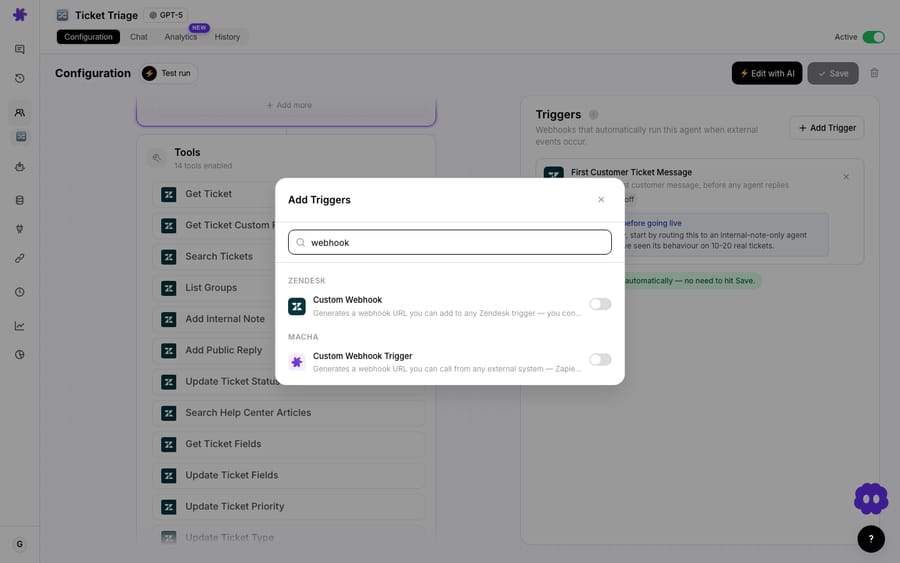
Tools are only half the story; something has to start the agent. Macha's trigger system (shipped March 1, 2026) gives the Freshdesk connector three entry points:
- Ticket Created: fires on every new ticket.
- Ticket Updated: fires when any field changes, whether status, assignee, priority or tags. This is the one that powers escalation flows.
- Custom Webhook: fires from a Freshdesk automation rule you define, for exact control over which events should invoke an agent.
Each trigger has a debounce control so a flurry of rapid edits gets batched into a single run instead of firing the agent five times in a row.
How do you connect Freshdesk to Macha?
- Connect Freshdesk. Add the connector from the integrations list and paste your Freshdesk API key. Macha verifies the connection before it saves.
- Build an agent. Write its instructions (or start from a template), attach knowledge sources, and tick the Freshdesk tools it's allowed to use. Keep it tight: an agent only needs the tools its job requires.
- Attach a trigger. Point it at Ticket Created or Ticket Updated, set a debounce, and decide whether it replies publicly or just drafts internal notes for review.
Before the connector saves, Macha runs a live test against your Freshdesk instance and shows a verified state, so you know the key works (and has the right scopes) before any agent depends on it. If you ever rotate the key, the reconnect form takes the new value the same way.
What can a Macha agent do on Freshdesk on day one?
These map to the Freshdesk tools and triggers above. Each one is a real configured pattern.
1. Auto-resolve repetitive questions from your knowledge base
Trigger: Ticket Created. The agent reads the new ticket, runs Search Articles against your Freshdesk knowledge base, and if it finds a high-confidence match, posts a public reply with the steps, then sets status to Resolved and tags it kb-auto-resolved. A customer asking "how do I export my data as a CSV?" gets a complete, sourced answer in seconds, and your queue never sees the ticket.
2. Triage and route by topic, priority, and sentiment
Trigger: Ticket Created. The agent analyzes the message, classifies the topic ("Billing → Duplicate Charge"), reads the sentiment ("Frustrated"), bumps priority to Urgent, applies tags, and uses Assign Ticket to drop it on the Billing team with an internal note explaining the classification. Your team opens an already-sorted queue instead of a wall of untriaged tickets.
3. Escalate the right tickets to Slack with context
Trigger: Ticket Updated (priority changed to Urgent). The agent pulls the full ticket, searches the KB for relevant troubleshooting and escalation procedures, writes a summary internal note, and posts an escalation alert to your #escalations Slack channel with the ticket number, how long it's been open, and the recommended next action. This one spans two connectors, Freshdesk plus Slack, which is the kind of cross-tool action a layer-on-top model makes easy.
4. Answer with KB articles and mark for follow-up
Trigger: Ticket Created. For a question like "how do I set up SAML SSO with Okta?", the agent finds the matching solution article (96% match), replies with the steps and a link to the full guide, then sets status to Pending and tags kb-article-sent so a human can confirm the customer is unblocked.
You can find more end-to-end patterns on the use cases page and the full action reference on the Freshdesk integration page.
How does Macha compare with Freshdesk's own Freddy AI Agent?
The fair question is: Freshdesk already has Freddy. Why add a layer? Two reasons, pricing model and control, and one honest caveat.
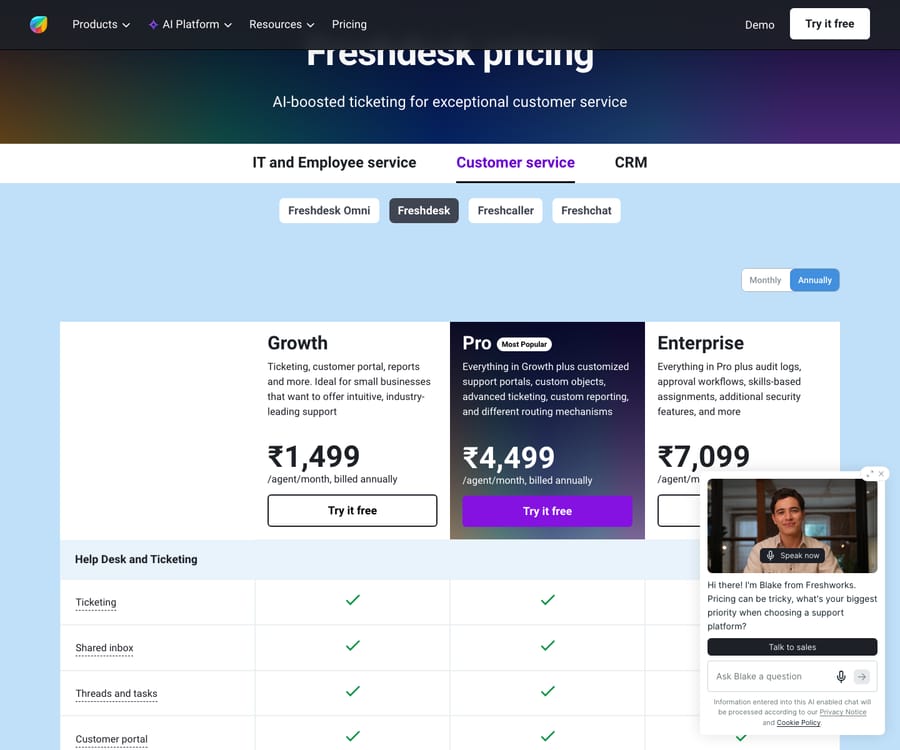
Pricing model. Freddy AI Agent is billed per session. Freshdesk's pricing page (checked 24 September 2026) lists $49 per 100 sessions (about $0.49 a session), with 500 free sessions on the Growth, Pro and Enterprise plans that are "limited to once per account." A session is a unique interaction between an end user and the AI Agent; for email, it's a 72-hour window from the customer's first email. Freshworks' Freshdesk AI page claims "up to 80% Resolutions with Freddy AI Agent" and, separately, that the platform can "automate up to 84% of your support queries." "Automate" is a looser bar than "resolve," so read both as marketing ceilings, not a forecast for your queue.
Macha is priced differently on purpose. You're billed per ticket: one thread with one person, charged once however many messages, lookups and replies it takes, not per deflection, resolution or 72-hour session. That matters because a ticket might take a handful of steps (read, search, reply, tag) or a dozen, and it costs the same either way, whichever model the agent runs on. Pricing starts at $299 a month for 750 tickets, about $0.40 each; see the pricing page for the tiers. That price includes the setup: the Macha team analyzes your past tickets, builds the knowledge base and the agent on Freshdesk, and runs it in safe mode, with drafts as private notes, until the drafts are right. It also covers a dedicated success manager who handles your changes afterwards, such as a new category, an instruction change or a new tool. Per-session billing also has an incentive worth naming: the vendor is paid for the session whether or not the ticket gets solved.
| Freshdesk Freddy AI Agent | Macha on Freshdesk | |
|---|---|---|
| What it is | Native AI inside Freshdesk | Configurable agent layer on top |
| Setup | Self-serve: you build it in Freshdesk's no-code builder | Done for you by the Macha team, with a dedicated success manager, included |
| Billing | Per session ($49 per 100, 72-hour email window) | Per ticket (from $299/mo for 750) |
| Free allowance | 500 sessions, once per account | $50 trial, no credit card |
| You control the tools | Limited, Freshworks-defined | Yes, pick exactly which tools each agent uses |
| Cross-tool actions | Within the Freshworks suite | Yes: Slack, Shopify, Stripe, Notion and more in one agent |
| Knowledge source | Freshdesk KB | Freshdesk KB plus your own connected sources |
Freshdesk prices checked on freshworks.com on 24 September 2026. Check the page again before you budget.
Control. Because Macha agents are yours to configure, a single agent can read a Freshdesk ticket, check an order in Shopify, look up a charge in Stripe, pull a policy from Notion, and then reply, all in one run. Native helpdesk AI generally stays inside its own suite. If your resolutions depend on data that lives outside Freshworks, the layer-on-top model is the difference between a real answer and "I'll escalate this."
What real users say about Freddy
Freshdesk itself reviews well on G2, and reviewers consistently praise Freddy for fast first replies and KB-driven deflection on simple, repetitive questions. The counterweight shows up in the same reviews: the headline resolution numbers don't always survive contact with a real queue. A widely cited limitation is thread handling: eesel reports that Freddy AI Agent's email flow replies to the first message and then hands off, so a customer follow-up generally drops to a human rather than being carried by the AI. Recurring G2 critiques echo it: "not customizable enough for unique workflows" and "can be inaccurate with complex or long-winded queries." And because a session is billed whether or not it resolves, low real-world resolution rates push up the effective cost per solved ticket. None of this makes Freddy bad, but it explains why teams whose resolutions depend on outside data or multi-step actions reach for a configurable layer.
So which should you use?
- Best for a quick native deflection bot on simple email questions: Freddy AI Agent. If your wins are first-touch FAQ answers that live entirely in your Freshdesk KB and you don't want to manage another tool, the native autopilot is the lower-friction switch.
- Best for agent productivity without autonomy: Freddy Copilot. If you want humans to stay in the loop on every reply and just go faster, the per-agent copilot is the right shape.
- Best for resolutions that need actions and outside data: Macha on Freshdesk. When answering a ticket means checking a Shopify order, looking up a Stripe charge, pulling a Notion policy or alerting Slack, and you want to control exactly what the agent can do and when, the layer-on-top model wins. It's also the better fit for teams running several specialized agents with tight, per-job tool scopes rather than one general bot.
When is Macha on Freshdesk not the answer?
- If you only need a basic email deflection bot and never touch other systems, Freddy's native flow may be simpler to switch on. Macha earns its place when answers require actions and outside data, not just canned replies.
- Public replies need a trust runway. Start any new agent in internal-note (draft) mode, review what it would have said, and only flip it to public replies once you've watched it on real tickets. Don't point an unsupervised agent at your whole queue on day one.
- Garbage knowledge in, garbage answers out. The KB-grounded workflows are only as good as your Freshdesk solution articles. If your KB is thin or stale, fix that first, or connect a richer knowledge source.
- Every ticket an agent touches is a billed ticket. The steps inside it are free, but the ticket itself comes out of your monthly allowance. Scope triggers tightly (a Custom Webhook on a narrow automation rule beats firing on every single ticket) and use debounce so rapid edits don't multiply runs.
FAQ
Is Macha a replacement for Freshdesk? No. Macha is an AI agent layer that runs on top of Freshdesk. Your tickets, SLAs, seats and reporting stay in Freshdesk; Macha adds agents that read and act on those tickets through the Freshdesk API.
How does the Freshdesk connector authenticate? With a Freshdesk API key. You paste it when you add the connector, and Macha verifies the connection before saving.
What can a Macha agent actually do in Freshdesk? Fifteen actions: get and search tickets, read attachments, search articles and contacts, post public replies and internal notes, update priority/status/tags/custom fields, assign tickets, and list agents and groups.
Can an agent run automatically on new tickets? Yes. Attach a Ticket Created or Ticket Updated trigger (or a custom Freshdesk webhook) and the agent runs autonomously, with a debounce control to batch rapid events.
What's the difference between Freddy AI Agent and Freddy Copilot? Freddy AI Agent is the autonomous, customer-facing autopilot, billed at $49 per 100 sessions. Freddy Copilot is agent-assist at $29 per agent per month billed annually: it drafts replies and summaries inside the workspace, but a human always sends the message. Macha is a separate, configurable agent layer that can run autonomously like the AI Agent, with tools, knowledge and guardrails you define, and it can reach systems outside Freshworks in the same run.
How is Macha priced compared to Freddy? Macha bills per ticket (one conversation, charged once however many messages it takes), not per session or per resolution, and the model you pick doesn't change the price. Pricing starts at $299 a month for 750 tickets, about $0.40 each. Freddy AI Agent bills per session after a one-time 500-session allowance and is self-serve: you build it in Freshdesk's no-code builder. On Macha, the Macha team does the setup for you, on the trial and every plan, and a dedicated success manager handles your changes afterwards. See the pricing page for current Macha plans.
Does this work the same as Macha on Zendesk? Yes: same agent engine, same trigger system, same multi-tool actions. If you've seen Macha on Zendesk, the Freshdesk experience is the same model pointed at Freshworks. The same agents run on Zendesk, Freshdesk, Gorgias, Front, HubSpot or Intercom.
How do you start?
The Freshdesk connector is live now. Start a free trial ($50 of usage, no credit card required), paste your Freshdesk API key, and build your first agent. Begin with the auto-resolve or triage workflow above, run it in draft mode for a few days, and graduate it to public replies once you trust it. Or let the Macha team do it: on the trial and every plan, they analyze your past tickets, build the knowledge base and the agent, and run it in safe mode until the drafts are right, and a dedicated success manager who handles your changes afterwards. Full setup details are in the docs.
Written by Abbas (Customer Support & AI, Macha) · Reviewed by Ankeet Guha (Co-founder & CTO) · Published 2026-06-24 · Last updated 2026-09-24.






