





 Shopify
 Stripe
 Slack
Slack Notion
 Google Workspace
 Confluence

How Do You Handle Freshdesk Ticket Escalations Automatically?


When a Freshdesk ticket flips to Urgent, native automation reassigns it and sends a notification, then stops. The senior agent who picks it up still opens a cold ticket with no summary, no runbook link and no sense of how long the customer has waited.
Key takeaways
- Freshdesk escalations can be automated by keeping native rules for routing and adding a Macha agent that writes an internal note and posts a Slack alert when priority changes to Urgent.
- Freshdesk SLA reminders and escalations need the Pro plan or above, and reminders can fire from 5 minutes to 4 hours before an SLA target is breached.
- Freshdesk hourly triggers run every hour but only process tickets updated within the last 30 days, and they are not available on the Free plan.
- The Macha Freshdesk connector authenticates with an API key and ships with 15 tools, including Get Ticket, Search Articles, Add Internal Note and Read Attachment.
- A Macha escalation run counts as one ticket, about $0.40, and Macha pricing starts at $299 a month for 750 tickets.

To handle Freshdesk escalations automatically, keep Freshdesk's own rules for routing and add an AI agent for the handoff: when a ticket's priority changes to Urgent, a Macha agent reads the full thread, searches your knowledge base, writes an internal note and posts a Slack alert. Freshdesk already moves the ticket and notifies someone. What it can't do is brief the person who inherits it, and that briefing is the expensive part.
| Layer | What it does on escalation | Freshdesk plan |
|---|---|---|
| Ticket update rules | Reassign, retag, change priority, notify when a field changes | All automation plans |
| Hourly triggers | Act on time conditions every hour, on tickets updated in the last 30 days | Growth and above (not Free) |
| SLA reminders and escalations | Remind 5 minutes to 4 hours before a breach, escalate after it | Pro and above |
| Macha agent | Reads the thread, searches the KB, writes an internal note, alerts Slack | Works alongside any of the above |
Macha is not a Freshdesk replacement. It's an AI agent layer that sits on top of your help desk (Zendesk, Freshdesk, Gorgias, Front, HubSpot or Intercom), connects your knowledge and comms tools, and takes real actions through them. Your tickets, SLAs, and agents stay exactly where they are.
What does Freshdesk's native escalation already cover?
It's worth being precise about the baseline, because Macha's job is to extend it, not duplicate it.
Freshdesk gives you three rule engines that touch escalation:
- Automation rules on ticket update fire when a field changes (priority, status, assignee, tags) and can reassign, retag, change priority, or notify.
- Hourly triggers (formerly time triggers) run every hour and act on time conditions like "open and overdue by more than two hours." Per Freshdesk's automation rules documentation, they only process tickets updated within the last 30 days, can fire up to 58 minutes after the threshold, and are not on the Free plan (Growth, Pro and Enterprise).
- SLA policies with reminders and escalations, so the team gets a heads-up 5 minutes to 4 hours before a target is breached and a breached ticket gets bumped to a more senior agent. Reminders and escalations need the Pro plan or above; Growth gets one default SLA policy (SLA policies docs).
Freshworks' own escalation management guide recommends exactly this: a defined escalation matrix, the right owner at each level, and reminders before every breach. If you haven't set those up, do that first: Macha assumes a sane escalation matrix underneath it.
What none of those rules do is read the ticket and prepare it. They move the ticket and tell someone it moved. They can't summarize a four-reply thread, decide which knowledge-base article is relevant, or write the two paragraphs that save the next agent ten minutes. Rules match conditions; they don't comprehend. That's the line Macha crosses.
How does an AI agent automate the escalation handoff?
Here's the workflow this use case implements. When a Freshdesk ticket's priority changes to Urgent, a Macha agent runs autonomously and does four things in sequence:
- Pulls the full ticket — subject, every reply, status, age, tags, and custom fields.
- Searches your knowledge base for articles relevant to the issue.
- Writes an internal note that summarizes the situation, the steps already tried, and the relevant runbooks.
- Posts an alert to Slack so the right people see it immediately, with the context inline.
The senior agent opens a ticket that's already been briefed. The Slack channel gets a clean, scannable alert instead of a bare "ticket reassigned" email. Nothing about Freshdesk's routing changes — Macha just makes the handoff land soft.
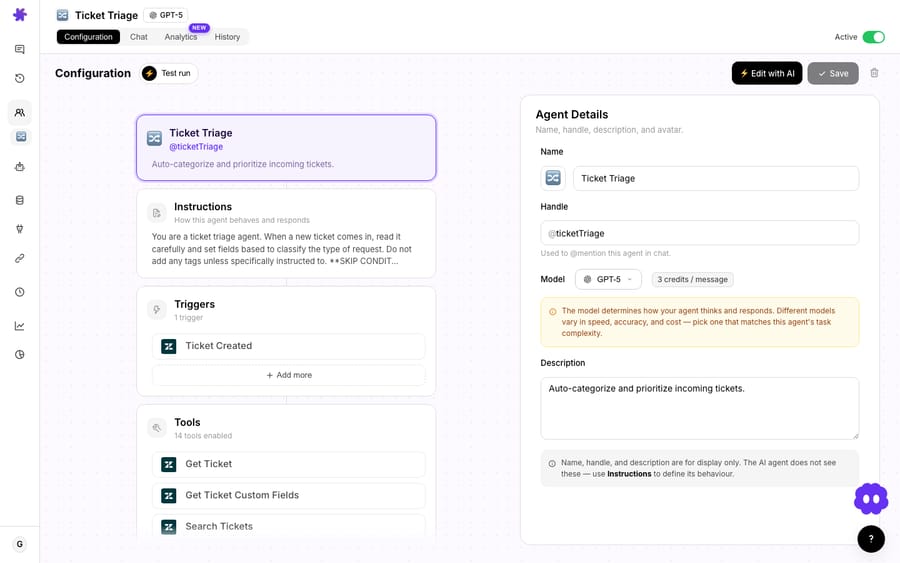
Step 1: Connect Freshdesk
Macha authenticates to Freshdesk with an API key, and the connector ships with 15 tools, enough to handle the whole escalation flow without leaving Macha. The ones this workflow uses:
| Tool | Role in escalation |
|---|---|
| Get Ticket | Retrieves the full thread, status, age, tags, and custom fields by ID |
| Search Articles | Searches the Freshdesk knowledge base for relevant solution articles |
| Add Internal Note | Posts a private note visible only to agents |
| Read Attachment | Extracts text from PDF, DOCX, XLSX, CSV, or TXT files on the ticket |
The connector also covers Update Priority, Update Status, Assign Ticket, Add Public Reply, List Agents, List Groups, Update Tags and Update Fields, so if you want Macha to do the reassignment too (rather than letting a Freshdesk rule handle it), it can. We'll come back to that choice in the watch-outs.
Step 2: Set the trigger
Macha runs the agent on a Ticket Updated trigger, which fires whenever any field on a Freshdesk ticket changes — including priority. You scope it with a condition so it only acts on real escalations: priority changed to Urgent. (Macha also supports Ticket Created and Custom Webhook triggers if your escalation signal comes from somewhere else — say, a Freshdesk SLA-breach webhook.)
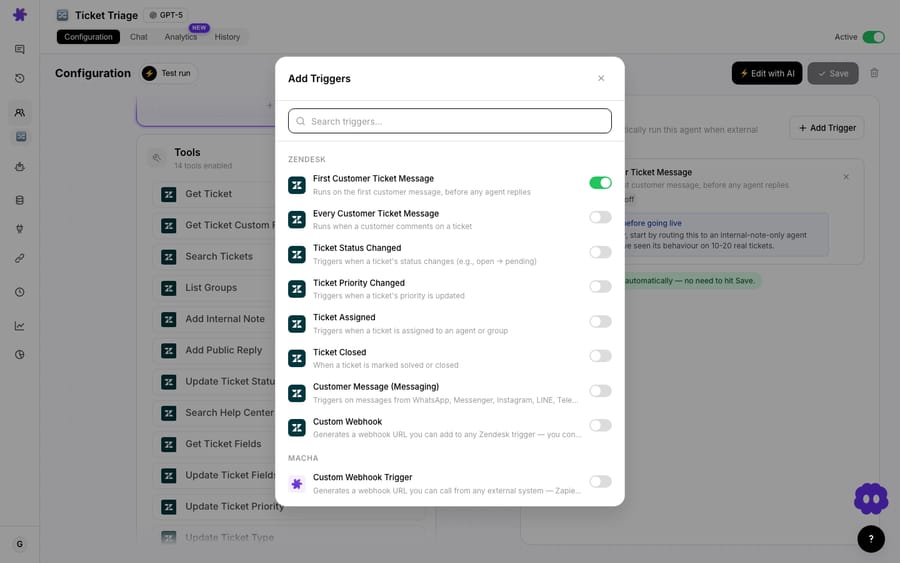
One detail that saves you grief: every event-driven trigger has a debounce setting. If an agent edits priority, assignee, and tags in quick succession, you don't want three escalation alerts. Set a debounce of a few seconds and Macha collapses the burst into one run. (New event types default to 0s — turn it on deliberately for noisy queues.)
Step 3: Gather context and search the KB
This is the part rules can't do. The agent calls Get Ticket to load the whole conversation, then reasons over it: how long has this been open, how many times has the customer replied, what's the actual problem. Then it calls Search Articles against your Freshdesk knowledge base and pulls the documents that match — a troubleshooting guide, an escalation procedure — instead of making the senior agent go find them.
If the ticket has attachments — a log file, an error screenshot exported to PDF, a CSV of failed transactions — Read Attachment extracts the text so that evidence makes it into the summary too.
Step 4: Write the note and alert the team
The agent writes an internal note on the Freshdesk ticket — visible only to agents — that bundles everything: a plain-language summary, the steps already attempted, the relevant KB links, and how long the customer has been waiting. Then it posts to your #escalations Slack channel so the alert is impossible to miss.
A real run on a simulated outage ticket looks like this:
🚨 Escalation alert — #escalations

• Ticket: #8301 — Complete service outage
• Customer: [email protected]
• Open for: 4 hours, 3 customer replies
• Context: Troubleshooting steps from KB added as internal note
• Action needed: Engineering review recommended
That's the whole handoff: by the time a human looks at the ticket or the Slack alert, the briefing is already written.
How much does an automated escalation run cost?
Macha bills per ticket — one conversation, charged once, never per "resolution", so the bill never hangs on an outcome definition you don't control. The escalation run described here takes four steps (get ticket, search articles, write note, post to Slack) and still counts as one ticket, about $0.40. Which model you pick changes how good and how fast the briefing is, not what you pay. Pricing starts at $299 a month for 750 tickets, with setup and monitoring by the Macha team included. See the pricing page — and you can start with a free trial ($50 of usage, no credit card required).
When should you not automate Freshdesk escalations?
This isn't a set-and-forget switch. A few honest caveats:
- Don't let Macha and Freshdesk rules fight over the same field. Decide who owns the reassignment. If a Freshdesk automation already routes Urgent tickets to your escalations group, let it — and have Macha only gather context and notify. If you want Macha to own routing (e.g. it picks the assignee by reading the ticket via List Agents), then disable the overlapping Freshdesk rule. Two systems writing priority on the same ticket is how you get loops.
- Scope the trigger tightly. "Ticket Updated" fires on every field change. Without a clean priority → Urgent condition (and a sensible debounce), you'll generate noise. Test on a low-volume view first.
- The note is only as good as your KB. If your Freshdesk knowledge base is thin or out of date, Search Articles returns weak matches and the summary reflects it. Garbage in, garbage briefing. Fix the KB first — it pays off across auto-reply and triage too, not just escalation.
- Keep the customer-facing reply human. This workflow writes an internal note and a Slack alert on purpose. For genuinely urgent, high-stakes tickets — a major outage, a furious enterprise account — let a person own the public reply. Macha briefs; the senior agent responds.
- It doesn't replace SLA reminders. Macha reacts to an escalation event; it isn't a time-based SLA monitor. Keep Freshdesk's SLA policies and pre-deadline reminders doing what they do well, and use Macha for the comprehension and handoff on top.
If your escalations are simple — a one-line ticket goes to one person who already has all the context — native rules are enough and you don't need this. Macha earns its keep when escalations are messy: long threads, cross-tool context, a KB worth searching, and a team that needs to be told why this one matters.
Where does this fit with the rest of your Freshdesk setup?
Escalation handling is one agent in a larger pattern. The same Freshdesk connector and trigger model powers triage and routing by topic, knowledge-base auto-replies, and internal-note enrichment — so the escalation agent slots into a stack where Macha is already reading tickets and acting on them. See the Freshdesk integration page for the full tool list, or the docs for trigger and agent setup.
FAQ
Does this replace Freshdesk's automation rules or SLA escalation? No. Keep your Freshdesk automation rules and SLA policies for routing, reassignment, and time-based reminders — they're good at that. Macha adds the layer those rules can't do: reading the ticket, searching the KB, and writing a context-rich briefing for whoever inherits the escalation.
What triggers a Macha escalation run? Most teams use the Ticket Updated trigger scoped to priority changed to Urgent. You can also trigger on Ticket Created or a Custom Webhook — for example, a Freshdesk SLA-breach webhook with a signing secret.
Can Macha reassign the ticket, not just notify? Yes — the connector includes Assign Ticket, Update Priority, Update Status, and List Agents/Groups. Just make sure Macha and your native Freshdesk rules aren't both writing the same field on the same ticket.
Does it post the summary to the customer? By default, no. This workflow writes an internal note (agents-only) and a Slack alert. The connector can Add Public Reply, but for urgent escalations we recommend keeping the customer-facing message human.
Which Freshdesk plan do I need for native SLA escalations? SLA reminders and escalations need Freshdesk Pro or above. Hourly triggers need Growth or above. The Macha agent works alongside either, because it runs on Freshdesk's Ticket Updated event.
How much does an escalation run cost? One ticket, about $0.40: the whole run (get ticket, search articles, add note, post to Slack) is charged once, whichever model it uses. Pricing starts at $299 a month for 750 tickets; see pricing.
Try it
If your escalated tickets keep landing on senior agents cold, this is a fast win. Start a free trial ($50 of usage, no credit card required), connect Freshdesk and Slack, and build an escalation agent that briefs the ticket before a human ever opens it. Your routing stays in Freshdesk — Macha just makes sure no one inherits a mystery.
Written by Abbas (Customer Support & AI, Macha) · Reviewed by Ankeet Guha (Co-founder & CTO) · Published 2026-06-24 · Last updated 2026-09-24.






