



 Intercom
 Shopify
 Stripe
 Slack
Slack Notion
 Google Workspace
 Confluence

Is Help Scout Good in 2026? Review of Pricing, Pros, Cons and Who It's For


Help Scout suits small and mid-market teams that want a simple, email-like shared inbox, and it charges $25 to $75 per user a month. Teams tend to outgrow it when they need deep reporting, strict SLAs or heavy omnichannel, and per-seat costs climb as headcount grows.
Key takeaways
- Help Scout prices per user: Standard $25, Plus $45 and Pro $75 per user a month at monthly billing, with annual billing 16% cheaper and a Free plan for up to 5 users.
- Help Scout holds a Capterra rating of 4.6 out of 5 from 226 reviews, and 78% of those Capterra reviewers come from small businesses.
- Help Scout's Standard plan includes 1 basic SLA policy, Plus includes 2 advanced SLA policies, and unlimited SLA policies arrive only on Pro.
- Adding a 26th agent to a 25-seat Help Scout Standard team forces the Plus rate, taking a roughly $625 monthly bill to about $1,170.
- Help Scout's AI Answers, the customer-facing resolution feature, costs $0.75 per resolution after a 3-month free trial, billed on top of per-seat fees.

Help Scout is a good fit for small and mid-market teams that want a simple, email-like shared inbox, and it costs $25, $45 or $75 per user a month (Standard, Plus, Pro) at monthly billing, with annual billing 16% cheaper and a Free plan for up to 5 users. Its weak spots are reporting depth, SLA policies gated by tier (1 on Standard, 2 on Plus, unlimited on Pro) and per-seat costs that climb with headcount. Capterra rates it 4.6 out of 5 from 226 reviews (checked 24 September 2026).
| Question | Answer (checked 24 September 2026) |
|---|---|
| Pricing model | Per user; legacy contacts-based plans only for existing customers |
| Plans | Free $0 (5 users), Standard $25, Plus $45, Pro $75 per user a month |
| Annual discount | 16% |
| AI Answers | $0.75 per resolution, 3-month free trial |
| Ratings | Capterra 4.6/5 (226 reviews); G2 4.4/5 (~435 reviews, June 2026) |
| Best for | Small and mid-market teams that value simplicity |
| Weak spots | Reporting depth, tiered SLA policies, heavy omnichannel |
How we reviewed it: ratings and sentiment come from G2, Capterra and TrustRadius reviews (G2 blocks automated access, so its figure is the one we recorded in June 2026); pricing was re-checked on 24 September 2026 against Help Scout's pricing page; and the product experience is grounded in Help Scout's own site, shown below. One disclosure: Macha is our own product, an AI agent layer that runs on top of Zendesk, Freshdesk, Gorgias, Front, HubSpot or Intercom. It gets one aside near the end, flagged as ours, and it does not integrate with Help Scout.
What is Help Scout, and who is it built for?
Help Scout is a customer support platform built around a shared inbox that feels like personal email. Instead of the heavy "ticket number, portal, queue" feel of a traditional help desk, customers get replies that look like a normal email from a real person — no case IDs, no robotic templates. Behind the scenes, your team gets a collaborative inbox with assignments, private notes, collision detection, saved replies, workflows, a knowledge base (Docs), a help widget (Beacon), live chat, and AI features layered on top.
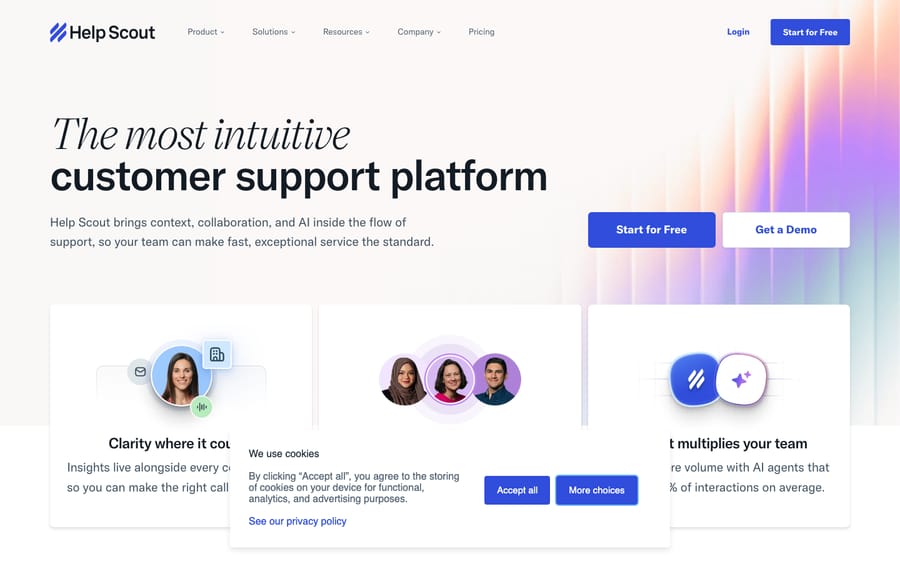
Its whole identity is human simplicity. Where Zendesk optimizes for configurability and enterprise depth, Help Scout optimizes for getting a small team live in an afternoon and keeping the customer experience warm. It's built primarily for small and mid-market teams — SaaS companies, startups, agencies, e-commerce brands, and growing support operations — that value ease of use and a personal touch over maximum power. The reviewer base reflects this: a large majority of Help Scout's reviewers come from small businesses, which is both its sweet spot and a hint at where it gets stretched. For a fuller primer on the product itself, see what is Help Scout.
What does Help Scout include?
A fair review has to look at what you actually get. Simplicity is the headline, but the platform is more capable than its minimalist reputation suggests.
The shared inbox and agent experience
The core is the shared inbox — a clean, email-like workspace where your team triages, replies, collaborates, and tracks conversations to resolution. This is the part reviewers love most. New hires get productive almost immediately, and the collaboration basics (private notes, @mentions, assignments, saved replies, collision detection so two people don't reply at once) are all there without a steep ramp. The experience deliberately avoids "ticket" language so customers feel like they're emailing a person, not a system.
Docs (knowledge base) and Beacon
Help Scout's Docs is a well-regarded knowledge base for public self-service articles, and Beacon is the embeddable help widget that surfaces those articles (and AI answers) right inside your app or site, deflecting questions before they become conversations. The two are tightly integrated and genuinely central to keeping volume down — the better your Docs, the fewer conversations hit the inbox.
Channels
Beyond email, even the Standard plan pulls live chat, SMS, WhatsApp, Instagram and Messenger into the same inbox. For most SMB and mid-market teams that coverage is more than enough. It is not, however, a heavy omnichannel contact center: native voice isn't part of the plan list (Pro offers preferred Aircall pricing instead), and high-volume omnichannel operations often find it thin here.
Workflows and automation
Help Scout's workflows handle routing, tagging, assignment, and triggered actions. Reviewers consistently call them a real time-saver, and they're praised on TrustRadius for organizing and prioritizing work. The catch: the more advanced workflow capabilities (and some views) sit on higher tiers — fine for most, but worth checking against your needs.
AI features
Help Scout has leaned into AI with AI drafts (suggested replies for agents), AI summarize, and AI Answers (customer-facing answers via Beacon that resolve common questions). The agent-assist pieces are included broadly, which is genuinely generous. AI Answers, the customer-facing resolution piece, is billed per resolution (covered in pricing below). One honest gap reviewers note: there's no full no-code chatbot/conversation builder, so it's lighter than dedicated AI-bot platforms.
Reporting and analytics
Help Scout includes dashboards for conversation volume, response/resolution times, CSAT, and team performance. The basics are clean and readable. Depth, though, is the single most common complaint — reviewers repeatedly say reporting is shallow for the price, custom reports require Plus or above, and reporting history is limited on Standard. SLA tracking is available, but its depth is gated by tier: Standard includes a single basic SLA policy, Plus bumps that to two advanced SLA policies, and unlimited SLA policies only arrive on Pro. So if you run strict, multi-tier SLAs you'll likely need the top plan — test this hard before committing.
How much does Help Scout cost in 2026?
Help Scout prices per user (per seat): each plan has a per-agent monthly rate, and your bill scales with how many agents you put on it. This is the current model for new signups — if you've read older breakdowns describing a "contacts-based" plan with unlimited users, that's the legacy model Help Scout now keeps only for existing customers; new accounts are billed per user. So the thing to model carefully is headcount, not contact volume.
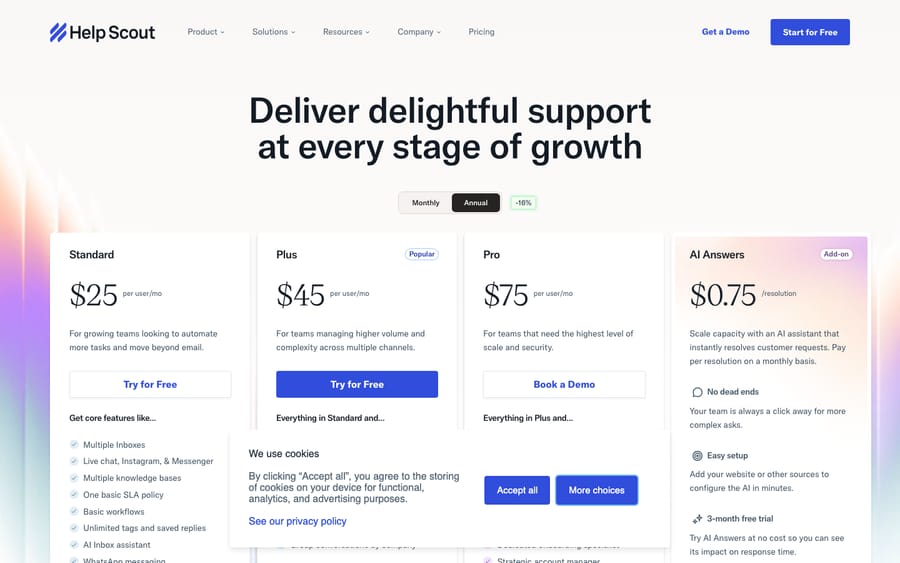
Here's the current shape, re-checked 24 September 2026 against the live pricing page (per-user rates shown at monthly billing; annual billing is 16% cheaper):
| Plan | Price | Key limits | Built for |
|---|---|---|---|
| Free | $0 | 5 users, 1 inbox, 1 Docs site, 10 saved replies | Tiny teams testing the waters |
| Standard | $25/user/mo | Up to 25 users, 2 inboxes, 2 Docs sites, 1 basic SLA policy, 150 workflows | Small teams moving beyond email |
| Plus | $45/user/mo | Up to 50 users (15 light users included), 5 inboxes, 3 Docs sites, 2 advanced SLA policies, 500 workflows, unlimited AI drafts | Growing teams with higher volume and more channels |
| Pro | $75/user/mo | Unlimited users (min 10 seats), 10 inboxes, 5 Docs sites, unlimited SLA policies/workflows, up to 50 light users | Teams needing the most scale and security |
A few honest footnotes that matter more than the table:
- Seats drive the bill. Because you pay per agent, cost scales directly with headcount — and tier limits create step-changes. Add your 26th agent on Standard and you're pushed up to Plus, taking the per-seat rate from $25 to $45/user across the whole team; a 25-seat Standard team at ~$625/mo jumps to ~$1,170/mo on Plus. That's the recurring "pricing surprise" under the current model: the headline per-seat number looks friendly, but seat count, tier ceilings, and add-ons are what actually move the total.
- AI Answers is usage-priced on top. The customer-facing AI resolution feature costs $0.75 per resolution after a 3-month free trial, metered separately from per-seat costs. The incentive is worth naming: a per-resolution price earns Help Scout more as AI Answers closes more of your volume. AI drafts for agents are included; AI Answers is the metered piece.
- Add-ons stack. Extra inboxes ($10/mo each) and extra Docs sites ($20/mo each) are common upgrades, and SSO/SAML and HIPAA compliance are Pro options, all adding to the total.
- There's a legacy contacts-based model. Older customers may still be on Help Scout's previous contacts-based plans (flat monthly with unlimited users). That model is no longer offered to new signups; if you're starting fresh you'll be quoted per user, so budget on seats.
The practical takeaway: Help Scout's per-seat sticker price is friendly, but your effective price tracks headcount, the tier ceiling you land in, and metered AI/add-ons — so count your agents and the SLA/inbox limits you need first. We break the full math down in our Help Scout pricing explainer.
Pricing and AI-billing figures re-checked against Help Scout's live pricing page on 24 September 2026; exact per-user rates, seat/inbox/SLA limits, and overage on metered features can change — verify with Help Scout for your situation.
What do Help Scout users say in reviews?
Aggregate scores are the closest thing to a crowd-sourced verdict:
- Capterra: 4.6 / 5 from 226 reviews, with 94% positive sentiment and 78% of reviewers from small businesses (checked 24 September 2026).
- G2: 4.4 / 5 from roughly 435 reviews when we recorded it in June 2026, with strong ease-of-use and ease-of-admin sub-scores. G2 blocked our September re-check, so treat that figure as dated.
- TrustRadius: consistently positive sentiment, with reviewers highlighting the intuitive interface, rapid adoption, and email management.
Those are strong, consistent numbers. Just as telling is what reviewers praise and gripe about.
What reviewers praise. Ease of use and the human, email-like experience top every list. One verified Capterra reviewer summed up the recurring sentiment: "The simplicity is what stands out most — Help Scout has a clean, intuitive interface that doesn't overwhelm users with unnecessary complexity, so new team members can get comfortable with it quickly without much hand-holding." The "keep it personal at scale" angle is the other repeated win — Dustin D., a Consumer Services user with 2+ years on the product, wrote on Capterra that "the main reason I went with them over others was the still small business feel you can give your customers even with dozens of employees being involved in customer interaction." Fast setup, the shared inbox, and a well-integrated knowledge base (Docs) round out the positives.
What reviewers criticize. Three themes dominate the negative reviews across G2, Capterra, and TrustRadius (presented as recurring aggregate sentiment, not single quotes). First, reporting and SLA depth: analytics are fine for basics but reviewers repeatedly call them shallow for the price, with custom reports gated to higher tiers and limited history on Standard — and while SLA tracking exists, robust multi-policy SLA enforcement is reserved for higher plans (one basic policy on Standard, two advanced on Plus, unlimited only on Pro). Second, scaling and advanced features: as teams grow they bump into the ceiling — lighter automation, fewer advanced controls, and less power than Zendesk for complex or high-volume operations. Third, occasional rough edges: reports of slow loading or a clunky feel at times, plus smaller gripes (draft loss on weak connections, attachment/signature quirks). None are dealbreakers for most SMBs — but they're the predictable friction points as you scale, and the heavy small-business skew of the reviewer base (78% on Capterra) is itself a tell about where Help Scout fits best.
What are Help Scout's pros and cons?
Pros
- Genuinely easy to use. The most-praised aspect on every platform — clean UI, fast onboarding, minimal training. New hires get productive quickly.
- Human, email-first customer experience. No ticket numbers or portals; replies feel personal. A real differentiator for brands that care about tone.
- Friendly entry pricing and a usable free tier. Standard starts at $25/user/mo and the Free plan covers a 5-person team — easy to start small and scale up.
- Fast setup, low admin overhead. Live in an afternoon, no consultant required — a sharp contrast with heavier platforms.
- Strong Docs + Beacon for self-service. A well-integrated knowledge base and help widget that meaningfully deflect volume.
Cons
- Reporting and SLA depth are tiered up. Fine for basics; deeper/custom analytics need a higher plan and history is limited on Standard. SLA tracking exists, but depth is gated — one basic policy on Standard, two advanced on Plus, unlimited only on Pro — so strict, multi-tier SLAs effectively require the top plan.
- Per-seat pricing scales with headcount. The per-user rate is friendly, but cost grows with every agent, and tier ceilings force step-up upgrades (e.g., the 26th seat pushes Standard to Plus); add-ons (extra inboxes/Docs sites, AI Answers per resolution) move the real bill further.
- Scaling and enterprise gaps. Lighter automation and fewer advanced controls than Zendesk; large, complex, or strict-governance operations can outgrow it.
- Not built for heavy omnichannel. Voice/telephony and deep social aren't its strength; high-volume contact centers and ecommerce-heavy teams often find channel depth and analytics thin.
- Fewer/lighter integrations and no full chatbot builder. Capable, but a smaller ecosystem and lighter AI-bot tooling than the biggest platforms.
Who should choose Help Scout, and who shouldn't?
Choose Help Scout if you're a small or mid-market team that wants support live quickly, values simplicity and a human, email-like customer experience over maximum configurability, has a relatively lean team where per-seat pricing stays comfortable, and has mainstream rather than deep reporting needs. For that profile Help Scout is genuinely excellent — and the 4.6 Capterra / 4.4 G2 ratings reflect a lot of happy teams in exactly that bucket.
Look elsewhere if you're a large or complex enterprise with strict governance and SLA requirements, you need advanced, highly customizable analytics, you run a heavy omnichannel or contact-center operation, or you're an ecommerce-heavy team needing deep store integrations and high-volume automation. At that end the value gap narrows and it's worth weighing the field — we line up the strongest options in the best Help Scout alternatives.
Is Help Scout's AI enough for autonomous resolution?
One watch-out deserves a little more. Help Scout's AI is improving — AI drafts for agents are included, and AI Answers can resolve common questions via Beacon — but it's lighter than dedicated AI platforms (no full no-code chatbot builder), and AI Answers is metered per resolution. Teams that want deeper, autonomous resolution — answers pulled from a connected knowledge base, past conversations, and other systems, resolved in-thread — sometimes add a dedicated AI agent layer on top of their help desk rather than relying on built-in features alone.
That's the category our own product, Macha, sits in — disclosed plainly because it's ours, and with an important caveat: Macha integrates with Zendesk, Freshdesk, Gorgias, Front, HubSpot or Intercom, not Help Scout. So this isn't a pitch to bolt Macha onto Help Scout; it can't. It's an honest aside that if your strategy hinges on heavy AI resolution and you're choosing a platform, where your help desk sits in the AI ecosystem is worth weighing. For teams already on (or moving to) one of those desks, Macha is not a help desk and not a Help Scout alternative — it runs on top of your desk, reads the customer's actual question, pulls from your connected knowledge, and resolves in-thread, escalating to a human with full context when it isn't confident. It bills per ticket — one conversation, charged once, however many replies, lookups and tags it takes — rather than per agent seat or per resolution. If that's relevant to your stack, you can see how the agent layer works or try it ($50 of free usage, no credit card required). Paid plans start at $299 a month for up to 750 tickets. If you're committed to Help Scout, its built-in AI may be plenty — and that's a perfectly reasonable choice.
Frequently asked questions
Is Help Scout good in 2026? Yes, for the right team. It carries strong, consistent ratings (Capterra 4.6/5 from 226 reviews; G2 4.4/5 from ~435 reviews as of June 2026) and excels at simple, fast, human-feeling support. The main caveats are shallow out-of-the-box reporting (with SLA depth gated to higher tiers), per-seat pricing that scales with headcount, and depth gaps at the enterprise/omnichannel end.
How much does Help Scout cost? Help Scout prices per user: Standard $25/user/mo, Plus $45/user/mo, and Pro $75/user/mo (monthly billing; annual is 16% cheaper), plus a Free plan ($0 for up to 5 users, 1 inbox, 1 Docs site). AI Answers is $0.75 per resolution after a 3-month free trial, and extra inboxes ($10/mo) and Docs sites ($20/mo) add to the total. Help Scout's older contacts-based plans are legacy and only retained for existing customers — new signups are billed per user. See the pricing explainer for the full breakdown.
What are Help Scout's main pros and cons? Pros: genuinely easy to use, human/email-first customer experience, friendly entry pricing with a usable free tier, fast setup, strong Docs + Beacon self-service. Cons: shallow default reporting with SLA depth gated to higher tiers, per-seat pricing that scales with headcount, scaling/enterprise gaps, limited heavy-omnichannel support, and a lighter integration/AI-bot ecosystem than the biggest platforms.
Is Help Scout good for small business? Very much so — it's arguably its sweet spot. 78% of Help Scout's Capterra reviewers are small businesses, drawn by the simplicity, fast setup, low entry price, and personal customer experience. The honest flip side is that the same simplicity becomes a ceiling for large, complex, or high-volume operations.
What do Reddit and review sites say about Help Scout? Across Reddit threads and review platforms the sentiment is consistent: people love the simplicity and the email-like feel, while the recurring gripes are reporting depth, SLA tracking that's gated to higher tiers, scaling limits versus Zendesk, and per-seat plus add-on costs creeping up as teams grow. That mirrors the Capterra (4.6) and G2 (4.4) picture.
Help Scout vs Zendesk — which is better? Neither is universally "better." Help Scout wins on simplicity, setup speed, human customer experience, and a friendlier entry price; Zendesk wins on depth, reporting, omnichannel, SLAs, and enterprise scalability — usually at a higher effective cost and complexity. Smaller teams that value simplicity lean Help Scout; large or complex operations lean Zendesk.
Should you buy Help Scout in 2026?
Help Scout earns its reputation. It's one of the easiest support tools to adopt, one of the most pleasant for customers, and a genuinely capable shared inbox for small and mid-market teams — and its 4.6 Capterra and 4.4 G2 ratings back that up. The honest caveats are equally real: reporting is shallow until you pay for more (and SLA depth is gated to higher tiers), the per-seat pricing scales with headcount and tier ceilings, and the depth and omnichannel gaps show at the enterprise end.
So the verdict isn't "good" or "bad" — it's "good for whom." If you're an SMB or scaling team that prizes simplicity, a human customer experience, and a friendly entry price, Help Scout is one of the safest, most likeable bets you can make. If you're large, data-heavy, SLA-bound, omnichannel, or ecommerce-heavy, model your effective cost (seats + tier + add-ons) and weigh it against the alternatives before you sign. Either way, buy it for the simplicity and human touch you'll actually use — not the depth you might wish it had.
Review quotes were observed in June 2026 on G2, Capterra, and TrustRadius; the Capterra rating was re-checked on 24 September 2026 and the G2 rating dates from June 2026. Both may change — verify before relying on them. Pricing was re-checked against Help Scout's live pricing page on 24 September 2026 (per-user is the current model for new signups; the older contacts-based model is legacy, retained for existing customers); exact rates and plan limits can change, so confirm with Help Scout. Macha is our own product (an AI agent layer on top of Zendesk, Freshdesk, Gorgias, Front, HubSpot or Intercom; it does not integrate with Help Scout), disclosed as such.
Simple per-ticket AI pricing
One thread with one person is one charge, however many replies it takes.





