





 Shopify
 Stripe
 Slack
Slack Notion
 Google Workspace
 Confluence

How Do You Auto-Reply to Freshdesk Tickets From Knowledge Base Articles in 2026?


Your Freshdesk knowledge base already answers "how do I export my data" and "where's my invoice", yet agents still paste those answers by hand. Freshdesk has three native ways to turn articles into replies, and an agent layer adds a fourth that reads knowledge outside Freshdesk.
Key takeaways
- Freshdesk turns knowledge base articles into replies three ways: keyword-based Suggested Solutions, the Freddy AI Copilot Reply Suggester, and the fully automated Email AI Agent.
- Freshdesk's Reply Suggester only suggests responses for the first customer reply in a ticket, so follow-up messages in the same thread never get an AI draft.
- Freddy AI Copilot costs $29 per agent per month as an add-on, on top of Freshdesk Pro at $55 or Enterprise at $89 per agent billed annually.
- The Freshdesk Email AI Agent includes 500 sessions once per account, then costs $49 per 100 sessions, and Freshdesk says each AI response consumes one session.
- A Macha agent on Freshdesk drafts from Confluence, Notion and Google Docs as well as Freshdesk articles, and bills per ticket from $299 a month for 750 tickets, with setup by the Macha team and a dedicated success manager included.
Freshdesk can reply to tickets from knowledge base articles in three native ways: Suggested Solutions (keyword matches an agent inserts by hand), Freddy AI Copilot's Reply Suggester ($29 per agent per month, first customer reply only), and the Freddy Email AI Agent (500 included sessions, then $49 per 100). A fourth option is an AI agent layer such as Macha, which drafts the reply from Freshdesk articles and knowledge outside Freshdesk, then updates the ticket in the same run.
| Option | What it does | Price (Freshworks pricing page, 24 Sept 2026) |
|---|---|---|
| Suggested Solutions | Suggests matching published articles; the agent inserts and sends | Included on paid plans |
| Freddy AI Copilot Reply Suggester | Drafts a full reply citing KB articles, first customer reply only | $29/agent/month add-on (Pro and Enterprise) |
| Freddy Email AI Agent | Answers email tickets from public solution articles with no human | First 500 sessions included, then $49 per 100 sessions |
| Macha agent layer | Drafts or sends from Freshdesk plus Confluence, Notion, Google Docs; sets status, tags, notes | From $299/month for 750 tickets, setup and a dedicated success manager included |
What are the native Freshdesk options, and where does each stop?
Freshdesk ships with three escalating levels of knowledge-base-to-reply automation. Knowing which one you're on matters, because they price and behave very differently.
1. Suggested Solutions: manual, included, keyword-based
The oldest and simplest. Freshdesk reads the subject and description of a new ticket, pulls keywords, and searches your published solution articles for matches. The agent sees a list of suggested articles next to the ticket and can insert the link or the full article text into the reply with one click.
This is keyword matching, not AI. It doesn't understand intent, it doesn't rephrase, and it only searches published articles. But it's included on paid plans and it saves real time on the long tail of "the answer is literally an article" tickets. The agent still writes and sends the reply; Suggested Solutions just hands them the raw material.
2. Freddy AI Reply Suggester: drafts the reply, first message only
Freddy AI Copilot goes a step further. Its Reply Suggester (the "Reply using AI" button) reads the ticket, finds relevant knowledge base content, including public, private and bot articles, and drafts a full reply in your brand voice, citing the source articles so the agent can check before sending. It's available on the Pro and Enterprise tiers.
Two things to know. First, it needs Solution Article Suggester turned on to show sources. Second, and this is the catch most teams hit, Freshdesk's own help article says it suggests responses only for the first customer reply in a ticket. Follow-up messages in the same thread don't get an AI draft. Copilot is a $29 per agent per month add-on on top of your plan, and Freshdesk plans are $19 (Growth), $55 (Pro) and $89 (Enterprise) per agent per month billed annually, per the Freshworks pricing page.
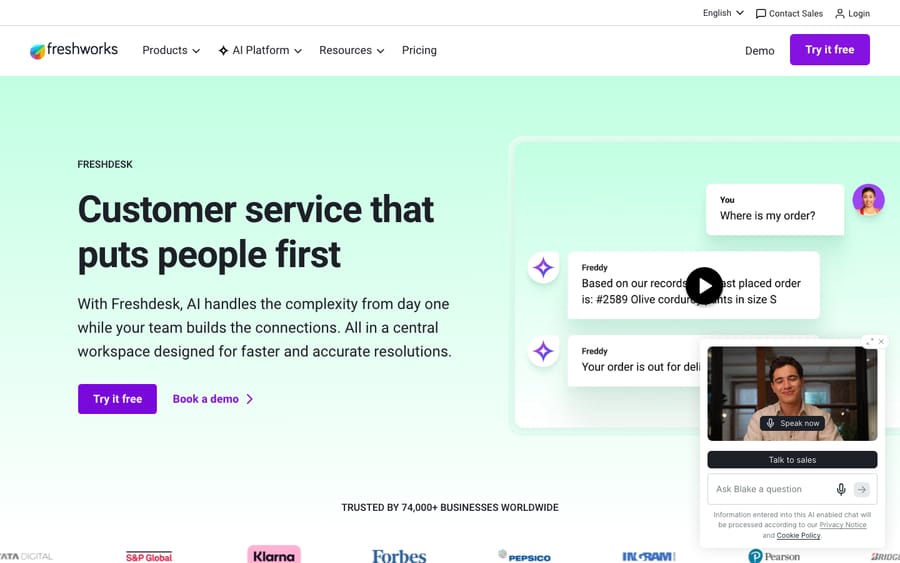
3. Email AI Agent: fully automated replies
The top tier. Freshdesk's Email AI Agent answers email tickets from your portal's public solution articles without a human in the loop, choosing up to three relevant articles per response. Ticket update automations can then tag the ticket (for example AI-Responded), move it to Waiting on Customer, assign it to a person, or escalate it. It's available on Pro and Enterprise only.
It's priced by session, not by seat. The first 500 sessions are a one-time allowance per account; after that, sessions cost $49 per 100, about $0.49 each. Freshdesk's help article says one bot session is consumed every time the Email AI Agent responds, so a ticket that takes three AI replies uses three sessions. You'll also see a cheaper figure quoted, $100 per 1,000 sessions (about $0.10), for the web and chat agent; that comes from eesel's Freshdesk Freddy AI pricing breakdown, not from Freshworks, so confirm it before you budget.
The shared limitation. All three native paths read from the Freshdesk knowledge base only, and the Email AI Agent reads public solution articles only. If half your real answers live in Confluence, Google Docs, a Notion runbook or an internal wiki, Freddy can't see them. That's the gap an AI agent layer is built to close.
How does an AI agent layer reply from knowledge outside Freshdesk?
Macha is not a Freshdesk replacement. It's an AI agent layer that runs on top of the Freshdesk you already use. You connect Freshdesk with an API key, point Macha at your knowledge (Freshdesk articles and Confluence, Notion, Google Docs, uploaded files, or a crawled help center), and build an agent that triggers on new tickets, finds the right answer, and drafts the reply, either sending it automatically or leaving it for an agent to approve.
The difference from native Freddy is the scope of knowledge and the actions on the back end. A Macha agent doesn't just draft text; it can post the public reply, set the status, apply tags and add an internal note in the same run. It also works on every reply in a thread, not just the first.
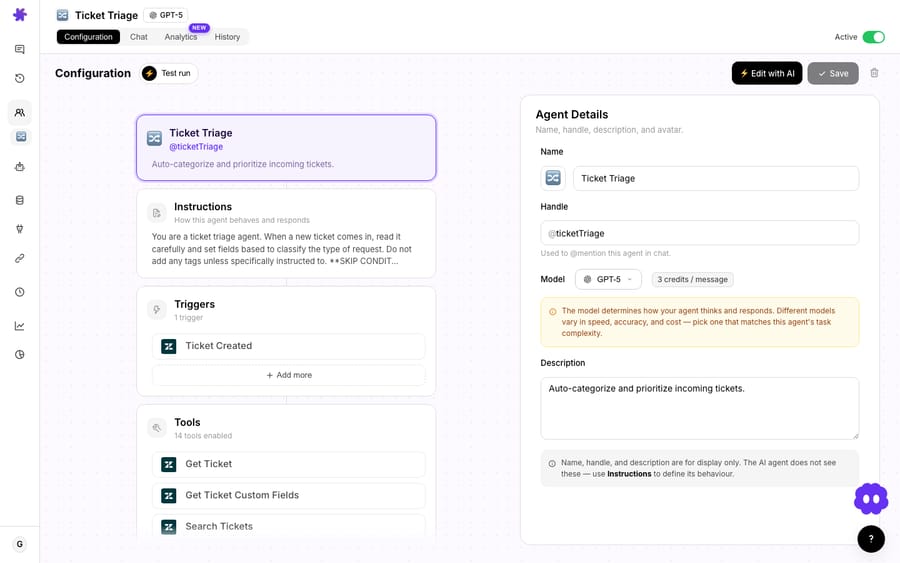
Step 1: Connect Freshdesk
Add Freshdesk from the connectors screen with an API key. Once connected, the agent gets the Freshdesk toolset, including Get Ticket, Search Tickets, Search Articles, Add Public Reply, Add Internal Note, Update Status, Update Tags and Search Contacts.
Step 2: Point the agent at your knowledge
This is where the agent approach pulls ahead. In Macha, a knowledge source can be your Freshdesk solution articles, a Confluence space, Notion pages, Google Docs, an uploaded PDF, or a crawled public help center, indexed together into one searchable layer. The agent searches all of them when it drafts a reply, so an answer that only exists in an internal Notion doc still makes it into the customer-facing response.

Step 3: Write the agent instruction
The agent's behavior is plain English. Something like:
When a new Freshdesk ticket is created, read the customer's question, search the knowledge base for the most relevant article, and draft a clear public reply with step-by-step instructions and a link to the full article. If the match is confident, set the status to Pending and tag kb-article-sent. If nothing relevant is found, leave the ticket untouched for a human and add an internal note saying no KB match was found.
The last sentence is the important one. It's the honesty guardrail: the agent only replies when it has a confident article match, and everything else stays human.
Step 4: Watch a run
Here's the worked flow from a reply agent. A customer submits:
"How do I set up SSO with my identity provider? We use Okta and need to configure SAML."
The agent searches the knowledge base, finds "Setting Up SAML SSO with Okta" at a 96% match, and drafts:
Great question! Here's how to set up SAML SSO with Okta: 1. In your admin panel, go to Settings → Security → SSO Configuration 2. Select "SAML 2.0" as the authentication method 3. Copy the Entity ID and ACS URL into your Okta app settings 4. Upload the metadata XML from Okta back into the SSO settings 5. Enable SSO and test with a sample login Full guide: [Setting Up SAML SSO with Okta] Let me know if you run into any issues during setup!
Then it sets the ticket to Pending and tags it kb-article-sent, sso-setup. One ticket, drafted and routed, with no agent keystrokes. Because the reply cites and links the article, the customer can go deeper if they need to.
How does native Freshdesk compare with an agent layer?
| Capability | Suggested Solutions | Freddy AI (Copilot / Email Agent) | Macha agent layer |
|---|---|---|---|
| Drafts the actual reply | No, suggests articles | Yes | Yes |
| Knowledge sources | Published Freshdesk articles | Freshdesk articles only (Email Agent: public articles) | Freshdesk + Confluence, Notion, Google Docs, files, crawled sites |
| Works on follow-up replies | Agent-driven | Copilot: first reply only | Every reply |
| Takes ticket actions (status, tags, notes) | No | Email Agent, through ticket update automations | Yes: reply, status, tags, internal note |
| Pricing model | Included on paid plans | $29/agent/month + $49 per 100 sessions after 500 | Per ticket (from $299/month for 750), setup and a dedicated success manager included |
| Runs on top of your help desk | Native | Native | Yes, a layer, not a replacement |
The honest read: if your answers all live in Freshdesk and you mostly need first-reply suggestions, native Freddy is the simpler buy. It's one toggle and an add-on line on your existing invoice. The agent layer earns its place when your knowledge is spread across tools, when you need automation on follow-ups, or when a reply has to come with real ticket actions and routing.
Which costs less: seats and sessions, or per-ticket billing?
Freshdesk's AI is priced two ways at once: per agent for Copilot ($29/agent/month) and per session for the Email AI Agent ($49 per 100 sessions after the 500 included), where each AI response uses a session. That's predictable if your volume is flat and surprising if it spikes or threads run long.
Macha bills per ticket: one thread with one person, charged once however many messages, lookups or drafts it takes, not per seat and not per AI response. A simple KB lookup-and-draft and a multi-tool run cost the same. Pricing starts at $299 a month for 750 tickets, about $0.40 each, and it's never per deflection, so the bill doesn't hang on a "resolution" definition you don't control. Setup is done for you on the trial and every plan: the Macha team connects Freshdesk and your knowledge sources, builds the reply agent, tests it on a sample of your past tickets, and runs it in safe mode, with drafts as private notes, until the drafts are right. The price also covers a dedicated success manager who handles your changes afterwards, such as a new source, an instruction change or a new tool. Start with the free trial ($50 of usage, no credit card required) and see the tiers on the pricing page.
When should you not automate KB replies?
A few watch-outs before you turn anything on:
- Thin or stale knowledge base. If your articles are out of date or sparse, automated replies will confidently send wrong answers. Fix the KB first; an agent is only as good as what it reads.
- High-stakes or regulated topics. Billing disputes, security incidents, legal and account-deletion requests should stay human or run draft-only with mandatory review.
- Ambiguous questions. When there's no confident match, the right behavior is silence plus a human handoff, not a guessed reply. Build that into the instruction (as in Step 3).
- Tone-sensitive moments. An angry customer doesn't want a polished KB excerpt; they want acknowledgment. Route negative-sentiment tickets to a person.
Start in draft mode (agent writes, human approves) for a week or two, read the drafts, then move the safe categories to auto-send. That's the path that keeps CSAT intact.
FAQ
Can Freshdesk automatically reply to tickets from knowledge base articles? Yes, three ways. Suggested Solutions hands agents matching articles to insert; Freddy AI's Reply Suggester drafts a reply from your KB (first customer reply only); and the Email AI Agent answers email tickets from public solution articles without a human. Coverage and price rise at each level.
Does Freddy AI read knowledge outside Freshdesk? No. Freshdesk's native AI reads the Freshdesk knowledge base only: public, private and bot articles for the Reply Suggester, public articles for the Email AI Agent. Answers in Confluence, Notion or Google Docs are invisible to it. A layer like Macha indexes those sources alongside your Freshdesk articles so the agent can draft from all of them.
How much does Freshdesk's AI reply feature cost? Freddy AI Copilot is a $29/agent/month add-on on Pro ($55/agent/month annual) or Enterprise ($89). The Email AI Agent is session-based: the first 500 sessions are included once per account, then $49 per 100 sessions, and each AI response uses a session. eesel reports the web and chat agent at about $100 per 1,000 sessions, a different product. Confirm current pricing on the Freshworks pricing page; eesel's pricing breakdown covers the history.
How is Macha different from Freddy AI? Macha is an AI agent layer on top of Freshdesk, not a replacement. It drafts replies from Freshdesk and external knowledge sources, works on every reply in a thread, and can set status, tag and add internal notes in the same run. Pricing is per ticket (one conversation, charged once), not per seat or per session.
Will the AI send wrong answers? Only if you let it. Build the agent to reply only on a confident article match and hand everything else to a human, run in draft-only mode first, and keep your knowledge base current.
How do you try it on your own Freshdesk?
If your team is still copy-pasting solution articles into Freshdesk by hand, you're paying people to do work an agent can draft. See the Freshdesk integration, browse more Freshdesk use cases, or start a free trial ($50 of usage, no credit card required) and build a reply agent against your own knowledge base in an afternoon, or have the Macha team build it for you.
Written by Abbas (Customer Support & AI, Macha) · Reviewed by Ankeet Guha (Co-founder & CTO) · Published 2026-06-24 · Last updated 2026-09-24.






