





 Shopify
 Stripe
 Slack
Slack Notion
 Google Workspace
 Confluence

What Did Macha Ship in April 2026? AI Agent Builder, Zendesk OAuth, Confluence and GDPR


Across five releases in April 2026, Macha added an AI Agent Builder that creates an agent from a plain-language description, made OAuth the default Zendesk connection, and shipped a seven-tool Confluence connector. Agents also learned to read image attachments, the model lineup was reset, and GDPR deletion, export and retention controls arrived.
Key takeaways
- Macha's April 2026 AI Agent Builder creates a fully configured agent, including instructions, tools, triggers and sub-agents, from a plain-language description of the job.
- Zendesk approved Macha's global OAuth client on April 9, making OAuth the default authentication method for new Zendesk connections instead of API keys.
- Macha's Confluence connector shipped on April 9 with seven tools, including search pages, create pages and add comments, and write actions require confirmation.
- Macha's Zendesk routing tools, Assign Ticket to groups, List Groups and Update Ticket Type, followed the April releases on May 2.
- Macha bills per ticket, one conversation charged once whichever model answers it, with plans starting at $299 a month for 750 tickets.

Macha's April 2026 releases (April 2, 3, 9, 17 and 23) added an AI Agent Builder that creates an agent from a plain-language description, made OAuth the default way to connect Zendesk, shipped a seven-tool Confluence connector, taught agents to read image attachments, reset the model lineup and added GDPR deletion, export and retention controls. Macha is the AI agent layer that runs on top of the help desk you already use, Zendesk, Freshdesk, Gorgias, Front, HubSpot or Intercom, so most of these changes make the agents smarter and the connections to your stack sturdier. The dated log lives on the changelog page; this post is the narrated version, grouped by what each change does.
| Release | What shipped |
|---|---|
| April 2 | Org switcher plan badges, simpler onboarding, website crawler page limit raised from 512KB to 2MB |
| April 3 | AI Agent Builder & Editor; sub-agents can write in autonomous mode |
| April 9 | Zendesk OAuth as default, Confluence connector, Custom API Tools, scheduled triggers, GDPR controls |
| April 17 | Image vision on Zendesk attachments, GPT-5.4 Mini, custom-field and subject tools, OAuth refresh fix and Reconnect |
| April 23 | New model lineup, connector health status, Test connection |
What is the AI Agent Builder & Editor?
The biggest change in April is that you no longer have to assemble an agent by hand. Build agents through conversation: describe what you need ("an agent that triages new Zendesk tickets, tags them by topic, and routes billing questions to the Billing group") and the builder creates a fully configured agent with instructions, tools, triggers, sub-agents and model selection wired up. It shipped on every plan, including Trial, and today every feature sits on Macha's single plan anyway.

It works in both directions. Edit with AI opens the same conversational editor from any existing agent's configuration page, so you can change instructions, add a tool, set up a trigger or wire in a sub-agent without hunting through the form. (On June 26 the button was renamed Edit with Sidekick, after the builder grew into Sidekick, Macha's in-dashboard admin copilot.) The builder is context-aware: it knows which integrations you've connected and suggests relevant configurations, and you can hover a suggestion pill to preview the prompt it will run. Everything it creates or modifies shows up as interactive artifact cards in the chat; click an agent card to jump straight to its config.
From the April 3 release the builder could also assign sub-agents when creating new agents, with automatic circular-dependency checks so you can't build an infinite delegation loop by accident.
Why it matters: the slowest part of adopting an agent platform is the blank canvas, knowing which tools and triggers to combine. Describing the outcome and letting the builder draft the configuration turns a 30-minute setup into a 30-second one, and the artifact cards keep every change visible and reviewable.
What does the Confluence connector do?
Macha added a Confluence connector on April 9 for knowledge-base teams that live in Atlassian. It ships with seven tools: search pages, read content, list spaces, get child pages, create pages, update pages and add comments. Write operations (create, update, comment) require confirmation, in line with how Macha gates every state-changing action. Connecting Confluence auto-creates a data source, the same behavior as Google Workspace and Notion, so your space content is searchable knowledge for agents from the start.

There's also token-expiry monitoring: you enter your Atlassian API token's expiration date, Macha emails you a reminder 30 days out, and it deactivates the connector on a 401 so a silently expired token never causes mystery failures. See the Confluence integration page for the tool list, or the broader integrations directory.
The same April 9 release brought Custom API Tools & the AI Tool Builder: define any REST endpoint (URL params, body templates, API-key, bearer or basic auth, credentials encrypted at rest), or describe the API and paste credentials and the AI Tool Builder discovers endpoints, tests them and creates tools. Tools group under named connectors with custom icons and brand colors, so a homegrown internal API shows up next to Zendesk and Stripe like any other integration.
Why it matters: Confluence is where a lot of teams keep the real answers. Auto-creating a source makes that knowledge usable on day one, and the expiry monitoring removes the most common cause of "the agent stopped answering": a dead token nobody noticed.
How did connecting Zendesk change in April?
April was a big month for the Zendesk connection. On April 9, Zendesk approved Macha's global OAuth client, and OAuth became the default authentication method for new Zendesk connections, replacing API-key auth. Tokens refresh proactively (and on a 401 fallback) with per-subdomain locking, so they're renewed before they expire.

On April 17, the OAuth path was hardened after a real incident. A concurrent-refresh race, two webhooks racing on a single-process Node server, had caused an outage for one customer (Schmid Digital). Compare-before-write logic now stops two refreshes from clobbering each other's tokens. The same release added a Reconnect button in the connector modal that re-authenticates in place (same connector ID, no tools stripped, no agents broken), plus an email template that points customers to it when a reconnect is needed. The re-auth path also preserves existing credential fields (webhook IDs, signing secrets) instead of overwriting the whole blob.
Why it matters: API keys were the old friction point: generate, scope, paste, rotate. OAuth removes that, and reconnect-in-place means a re-auth no longer breaks every agent attached to the connector. The compare-before-write fix is reliability work you only notice when it's missing.
Which models can read images on Zendesk tickets?
Shipped April 17: when an agent hits an image attachment on a Zendesk ticket (JPEG, PNG, GIF or WebP), it downloads the image, encodes it and sends it to the model for visual analysis. An agent can describe a screenshot, read the text inside an image, identify a product or parse a receipt, the things customers attach instead of typing.
Vision runs on the vision-capable models. After the April 23 model refresh, that meant GPT-5.4 Mini, Claude Sonnet 4.5 and Claude Sonnet 4. When vision first shipped on April 17, GPT-5 Mini and GPT-4o Mini were vision-capable too, but both were retired on April 23. Claude Sonnet 4 was itself retired on August 26, 2026 and replaced by Claude Sonnet 5, so check the current model picker before choosing one for an image-heavy queue. Groq models return a "not supported" message rather than failing. Under the hood it's a shared image utility (download plus base64 encoding) that future connectors like Freshdesk and Slack can adopt with a single function call.
Why it matters: a large share of support tickets are "here's a photo of the problem." An agent that can't read the attachment has to ask the customer to describe what they already showed you. Vision closes that gap for the most common attachment types.
Which new Zendesk tools shipped around April?
Two read and write tools landed on April 17, and three routing tools followed on May 2:
- Get Ticket Custom Fields (April 17): returns every custom field on a ticket with its title resolved from the schema, so an agent reads
Bestellnummer: 013724827106instead offield_1900003089273: 013724827106. Field definitions are cached per connector for five minutes. This is what makes custom-field data usable in agent reasoning. - Update Subject (April 17): change a ticket's subject line (validated 1 to 150 characters; requires confirmation in chat mode). Handy for normalizing messy inbound subjects before routing.
- Assign Ticket to groups (May 2): the assign tool accepts a group, an agent or both, so triage agents can route straight to a queue ("Billing", "Tier 2 Support") instead of always pinning a specific person.
- List Groups (May 2): a read tool that lists every active Zendesk group, so an agent can resolve a group name to its ID before routing.
- Update Ticket Type (May 2): set a ticket's type (problem, incident, question or task) to categorize cleanly without touching custom fields.
April 17 also added a safety layer: activation confirmation modals appear when you toggle on high-impact tools (Add Public Reply, Update Ticket Status) or triggers (Every Customer Message, New Ticket), and enabled tools and triggers carry a persistent advisory card on the agent config page, a short, always-visible note on how to use them safely. You can wire a routing trigger into an agent from the same trigger picker shown below.
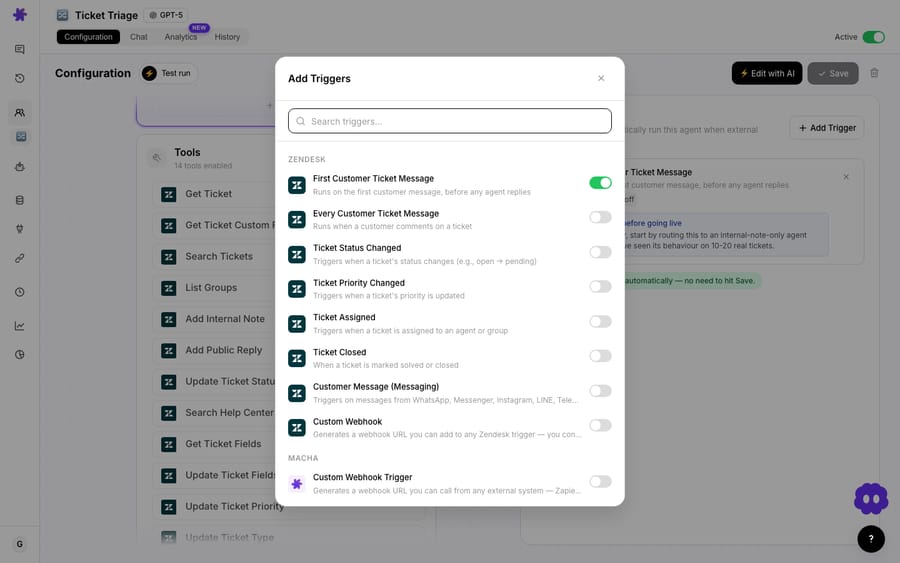
Why it matters: routing is where most triage agents prove their worth, and resolving a group name to its ID is the plumbing that previously forced you to hard-code IDs. Resolving custom-field labels turns raw schema noise into context the model can reason over.
What changed in the April 23 model lineup?
The April 23 release reset the model menu:
| Model | Context | Role in April |
|---|---|---|
| GPT-5.4 | 1M | Most capable, strongest reasoning and accuracy |
| GPT-5 | 1M | New default for all new agents |
| GPT-5.4 Mini | 400K | Fast, high-volume workhorse, vision-capable |
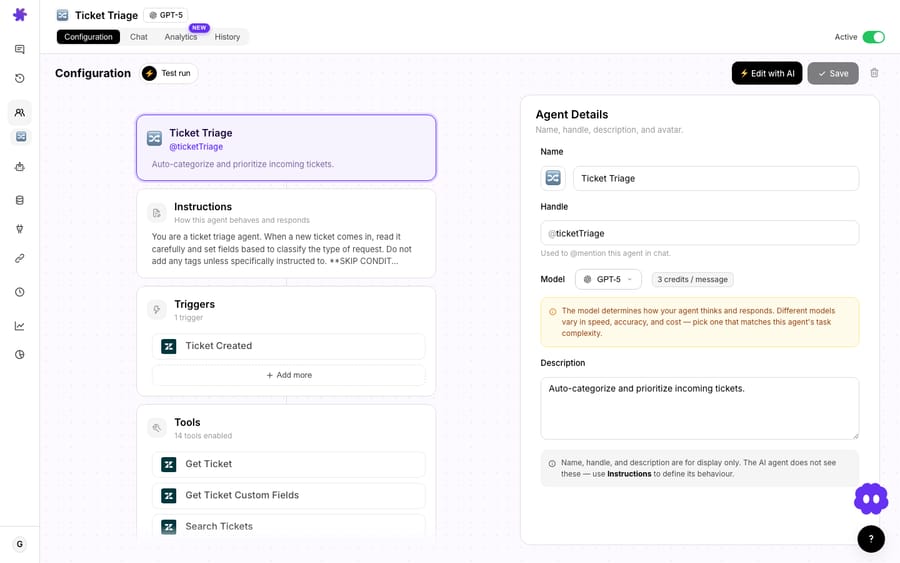
GPT-5 Mini, GPT-4o Mini and o4-mini were retired, and every agent running on them was auto-migrated to GPT-5.4 Mini with no manual action required. At the time, models were priced in credits per message, and GPT-5.4 Mini dropped from 1.25 credits to 1. That pricing is gone: Macha now bills per ticket, one conversation charged once whichever model answers it, so picking a model is a straight capability decision per agent.
The lineup has kept moving since April. GPT-5.6 Terra and GPT-5.6 Luna arrived on July 27, 2026, and Claude Sonnet 5 replaced Claude Sonnet 4 on August 26, 2026. Pricing today starts at $299 a month for 750 tickets, about $0.40 a ticket; see the pricing page for every tier.
Why it matters: auto-migration meant nobody got stranded on a retired model, and the 1M-context options suit agents that read long ticket threads or large knowledge sources in one pass.
What GDPR and retention controls shipped?
The April 9 release also shipped a data-governance layer, refined from the late-March privacy work:
- 30-day scheduled deletion for accounts and organizations, with cascade cleanup (Spaces files, MongoDB collections, org memberships).
- Data export: download a complete copy of your data as JSON, with credentials, embeddings and other sensitive fields stripped.
- Cookie consent: accept/decline banner across all pages and layouts.
- Conversation TTL: conversations auto-delete after 45 days of inactivity; internal agent logs expire after 7 days.
- Credential encryption in logs: API keys and tokens that appear in internal agent log messages are encrypted with AES-256-GCM before storage.

Why it matters: these are the items a security review asks about. Scheduled deletion, JSON export and retention TTLs built into the product, rather than handled by support ticket, are what let a regulated team say yes.
What reliability changes shipped?
A few changes you'll feel as fewer surprises:
- Connector health status (April 23): connectors carry a state (
connected/auth_failed). When auth breaks, affected agents are automatically deactivated and admins are emailed, so a broken connector fails loud and safe instead of silently mis-answering. - Test connection (April 23): verify any connector's credentials with one click.
- Webhook rejection tracking (April 23): after a threshold of rejected webhooks on a broken connector, Macha returns 410 Gone to prompt the external system to stop sending.
- Usage-alert dedup (April 17): usage alerts (50% / 80% / 90%) are tracked in the database, so you don't get duplicate emails after a deploy, and admin alerts fire once per threshold rather than once per admin in the org.
- Sub-agent writes (April 3): sub-agents can perform write operations in autonomous mode (replies, updates) while staying read-only during interactive chat for safety.
What should you check before turning these on?
- OAuth is the default, but existing API-key connections still work. If you connected Zendesk before April, you're not forced to migrate, though reconnect-in-place makes OAuth the lower-maintenance path.
- Image vision only covers images, and only on supported models. PDFs and other documents go through the separate attachment-extraction path, and Groq-based agents won't do vision at all (they return a clean "not supported"). If reading screenshots matters, keep that agent on a vision-capable model.
- The retired-model migration is automatic, so re-test your prompts. A model swap can change behavior. If you had instructions tuned for GPT-4o Mini, re-run a Test Run before trusting the migrated agent in autonomous mode.
- Retention TTLs delete data on a clock. Conversations expire after 45 days of inactivity and internal logs after 7. If you relied on old conversations as a record, export what you need first.
- The AI Agent Builder drafts; you still own the review. It produces a real, runnable configuration, so read the tools and triggers it wired up before enabling write actions, as you would for a hand-built agent.
FAQ
Where's the official Macha changelog? The dated, canonical log is at /policies/changelog. This post is the narrated April 2026 summary with context on why each item shipped.
Is the AI Agent Builder available on my plan? Yes. Building and editing agents through conversation shipped on all plans, and Macha now sells one plan with every feature included. The free trial gives $50 of usage with no credit card required.
Did April change how I connect Zendesk? For new connections, yes: OAuth is the default (Zendesk approved Macha's global OAuth client on April 9). Existing API-key connections continue to work, and a Reconnect button, added on April 17, re-authenticates in place without breaking your agents.
Which models can read images? After the April 23 lineup: GPT-5.4 Mini, Claude Sonnet 4.5 and Claude Sonnet 4. GPT-5 Mini and GPT-4o Mini were vision-capable when the feature shipped on April 17 but were retired on April 23, and Claude Sonnet 4 was retired on August 26, 2026. Groq models return a "not supported" message rather than failing the run.
What happened to the models I was using? GPT-5 Mini, GPT-4o Mini and o4-mini were retired on April 23, and agents on them were automatically migrated to GPT-5.4 Mini. New agents defaulted to GPT-5 from that release; today new agents start on GPT-5.4.
How is Macha charged? Per ticket: one thread between Macha and one person, charged once however many messages it takes, whichever model the agent runs on. Plans start at $299 a month for 750 tickets; see the pricing page for every tier.
How do I try these features?
Build an agent by describing it. Start a free trial ($50 of usage, no credit card required), connect Zendesk over OAuth, point a Confluence or Notion source at it, and ask the builder for a triage agent, then read the docs for the full configuration walkthrough. For what's shipped since, follow the changelog and the blog.
Written by Abbas (Customer Support & AI, Macha) · Reviewed by Ankeet Guha (Co-founder & CTO) · Published 2026-06-24 · Last updated 2026-09-24.






