





 Shopify
 Stripe
 Slack
Slack Notion
 Google Workspace
 Confluence

Which Slack Workflows Should a Support Team Automate? 10 Examples (2026)


Slack's Workflow Builder is good at forms and reminders, but it can't read a Zendesk ticket, look up a Shopify order or check a failed Stripe payment. These ten workflows use AI agents that read those systems first and then post alerts, reports and answers in Slack.
Key takeaways
- The ten Slack workflows for support teams split into five alerts, two scheduled reports, and three Q&A lookups triggered when someone mentions the bot in a channel.
- Macha's Slack connector gives agents five actions, Send Message, Reply in Thread, List Channels, Get Channel Info, and List Users, plus App Mention and Direct Message triggers.
- An urgent-ticket relay uses a Zendesk trigger with the condition Priority is Urgent to call Macha's Custom Webhook, so only urgent tickets ever reach the agent.
- Stripe and Shopify have no event triggers in Macha, so the failed-payment alert runs hourly and the weekly refund report posts every Monday at 9:00 AM.
- Slack Workflow Builder is available on paid Slack plans only and runs fixed steps, while a Macha agent reads Zendesk, Shopify, Stripe and Notion before writing its message and is set up for you at about $0.40 a ticket, with setup by the Macha team and a dedicated success manager included.

The ten Slack workflows support teams get the most from fall into three jobs: alerts (urgent tickets, VIP tickets, failed payments, topic spikes, escalations), reports (a daily metrics digest and a weekly refund report), and Q&A (wiki answers, knowledge base suggestions, and order lookups when someone @mentions the bot). Slack's native Workflow Builder posts templated messages; each workflow below is an AI agent that reads your help desk, Shopify, Stripe or Notion first and writes the Slack message from what it found.
| # | Workflow | Trigger | Systems read |
|---|---|---|---|
| 1 | Urgent-ticket relay | Zendesk webhook (priority Urgent) | Zendesk |
| 2 | VIP ticket alert | Zendesk webhook (VIP tag) | Zendesk, Shopify |
| 3 | Failed-payment flag | Schedule (hourly) | Stripe |
| 4 | Trending-topic warning | Schedule (hourly) | Zendesk |
| 5 | Escalation bundle | Zendesk webhook (escalation tag) | Zendesk, Shopify, Stripe |
| 6 | Daily metrics digest | Schedule (daily 9:00 AM) | Zendesk |
| 7 | Weekly refund report | Schedule (Monday 9:00 AM) | Stripe |
| 8 | Wiki answers | Slack App Mention | Notion |
| 9 | KB article suggestions | Slack App Mention | Zendesk Help Center, Notion |
| 10 | Order lookups | Slack App Mention | Shopify |
Macha is the layer that runs these. It sits on top of the help desk you already run (Zendesk, Freshdesk, Gorgias, Front, HubSpot or Intercom), connects to your commerce and knowledge tools, and uses Slack as a two-way surface: a place to push alerts and reports to, and a place your team can ask questions from. Slack isn't replacing your help desk here. It's the room your team already lives in. Every workflow below maps to a real pattern in Macha's use-case library.
How do you connect Slack and the systems it reports on?
A Macha Slack workflow has two halves: a trigger (what starts it) and one or more actions across your connected tools (what it does). The Slack connector uses OAuth and gives agents five actions (Send Message, Reply in Thread, List Channels, Get Channel Info, List Users) plus two triggers: App Mention (someone @mentions the bot) and Direct Message. Slack is a communication connector, not a knowledge source. Agents talk through it; they pull facts from Zendesk, Shopify, Stripe, Notion and the rest.

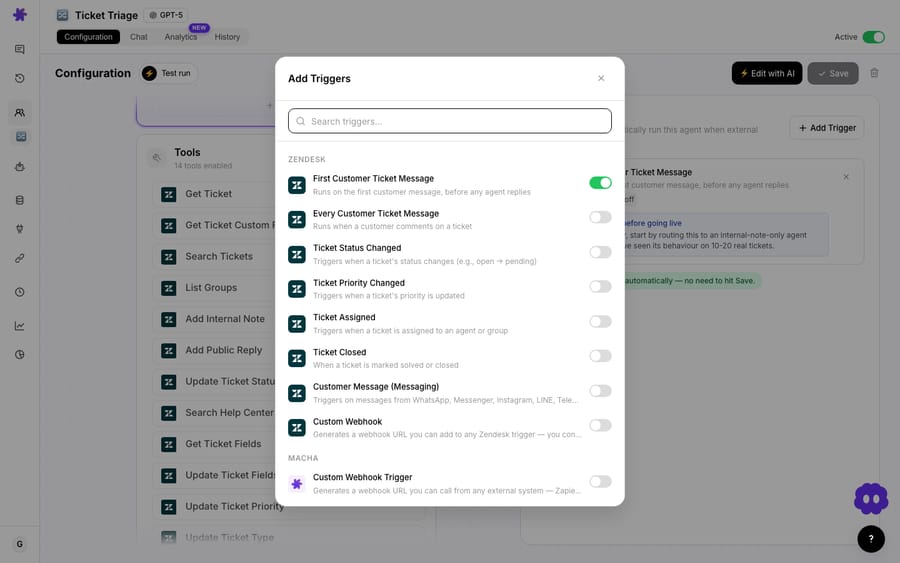
The other half is the trigger. Alerts fire on help desk events or on a schedule; Q&A fires on an @macha mention; reports fire on a schedule. Zendesk's own triggers are New Ticket, Customer Reply, Status Changed, Priority Changed, Ticket Assigned, Ticket Closed, Messaging, and Custom Webhook. The Custom Webhook is the precise one: you set the exact conditions (priority is Urgent, tags contain vip) in a Zendesk trigger, so only matching tickets ever reach the agent. Shopify and Stripe have no event triggers in Macha, so workflows that watch them run on a schedule.
That's the whole model. Now the ten.
Which Slack alerts should a support team set up?
Alert workflows watch your help desk and payment systems and post to a channel when something crosses a line, so nobody has to babysit the queue.
1. Relay urgent tickets to a Slack channel
Trigger: Zendesk Custom Webhook, fired by a Zendesk trigger with the condition Priority is Urgent → Action: Slack Send Message to #urgent-support.
The simplest one to stand up, and the one teams keep. When a ticket lands at Urgent priority, the agent reads it and drops a notification into your on-call channel with the subject, customer, age, and a direct link, within seconds of creation. Nobody has to ask who's watching the queue. An urgent account-compromise ticket shouldn't wait for someone to refresh Zendesk.
🚨 Urgent Ticket #9102: Account compromised, unauthorized access. Customer: [email protected] · Priority: Urgent · Created 2 minutes ago. Possible security incident, needs immediate attention.
Build it in three steps. This mirrors the trigger → step → destination pattern of Slack's Workflow Builder, except the step is an agent that reads the ticket:
- Pick the trigger. New agent → Trigger → Zendesk: Custom Webhook. In Zendesk admin, create a trigger with the condition
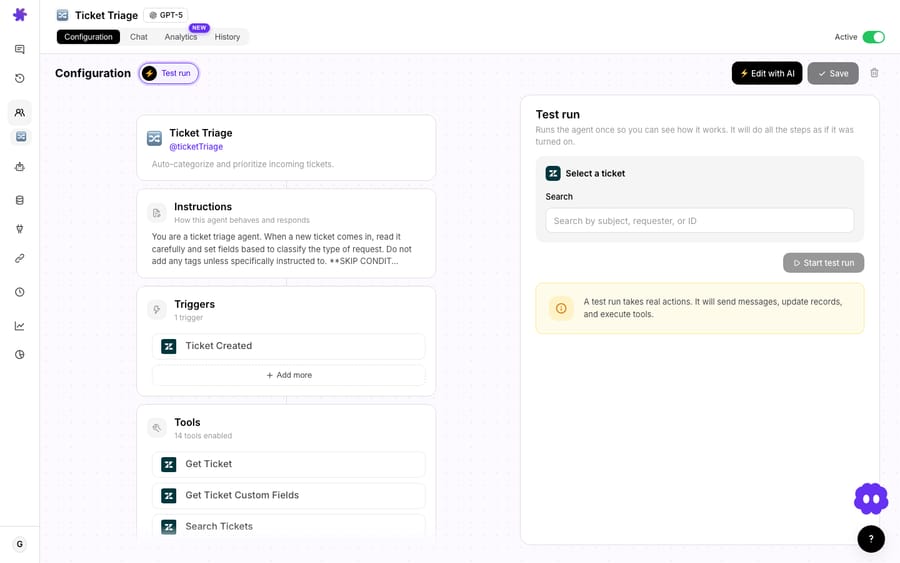
Priority is Urgentthat calls the webhook, so only urgent tickets wake the agent. (UseTags contains vipinstead and you've got workflow #2. Add Priority Changed as a second trigger if tickets get bumped to Urgent later.) - Add the actions. Hand the agent two tools: Zendesk Get Ticket (so it can read the subject and body for a one-line summary) and Slack Send Message. In the agent's instructions, define the card: subject, requester, ticket age, priority, and a direct link.
- Set the channel. In the Slack Send Message action, choose
#urgent-supportand invite the Macha bot into that channel. Save, then hit Test run to preview the exact message before it fires for real.
The other nine workflows are variations on these three choices: change the trigger, change the tools the agent can reach, change the channel it writes to.
2. Alert the team when a VIP submits a ticket
Trigger: Zendesk Custom Webhook, Tags contains vip → Actions: Shopify Lookup Customer + Search Orders, Zendesk Update Priority, Slack Send Message.
Urgency isn't only about priority flags. Sometimes it's about who. When a customer with a VIP tag opens a ticket, the agent pulls their order history and lifetime value from Shopify, bumps the ticket priority, and posts a heads-up to #vip-support: "Rachel Torres, $4,200 lifetime, 15 orders, active since 2023, never complained before." Your best customers get an informed reply instead of a cold one.
3. Detect and flag failed payments
Trigger: Scheduled, hourly → Actions: Stripe List Payments + Get Customer, Slack Send Message.
Involuntary churn is quiet. Each hour the agent lists recent Stripe payments, picks out the failed ones, and for each grabs the amount, decline reason, plan, and the customer's history. It posts a Slack alert with a suggested next step and flags when it's a high-value, long-tenured account worth a personal reach-out rather than an automated dunning email. Because Stripe has no event trigger in Macha, the lag is your schedule: hourly means the team hears within the hour.
4. Early warning for trending topics
Trigger: Scheduled, hourly → Actions: Zendesk Search Tickets, Slack Send Message.
This one is less obvious and very well liked. On a schedule the agent searches recent tickets and posts when a topic spikes against its baseline: "Login issues up 300% in the last two hours, common thread: 502 error." That's your outage early-warning system. You hear about it in Slack before the queue floods. (More on scheduled triggers under Reports.)
5. Escalate with a full context bundle
Trigger: Zendesk Custom Webhook, fired when an escalation tag is added → Actions: Zendesk Get Ticket, Shopify Get Order, Stripe Get Customer, Zendesk Update Priority + Assign Ticket + Add Internal Note, Slack Send Message.
When a ticket gets escalated, the senior rep who receives it usually starts cold: re-reading the thread, hunting for the order, checking billing. This workflow does that legwork. The agent gathers ticket history, orders, and payment data, writes an internal note on the ticket, sets priority to Urgent, assigns it, and posts the bundled summary to #escalations. The escalation team starts with everything in hand. It's the closest Macha gets to the "swarming" pattern in Slack's own customer-service guide, except the context bundle assembles itself.
Which support reports can post to Slack on a schedule?
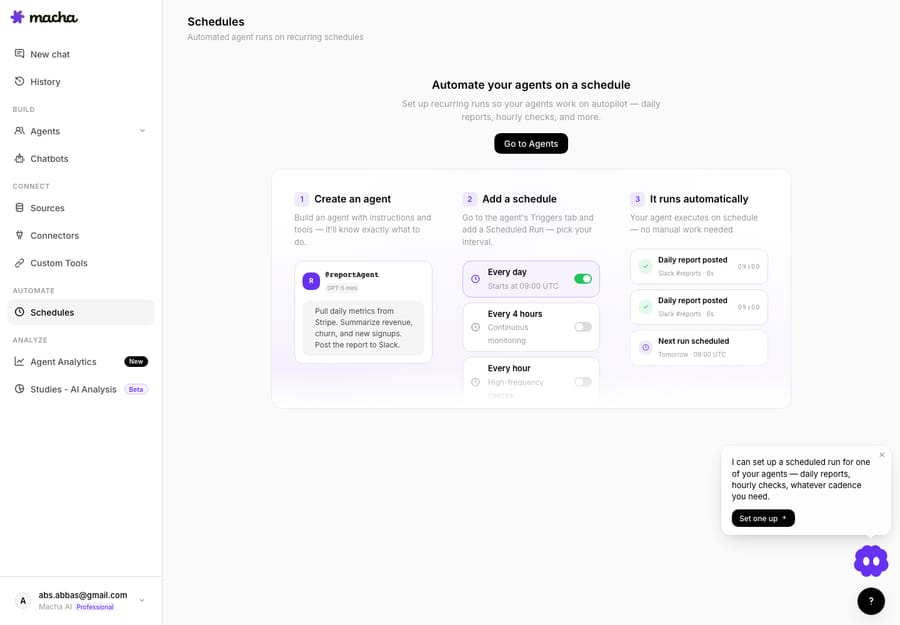
Report workflows replace the manual spreadsheet ritual. They run on scheduled triggers, which Macha includes on every plan. Pick a cadence, and the agent queries your systems and posts a summary while you sleep.
6. Daily support metrics summary
Trigger: Scheduled, daily 9:00 AM → Actions: Zendesk Search Tickets, Slack Send Message.
Every morning the agent searches yesterday's Zendesk tickets (created, solved, still open, satisfaction ratings, top topic) and posts a digest to a leadership or team channel. Leadership stays aligned without anyone building a report by hand. For time-based metrics like first response time, keep using Zendesk Explore; the agent works from ticket search results.
📊 Daily Support Summary, March 4: Created 47 · Solved 52 · Open backlog 31 · CSAT 94% (from 36 ratings). Top topic: Order tracking (18). Backlog down: 5 more solved than created.
7. Weekly refund report
Trigger: Scheduled, Monday 9:00 AM → Actions: Stripe List Payments, Slack Send Message.
Same idea, financial lens. Every Monday the agent compiles the last seven days of Stripe refunds (total, count, average, top reasons, and the week-over-week trend) and posts it to the team channel. Refund patterns become visible without a pivot table. Pair it with workflow #3 and your money-out picture is covered in Slack.
A third report shape is worth naming even though it isn't strictly a report: proactive customer updates. A scheduled agent can search open Shopify orders for fulfillments running past their delivery estimate, post a customer-facing update on the matching Zendesk ticket, and drop a note in #ops so the team knows a delay notice went out. A future angry ticket becomes a pre-emptive message.
How can Slack answer your team's support questions?
Q&A workflows fire on the App Mention trigger: your team @mentions the bot in any channel it's in, and the agent answers in-thread using your connected knowledge and tools. This is where Slack stops being a notification feed and becomes interactive.
8. Answer internal questions from your wiki
Trigger: Slack App Mention → Actions: Notion Search Pages + Get Page, Slack Reply in Thread.
"@macha what's our refund policy for enterprise customers?" The agent searches your Notion wiki, finds the right page, and replies in-thread with the answer and a source link. The repetitive questions that clog support channels get answered right away, with a citation, so people can trust it.
9. Auto-suggest knowledge base articles
Trigger: Slack App Mention → Actions: Zendesk Search Articles, Notion Search Pages, Slack Reply in Thread.
A step up from #8: when someone asks a support question, the agent searches both your Zendesk Help Center and your Notion docs, then replies with the key points and links to both. New agents stop re-asking the same questions, and the answer always points back to the canonical article, which keeps your docs honest because gaps show up fast.
10. "Where is my order?" lookups from Slack
Trigger: Slack App Mention → Actions: Shopify Get Order, Slack Reply in Thread.
For teams that field order questions internally, this kills a constant context switch. "@macha what's the status of order #2041?" The agent looks the order up in Shopify and replies in-thread with line items, fulfillment status, tracking, and delivery estimate. Nobody opens the Shopify admin. It's the internal cousin of a customer WISMO agent: the same agent definition, answering in Slack instead of on a ticket.
Bonus: route questions to the right channel. When a question lands in the wrong place, an agent can recognize the topic, reply with a redirect, and cross-post to the correct channel (e.g. a Stripe question moved to #billing-support). Less noise, faster answers.
How is this different from Slack Workflow Builder?
It's worth being precise, because the comparison is the point. Workflow Builder is available on paid Slack plans only, and it starts workflows from a link, a webhook, a schedule, a list item update, a message containing keywords, a person joining a channel, or an emoji reaction.
| Slack Workflow Builder | Macha agents in Slack | |
|---|---|---|
| Triggers | Link, webhook, schedule, list update, keyword message, channel join, emoji | Help desk events and webhooks, schedules, @mentions, DMs |
| Logic | Fixed steps you pre-build | An agent reasons over the live data |
| Reads your systems | Only via separate connector steps | Reads Zendesk, Shopify, Stripe, Notion through its connectors |
| Message content | Templated fields | Written from current context |
| Slack plan | Paid plans only | Connects by OAuth |
| Setup | You build each workflow in Workflow Builder | Done for you by the Macha team, with a dedicated success manager, included |
| Best for | Intake forms, reminders, approvals | Context-rich alerts, reports, and Q&A |
They're complementary. Use Workflow Builder for the form that collects a request; use a Macha agent for the part where something has to be read, decided, and explained. You don't build those agents yourself: on the trial and every plan, the Macha team sets them up and tests them on your past tickets, and about $0.40 a ticket includes a dedicated success manager who handles your changes afterwards, such as a new channel, a new report or an instruction change. If you run Zendesk, our Macha-on-Zendesk overview shows how the same agents handle tickets directly, not just the Slack notifications about them.
When are Slack workflows the wrong answer?
Not every "put it in Slack" idea is a good one:
- Alert fatigue is real. Relay every ticket to Slack and people mute the channel. Scope alerts tightly (Urgent priority, VIP tag, failed payments, genuine spikes), not "all new tickets."
- Slack is a surface, not a system of record. These workflows notify and answer; the ticket still lives in your help desk. Don't try to manage the queue from Slack threads. Resolution, status, and audit trail belong in the help desk.
- Q&A is only as good as your docs. An agent answering from Notion will faithfully repeat an outdated page. Treat wrong answers as a docs bug, not an AI bug.
- Nothing here is gated by plan. Macha is one plan: the scheduled triggers behind workflows #3, #4, #6 and #7, the event-driven alerts and the
@mentionQ&A all come with every tier, so there's no feature gate to plan around. - Right-size the cadence anyway. Macha bills per ticket: one conversation, charged once however many steps the agent takes inside it, and the model doesn't change the price. The plan starts at $299 a month for up to 750 tickets. But an hourly scan firing into a busy channel is noise nobody reads, so start daily or weekly and tighten from there. See the pricing page for the tiers.
FAQ
Do I need Slack's paid plan to use these? Slack's own Workflow Builder needs a paid plan. Macha's workflows run through the Macha bot, which you install by OAuth; some Slack-native features (like Slack Connect for external channels) depend on your Slack plan, but the agent workflows don't use them.
Can the agent post to private channels and DMs? Yes. The Slack connector supports channel messages, threaded replies, and direct messages, scoped to the channels the bot is invited into.
Does this replace our help desk? No, and it shouldn't. Macha is a layer on top of Zendesk, Freshdesk, Gorgias, Front, HubSpot or Intercom. Slack is where the alerts, reports, and questions surface; the tickets stay in your help desk.
How do scheduled reports know what to include? You define the query and the format when you build the agent, e.g. "yesterday's Zendesk tickets: created, solved, still open, CSAT, top topic." The schedule decides when it runs.
Which of these can I try first? Start with #1 (relay urgent tickets) and #8 (answer questions from your wiki): one alert, one Q&A, both quick to stand up. See the Slack integration page and the docs for setup.
Which workflow should you start with?
You don't need all ten. Pick the single workflow that removes the most manual effort this week, usually urgent-ticket alerts or in-thread Q&A, and stand it up. Start a free trial with $50 of usage and no credit card, connect Slack alongside your help desk, and let the first agent post to one channel. Add the next nine once the team trusts the first.
Written by Abbas (Customer Support & AI, Macha) · Reviewed by Ankeet Guha (Co-founder & CTO) · Published 2026-06-24 · Last updated 2026-09-24.






