





 Shopify
 Stripe
 Slack
Slack Notion
 Google Workspace
 Confluence

Which Shopify Support Workflows Can You Automate With Macha? 6 to Start With


Macha automates six Shopify support workflows (order status, stock questions, cancellations, delay alerts, VIP routing and in-ticket order lookup) on top of the help desk you already use. Stormy AI estimates WISMO and WISMR tickets make up 40 to 60% of ecommerce ticket volume, and all six workflows run off one Shopify connector.
Key takeaways
- Macha automates six Shopify support workflows on top of an existing help desk: order status, stock questions, cancellation triage, shipping-delay alerts, VIP routing, and in-ticket order lookup.
- Macha's Shopify connector reads products, orders and customers, and its create_refund action issues a refund only after an agent confirms it.
- Macha's Shopify connector has no order-event triggers, so shipping-delay checks run on a scheduled trigger that searches unfulfilled orders and posts late ones to Slack.
- Stormy AI, citing Lorikeet, puts an AI-handled resolution at $1 to $3 against $13.50 for an agent-assisted contact.
- Macha bills per ticket, starting at $299 a month for 750 tickets (about $0.40 each), with a free trial of $50 in usage and no credit card.

Macha can automate six Shopify support workflows from one Shopify connector: order status (WISMO), stock and availability questions, cancellation triage with a drafted refund, shipping-delay alerts, VIP routing, and in-ticket order lookup for your agents. Two run fully on their own, and the other four keep a person in the loop.
Macha isn't another help desk, and it isn't a Shopify app that bolts a chat widget onto your storefront. It's an AI agent layer that sits on top of the help desk you already use (Zendesk, Freshdesk, Gorgias, Front, HubSpot or Intercom) and connects to Shopify, plus Stripe, Slack, Notion and more, so agents can read live order data and take action without leaving the ticket. You keep your help desk, your macros and your routing. Macha does the lookups and the legwork.
| # | Workflow | Trigger | Key actions | Human in the loop? |
|---|---|---|---|---|
| 1 | Order status (WISMO) | New ticket | Get Order → reply → solve | No, fully automatic |
| 2 | Stock / availability | New ticket | Search Products → reply | No, fully automatic |
| 3 | Cancellation + refund | New ticket | Get Order + Stripe → draft | Yes, agent approves |
| 4 | Shipping-delay alerts | Scheduled trigger | Search Orders → Slack alert | Yes, ops decides on outreach |
| 5 | VIP routing | New ticket (VIP) | Lookup Customer → prioritize + Slack | Yes, routes to a human |
| 6 | Agent order lookup | Agent asks in Copilot | Get Order + Lookup Customer inline | Yes, copilot |
The six are ordered roughly by how much they pay back, so start at the top. Stormy AI estimates that "where is my order" (WISMO) and "where is my refund" (WISMR) tickets make up 40 to 60% of ecommerce ticket volume, and those are the questions Shopify's own data can answer.
What does the Shopify connector let Macha's agents do?
Every workflow here runs on the same foundation: a Shopify connector that gives your agents read access to your store. You add it once, authenticate with an API key, and from then on any agent can search products, look up an order by number or email, pull fulfillment and payment status, and retrieve a customer's order history.

The Shopify connector's read actions are Search Products, Get Discounts, Get Order, Search Orders, Lookup Customer, Customer Orders, and it also has two write actions, create_refund and Cancel Order, that refund or cancel an order only after a confirmation step. When a workflow needs to move money (a cancellation refund, say), the agent proposes the refund through Shopify's create_refund, or through the Stripe connector's Create Refund if you take payments in Stripe, and anything customer-facing stays a drafted, human-approved step. That separation is deliberate, and it's why these flows are safe to turn on. The Shopify connector also has no order-event triggers of its own, which matters for workflow 4. See the full Shopify integration for the action list.
1. How do you auto-resolve "where is my order?" tickets end to end?
This is the highest-volume ticket type in ecommerce, and it's the one most worth fully automating. When a customer writes in asking about their order, an agent reads the message, extracts the order number (or matches on email), looks the order up in Shopify, checks fulfillment and tracking, replies, and marks the ticket solved. No human touches it.
Trigger: New ticket, classified as an order-status question. Actions: Shopify → Get Order → Helpdesk → Add Public Reply → Update Status (Solved).
In practice the reply reads like a person wrote it: "Hi! Your order #1847 shipped on March 2nd via FedEx. Tracking number 7829401, estimated to arrive tomorrow." Because the agent pulls the live order record rather than a canned macro, the answer is correct the moment it sends. This workflow clears the biggest slice of your queue, so validate it first.
2. How do you answer stock and availability questions instantly?
"Do you have the Comfort Hoodie in size L?" is a sale waiting on a slow reply. When a customer asks whether something's in stock or available in a given variant, the agent searches your catalog, reads the inventory level for the exact variant, and answers, often with a direct product link.
Trigger: New ticket, classified as a product-availability question. Actions: Shopify → Search Products (returns variant inventory) → Helpdesk → Add Public Reply.
Because the agent checks inventory at the moment it answers rather than a cached feed, it won't promise stock you don't have. If size L shows 12 units, it says so and links the page; if it's out, it says that too, which is a natural place to offer a back-in-stock notification. It's a small workflow with an outsized effect on conversion, since it removes friction at the moment someone's deciding to buy.
3. How should cancellation requests and refunds be handled?
Cancellations are where you want speed and a human checkpoint. The agent does everything except the irreversible part: it checks whether order #2205 has shipped (in Shopify), confirms the payment is refundable (in Stripe), and writes a ready-to-send reply, then hands it to an agent to approve.
Trigger: New ticket, classified as a cancellation request. Actions: Shopify → Get Order (fulfillment status) → Stripe → Get Payment (refund eligibility) → Helpdesk → Add Internal Note (draft for review).
The draft comes back complete: "Your order #2205 hasn't shipped and is eligible for cancellation. I'll process a full refund of $89.00 to your Visa ending 4242, and you'll see it in 5 to 7 business days." Your agent reads it, approves, and the refund runs through Shopify's create_refund action (or Stripe's Create Refund if the payment sits in Stripe). You get the time savings without letting an AI move money unattended, which is the human-in-the-loop boundary you want on financial actions.
4. How do you catch shipping delays before customers write in?
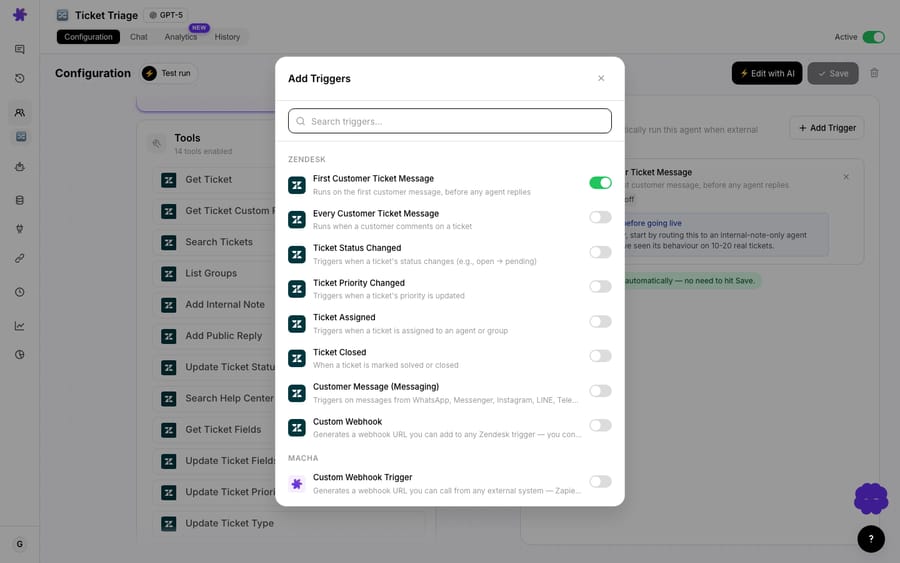
The best WISMO ticket is the one that never gets created. Because the Shopify connector has no order-updated trigger, this workflow runs on a scheduled trigger (scheduled triggers are included on every Macha plan) instead of reacting to a Shopify event.
Trigger: Scheduled, for example every morning. Actions: Shopify → Search Orders (unfulfilled, older than your promised dispatch window) → Slack → Send Message (list of late orders to your ops channel) → Helpdesk → Add Public Reply on any open ticket from one of those customers.
Your ops team sees the delay list land in Slack, so a pattern (a warehouse backing up, a carrier having a bad week) surfaces before it becomes a flood, and they decide who gets a heads-up. Where a delayed customer already has an open ticket, the agent posts a short, honest update: "Order #1523 is running behind; we now expect it by March 6, sorry for the wait." Macha's help-desk tools reply on existing tickets and don't open new ones, so a first-contact email to someone who hasn't written in goes out from your email or Shopify notification tool.
5. How do you flag and fast-track VIP customers?
Not every ticket deserves the same SLA. When a high-value customer writes in, the agent checks their order history and spend in Shopify, bumps the ticket's priority, tags it, and pings the right Slack channel with context, so a $4,200 lifetime customer never waits in the general queue behind a first-time discount-code question.
Trigger: New ticket with a VIP tag (or detected via Shopify spend). Actions: Shopify → Lookup Customer + Search Orders (lifetime spend, order count) → Helpdesk → Update Priority + Update Tags → Slack → Send Message.
The Slack alert carries what a human needs to respond well: "VIP ticket: Rachel Torres, lifetime value $4,200 across 15 orders, active since 2023, never complained before." This one doesn't deflect a ticket; it makes sure your most valuable relationships get a fast, informed human response. That's automation routing attention, not removing it.
6. How do agents get order context mid-ticket?
The genuinely tricky tickets still go to a human. But that human shouldn't have to tab over to Shopify admin and search. With Macha's Copilot widget or Chrome extension (see the docs), an agent asks in plain language ("pull up order #3019") and the order details appear next to the ticket: items, fulfillment, payment status, customer.
Trigger: Agent asks for order context on an open ticket. Actions: Shopify → Get Order + Lookup Customer → surfaced inline for the agent.
This is the copilot version of the same connector that powers workflows 1 to 5. It won't show up in your deflection numbers, but it shaves a lookup off every complex ticket, and those add up. On cost, Stormy AI, citing Lorikeet, puts an AI-handled resolution at $1 to $3 against $13.50 for an agent-assisted contact.
Which of the six run without a human?
Look at the table at the top: two workflows are fully autonomous (order status and stock), and four keep a person in the loop through a draft, an alert, a routing decision or a copilot answer. That mix is the point. The goal isn't "automate everything"; it's to let the agents handle the mechanical WISMO and WISMR share of the queue so your people spend their time where judgment matters.
Where should you not point Shopify automation?
Automation that's wrong is worse than no automation, so a few honest boundaries:
- Don't fully auto-resolve refunds or order edits. Macha's Shopify refund action runs only after a confirmation step, and so does Stripe's. Keep it that way: a misfired refund erodes more trust than a slow one. Cancellations (workflow 3) belong in the draft-and-approve column for a reason.
- Match quality depends on your data. If your tickets don't reliably contain an order number or the matching email, the agent's lookup gets shakier. Tidy your ticket forms first.
- Set a clear escalation rule. Anything the agent can't resolve with confidence should hand off to a human with the context already gathered, not loop the customer. Define that threshold up front.
- Start with one workflow, measure, then expand. Turn on WISMO, watch a week of real replies, tune the tone and the escalation rule, then add the next. Switching on all six at once makes it hard to tell what's working.
None of these are reasons not to automate; they're reasons to automate deliberately. Macha gives you the human-in-the-loop controls (drafts, approvals, escalation) so you can.
Why do this on top of your helpdesk, not in a new tool?
It's tempting to think the answer is "rip out Zendesk and buy an all-in-one Shopify support app." Usually it isn't. Your team already lives in your help desk; your macros, views, SLAs and reporting are built there. Macha keeps all of that and adds the AI agent layer plus the Shopify, Stripe and Slack connections on top, so you get autonomous resolution without a migration. If you're on Zendesk, the Macha on Zendesk page walks through how the layer sits inside your existing workspace.
FAQ
Does Macha replace my Shopify support app or helpdesk? No. Macha is an AI agent layer that runs on top of Zendesk, Freshdesk, Gorgias, Front, HubSpot or Intercom and connects to Shopify. You keep your help desk; Macha adds the agents and the commerce data access.
Can Macha actually process a Shopify refund automatically? Yes, with a confirmation step. The agent verifies the details (order eligibility from Shopify, payment from Stripe if you use it), then proposes the refund through Shopify's create_refund action or Stripe's Create Refund, and the refund runs once someone confirms it.
What Shopify data can the agents see? Products and variants (including inventory levels), orders (line items, fulfillment, payment status), and customer profiles with order history, via Search Products, Get Order, Search Orders, Lookup Customer and Customer Orders.
Can a Shopify order update trigger a Macha agent? Not directly. The Shopify connector has no triggers, so order-driven checks like delay alerts run on a scheduled trigger that searches orders, while ticket-driven workflows start from your help desk's new-ticket trigger.
How much does this cost to run? Macha bills per ticket: one conversation, charged once, however many lookups and replies it takes. The plan starts at $299 a month for 750 tickets, about $0.40 a ticket, and setup and monitoring by the Macha team are included. See the pricing page for the higher volume tiers.
How long does it take to set up one workflow? The WISMO agent is the fastest win: connect Shopify, point an agent at order-status tickets, test it on a few, and turn it on. Most teams have the first workflow live the same day.
Which workflow should you start with?
You don't need a six-month automation project. Pick the workflow that's eating the most hours (for almost every Shopify store that's WISMO) and build that one. Start a free trial ($50 of usage, about 125 tickets, no credit card, no time limit), connect Shopify and your help desk, and ship your first agent. The other five are the same connector pointed at the next question. For the full build walkthrough, see the docs, or browse more use cases and the blog for related playbooks.
Written by Abbas (Customer Support & AI, Macha) · Reviewed by Ankeet Guha (Co-founder & CTO) · Published 2026-06-24 · Last updated 2026-09-24.






