





 Shopify
 Stripe
 Slack
Slack Notion
 Google Workspace
 Confluence

How Do You Add an Automated Follow-Up Note After a Zendesk Ticket Is Solved?


A Macha agent can post a short, personalized check-in on every solved Zendesk ticket using one trigger and two tools. Here is how to build it, how to test it safely, and the tickets where you should leave it off.
Key takeaways
- An automated follow-up note in Zendesk needs one Macha trigger, Ticket Closed, and two tools, Get Ticket to read the resolution and Add Public Reply to post the check-in.
- Fluent Support's review of over 100,000 of its own resolved tickets found personalized closing messages were 47% more likely to be rated excellent than generic sign-offs.
- Macha's trigger debounce batches rapid events on one ticket for at most 2 minutes, so a genuine next-day follow-up needs a scheduled trigger and the Search Tickets tool.
- Agent Simulations return canned responses for write tools, while Try it posts for real, so test the follow-up agent in Simulations before switching the trigger on.
- A follow-up posted on a ticket the agent already handled adds no second charge, since Macha bills once per ticket, about $0.40 each on the $299 plan for 750 tickets.

To add an automated follow-up note after a Zendesk ticket is solved, build a Macha agent with one trigger (Ticket Closed) and two tools (Get Ticket and Add Public Reply): the trigger wakes the agent on solve, the agent reads the resolution, and it posts a short check-in that names the customer's actual issue. A follow-up a day or two later closes the loop properly: did that actually fix it, and is there anything else? It catches the "well, actually it's still happening" cases before they become angry re-opens. The problem has always been that nobody has time to revisit every solved ticket and write a personal note.
Macha sits as an AI layer on top of the help desk you already run (Zendesk, in this walkthrough). No new inbox, no separate tool, no batch-and-blast. Here are the three parts of the build:
| Piece | What it is | In this build |
|---|---|---|
| Trigger | The event that wakes the agent | Zendesk Ticket Closed (fires when a ticket is marked solved) |
| Read tool | How the agent learns what happened | Get Ticket: pulls the subject, requester, and full comment thread |
| Write tool | How the agent responds | Add Public Reply: posts a customer-visible note on the ticket |
Below: how to build it, what it costs, and the cases where you should not turn it on.
Is a post-resolution follow-up worth the effort?
The one public dataset on this comes from a vendor's own queue. The WPManageNinja team behind Fluent Support reviewed over 100,000 resolved support tickets and found that customers who got personalized, needs-focused email endings were 47% more likely to rate their experience as "excellent," while generic sign-offs like "Let me know if you need more help" triggered 23% more follow-up questions. After the team switched to a structured closing framework, it reported 67% fewer "what exactly did you do?" replies and a 38% drop in escalations (Fluent Support). Treat those as one company's before-and-after, not an industry benchmark, but the direction is consistent with everything else published on closing messages.
Best-practice guides from Pylon, eesel, and Gorgias land on the same beats: reach out while the interaction is still fresh, make the message specific to the issue rather than a template, give an easy reopen path if the fix didn't hold, and route anyone who's unhappy to a senior agent fast. A generic mass survey hits none of those. A per-ticket agent can hit all of them.
The catch is "personalized." A one-size note pasted onto every solved ticket is exactly the generic ending the data warns against. To beat the baseline, the follow-up has to reference this customer's problem, which an AI agent with read access to the ticket can do and a static help desk automation can't.
What does the finished follow-up look like?
The loop is ticket solved → agent reads the resolution → agent writes and posts a tailored check-in. Here's the output the agent produces, paraphrased from a real billing case:
"Hi Sarah, I wanted to check in and make sure everything was resolved to your satisfaction regarding the billing issue we discussed. If you have any other questions or concerns, don't hesitate to reach out. We're always here to help."
Note what it doesn't do: it doesn't quote internal notes, it doesn't invent next steps, and it names the actual topic ("the billing issue") rather than "your recent ticket." That specificity is the point of using an agent at all.
How do you build the follow-up agent?
1. Create the agent
In Macha, create a new agent and give it a clear identity, something like Resolution Follow-Up. A short, single-shot reply doesn't need your strongest reasoning model, so a mid-tier model keeps it quick. Macha bills per ticket (one conversation, charged once however many messages it takes, whichever model runs it), so model choice here is a quality and speed call, not a cost lever.
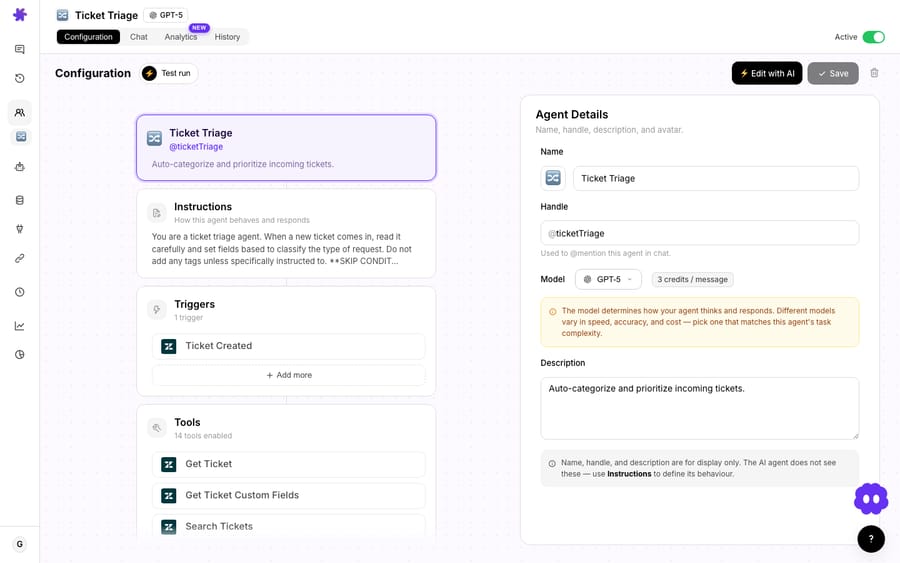
The Instructions field sets the voice and the guardrails. A solid starting prompt:
You are a follow-up agent. When a ticket is solved, read the conversation and write one short, warm public reply (2–3 sentences) that references the specific issue by name, confirms it was resolved, and invites the customer to reply if anything is still wrong. Match the brand's tone. Do not mention internal notes, do not promise actions or timelines, and do not repeat troubleshooting steps. If the resolution looks contested or the customer was clearly frustrated, do not post. Flag for a human instead.
That last instruction matters; we'll come back to it in the watch-outs.
2. Add the Ticket Closed trigger
Open the trigger picker and choose Ticket Closed. It fires whenever a Zendesk ticket is marked solved or closed, and Macha creates the Zendesk webhook for it automatically.
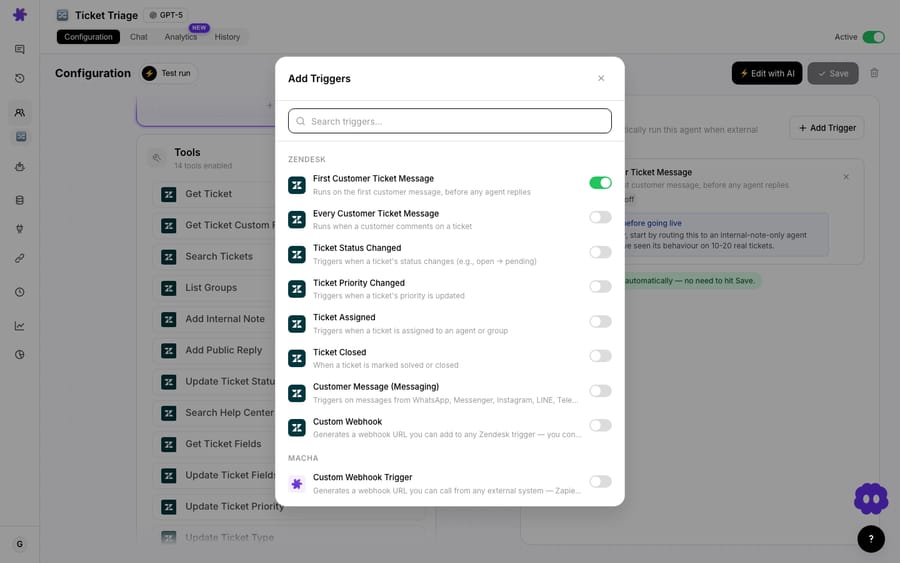
One setting is worth knowing here: debounce. Every event-driven Zendesk trigger shows a Debounce chip, and the default for new triggers is 0 seconds (off). Set a window and Macha batches rapid events on the same ticket into one run, so a ticket that's solved, reopened and re-solved within seconds doesn't produce two notes. It's a trailing-edge batch, not a scheduler: Macha force-fires after 10 times the window, capped at 2 minutes. If you want a genuine next-day check-in, use a scheduled trigger plus the Search Tickets tool to pick up recently solved tickets instead (see the watch-outs).
3. Wire the Get Ticket and Add Public Reply tools
Give the agent exactly two tools. Get Ticket lets it read the resolution; Add Public Reply lets it post the note. Add them from the tools picker:
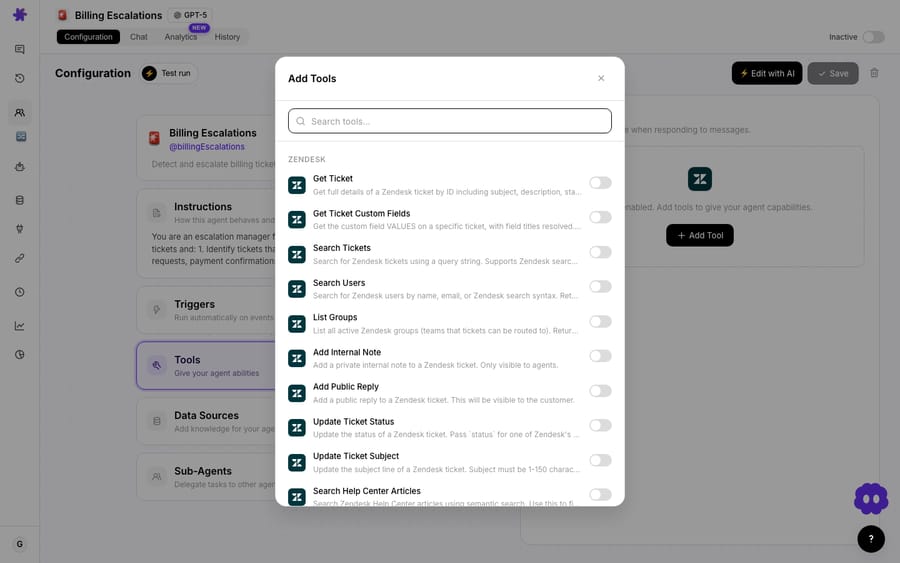
Keeping the tool set minimal is a deliberate safety choice. If the agent can only read and reply, it can't change status, reassign, or alter fields, so the blast radius of a bad run is one extra comment, not a mangled ticket. If you'd rather the follow-up stay private (for an internal QA loop, say), swap Add Public Reply for Add Internal Note.
4. Test before you go live
Run the agent against recently solved tickets before it can post to a real customer. Two ways to do it, and the difference matters. Agent Simulations replay past tickets and return canned responses for write tools, so nothing posts. Try it in chat uses the real tools, so a public reply called there actually posts unless the tool is marked as requiring confirmation. Tune the instructions until the tone is right and the specificity lands. Once the trigger runs autonomously, a bad reply goes out with no confirmation step, which is why the testing comes first. Toggling the agent off later sets its Zendesk webhook and trigger to inactive rather than deleting them, so pausing and resuming never breaks the wiring.
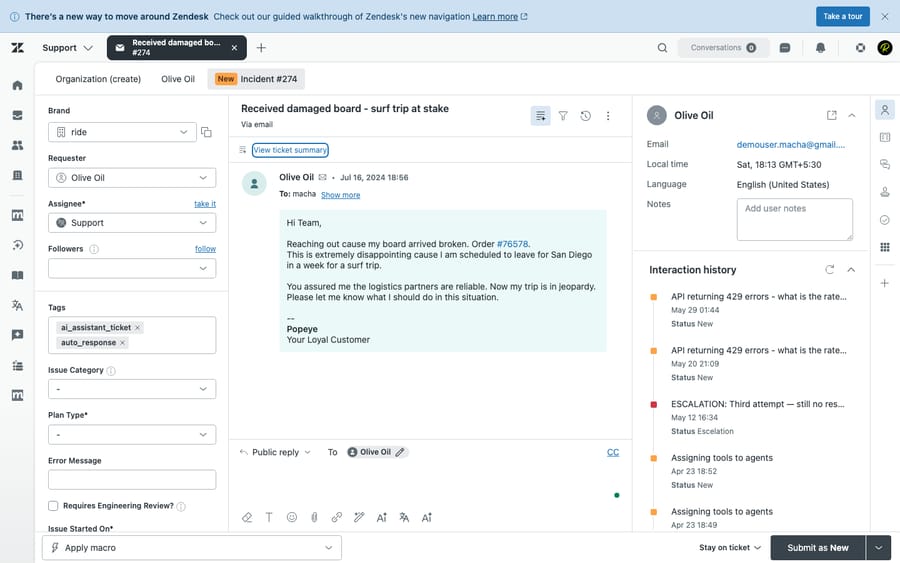
The note lands in the customer's ticket, in the public reply thread alongside the rest of the conversation:
How do you tune the follow-up so it actually helps?
A few choices separate a follow-up that lifts CSAT from one that annoys people:
- Timing. Reach out while the interaction is fresh, within a couple of hours to a day. An instant reply on solve can feel robotic ("I literally just closed this"). Debounce only buys up to 2 minutes, so for a real delay use a scheduled trigger that picks up tickets solved the day before.
- Specificity over template. The reason to use an agent instead of a Zendesk automation is the personalized line. If your instructions produce something that reads like a mail merge, tighten them until the agent names the real issue.
- One clear exit. Always include a low-friction "reply if anything's still wrong." It's your early warning for fixes that didn't hold, and it's cheaper to catch a reopen here than as a fresh angry ticket.
- Don't double up with CSAT. If Zendesk already sends a satisfaction survey on solve, decide whether the agent note replaces it, precedes it, or embeds the ask. Two separate asks fatigue customers; pick one primary signal.
When should you not turn the follow-up agent on?
This pattern is useful, but it needs judgement. Be honest about these cases:
- Frustrated or contested resolutions. If a ticket was solved under protest, a chirpy "glad that's sorted!" is salt in the wound. That's why the instructions tell the agent to flag for a human instead of posting when the sentiment is bad. Test that branch deliberately.
- High-volume queues where every reply has a cost. Each run adds a touch to every solved ticket, and a thread the agent hadn't otherwise handled counts as a ticket of its own. On a queue closing thousands of tickets a day, that's real spend and real customer noise. Sample it on a subset first and measure the CSAT change before going broad.
- Tickets that shouldn't be reopened. A follow-up invites a reply, which can reopen tickets you'd rather keep closed (spam, resolved duplicates, automated notifications). Scope the trigger by group, tag, or form so the agent only follows up where a check-in adds value.
- Regulated or scripted comms. If your closing messages are legally templated, an AI-paraphrased note may not pass compliance. Keep those flows on fixed templates.
- Survey replacement. This agent gathers qualitative signal and catches reopens; it doesn't compute a CSAT score. Pair it with your existing measurement.
Used with these guardrails, the follow-up is additive. Used blindly across every solved ticket, it's the generic ending the data warns against, just automated.
How is this different from a plain Zendesk automation?
You can send a templated email on solve with native Zendesk triggers and macros, and for a fully static message you should: it's free and simple. The line is personalization and judgement. A Zendesk automation sends the same words to everyone and can't decide not to send when a customer is upset. A Macha agent reads the actual thread, writes a note specific to the issue, and can route the awkward cases to a human instead of posting. That's the gap between a mail merge and a check-in, and it's the gap the 47% figure lives in.
If you already run other agents on Zendesk, this slots in beside them. See Macha on Zendesk for the full tool and trigger surface, and the use-case library for adjacent patterns like triage and routing.
FAQ
Which trigger fires the follow-up? The Zendesk Ticket Closed trigger, which fires when a ticket is marked solved or closed. You can scope it by group, tag, or form so the agent only follows up on the tickets where a check-in is useful.
Will it post to a customer automatically? Yes. Once the trigger is on, the agent runs autonomously and posts a public reply with no confirmation step. Test it in Agent Simulations first, and use the instructions to make it flag (rather than post on) contested or frustrated tickets.
Can the follow-up be private instead of customer-facing? Yes. Swap the Add Public Reply tool for Add Internal Note and the agent's check-in becomes an agent-only note, handy for QA or manager review loops.
Can the follow-up wait a day instead of posting on solve? Not with debounce alone, which batches events for at most 2 minutes. For a next-day check-in, run the agent on a scheduled trigger and give it the Search Tickets tool to find tickets solved in the previous 24 hours.
How much does each follow-up cost? Macha bills per ticket: one conversation, charged once however many messages it takes, whichever model it runs on. A follow-up posted on a thread the agent already handled doesn't add a second charge. Pricing starts at $299 a month for 750 tickets, about $0.40 each. See the pricing page for the other tiers.
Does this replace my CSAT survey? No. It's a qualitative check-in that catches reopens and adds a human touch. Keep your CSAT measurement; just make sure you're not sending two competing asks on the same solve.
Will pausing the agent break my Zendesk setup? No. Toggling the agent off sets its Zendesk webhooks and triggers to inactive rather than deleting them, so pausing and resuming keeps the same resource IDs and config intact. Deleting the trigger from Macha, by contrast, removes the Zendesk webhook and trigger fully.
How do you get started?
If your team closes tickets and then goes quiet, this is one of the fastest agents to stand up: one trigger, two tools, a few lines of instruction. Start a free trial ($50 of usage, no credit card required), connect Zendesk, and build the follow-up agent, or read the docs for the full walkthrough. You can also describe it in plain language and let Sidekick, Macha's in-dashboard builder, assemble the trigger, tools, and instructions for you.
Written by Abbas (Customer Support & AI, Macha) · Reviewed by Ankeet Guha (Co-founder & CTO) · Published 2026-06-24 · Last updated 2026-09-24.






