





 Shopify
 Stripe
 Slack
Slack Notion
 Google Workspace
 Confluence

What Is Macha Agent Evaluation? An AI Judge for Your Agents


Knowing an AI agent ran is easy; knowing it followed its instructions on each conversation is the number that matters. Macha's Agent Evaluation gives you that number, and we ran it on a real agent to show what comes back.
Key takeaways
- Macha's Agent Evaluation uses an AI judge to score each past conversation Yes, Partially or No on whether the agent followed its instructions, with a one-line Why reason.
- Auto-Eval grades every trigger-fired Agent mode conversation automatically on a fixed GPT-5 judge at no credit cost, filling five fields including Resolution, Customer sentiment and Category.
- In a real 18-conversation manual evaluation judged by GPT-5, the Ticket Summarizer agent scored 75% followed, with 10 conversations marked Yes, 7 Partially and 1 No.
- The percentage followed gives partial credit: Yes plus half of Partially, divided by the total, so 10 plus half of 7 equals 13.5 out of 18.
- Manual evaluations bill credits per evaluated conversation and show an estimate first; the 18-conversation run showed 36 credits on the GPT-5 judge.

Agent Evaluation is an AI judge inside Macha that grades an agent's past conversations and scores each one Yes, Partially or No for whether the agent followed its instructions, with a one-line reason. It comes in two layers: Auto-Eval, which grades every trigger-fired conversation automatically on a GPT-5 judge at no charge, and manual evaluations, where you pick the scope, the checklist and the judge model and pay credits per evaluated conversation. You get a headline percentage followed, a per-conversation verdict you can audit in a click, and a checklist Macha can build from the agent's own prompt.
To write this, I ran a real manual evaluation over 18 conversations of one of our agents, and I'll show you exactly what came back, including where it scored the agent down.
| Auto-Eval | Manual evaluation | |
|---|---|---|
| Setup | None; on by default once an agent has a trigger | Three-step wizard: Scope, Extract, Review |
| What it grades | Every trigger-fired (Agent mode) conversation | A date range and model you choose |
| Checklist | Fixed: Instructions followed, Why, Resolution, Customer sentiment, Category | Instructions followed and Why, plus any fields you add or Build with AI proposes |
| Judge | GPT-5, fixed | You pick (defaults to GPT-5) |
| Cost | No credits | Credits per evaluated conversation, estimated before you run |
How did we test Agent Evaluation?
The screenshots and numbers here come from a real evaluation run on the Macha dashboard: a live agent ("Ticket Summarizer"), its real conversations from the last seven days, judged by GPT-5. Nothing is mocked. Where the agent slipped, the report says so, and we left that in.
What does Agent Evaluation do, and what doesn't it do?
Agent Evaluation grades past conversations. It's a reviewer, not a live moderator. It doesn't sit in front of your agent stopping bad replies in real time (for that you use the agent's instructions and confirmation gates on write tools). It looks backward over a window of conversations and tells you how the agent actually did, so you can decide whether a prompt change helped, catch a regression, or set a baseline before rolling an agent out wider.
It lives on every agent's detail page, under an Agent Evaluation tab next to Configuration, Try it and History. Because it's scoped to the agent you're already looking at, you can't accidentally evaluate the wrong one.
What does Auto-Eval grade without any setup?
Once an agent is wired to a trigger, Auto-Eval grades every conversation it handles in Agent mode against its live instructions. Dashboard chats, widget conversations and test runs are left out, so the score reflects what customers actually receive. The judge fills in five fields: Instructions followed, Why, Resolution, Customer sentiment and Category. Every 50 graded conversations, an AI-written note summarizes the dominant failure patterns and suggests two to four instruction tweaks. You can't change Auto-Eval's rubric or judge; that's the trade for it costing nothing. When you need a custom rubric or a specific historical window, you create a manual evaluation, which is what the rest of this post walks through.
How do you set up a manual evaluation?
Open an agent, click Agent Evaluation, and (the first time) hit Create your first evaluation. You get a three-step wizard: Scope → Extract → Review.
1. Scope: what to evaluate
You set a date range (last 7 days by default), can optionally restrict to conversations that ran on a specific model (handy after a model migration), and choose which version of the agent's instructions to judge against:
- The instructions that were live when each conversation ran: the honest "did this agent do its job at the time?" review.
- Your current instructions: the "would today's prompt have passed?" regression view.
- A specific saved version: for A/B comparisons between prompt iterations.
That version choice is what makes Evaluation a before-and-after tool rather than a one-shot score.
2. Extract: let Macha build the checklist
This is the part that saves you an afternoon. Click Build with AI and Macha reads the agent's own instructions, identifies the rules in them, and proposes one evaluation field per rule, with a name, field type, options and judge guidance, streaming them in as it works. Macha's docs say this usually produces a 3 to 7 field checklist in under thirty seconds.
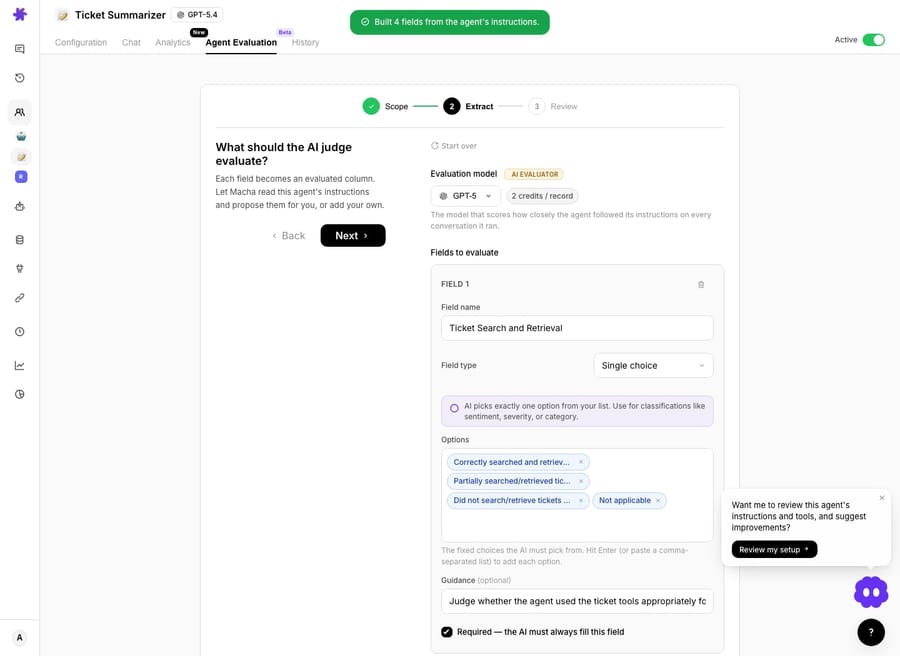
In my run it built four fields from the agent's instructions in about thirty seconds, including Ticket Retrieval Workflow Used, Summary Content Coverage, Summary Clarity and Concision, and Delivery Action and Channel Fit. You can edit, delete or add to anything it proposes, or skip it and define the checklist by hand (field types are Yes/No, single or multiple choice, number, and short or long text, each with guidance for the judge).
Which fields are always included?
Every evaluation includes two mandatory fields you can't remove:
- Instructions followed: a Yes / Partially / No verdict. Yes means every required step was done correctly; Partially means mostly right with a notable slip (wrong tag, skipped step); No means the wrong action or ignored instructions.
- Why: a one-to-two-sentence reason pointing at a specific moment in the conversation. This is the audit trail: scan the score, click a row, see why, without re-reading the transcript.
3. Review: see the cost, then run
Like Studies, Evaluation makes you look at the bill first. Estimate cost shows the matching conversation count and the credit total for the judge model you picked, and you confirm before anything runs.
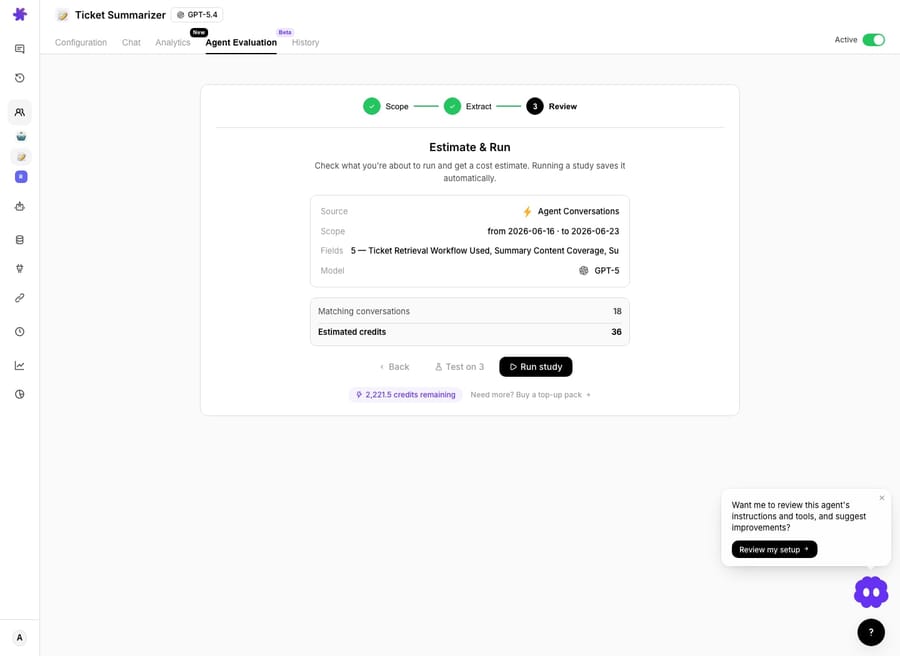
My run showed 18 conversations, 36 credits on the GPT-5 judge, two credits per conversation. Macha's current docs describe the estimate as one credit per evaluated conversation, so read the number on your own Review screen rather than either figure here. If your filters return zero conversations, the run button is disabled with a one-click link back to widen the scope.
What did the judge find in a real run?
The evaluation processed all 18 conversations with 0 errors and produced a report. The headline is a donut:
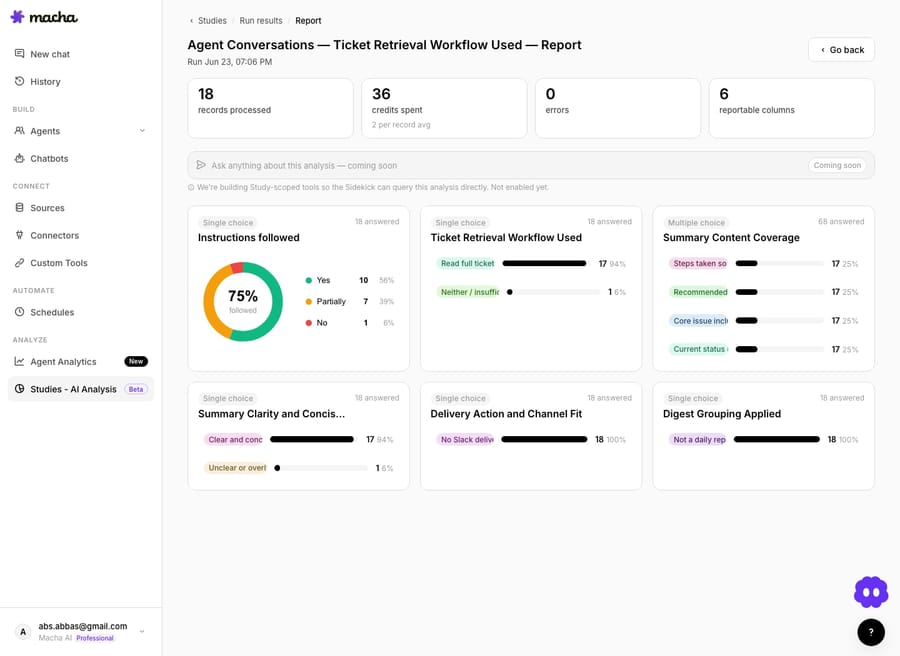
75% followed. Here's the breakdown, and how that number is computed:
| Verdict | Count | Share |
|---|---|---|
| Yes (fully followed) | 10 | 56% |
| Partially (notable slip) | 7 | 39% |
| No (wrong action) | 1 | 6% |
The score isn't just "% Yes." It gives partial credit: Yes + ½ × Partially ÷ total, so 10 + (½ × 7) = 13.5 out of 18 = 75% followed. Auto-Eval computes its adherence score the same way. That's a fairer signal than pass/fail: an agent that's mostly right with small slips reads as 75%, not 56%.
The custom fields tell you where it slipped. In this run the agent was strong on retrieval and clarity but not perfect:
- Ticket Retrieval Workflow Used: read the full ticket on 17 of 18 (94%); one conversation had insufficient retrieval.
- Summary Clarity and Concision: 94% clear and concise; one unclear.
- Delivery Action and Channel Fit: 100% used the right channel.
- Digest Grouping Applied: 100% correct.
So the agent's weak spot isn't tone or delivery. It's the occasional shallow retrieval that drags conversations from "Yes" to "Partially." That's a concrete, fixable prompt note, and I only know it because the judge graded every conversation, not a sample.
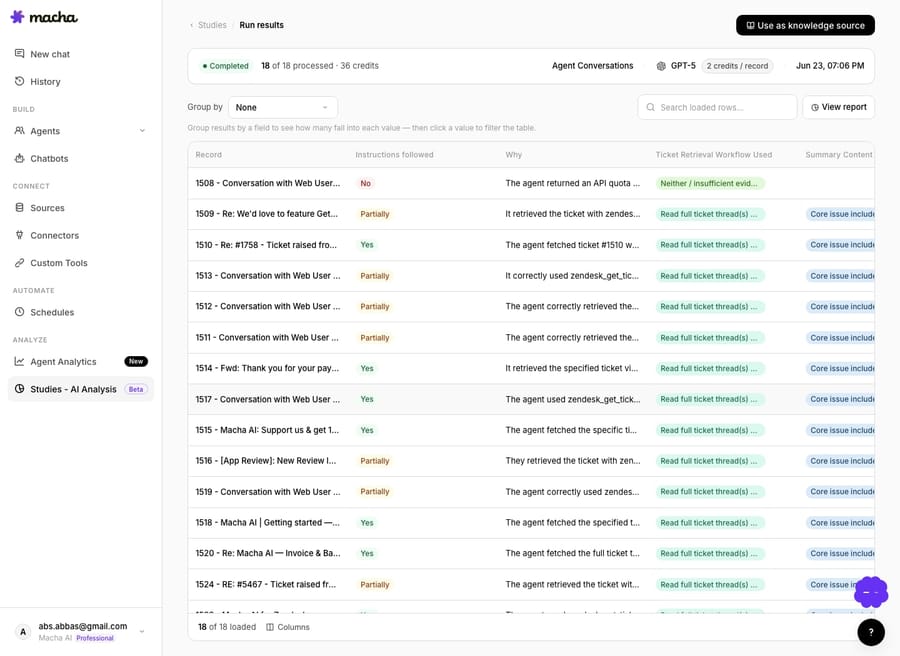
Each verdict is auditable. The results table puts the Instructions followed pill and the Why reason as the first two columns, so you can scan the score and click into any conversation to see the judge's reasoning against the original transcript.
How do you use evaluations to improve a prompt?
A single score is mildly interesting; the before-and-after is the point.
- Did my prompt change help? Run an evaluation pinned to "instructions as they ran," note the score, edit the prompt, then re-run over the same date range against your current instructions. Two donuts, one comparison: you see whether you helped, hurt or did nothing.
- Weekly quality line. Auto-Eval already charts adherence daily for trigger-fired work. For a custom rubric, run the same manual evaluation over the last 7 days every week and watch the percentage trend.
- Regression catch. After any prompt change, re-run on a fixed historical window to confirm you didn't break something the old prompt got right.
You re-run straight from the evaluations list; it reopens the same config so you only change what you want.
A note on scope: when an agent delegates to sub-agents, the judge sees the whole delegation tree, every tool call and sub-agent reply, so a routing agent is graded on whether its handoff was actually correct, not merely on whether it called a tool.
Where does Agent Evaluation fit with the rest of Macha?
Evaluation is the quality counterpart to building and analyzing:
- Use Studies to understand your ticket volume and decide what to automate.
- Build the agent, connect its tools, and run it.
- Use Agent Evaluation to confirm it's doing the job, and to keep it honest every time you touch the prompt.
Honest trade-offs: it evaluates the past, not live traffic. The judge is itself an AI model, so treat the verdicts as a strong, consistent reviewer rather than ground truth; the Why column exists so you can spot-check the calls. Manual runs cost credits per conversation, shown before you commit, while Auto-Eval is free but fixed.
FAQ
What does Agent Evaluation actually score? Whether your agent followed its instructions on each past conversation, as a Yes/Partially/No verdict plus a one-line reason, and any custom checks you add (right tool, right tone, right action).
Where do I find it? On any agent's detail page, under the Agent Evaluation tab. It evaluates that specific agent's conversations.
Do I have to write the checklist? No. Build with AI reads the agent's instructions and proposes the checklist for you (you can edit it). Or define fields manually if you have a specific rubric. Auto-Eval needs no checklist at all.
How is the "% followed" calculated? (Yes + ½ × Partially) ÷ total conversations. Partial credit for partial work: in our run, 10 Yes + 7 Partially over 18 = 75%.
How much does it cost? Auto-Eval costs nothing. Manual evaluations cost credits per evaluated conversation, shown as an estimate before you run; our 18-conversation run on the GPT-5 judge showed 36 credits. Continuous evaluation is included on every plan; see the pricing page.
Is it real-time? No. It evaluates past conversations. For live guardrails, use the agent's instructions and confirmation gates on write tools.
Does Auto-Eval grade dashboard chats? No. It grades trigger-fired conversations in Agent mode only; dashboard chats, widget conversations and test runs are excluded.
How do you try it?
If you've shipped an AI agent and only have a gut feel for how well it's doing, Auto-Eval turns that into a number from day one, and a manual evaluation shows you exactly where to tighten the prompt. Start a free trial ($50 of usage, no credit card required), open an agent, and run your first evaluation, or read the docs for the full walkthrough.






