





 Shopify
 Stripe
 Slack
Slack Notion
 Google Workspace
 Confluence

Can AI Agents Read Image Attachments on Zendesk Tickets? Macha Vision in 2026


Customers don't describe their problem, they screenshot it. Macha agents now read those images on Zendesk tickets and act on what they see.
Key takeaways
- Since the April 17, 2026 release, Macha agents read JPEG, PNG, GIF and WebP image attachments on Zendesk tickets by sending them to a vision-capable model.
- Macha's connector docs list image vision as working with GPT-5, GPT-5.4, GPT-5.4 Mini and Claude Sonnet, while Groq-hosted models return a not-supported message.
- Zendesk's own documentation says its native AI agents process only text and do not scan attached files or media in conversations.
- PDF, DOCX, XLSX, CSV and TXT attachments go through text extraction rather than vision, on Zendesk, Freshdesk, Gorgias and Front.
- Reading an image costs nothing extra because Macha bills per ticket, about $0.40 each from $299 a month for 750 tickets, and that price includes the Macha team setting up the agent and a dedicated success manager.
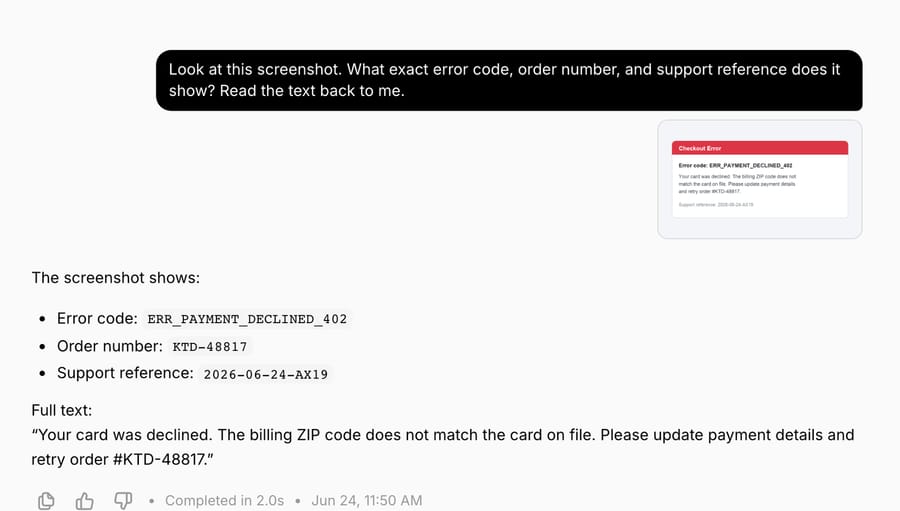
Yes. Since the April 17, 2026 release, Macha agents read JPEG, PNG, GIF and WebP image attachments on Zendesk tickets: the agent downloads the file, encodes it and sends it to a vision-capable model such as GPT-5.4, GPT-5.4 Mini or Claude Sonnet. It can then describe a screenshot, pull the text out of it, identify a product or parse a receipt, and act on what it found with the tools it already has.
That matters because the error dialog, the cracked product, the receipt with the order number and the checkout page that won't advance all tend to arrive as a .png stapled to a ticket. An agent that reads only the ticket body misses the one piece of evidence that explains the problem.
| Question | Answer (checked 24 September 2026) |
|---|---|
| Image types read on Zendesk tickets | JPEG, PNG, GIF, WebP |
| Models that can see images | GPT-5, GPT-5.4, GPT-5.4 Mini, Claude Sonnet 4.5 |
| Models that can't | Groq-hosted models (GPT OSS 120B, GPT OSS 20B) return a "not supported" message |
| Document attachments | PDF, DOCX, XLSX, CSV and TXT go through text extraction, not vision |
| Extra cost for images | None; Macha bills per ticket |
Why does reading attachments matter more than "the bot can see pictures"?
Most AI agents on help desks still can't read attachments, and the help desks say so.
Zendesk's own documentation states that its native AI agents "process only text in conversations and tickets. AI doesn't scan attached files and media in conversations." (Zendesk help, checked 24 September 2026). The attachment is kept for a human to open after escalation, but the AI never looks at it.
Gorgias has gone further. Its AI Agent Vision now works on email, chat, Instagram and Facebook Messenger, and WhatsApp, though not SMS, and it reads PNG, JPEG, WebP and non-animated GIFs only. Gorgias says Vision "is not compatible with video files or documents like DOCX and PDFs, even if they include images" (Gorgias docs).
So the baseline is uneven: on a native Zendesk AI agent, a customer attaches the one image that explains everything and the AI either ignores it or hands the ticket to a human. A fair share of "AI couldn't resolve this" outcomes aren't reasoning failures. They're perception failures. The agent never saw the evidence.
Because Macha is an AI agent layer that sits on top of your Zendesk rather than a feature inside one help desk's roadmap, vision is something we add to the agent itself, and it reads the attachments Zendesk's own AI skips.
What can the agent actually do with an image?
Vision isn't a party trick that returns "I see a photo of a screen." A Macha agent uses the image the way a support rep would, as evidence to act on. It can:
- Read text out of a screenshot: an error message, an order confirmation, a tracking page, a settings screen. This is OCR plus context: it understands what kind of screen it's looking at, not just the characters.
- Describe a product photo: a damaged item, a wrong color, a missing part, so a returns or warranty flow has something to reason about.
- Identify a product from a picture against your catalog knowledge.
- Parse a receipt or invoice: pull the order number, date, total or line items into a structured form the rest of the workflow can use.
The important word is then. Once the agent has read the image, it's back in normal territory: it can look up the order, check a custom field, draft a reply, set the priority or route the ticket. A customer sends a photo of a cracked mug with "this arrived broken" and nothing else; the agent reads the damage and the order number printed on the packing slip in the same image, confirms the order and starts the replacement without a human opening the file.
Plenty of tools can caption an image. The value is an agent that captions the image and then does the next four things because of what it read.
Which models and file formats support vision?
Vision works on the image types customers actually send: JPEG, PNG, GIF and WebP. When the agent hits one of these on a Zendesk ticket, it handles the download and base64 encoding itself. There's nothing to configure on the attachment side.
What you do choose is the model, because vision only runs on vision-capable models. Macha's connector docs list image vision as working with GPT-5, GPT-5.4, GPT-5.4 Mini and Claude Sonnet:
| Model | Vision | Notes |
|---|---|---|
| GPT-5.4 | ✅ | Macha's most capable OpenAI option for multi-step work |
| GPT-5 | ✅ | Balance of quality and cost |
| GPT-5.4 Mini | ✅ | Fast, 400,000-token context window per OpenAI |
| Claude Sonnet 4.5 | ✅ | Strong on dense screenshots and document-style images |
| Groq models (GPT OSS 120B, GPT OSS 20B) | ❌ | Return a "not supported" message, no hard error |
The April release notes also named GPT-5 Mini and GPT-4o Mini. Neither appears in Macha's current model line-up, so pick from the list above.
The Groq behavior is deliberate. If you've picked a fast Groq model for latency and a ticket happens to carry an image, the agent doesn't crash or silently drop the attachment. It tells you the model can't see it. That's the safe failure mode: a clear signal, not a quiet gap.
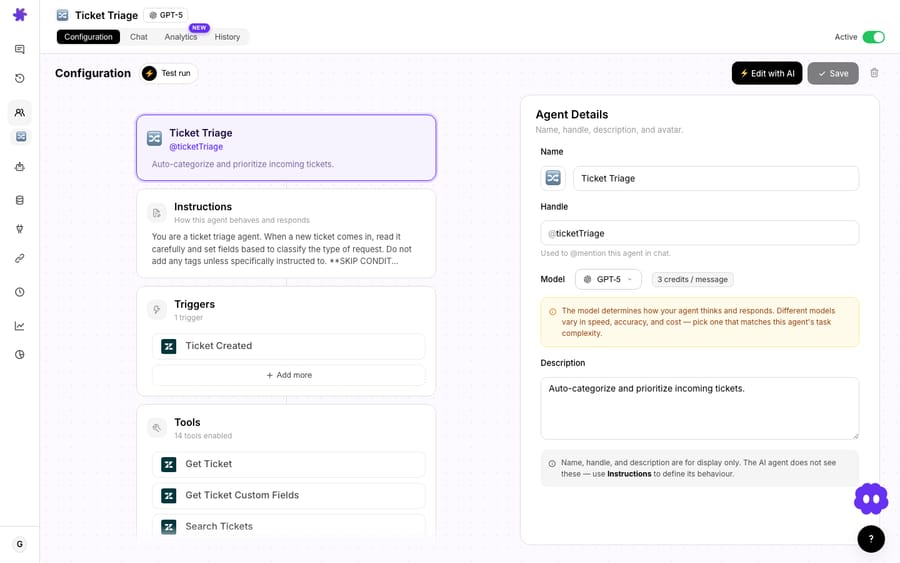
Picking the model is the whole setup. Choose a vision-capable model on the agent, and image reading is on for every Zendesk ticket that agent touches.
Does reading an image cost extra?
No. Vision doesn't add a separate image fee. An image rides along inside the ticket it arrived on, the same way a longer text message does. Macha bills per ticket: one conversation, charged once however many messages, lookups or images the agent works through.
Model choice doesn't change the bill either. A vision-capable model costs the same per ticket as any other, so pick the one that reads your customers' screenshots best. Pricing starts at $299 a month for 750 tickets, about $0.40 each, and that includes setup and a dedicated success manager who handles your changes: the Macha team builds the agent, tests it on your past tickets and runs it in safe mode until the drafts are right. The current tiers live on the pricing page, and nothing is charged per resolution.
When shouldn't you rely on vision?
Vision is a real capability, not magic. Keep these limits in mind:
- Images go through vision; documents go through text extraction. JPEG, PNG, GIF and WebP are sent to the model as images. PDF, DOCX, XLSX, CSV and TXT attachments take a different path: Macha extracts their text on Zendesk, Freshdesk, Gorgias and Front. If a customer attaches a PDF receipt, the agent reads its text, not a picture of it, so a scanned PDF with no text layer gives it little to work with.
- Bad inputs make bad reads. A blurry, cropped or low-light photo produces a weaker read, exactly as it would for a human. Vision doesn't invent detail that isn't legible in the pixels, and you don't want it to.
- Model-dependent. If your agent is on a Groq model, there's no vision. If a queue is image-heavy, put it on a vision-capable model.
- It's perception, not authority. Reading a number off a receipt is a starting point, not proof. For refunds and account changes, keep vision as the input to a tool that verifies (look the order up, check the system of record) rather than treating the photo as the source of truth.
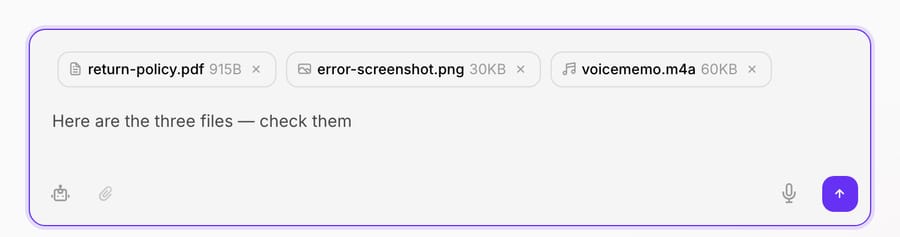
- Zendesk for on-ticket images. Macha's connector docs list image vision on the Zendesk connector. The other help-desk connectors document text extraction from document attachments, not image vision. Images you drop into an agent chat in the Macha dashboard are read as images regardless of help desk (up to 5 MB each, 3 files per message).
Used well, vision shrinks the "escalate because the AI can't see the attachment" bucket. Used carelessly, trusting a blurry photo for a refund, it's a new way to be confidently wrong. Pair perception with verification.
How does vision fit with the agent's other tools?
The vision call on its own isn't what makes this useful. It lands inside an agent that already has hands. The same agent that reads the screenshot can read the ticket's custom fields (with their real labels, not raw IDs), look up the order, update the subject line, post a reply or route the ticket. The image becomes one more input to a workflow that could already act.
If you're building agents on Macha, the move is simple: for any queue where customers send screenshots, receipts or product photos (billing, returns, technical support), assign a vision-capable model and let the agent see what your customers are showing it.
FAQ
Does Macha's AI read image attachments on Zendesk tickets? Yes. Since the April 17, 2026 release, when a Macha agent finds a JPEG, PNG, GIF or WebP attachment on a Zendesk ticket, it downloads and encodes the image and sends it to a vision-capable model. The agent can describe screenshots, read text in images, identify products and parse receipts.
Which models support vision? Macha's docs list GPT-5, GPT-5.4, GPT-5.4 Mini and Claude Sonnet (4.5 and 4). Groq-hosted models don't support vision and return a clear "not supported" message rather than failing.
Can it read PDFs or Word documents? Not as images. PDF, DOCX, XLSX, CSV and TXT attachments go through text extraction instead, which Macha's docs list for Zendesk, Freshdesk, Gorgias and Front.
Does reading an image cost extra? No separate surcharge. Macha bills per ticket: one conversation, charged once, whether or not it carries an image. See the pricing page for current rates.
Does Zendesk's own AI read attachments? No. Per Zendesk's documentation, its native AI agents process only text and don't scan attached files or media in conversations. That's why reading the image at the agent layer is useful.
Will on-ticket vision come to Freshdesk and other help desks? The download-and-encode utility was built to be reused across connectors. As of 24 September 2026, Macha's docs list on-ticket image vision for Zendesk only; the other help-desk connectors read document attachments as text.
How do you try it?
If your customers send screenshots and your AI can't see them, you're escalating tickets that didn't need a human. Start a free trial ($50 of usage, no credit card required) and connect Zendesk. The Macha team builds your first agent on a vision-capable model and runs it in safe mode, with drafts as internal notes, so you can see it read what's actually in the attachment before anything reaches a customer. For the full setup, see the docs, or read more on the Macha blog.
Written by Abbas (Customer Support & AI, Macha) · Reviewed by Ankeet Guha (Co-founder & CTO) · Published 2026-06-24 · Last updated 2026-09-24.






