





 Shopify
 Stripe
 Slack
Slack Notion
 Google Workspace
 Confluence

How Does AI Vision Read Screenshots, Receipts and Product Photos on Support Tickets? (2026)


Customers would rather show you the problem than describe it, so support queues fill with screenshots, receipts and product photos. For years the AI on top of the help desk skipped all of them.
Key takeaways
- AI vision sends a ticket's image attachment to a multimodal model, which reads the error, receipt details or product damage so the agent can triage, reply or act.
- Macha agents have read JPEG, PNG, GIF and WebP attachments on Zendesk tickets since April 17, 2026, using GPT-5, GPT-5.4, GPT-5.4 Mini or Claude Sonnet.
- Groq-hosted models in Macha do not support vision and return a not supported message instead of guessing at an image's contents.
- Gartner predicts 80% of enterprise software and applications will be multimodal by 2030, up from less than 10% in 2024.
- Macha extracts text from PDF, DOCX, XLSX, CSV and TXT attachments on Zendesk, Freshdesk, Gorgias and Front, while on-ticket image vision is listed for Zendesk.
AI vision reads a support ticket's image attachments by sending the picture itself to a multimodal model, which pulls out the error message on a screenshot, the order number on a receipt or the damage in a product photo, and hands that to the agent so it can triage, reply or act. In Macha, agents have done this on Zendesk tickets since April 17, 2026, for JPEG, PNG, GIF and WebP files, on GPT-5, GPT-5.4, GPT-5.4 Mini or Claude Sonnet.
| Image type | What the agent reads | What it does next |
|---|---|---|
| Screenshot | Error string, setting, version number | Answers from knowledge, or tags and routes a known bug |
| Receipt or invoice | Order number, date, amount | Looks up the order or payment, then replies or refunds |
| Product photo | Product, type of damage, wrong or missing part | Summarizes for a human or starts a returns flow |
Quick framing, because it matters: Macha is an AI agent layer on top of the help desk you already run (Zendesk, Freshdesk, Gorgias, Front, HubSpot or Intercom). It isn't a help desk and isn't trying to replace one. So "AI vision" here means your existing tickets, with their existing attachments, become readable by the agents you build on top.
What does "AI vision" actually mean on a support ticket?
There are two different things people lump under "the AI reads images," and the difference matters:
- OCR pulls characters out of an image. It's good at clean, printed text and bad at everything else: rotated scans, glare, layout, "what is this a photo of."
- Vision (multimodal) models take the whole image as input alongside the conversation and reason about it. They read text and understand the scene: that this is a checkout error, that the package in the photo is crushed on one corner, that the highlighted line on the receipt is the duplicate charge.
Modern support automation runs on the second kind. Claudexia's write-up says Claude handles multi-column layouts, rotated scans and handwritten annotations far better than classical OCR pipelines (Claudexia), and Roboflow put GPT-5 through more than 80 structured visual tasks, including reading a torn receipt (Roboflow). Gartner predicts 80% of enterprise software and applications will be multimodal by 2030, up from less than 10% in 2024 (Gartner press release, July 2025).
The payoff for a support team is mundane and large. Manual screenshot review is a tax on agent time: squinting at an image, retyping the error string, looking up the order before any real work starts. Vision moves all of that to the first read.
How does a Macha agent see an attachment?
Macha shipped image vision for Zendesk attachments on April 17, 2026. The mechanism is deliberately simple, and it explains both what vision can do and where it stops.
When one of your agents is working a ticket and finds an image attachment (JPEG, PNG, GIF or WebP), it:
- Downloads the attachment from the ticket.
- Base64-encodes it.
- Sends it to the AI model as vision content, alongside the rest of the conversation context.
From there the model can describe a screenshot, read text inside an image, identify a product or parse a receipt, and that reading becomes part of the same reasoning the agent uses to draft a reply, set a tag, route the ticket or call a tool. There's no separate image pipeline to babysit; the image is one more input, like the ticket body and your knowledge sources.
The same machinery powers Macha's chat attachments (shipped March 1, 2026): you can drag and drop images, documents (PDF, DOCX, CSV, XLSX, TXT) and audio into a chat with an agent, up to 3 files per message. Images up to 5 MB are sent as vision content; documents up to 10 MB have their text extracted into context. So whether the picture arrives on a live Zendesk ticket or you hand it to an agent in chat, the same vision capability applies.
Document attachments on tickets work too, through text extraction rather than vision: Macha's docs list PDF, DOCX, XLSX, CSV and TXT extraction on the Zendesk, Freshdesk, Gorgias and Front connectors.
Under the hood, the download-and-encode step is a shared image utility, a reusable helper rather than a Zendesk-only hack. Today, Macha's docs list the autonomous, on-ticket image path for Zendesk only.
Which models can see images, and which can't?
Vision isn't a Macha-wide on/off switch; it's a property of the model you pick for the agent. Macha's connector docs list image vision as working with GPT-5, GPT-5.4, GPT-5.4 Mini and Claude Sonnet:
| Model | Vision | Notes |
|---|---|---|
| GPT-5.4 | ✅ | Most capable OpenAI option in Macha |
| GPT-5 | ✅ | Balance of quality and cost |
| GPT-5.4 Mini | ✅ | Fast; 400,000-token context window per OpenAI |
| Claude Sonnet 4.5 | ✅ | Strong layout/document reasoning |
| Groq models (GPT OSS 120B, GPT OSS 20B) | ❌ | Return a "not supported" message |
The April 17 release notes also listed GPT-5 Mini and GPT-4o Mini; neither is in Macha's current model line-up.
The important design choice is that last row: if you point a vision task at a Groq model that can't see, the agent doesn't crash or hallucinate a description of an image it never received. It returns a clean "not supported" message. The practical advice follows: if image attachments are common in your queue, choose a vision-capable model for that agent. GPT-5.4 Mini is a sensible pick for high-volume queues; Claude Sonnet 4.5 or GPT-5.4 suit dense screenshots and messy documents. Any of the five above will see.
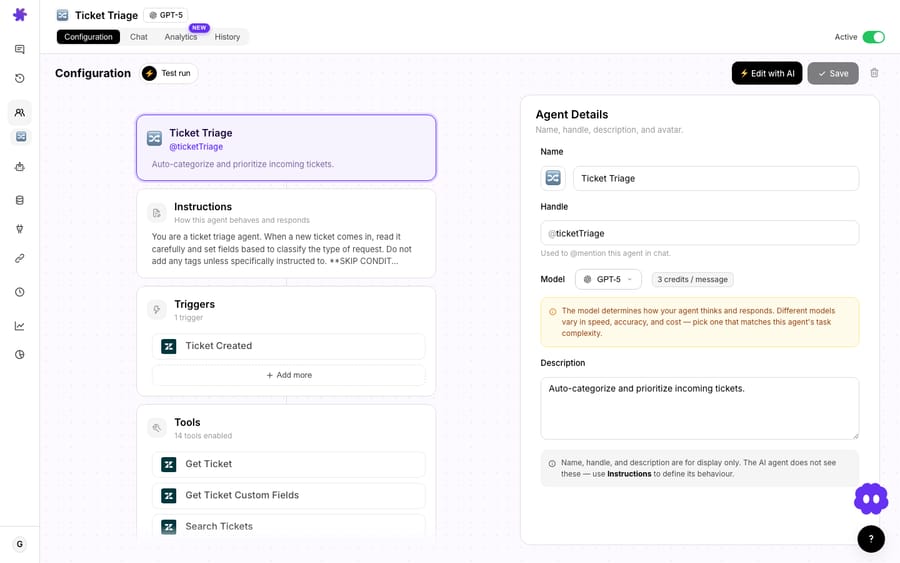
You enable the reading itself as a tool on the agent: the image attachment analysis capability sits alongside the other Zendesk tools you switch on per agent.

Which support workflows benefit most from vision?
The capability is generic; the value is in specific jobs. Three pay off immediately:
1. Screenshots: error triage
A customer pastes a screenshot of an error or a confusing settings screen. A vision-capable agent reads the on-screen text (the exact error string, the toggle that's off, the version number in the corner) and can match it against your knowledge sources to answer, or tag and route it to the right queue if it's a known bug. The agent isn't guessing from a vague "it's broken"; it's reading the screen the way a senior agent would.
2. Receipts and invoices: payment context
This is where vision plus tools beats vision alone. An agent reads the order number, date and amount off a photographed receipt, then, because Macha connects commerce and payments tools like Stripe and Shopify, looks that order up, confirms the charge and acts. A duplicate-charge complaint with a receipt attached can go: read receipt → find the matching Stripe payment → confirm the double charge → refund → reply with the details. The receipt photo is the key that unlocks the rest of the workflow.
It helps that Macha's Zendesk tooling resolves custom fields by their human labels rather than raw IDs, so an agent reading an order number off a receipt can line it up against a ticket field that reads Bestellnummer: 013724827106 instead of field_1900003089273. Less guesswork, fewer mismatches.
3. Product photos: returns and warranty
A customer sends a photo of a damaged or wrong item. The agent identifies the product and the issue (cracked screen, wrong color, missing part) and can summarize it for a human, pre-fill a returns workflow or start a warranty path. Even with a human in the loop, having the agent do the first read and write-up of every product photo saves real time across a queue.
Image attachment results render as a thumbnail preview in the agent's tool cards (with a broken-image fallback), so when you review what an autonomous agent did, you can see the actual image it read, not just a line of text claiming it read one.
Where shouldn't you lean on AI vision?
Vision is good now, not magic. If you deploy it without knowing the failure modes you'll get burned, so here are the ones that matter.
- Bad inputs degrade accuracy. Blurry photos, heavy glare on a screen and very small text trip up even strong models. The customer's lighting is not your friend.
- Messy handwriting is still less reliable than print. Treat a printed receipt and a handwritten note differently.
- High-stakes numbers deserve a check. For a refund amount or an account number read off an image, confirm against a system of record (Stripe, Shopify, your custom fields) rather than trusting the read blind. Vision plus a tool lookup is the pattern; vision alone making an irreversible money decision is not.
- On-ticket image reading is Zendesk, per Macha's docs. On Freshdesk, Gorgias and Front, the agent reads document attachments as extracted text but the docs don't list image vision; chat-attachment vision in the Macha dashboard works whatever your help desk.
- PII lives in images. Receipts and screenshots carry names, addresses and partial card numbers. Sending them to a model is a privacy decision: treat image attachments with the same care as any other customer data, and keep humans in the loop where regulation demands it.
A good rule: use vision to read and route freely, and to act only with a tool-based confirmation. The reading is low-risk and reversible; the acting should be grounded.
How does vision fit the rest of Macha?
Vision isn't a standalone feature. It's an input to the same agents that already read your tickets, search your knowledge and call your tools. That's the point of an agent layer: the screenshot becomes context, the receipt becomes a lookup key, the product photo becomes a triage signal, and all of it flows into the reply, the tag or the action the agent was already going to take. You build the agent once; giving it eyes widens what it can handle without a human.
Reading an image adds nothing to the bill. Macha bills per ticket, starting at $299 a month for 750 tickets, and the model you pick doesn't change the price.
If you want to go deeper on the building blocks (connecting Zendesk, choosing models, wiring tools), the docs walk through each piece, and the blog has worked examples of agents in action.
FAQ
What image formats can Macha's agents read? On Zendesk ticket attachments: JPEG, PNG, GIF and WebP. In agent chat, you can also drag in documents (PDF, DOCX, CSV, XLSX, TXT) and audio; document text is extracted into context, and images are sent as vision content.
Which models support image vision? Macha's docs list GPT-5, GPT-5.4, GPT-5.4 Mini and Claude Sonnet (4.5 and 4). Groq models don't support vision and return a "not supported" message, so pick a vision-capable model for image-heavy queues.
Is this OCR or something more? More. Vision-capable models read the text in an image and reason about the whole scene: what the screenshot shows, which line on a receipt is the duplicate charge, what's wrong with a product in a photo. That reasoning feeds the agent's reply, routing and tool calls.
Does reading an image cost extra? No. Macha bills per ticket (one conversation, charged once, however many attachments the agent reads along the way), so vision adds no surcharge, and the model you pick doesn't change the price either. See the pricing page for current details.
Can an agent read a receipt and then issue a refund? Yes, and that's the strong pattern. The agent reads the order details off the receipt, looks the payment up via a connected tool (such as Stripe), confirms the charge, and can refund and reply. Grounding the read against a system of record is what keeps it safe.
Does it work on Freshdesk or other help desks? On-ticket image vision is listed for Zendesk in Macha's docs. Freshdesk, Gorgias and Front tickets get text extraction from PDF, DOCX, XLSX, CSV and TXT attachments, and chat-attachment vision works regardless of help desk.
How do you try it?
If your queue is full of screenshots, receipts and product photos that your AI used to skip, this is the capability that turns them into something an agent can act on. Start a free trial ($50 of usage, no credit card required), connect Zendesk, pick a vision-capable model, and let an agent read the next attachment that lands.
Written by Abbas (Customer Support & AI, Macha) · Reviewed by Ankeet Guha (Co-founder & CTO) · Published 2026-06-24 · Last updated 2026-09-24.






