





 Shopify
 Stripe
 Slack
Slack Notion
 Google Workspace
 Confluence

How Do You Alert Your Team in Slack When a VIP Customer Submits a Ticket?


A VIP ticket that sits behind forty routine order questions burns goodwill with the customer you can least afford to keep waiting. The fix is a Slack alert that fires only for real VIPs and arrives with their lifetime value and order history already attached.
Key takeaways
- A VIP Slack alert works best when it is gated on a vip tag or a Shopify lifetime value over $2,000, sets the ticket to Urgent, then posts to a channel like #vip-support.
- Zendesk's ticket triggers for Slack accept placeholders, Markdown and @mentions, but they cannot pull Shopify order history or decide to escalate based on spend.
- In the worked example, the Macha agent enriched a ticket with a customer's $4,200 lifetime value across 15 orders before posting the alert to Slack.
- Macha's Zendesk connector sets priority with Update Priority and adds a vip-customer tag with Update Tags, so the help desk and the Slack alert stay in sync.
- Macha bills per ticket however many lookups or messages an agent performs, starting at $299 a month for 750 tickets, about $0.40 each, with setup by the Macha team and a dedicated success manager included.

To alert your team in Slack when a VIP customer submits a ticket, gate an automation on a VIP signal (a vip tag, a VIP organization, or a Shopify lifetime value over a threshold such as $2,000), set the ticket to Urgent in the help desk, and then post a message to a channel like #vip-support. Zendesk's own Slack ticket triggers handle the tag-based version on every Suite plan. An AI agent adds the parts a trigger can't: looking the customer up in Shopify before deciding, and writing lifetime value and order history into the alert.
Most setups stop at a one-line "New ticket #4821", so someone still has to open Zendesk, look up who the customer is and judge the urgency before anyone acts. The three ways to build it compare like this:
| Option | VIP signal it can use | Data in the Slack message | What you maintain |
|---|---|---|---|
| Zendesk ticket trigger for Slack | Tags, organization, fields inside Zendesk | Zendesk placeholders, Markdown, @mentions | One trigger |
| n8n (or similar) workflow | Anything you can call over HTTP | Whatever you build | A webhook pipeline and its nodes |
| Macha agent on your help desk | Tags, fields, or Shopify/Stripe spend | Lifetime value, order count, a one-line summary | Nothing yourself: the Macha team sets it up, and a dedicated success manager handles changes |
The rest of this page builds the third version with Macha on top of the help desk you already run: an alert that fires only for high-value customers, arrives enriched with their lifetime value and order history, and lands in Slack after the ticket is already bumped to Urgent.
What should a VIP Slack alert include?
Before the mechanics, here's the target. A genuinely useful VIP alert answers four questions in the time it takes to glance at Slack:
- Is this actually a VIP? Not "a ticket came in", but this specific customer is worth dropping what you're doing for.
- Who are they, in numbers? Lifetime value, order count, tenure. Enough to calibrate the response without opening another tab.
- What do they want? A one-line read of the ticket, not just a subject line.
- What's already been done? Priority set, tags applied, so the alert is a heads-up, not a to-do list.
Native helpdesk-to-Slack integrations get you partway. Zendesk's own Slack integration can post a notification to a channel from a ticket trigger, on Suite Team, Growth, Professional, Enterprise and Enterprise Plus and on Support Team, Professional and Enterprise (Zendesk help). You can scope it to a VIP tag or organization, and the header and body accept static text, Zendesk placeholders, Markdown and @mentions. What it can't do is reach outside Zendesk: no Shopify order history, no lifetime value, no spend-based decision (Geckoboard's guide walks through the same limits). You can get richer cards by building an n8n workflow with a webhook and a few HTTP nodes, but then you own a pipeline to maintain. Macha sits in the middle: richer than the native trigger, without a workflow engine to babysit.
Does Macha replace your help desk?
Quick clarification, because it changes how you read everything below. Macha is not a helpdesk. It's an AI agent layer that runs on top of the help desk you already use: Zendesk, Freshdesk, Gorgias, Front, HubSpot or Intercom. Your tickets, agents, SLAs, and reports stay exactly where they are. Macha connects to that helpdesk plus your commerce and comms tools (Shopify, Slack, Stripe) and runs agents that react to ticket events and take real actions through those tools.
So the VIP alert isn't a new inbox. It's an agent that watches your existing Zendesk, recognizes a VIP, enriches the ticket from Shopify, updates it, and posts to Slack, all without you leaving the helpdesk your team already lives in.

How does the VIP alert workflow run, step by step?
Here's the exact path this agent runs, mapped to the real actions each connector exposes.
| Step | Tool | What happens |
|---|---|---|
| Trigger | Zendesk | A ticket is created and the VIP condition matches |
| Read | Zendesk Get Ticket | Pull the full ticket: subject, message, requester, custom fields |
| Enrich | Shopify Lookup Customer + Search Orders | Look up lifetime spend, order count, tenure |
| Escalate | Zendesk Update Priority + Update Tags | Set priority → Urgent, add a vip-customer tag |
| Alert | Slack Send Message | Post a context-rich card to #vip-support |
Five steps, three connectors, one trigger. The Zendesk actions are the connector's own: Update Priority sets urgent, high, normal or low, and Update Tags adds tags without overwriting the ones already there. Let's build each part.
1. The trigger: fire only on VIP tickets
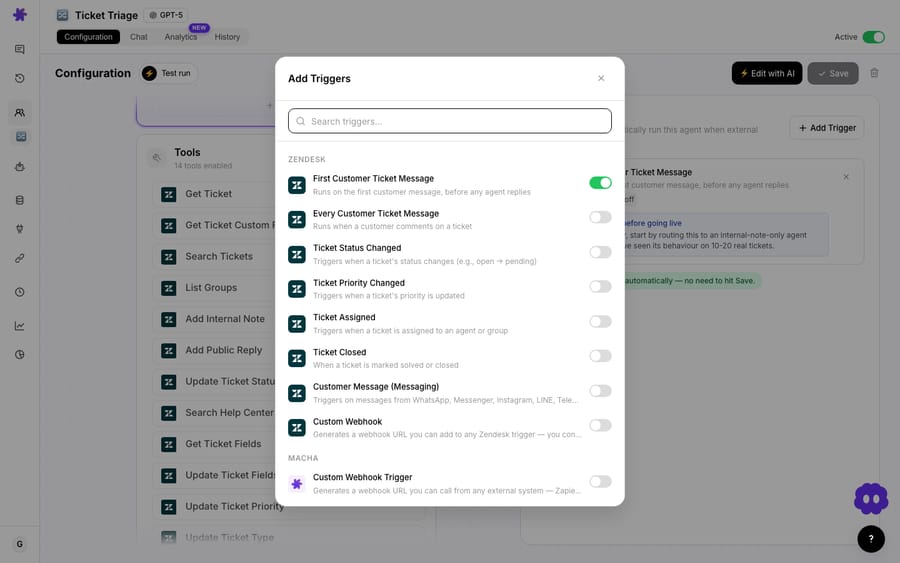
Macha's Zendesk connector exposes a New Ticket trigger that fires on the first customer message, before any agent replies, which is exactly the moment you want the alert. You add that trigger to the agent and gate it on a VIP condition. If you'd rather let Zendesk do the filtering, the Custom Webhook trigger gives you a URL to attach to a Zendesk trigger, so only tickets matching your Zendesk conditions (say, tag contains vip) ever reach the agent.
How you define "VIP" depends on what you already track, and you have options:
- A Zendesk tag. If VIP accounts already carry a
viptag (or sit in a VIP organization), gate on that. This is the most common setup and matches how most teams already segment. - A custom field. An "Account Tier" field set to
EnterpriseorVIP. - A spend threshold from Shopify. Let the agent look up the customer first and only escalate if lifetime value clears a bar you set (e.g. over $2,000). This catches high-value customers who were never manually tagged, the ones a tag-only rule quietly misses.
That last option is the one a plain Zendesk trigger can't do on its own: it requires reaching into Shopify before deciding whether to alert. That's the difference an agent makes.
2. Read and enrich: turn a name into a number
Once the trigger fires, the agent calls Zendesk Get Ticket to read the full conversation, then hops to Shopify. Lookup Customer returns the customer profile; Search Orders confirms lifetime spend and order count. Now the agent knows it's not just "Rachel Torres opened a ticket" but "Rachel Torres, $4,200 lifetime, 15 orders, customer since 2023, and she's never complained before."
That enrichment is the whole point. A first responder reading the Slack alert can calibrate their tone and urgency immediately, because the alert did the lookup work for them.

3. Escalate in the helpdesk, then alert in Slack
Before it pings anyone, the agent uses Zendesk Update Priority to set the priority to Urgent and Update Tags to apply a vip-customer tag. This matters: it means your existing SLAs, views, and routing rules immediately treat the ticket as what it is. The Slack alert and the helpdesk state stay in sync: nobody has to manually re-prioritize after seeing the ping.
Then Slack Send Message posts to your #vip-support channel. Because the agent assembled the message, it can be genuinely useful instead of a bare ticket number:
🚨 VIP Ticket Alert • Customer: Rachel Torres • Lifetime value: $4,200 (15 orders) • Ticket: "Missing item in my latest order" • Priority: Urgent · tagged vip-customer Customer since 2023, no prior complaints.
You can shape this however your team works: @mention the on-call lead, link straight back to the ticket, drop the order numbers in question, or reply in a thread for follow-ups (the Slack connector also exposes Reply in Thread). The native Zendesk-to-Slack trigger can fill a template with Zendesk placeholders, but it can't add Shopify data or a summary written from the ticket. Here, the message is the agent's output.
What happens when three tickets land at once?
Say the threshold is "lifetime value over $2,000 or carries the vip tag." Three tickets land in the same minute:
- Ticket A: tagged
vip, "Missing item in my latest order." Agent enriches ($4,200 LTV, 15 orders), sets Urgent, posts to#vip-support. The team sees it in seconds. - Ticket B: untagged, but the customer's Shopify lifetime value is $3,800. The agent catches it on the spend rule even though nobody tagged them, and escalates. A tag-only Zendesk trigger would have let this one sit in the queue.
- Ticket C: untagged, $90 lifetime, routine question. No alert. It flows into the normal queue untouched, so
#vip-supportstays signal, not noise.
That third case is as important as the first two. An alert channel only works if it's quiet by default. The moment it cries wolf, people mute it.
When is a native Slack trigger enough, and what are the watch-outs?
This isn't free or magic. A few things to weigh:
- Every ticket the agent touches is a billable ticket. Macha bills per ticket: one conversation, charged once however many lookups, writes and messages the agent gets through. The plan starts at $299 a month for up to 750 tickets. If your "VIP" criteria are loose and most tickets qualify, you're paying to enrich a lot of tickets. Scope the trigger tightly.
- If you have very few VIPs and they're already obvious, a plain Zendesk Slack trigger on a
viptag may be all you need: no enrichment, no extra cost, a ping with the ticket's own fields. Use the simplest thing that works; reach for an agent when you want the context and the spend-based catch, not just the notification. - Garbage in, garbage out. The spend-threshold rule is only as good as your Shopify data. If customers check out as guests or use different emails, the lookup can miss them. Tags remain the reliable backstop.
- Slack alerts are a nudge, not a system of record. Keep the priority and tagging happening in Zendesk (as this agent does) so the ticket is correctly handled even if someone misses the Slack message.
Used with discipline (tight VIP criteria, a quiet channel, enrichment that saves a lookup), it's one of the most useful agents you can build. It's a small piece of automation guarding your most valuable relationships.
Can you adapt it to Stripe, another help desk or another channel?
Nothing here is Shopify- or Slack-specific in spirit:
- On Stripe instead of Shopify? Swap the enrichment step to Stripe's Get Customer and List Payments actions to total a customer's revenue.
- On another help desk? Macha also runs on Zendesk, Freshdesk, Gorgias, Front, HubSpot or Intercom, and the trigger and ticket-update steps map across.
- Want a second alert channel? Add an email or a Slack DM to the account's CSM alongside the channel post.
- Want the agent to draft a reply too? Hand it your knowledge sources and it can post a suggested first response into the ticket while it alerts the team.
See the full set of Macha use cases for more agents that build on the same pattern, or the Macha-on-Zendesk overview for how the layer sits on your existing setup.
FAQ
How does Macha know a customer is a VIP? However you already define it: a Zendesk tag, a VIP organization, a custom "Account Tier" field, or a lifetime-spend threshold the agent checks in Shopify or Stripe before deciding to alert. You can combine them (e.g. "tagged vip OR over $2,000 lifetime").
How is this different from the native Zendesk Slack integration? The native integration posts a notification from a ticket trigger to a channel, built from static text, Zendesk placeholders, Markdown and @mentions. That's useful, but it can't enrich the message with order history or lifetime value from Shopify, and it can't make a spend-based escalation decision. Macha's agent reads the ticket, looks up the customer in your commerce tool, sets the priority in Zendesk, and composes a context-rich Slack message itself.
Does it change the ticket in my helpdesk? Yes, by design. It sets the priority to Urgent with Zendesk Update Priority and applies a vip-customer tag with Update Tags, so your existing SLAs and views treat it correctly. The Slack alert and the helpdesk stay in sync.
Can I do this without Macha? Yes, for tag-based alerts. Create a Zendesk ticket trigger for Slack with a condition such as "Tags contains vip", set priority in the same trigger, and write the message with placeholders. You only need an agent or a workflow tool when the VIP decision depends on data outside Zendesk, such as Shopify spend.
Will it spam our Slack channel? Only if your VIP criteria are too broad. Scope the trigger to a real VIP segment and routine tickets never fire an alert, and the channel stays signal.
What does it cost? Macha bills per ticket: one conversation, charged once, however many steps the agent takes to finish it. Pricing starts at $299 a month for 750 tickets, about $0.40 each. That includes setup: the Macha team builds the agent, connects Shopify and Slack, and tests it on your past tickets, on the trial and every plan. It also includes a dedicated success manager who handles your changes afterwards, such as a new VIP rule, instruction changes or new tools. There are no per-message or per-resolution fees. See the pricing page for current plans, or start a free trial ($50 of usage, no credit card required).
How do you get started?
If your most valuable customers are waiting in the same queue as everyone else, this is a fast win. Connect Zendesk, Shopify, and Slack, point a VIP-alert agent at your queue, and the next time a high-value customer writes in, the right people will know in seconds, with the context already attached. Start a free trial ($50 of usage, no credit card required) or read the docs for the full walkthrough.
Written by Abbas (Customer Support & AI, Macha) · Reviewed by Ankeet Guha (Co-founder & CTO) · Published 2026-06-24 · Last updated 2026-09-24.






