





 Shopify
 Stripe
 Slack
Slack Notion
 Google Workspace
 Confluence

How Do You Alert Your Team When a VIP Customer Submits a Ticket?


A high-value customer's ticket usually lands in the same queue as password resets and shipping questions, and waits its turn. A VIP alert gets the right people onto it within minutes, with the customer's value already attached.
Key takeaways
- A Macha agent on Zendesk's Ticket Created trigger can pull Shopify lifetime value and order count, set the ticket to Urgent, tag it vip-customer, and post to Slack.
- Zendesk's native Slack integration sends trigger notifications with Markdown and placeholders at no extra cost, but it can only show data already on the ticket.
- In the worked example, the agent flagged a customer with $4,200 lifetime value across 15 orders and posted the alert to #vip-support.
- A sample Macha instruction treats a customer as a VIP when Shopify lifetime value is above $1,000 or the ticket already carries a VIP tag.
- A full VIP alert run with two Shopify calls, two Zendesk updates and a Slack post counts as one ticket, about $0.40 on the $299 plan, with setup by the Macha team and a dedicated success manager included.

To alert your team the moment a VIP customer submits a ticket, run an agent on Zendesk's Ticket Created trigger that looks up the customer's Shopify lifetime value, sets the ticket to Urgent, tags it vip-customer and posts the context to a Slack channel such as #vip-support. If your VIPs are already tagged in Zendesk and you only need a ping, Zendesk's own Slack integration does it for free.
| Native Zendesk Slack trigger | Macha VIP agent | |
|---|---|---|
| Cost | Included with Zendesk Team plans and up | One billed ticket per run, about $0.40 on the $299 plan, setup and a dedicated success manager included |
| How VIP is decided | A condition on ticket data (tag, organization, field) | Ticket data plus Shopify lifetime value and order history |
| Message content | Header and body from static text, placeholders and Markdown | Composed by the agent from what it read |
| Writes back to the ticket | Separate trigger actions | Sets priority and tags in the same run |
A VIP customer ticket alert fixes the timing problem: the instant a high-value customer writes in, the right people know, with the context they need to respond well. The trick is that "knowing" should mean more than a plain-text ping. The team shouldn't have to open the ticket, cross-reference the email in Shopify, and guess at the account's worth before they decide how hard to jump. That work should already be done by the time the alert lands.
This is a workflow Macha runs as an AI agent on top of the helpdesk you already use: Zendesk, Freshdesk, Gorgias, Front, HubSpot or Intercom. Macha doesn't replace your helpdesk; it sits on top of it, watches for the tickets that matter, enriches them from your commerce and billing tools, and posts a context bundle to Slack. The build below uses Zendesk; the same pattern works on the other help desks with their own ticket-created triggers.
What does the VIP alert workflow do?
The full path, end to end, looks like this:
- Trigger: a ticket is created in Zendesk, and the customer carries a VIP signal (a tag, an organization tier, a custom field, or, because this is an AI agent, a judgment call from the order history itself).
- Enrich: Macha calls Shopify to pull the customer's lifetime value and order count, and grabs the latest order if the ticket references one.
- Prioritize: Macha writes back to the ticket: sets priority to Urgent and adds a
vip-customertag so your existing views, SLAs, and reporting all light up correctly. - Alert: Macha posts a formatted message to
#vip-supportwith the customer's name, lifetime value, the ticket subject, and the priority: everything an agent needs to act before they've even clicked in.
Here's the shape of the Slack alert it produces:
🚨 VIP Ticket Alert • Customer: Rachel Torres • Lifetime value: $4,200 (15 orders) • Ticket: "Missing item in my latest order" • Priority: Urgent This customer has been with us since 2023 and has never had a complaint before.
That last line is the part a native Slack trigger can't write. It comes from an AI agent that read the ticket and the order history, not a template that string-substitutes a few fields.
Why not just use a native Zendesk trigger?
Fair question, and for some teams the native route is genuinely the right call. Zendesk's built-in Slack integration lets you create a trigger with conditions like Ticket is Created AND Priority is Urgent, add the Notify Zendesk integration action, choose your Slack integration and a channel, and write a notification header and body from static text and placeholders (Zendesk's trigger guide, checked 24 September 2026). It's included on Suite Team and Support Team plans and up, it's instant, and it's zero-code. If all you need is "post urgent tickets to a channel," start there.
But native triggers hit three walls that matter for VIP handling specifically:
- They can't enrich. A trigger only knows what's already on the ticket. It can't reach into Shopify to confirm this person has spent $4,200 across 15 orders, so the "VIP" decision has to be pre-baked into a tag someone remembered to apply.
- The message can only show ticket data. Native notifications support Markdown, mentions and Zendesk placeholders, so they can look good. But every value comes from the ticket itself, so lifetime value and order count can't appear unless someone already copied them onto the ticket.
- They can't reason. "Is this actually a VIP?" is often a judgment, not a flag. An order history that crossed a spend threshold last week, a long-tenured account, a first-ever complaint from a loyal buyer: a static condition misses all of it.
Macha's agent closes those gaps because it's a model with tools, not a rules engine. Independent guides covering Zendesk urgent ticket alerts to Slack reach the same conclusion: native triggers are great for the simple case and start to creak the moment you want enrichment or conditional logic.
How do you build the VIP alert in Macha?
1. Connect Zendesk, Shopify, and Slack
The workflow spans three tools, so connect all three under Connectors. Zendesk is the source of tickets, Shopify is where the customer value lives, and Slack is where the alert goes.

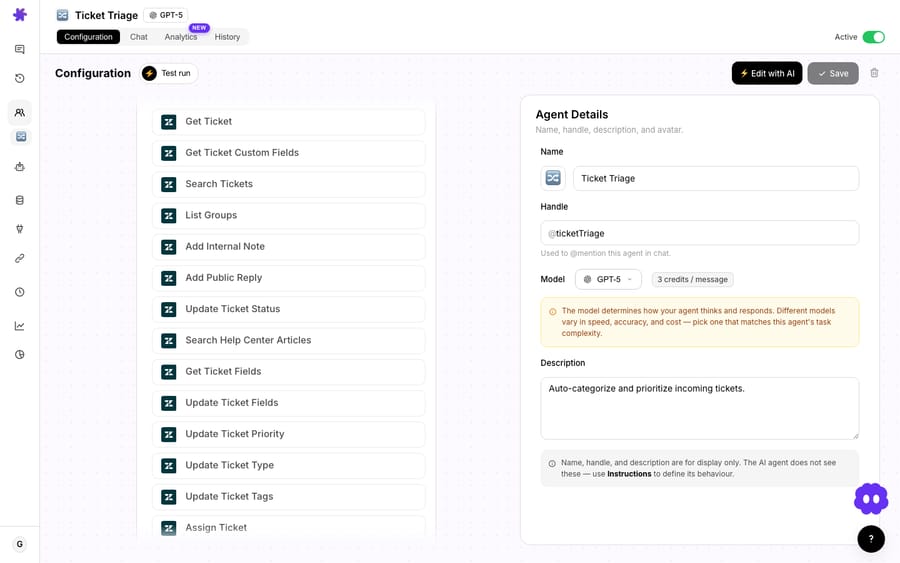
Each connector exposes a focused set of actions to the agent: Zendesk surfaces Get Ticket, Update Priority, Update Tags, and Add Internal Note; Shopify surfaces Lookup Customer and Search Orders; Slack surfaces Send Message. You're not wiring fields together by hand; you're giving an agent the tools and the instructions, and letting it decide which to call.
2. Set the trigger to "Ticket Created"
Create an agent and add a trigger. In the trigger picker, choose Ticket Created so the agent runs the moment a new Zendesk ticket lands.
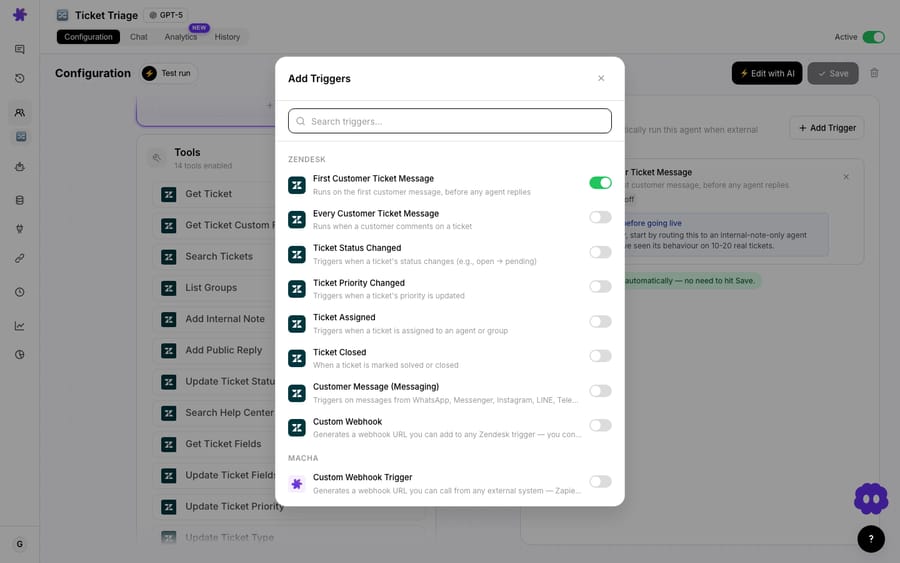
You can keep the trigger broad and let the agent's instructions decide what counts as a VIP, or narrow it with a Zendesk condition (a tag, an organization, a custom field) so the agent only wakes for likely-VIP tickets and you spend nothing on the rest. For high-volume queues, the conditional approach keeps the billed ticket count lean.
3. Give the agent its instructions and tools
This is where Macha differs from a flow builder: you describe the job in plain language, enable the tools the agent is allowed to use, and the model orchestrates the steps.
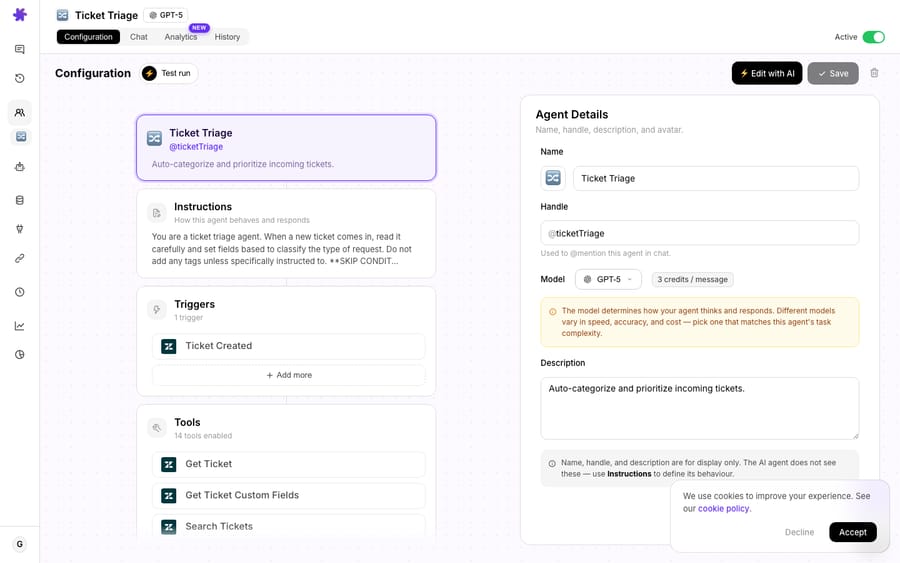
Instructions for this agent read roughly like:
When a ticket is created, look up the customer in Shopify. If their lifetime value is above $1,000 or they carry a VIP tag, set the ticket priority to Urgent, add the tagvip-customer, and post an alert to#vip-supportwith the customer's name, lifetime value, order count, the ticket subject, and a one-line note on their history. If they're not a VIP, do nothing.
The write-back actions, Update Ticket Priority and Update Ticket Tags, are right there in the Zendesk toolset, so the agent changes the ticket itself, not just a notification about it.
4. Post the alert
Finally, the Slack Send Message action delivers the bundle to your VIP channel. Because the agent composes the message, you control tone and contents through instructions: add the assigned group, a deep link to the ticket, or a "respond within 30 minutes" reminder. Many teams point this at a dedicated channel like #vip-support so VIP signal never gets buried under general ops chatter.
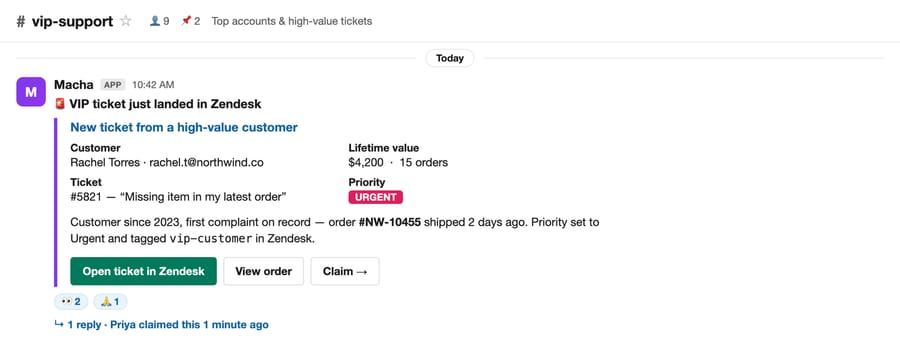
The whole bundle is composed by the agent, so every field (lifetime value, order count, the history note, even the action buttons) reflects what it actually read and decided. A native trigger can post a link; only an agent with tools can post this.
What does a VIP alert cost?
Macha bills per ticket, not per alert or per action, one conversation, charged once, however much reasoning and however many tool calls the run takes. A model that reads a ticket, makes two Shopify calls, writes two Zendesk updates, and posts to Slack costs exactly what a one-line reply costs: one ticket, about $0.40 on the $299-a-month, 750-ticket tier. The single biggest lever on cost here is the trigger condition: scope it so the agent only runs on plausibly-VIP tickets and you're not paying to evaluate every password reset. Setup is done for you on the trial and every plan: the Macha team builds the agent, connects Shopify and Slack, and tests it on your tickets, and the price includes a dedicated success manager who handles your changes afterwards, such as a new VIP rule, instruction changes or new tools. You can start on a free trial ($50 of usage, about 125 tickets, no credit card and no time limit) and watch real usage on your own queue before committing. See the pricing page for current plans.
When should you not use a VIP alert agent?
No workflow is free of trade-offs. A few honest ones:
- "VIP" has to mean something. If your lifetime-value threshold is too low, the alert channel becomes noise and the team learns to ignore it, which defeats the purpose. Tune the bar to the top slice of accounts you'd genuinely treat differently, and revisit it as you grow.
- Alert fatigue is real. One channel, a clear threshold, and a "respond within X" norm beat a firehose. If you find yourself muting
#vip-support, the threshold is wrong, not the workflow. - If you have no commerce data, skip the enrichment. The standout feature here is pulling Shopify LTV. If your "VIP" definition is purely a Zendesk tag or organization tier and you don't need order context, a native Zendesk Slack trigger may do the job for free, and you should use it. Macha earns its keep when you want enrichment, judgment, or write-back, not when a static rule already covers you.
- An alert is not a resolution. This workflow gets the right humans there fast with context; it does not answer the ticket. Pair it with auto-triage and routing if you also want first-line resolution.
Which related workflows pair with VIP alerts?
If this fits, these neighboring use cases usually do too:
- Relay urgent tickets to Slack: the broader "get this in front of someone now" pattern.
- Escalate tickets with a full context bundle: the same enrichment idea, applied to escalations rather than VIP detection.
- Look up order details mid-conversation: the Shopify lookup, used live in a reply instead of an alert.
For the Zendesk-specific build, the Macha on Zendesk page walks through how agents read and write tickets in your existing instance.
FAQ
How does Macha know a customer is a VIP? Three ways, in increasing sophistication: an existing Zendesk tag or organization tier, a custom field, or, uniquely, by reading the customer's Shopify order history at runtime and applying a threshold you set in the agent's instructions. The last option catches customers who became VIPs without anyone updating a tag.
Does this replace my Zendesk triggers and SLAs? No. Macha writes priority and tags back to the ticket, so your existing Zendesk views, SLAs, and reporting keep working exactly as they do today, the agent feeds them better, faster signal.
Can it post somewhere other than Slack? Yes. Slack is the common choice, but the same agent can add an internal note to the ticket, notify a specific group, or (with the right connector) reach other channels. Slack's Send Message and Reply in Thread actions cover most VIP-alert setups.
What if the customer isn't in Shopify? The agent handles the miss gracefully: you instruct it to fall back to whatever's on the ticket (organization, tags, prior tickets) and still post the alert, just without the lifetime-value line.
Is this better than the native Zendesk → Slack integration? For plain "post urgent tickets to a channel," the native integration is included in your Zendesk plan and works fine, with Markdown and placeholders for formatting. Macha is better when you want the alert enriched with order/lifetime-value data, conditional on AI judgment rather than a static flag, and able to write back to the ticket. Choose based on whether you need enrichment and reasoning: if you don't, use the free option.
How do you try it on your own queue?
The fastest way to feel the difference is to point it at your own queue. Start a free trial ($50 of usage, no credit card required), connect Zendesk, Shopify, and Slack, and build the agent in a few minutes, or read the docs for the full walkthrough. The first time a five-figure customer's ticket lands in #vip-support with their lifetime value already attached, the workflow has paid for itself.
Written by Abbas (Customer Support & AI, Macha) · Reviewed by Ankeet Guha (Co-founder & CTO) · Published 2026-06-24 · Last updated 2026-09-24.






