





 Shopify
 Stripe
 Slack
Slack Notion
 Google Workspace
 Confluence

How Do You Turn Resolved Tickets Into Runbooks Automatically?


Hard tickets get solved, closed and forgotten, so the next agent who meets the same issue starts from zero. A Macha agent can write the runbook for you the moment the ticket closes, straight into Confluence.
Key takeaways
- A Macha agent turns a solved Zendesk ticket into a Confluence runbook with four sections: Problem, Root cause, Solution and Prevention, using Get Ticket, Search Pages and Create Page.
- The runbook agent fires on Zendesk's Ticket Closed event and runs Confluence Search Pages before writing, so an existing runbook is not duplicated.
- Supportbench's runbook guidance suggests starting with the top 20 ticket categories by volume, so scope the trigger with a tag such as needs-runbook or an escalation group.
- Every Confluence write in this Macha workflow, including Create Page and Update Page, requires confirmation, so the connector never silently creates or overwrites a wiki page.
- A full runbook job, from reading the ticket to writing the Confluence page, counts as one ticket, about $0.40 on Macha's $299-a-month plan for 750 tickets.

To turn resolved tickets into runbooks automatically, attach a Macha agent to Zendesk's Ticket Closed event and give it three tools: Zendesk Get Ticket, Confluence Search Pages and Confluence Create Page. The agent reads the solved conversation, checks Confluence for an existing runbook, and writes a new page with four sections (Problem, Root cause, Solution, Prevention) only if none exists.
Teams know they should write runbooks. They rarely do, because writing the runbook takes longer than resolving the ticket did, and once the ticket is solved nobody has a reason to document it. An agent removes that step: no screen recording and no "remember to write it up later". This is one of Macha's knowledge-management use cases, and it runs on connectors most support teams already have: Zendesk and Confluence.
What does the runbook agent do with each solved ticket?
Macha is not a wiki and not a helpdesk — it's an AI agent layer that sits on top of the tools you already run and takes real actions in them. For this workflow, the agent does four things every time a ticket is solved:
- Reads the resolved ticket — the full comment thread, tags, and custom fields, not just the subject line.
- Extracts the runbook — distils the conversation into Problem, Root cause, Solution, and Prevention.
- Checks for duplicates — searches your Confluence space so you don't end up with five pages on the same SSO bug.
- Writes the page — creates a structured runbook in your chosen space, with confirmation before any write.
Here's the worked shape of it, taken straight from the use-case definition:
| Step | Tool | What happens |
|---|---|---|
| Trigger | Zendesk | Ticket is marked solved/closed with a technical resolution |
| Get ticket details | Zendesk · Get Ticket | Pulls ticket #4821 — "SSO login failing for new users" — and its 6 comments |
| Search for existing docs | Confluence · Search Pages | Checks for a runbook on "SSO login failing" — none found |
| Create the runbook | Confluence · Create Page | Writes "Runbook: SSO Login Failing for New Users" to the Support Runbooks space |
And the agent's own summary of that run, posted back so the team can see what it did:
Runbook: SSO Login Failing for New Users - Problem: New users get "Invalid SAML response" when attempting SSO login - Root cause: IdP attribute mapping is missing the department field required by our SAML config - Solution: Add the department attribute mapping in the IdP admin panel, then have the user retry - Prevention: Added department to the SSO setup checklist
That's the difference between a tool that can document and a system that does — turning a one-off fix into searchable institutional memory without anyone deciding to.
How do you build a runbook agent in Macha?
The whole thing is one agent with a trigger and two connectors. You don't write code.
1. Connect Zendesk and Confluence
Both are live connectors. Zendesk gives the agent read access to tickets — full conversation history, tags, brand, requester info, and custom fields with labels resolved. Confluence gives it search and page-creation tools. Critically, every Confluence write requires confirmation by design — the connector will not silently create or overwrite a page, which matters a lot when you're letting an agent author into your team's wiki.
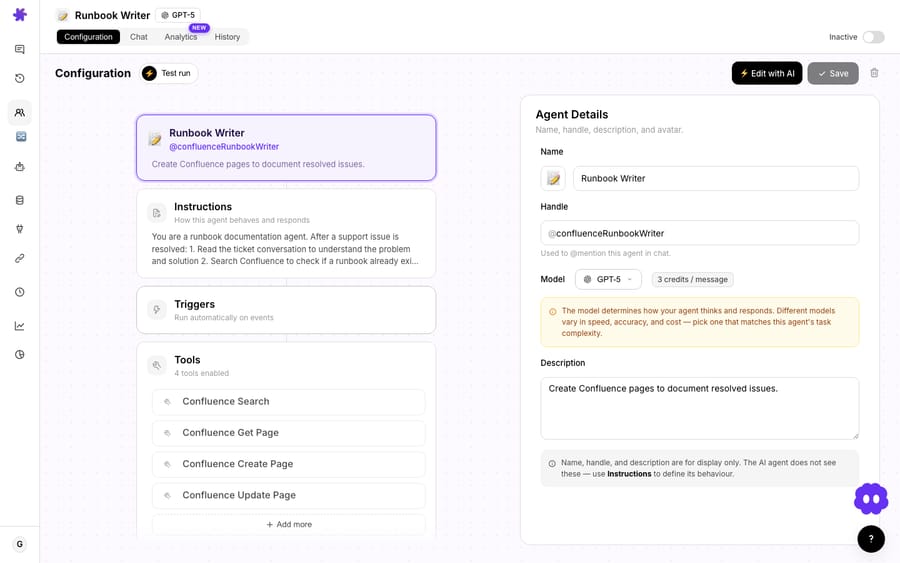
2. Set the trigger to fire on resolution
The point of this workflow is that no one has to remember it. So instead of running the agent by hand, you attach a Zendesk trigger. The relevant event is Ticket Closed, which fires when a ticket is marked solved or closed — exactly the moment the knowledge is freshest and the conversation is complete.
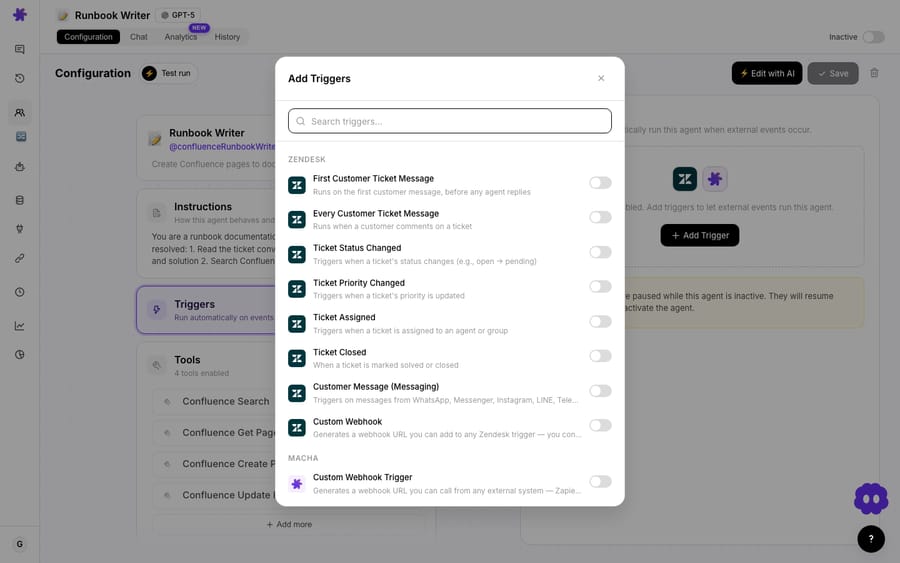
You'll want to narrow it. Firing on every closed ticket is noise — most tickets ("where's my order?") don't deserve a runbook. Scope it with a condition so the agent only runs on tickets worth documenting: a specific tag (needs-runbook, applied by the resolving agent), a group (Tier 2 / Engineering Escalations), or a ticket type. Supportbench's runbook-library guidance suggests starting with your top 20 ticket categories by volume, where a single runbook pays for itself fastest.
3. Give the agent its tools and instructions
The agent needs three actions: Zendesk Get Ticket, Confluence Search Pages, and Confluence Create Page. You pick those in the tool picker, then write the instructions in plain language.
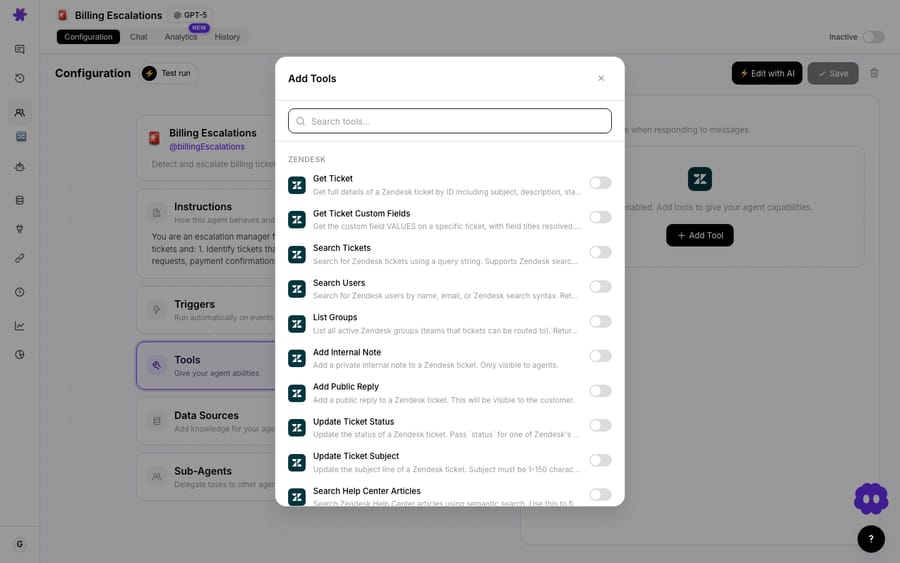
The instructions are where the runbook quality lives. A good prompt tells the agent the template (so every runbook looks the same), the dedup rule (search before you write; if a close match exists, update it or skip rather than duplicate), and the destination space. Something like:
When a ticket is solved, read the full conversation. Summarise it as a runbook with these exact sections: Problem, Root cause, Solution, Prevention. Before creating anything, search the "Support Runbooks" space for an existing page on the same issue. If a close match exists, do not create a duplicate. Otherwise, create a new page titled "Runbook: [issue]" in the Support Runbooks space.
That standardized template is doing real work. As the Supportbench team puts it, "a runbook is only as good as its structure — without a consistent template, runbooks become scattered notes" no one trusts during the next incident. Telling the agent the headers up front is how you get a library instead of a junk drawer.
How does this compare with other auto-runbook tools?
This is a busy category, and the tools in it solve the problem from very different angles. It's worth being honest about where Macha fits.
- Screen-recording tools (e.g. Glitter AI) capture the fix as you perform it. The technician records the screen and talks through it, and the tool turns the recording into a step-by-step guide with screenshots. One customer quoted on Glitter's site made a guide in about 5 minutes against 30 by hand. Guides export as PDF, HTML or Markdown, or embed in tools such as Confluence and Notion. That suits click-by-click procedures. It still needs a person to remember to record, and it documents the clicks, not the reasoning in the ticket thread. Macha needs neither a recording nor a person: it reads the conversation that already happened.
- Helpdesk-native AI (e.g. Supportbench's KB-from-case-history) drafts an article when a resolved case reveals a gap. Closest in spirit to this workflow, but locked to that one helpdesk.
- Incident/SRE platforms (incident.io, Cutover, HCL BigFix Runbook AI) build and execute operational runbooks from incident data. Powerful for on-call engineering, overkill for a support team that just wants its resolved tickets written down.
Macha's niche is specific: autonomous, conversation-driven documentation that writes into the wiki you already use, triggered by your existing helpdesk, with the dedup check built into the same agent. It's not trying to replace Confluence or Zendesk — it's the layer that finally makes the runbook get written.
When should you not auto-document tickets?
Automation that authors into your knowledge base deserves a few guardrails. Be honest about these before you switch it on for the whole queue:
- Don't fire on every closed ticket. Most resolved tickets are routine and don't warrant a doc. Without a tag or group filter you'll flood Confluence and bury the runbooks that matter. Start narrow.
- Garbage in, garbage out. The agent can only document what's in the ticket. If the real fix happened in a side-channel Slack thread and the ticket just says "fixed, closing," the runbook will be thin. This works best where agents actually write their resolution into the ticket.
- Keep the confirmation step honest. Confluence writes require confirmation for a reason. For a fully hands-off flow you can auto-confirm, but for the first few weeks, keep a human approving page creation so you can tune the template and catch hallucinated specifics.
- Dedup is a prompt, not a guarantee. Search-before-write dramatically cuts duplicates, but near-misses (different wording for the same bug) can still slip through. Plan a light periodic cleanup, and consider having the agent update an existing page rather than always creating new ones. The Confluence connector includes an Update Page tool for this, confirmation-gated like Create Page.
- Sensitive data. Resolved tickets contain customer PII. Scope the runbook template so the agent documents the issue and fix, not the customer's personal details — and review your space permissions.
If your team already maintains disciplined, high-quality runbooks by hand, or your "tickets" are mostly low-complexity FAQs, this will add more noise than value. It earns its keep on complex, recurring, technical issues — the ones that cost a senior hour every time they recur.
What does a runbook library built from tickets pay back?
The reason this is worth wiring up isn't any single runbook — it's the loop. Every solved escalation quietly thickens your documentation. New hires onboard against real, recent fixes instead of stale wiki pages. And because Confluence is searchable, the next agent (human or AI) finds the runbook before re-solving the same problem. Over a few months, the issues that used to eat a senior hour each become a thirty-second lookup.
That's the whole pitch for Macha as an agent layer: it doesn't just answer the ticket in front of it — it makes the work it does accumulate. Pair this with Macha's live agents that resolve and triage incoming tickets, and you get a support operation that both handles today's volume and gets measurably smarter about tomorrow's.
FAQ
Does this require recording my screen like some runbook tools? No. Macha reads the resolved ticket's text conversation — the comments, tags, and fields — and writes the runbook from that. There's nothing to record and no plugin to install on agents' machines.
Where do the runbooks get written? To Confluence, in whatever space you specify (e.g. "Support Runbooks"). The agent uses the Confluence Create Page action, and every write is confirmation-gated by default.
How does it avoid creating duplicate pages? Before writing, the agent runs a Confluence Search Pages query for the same issue. You instruct it to skip or update when a close match exists rather than create a new page. It's not perfect, but it removes the bulk of duplicates.
Can I limit it to only certain tickets? Yes — that's recommended. Scope the Zendesk Ticket Closed trigger with a condition like a tag (needs-runbook), a specific group, or a ticket type, so only issues worth documenting trigger the agent.
What does it cost to run? Macha bills per ticket: one conversation, charged once, however many steps the agent takes to finish it. A whole runbook job (read the ticket, search, write the page) is one ticket, about $0.40, so the cost scales with how many tickets you document, not with seats. Pricing is one plan priced by volume: $299 a month for 750 tickets, $599 for 1,500, and up to $3,999 for 10,000, with setup and monitoring by the Macha team included. See the pricing page for every tier.
Does Macha replace Confluence or Zendesk? No. Macha is the AI agent layer on top of the helpdesk and wiki you already use. It reads from Zendesk and writes to Confluence — it doesn't replace either.
Get started
If your team keeps re-solving the same hard tickets, this is the highest-leverage agent you can build. Start a free trial ($50 of usage, about 125 tickets, no credit card and no time limit), connect Zendesk and Confluence, scope a Ticket Closed trigger to your escalation queue, and let your resolved issues document themselves. The full setup is in the Macha docs.
Written by Abbas (Customer Support & AI, Macha) · Reviewed by Ankeet Guha (Co-founder & CTO) · Published 2026-06-24 · Last updated 2026-06-24.






