





 Shopify
 Stripe
 Slack
Slack Notion
 Google Workspace
 Confluence

How Do You Auto-Suggest Knowledge Base Articles in Slack With an AI Agent?


Most support teams have a Slack channel where the same questions come up every week, and the answers already sit in a Help Center article or a Notion page. An AI agent triggered by an @mention can search both and reply in the thread with the answer and its sources.
Key takeaways
- A Macha agent in Slack answers @mentions by searching the Zendesk Help Center and Notion together, then replies in-thread with a synthesized answer and citations to both sources.
- Zendesk's Answer Bot for Slack only fires on questions of at least five words ending in a question mark, and it comes with Suite Growth and higher plans.
- eesel AI sells monthly credit plans from $299 for 500 tickets or chats, while Guru and ClearFeed no longer publish list prices and quote each customer instead.
- Macha bills per ticket regardless of how many searches or replies it takes, starting at $299 a month for 750 tickets, about $0.40 each, with setup by the Macha team and a dedicated success manager included.
- Macha's Zendesk Help Center knowledge source syncs 347 articles live, so editing an article there updates what the Slack agent says without a second copy to maintain.

To auto-suggest knowledge base articles in Slack, connect Slack, Zendesk and Notion to a Macha agent, trigger it on a Slack App Mention, and give it two search tools, Search Help Center Articles and Notion's Search Pages, so it replies in the thread with the answer and links to both sources. Zendesk's own Answer Bot for Slack does a narrower version of this: it suggests Help Center articles only, and only for questions of at least five words that end in a question mark. This is the build we use with Macha, an AI agent layer that sits on top of the helpdesk you already use and answers in Slack from the same Help Center your customers see.
| Piece | What you set up |
|---|---|
| Trigger | Slack App Mention in chosen channels, or DMs |
| Knowledge | Zendesk Help Center (live sync), Notion pages, uploaded files |
| Tools | Search Help Center Articles, Notion Search Pages, Slack reply in thread |
| Output | One in-thread answer with citations to each source used |
| Cost | Billed per ticket, from $299 a month for 750 tickets |
Macha isn't a replacement for Zendesk, Notion, or Slack. It's the agent that reads across all three and writes the answer back into the thread.
What does an AI agent do when someone asks a question in Slack?
The pattern is narrow and useful. When someone asks a question in a Slack channel where the agent lives, the agent:
- Triggers on a Slack App Mention (
@macha …), or you can scope it to a DM. - Searches your knowledge across more than one source: Zendesk Help Center articles, Notion pages, and any documents you've uploaded.
- Replies in-thread with the key takeaways and links back to the source article, so the asker can verify and read more.
Here's the worked example straight from the use case: a teammate types "@macha how do we handle returns for items bought more than 30 days ago?" The agent finds the Return Policy article in Zendesk, finds an Extended Returns: Exceptions page in the Notion wiki, and posts a single reply:
Standard policy: returns within 30 days for full refund. After 30 days: • Defective items: covered under warranty (up to 1 year) • Store credit: available up to 60 days • Exceptions: manager approval needed for 60+ days Sources: Return Policy (Help Center), Extended Returns (Notion)
That's the whole point: one answer, synthesized from two systems, cited. The asker doesn't open two tabs and reconcile them: the agent already did.
Why would a team build a Slack knowledge base bot?
It's worth being honest about what problem this solves, because "AI in Slack" gets oversold. The realistic wins:
- Deflecting repeat questions so your senior people aren't the human search bar for the team. The questions that recur weekly are exactly the ones a documented answer handles well.
- One reply across many sources. Your knowledge is fragmented: Help Center for customer-facing policy, Notion for internal process, Google Docs for the messy middle. A good agent reads all of it and gives one coherent answer instead of three "have you checked the wiki" responses.
- Surfacing knowledge gaps. When the agent can't find an answer, that's a signal: the doc doesn't exist or isn't findable. That's the most valuable output of all: it tells you what to write next.
This is the same problem Zendesk's own Answer Bot for Slack addresses: it listens in configured channels and suggests Help Center articles. It isn't a free standalone app; Zendesk's help article (checked 24 September 2026) lists it for Suite Growth, Professional, Enterprise and Enterprise Plus, or Support Professional and Enterprise. It also can't suggest articles in Slack for questions asked in Chinese, Korean, Japanese or Thai. For a team already on one of those plans it's a reasonable starting point, and worth knowing its limits, because they're exactly where a configurable agent earns its place. Answer Bot only reads your Zendesk Help Center (not your Notion wiki or uploaded docs), it requires the question to be at least five words ending in a question mark to fire, and it stays silent if it can't find an article. A Macha agent triggers on a plain @mention, reads across every knowledge source you've connected, and summarizes the answer rather than dropping a bare link.
How do you build a Slack knowledge base bot in Macha?
There are three connections and one agent. None of it requires code.
1. Connect Slack, Zendesk, and Notion
In the Connectors area you authorize the tools the agent will use. Slack connects over OAuth and gives the agent the actions it needs: Bot mentions (the trigger), Reply in Thread, Send Message, List Channels. Zendesk and Notion connect the same way and bring their own actions.

One thing to get right up front: in Macha, Slack is a communication channel, not a knowledge source. You don't index Slack messages; you use Slack to ask and answer. Your knowledge comes from Zendesk, Notion, and uploads.
2. Sync your knowledge sources
This is the part that makes the answers good. Under Sources, your Zendesk Help Center auto-syncs as a live knowledge source: every published article, kept current. Notion syncs the same way: pages are indexed and re-synced so the agent always reads the latest version, not a stale snapshot. You can also upload PDFs, DOCX, CSVs, or crawl a website.

Because these are live syncs, you edit the article once in Zendesk or Notion and the Slack answers update with it. There's no second copy of your docs to maintain.
3. Build the agent and give it search tools
Create an agent, write a short instruction in plain English, "When someone @mentions you in #support, search the Help Center and the Notion wiki, then reply in the thread with a concise answer and links to the sources you used", and attach the tools it needs. The two that matter here are Search Help Center Articles (Zendesk) and Search Pages (Notion); the reply goes back through Slack's Reply in Thread.
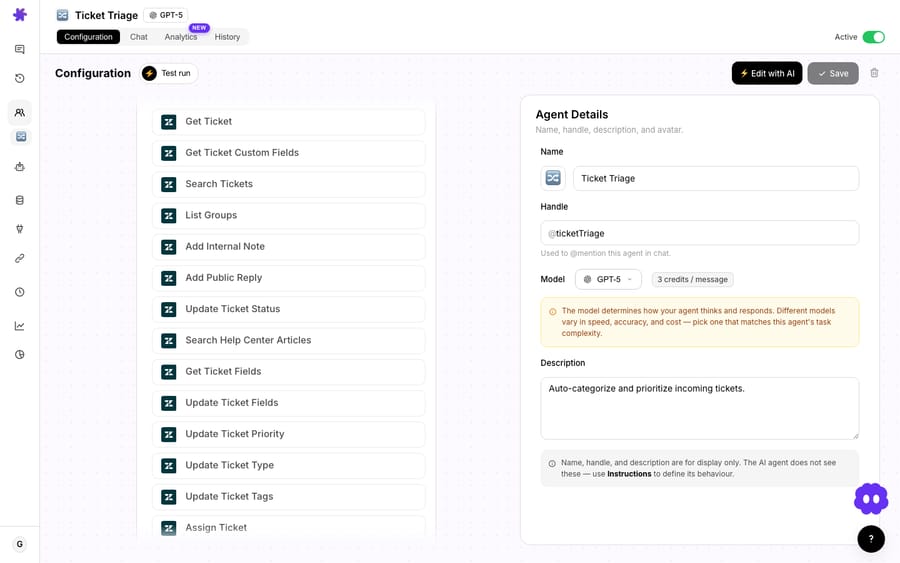
Pick a model to match the job. A retrieval-and-summarize task like this doesn't need your heaviest model: a fast, light one handles "find the article, write three bullet points" well, and it lands the answer in the thread sooner. Model choice doesn't change what you pay: Macha bills per ticket, one conversation, charged once however many searches it takes, whichever model the agent runs on. See pricing for the tiers.
4. Point the trigger at Slack mentions
Finally, add the Slack App Mention trigger and scope it to the channels you want, typically an internal #support or #ask-anything channel. From then on the agent runs autonomously: mention it, it answers.
What are the alternatives, and what do they cost?
If you're evaluating this as a category, here's the honest lay of the land. We re-checked each vendor's own pricing page on 24 September 2026. Several no longer publish a per-seat price, so the table says so rather than repeating an old estimate.
| Tool | What it is | Indicative price |
|---|---|---|
| Zendesk Answer Bot for Slack | Zendesk integration; suggests Help Center articles in channels | Included on Suite Growth and above (Support Professional and above) |
| Macha | AI agent layer; searches Help Center + Notion + uploads, replies in-thread, takes actions | Per ticket, from $299/mo for 750, setup and a dedicated success manager included; $50 of free usage, no credit card required |
| ClearFeed | Slack-first support + KB bot with ticketing | Not published; agent- or usage-based quote, 14-day trial |
| eesel AI | Trainable Slack/helpdesk AI | Monthly credit plans from $299 for 500 credits; 1 credit per ticket or chat |
| Guru | Knowledge platform with Slack AI | Custom pricing, sales call required |
| Slack AI | Native search and summaries across Slack | Included in Slack plans; advanced AI on Business+ and above, no separate add-on listed |
Sources, checked 24 September 2026: ClearFeed pricing, eesel AI pricing, Guru pricing, Slack pricing. Credit-based pricing like eesel's means the bill tracks every question answered; per-seat pricing tracks headcount instead.
Where Macha differs from most of this list is positioning: it's not a standalone Slack tool you bolt on. It's the agent layer over your existing helpdesk: the same agents that triage and resolve Zendesk tickets also answer in Slack, reading the same knowledge. You build the knowledge and the agent once, and reuse them across channels.
It's also the option where someone else does the building. eesel's Teammate plans are self-serve, with a dedicated setup person on its custom-priced Enterprise plan. On Macha, the team sets up the Slack agent and its knowledge sources for you on the trial and every plan, and the price includes a dedicated success manager who handles your changes afterwards, such as new sources, instruction changes or new tools. $299 gets you 750 tickets on Macha and 500 on eesel: $0.40 a ticket against $0.60, with setup done for you included.
When is a Slack knowledge base bot the wrong tool?
A Slack KB bot is genuinely useful, but it isn't a fix for everything. Be clear-eyed about the limits:
- It can only be as good as your docs. If your return policy lives in three people's heads and one outdated PDF, the agent will confidently summarize the outdated PDF. Garbage in, garbage out: fix the knowledge first. The upside: the questions the agent fails on are a precise to-do list for your documentation.
- It's deflection, not resolution. This pattern answers known questions from existing knowledge. It does not log a ticket, process a refund, or escalate on its own unless you build those actions in. (Macha agents can take real actions, create tickets, look up orders, but that's a different, more involved agent than a read-only answer bot.)
- Noisy channels need scoping. Don't drop an @mention agent into your busiest general channel and expect signal. Point it at a dedicated
#askor#supportchannel where questions are actually questions. - Confidence and citations matter. Always have it cite the source article so a human can verify. An answer with no link is a guess you can't check. Synthesized answers are convenient, but the citation is the trust mechanism.
- Sensitive content. If your Notion contains material some teammates shouldn't see, remember the agent searches what you connect: scope its knowledge sources accordingly.
FAQ
Does this replace my helpdesk? No. Macha is an AI agent layer that sits on top of Zendesk, Freshdesk, Gorgias, Front, HubSpot or Intercom. The Slack bot reads from the same Help Center your helpdesk uses; it doesn't replace the helpdesk or your knowledge base.
Can it search more than one source in a single answer? Yes, that's the main reason to use an agent over a single-source bot. One reply can pull from your Zendesk Help Center, your Notion wiki, and uploaded documents at once, and cite each source it used.
Does it work in DMs or only channels? Both. You can trigger on an App Mention in a channel or scope the agent to direct messages. Channels are the common choice for shared team questions.
How much does it cost to run? Macha bills per ticket, one conversation, charged once however many searches and replies it takes, starting at $299 a month for 750 tickets, about $0.40 each. That includes setup by the Macha team and a dedicated success manager who handles your changes afterwards. Start with a free trial ($50 of usage, no credit card required).
What happens when the agent can't find an answer? Configure it to say so plainly rather than guess, and treat every "I couldn't find that" as a documentation gap to fill. That feedback loop is one of the most valuable outputs of running the bot.
Will my Slack answers go stale when I edit a doc? No. Zendesk Help Center and Notion sync live, so editing the source article updates what the agent says in Slack. There's no separate copy to maintain.
How do you get started?
If your team's #support channel is doing the work your documentation should, a Slack knowledge base bot is one of the cheapest agents to set up and one of the quickest to pay back. Connect Slack, sync your Help Center and Notion, and point an agent at your busiest question channel. Start a free trial ($50 of usage, no credit card required), or read the docs for the full walkthrough.
Written by Abbas (Customer Support & AI, Macha) · Reviewed by Ankeet Guha (Co-founder & CTO) · Published 2026-06-24 · Last updated 2026-06-24.






