





 Shopify
 Stripe
 Slack
Slack Notion
 Google Workspace
 Confluence

Autonomous vs Interactive AI Agents: Which Mode Should Each Support Task Run In?


Autonomous and interactive AI agents are two execution modes of the same agent, and the right one depends on how reversible a task is and how many customers one decision touches. Triage and knowledge-base replies can run on a trigger, while refunds, account changes and a new agent's first runs belong in chat with a human confirming each write.
Key takeaways
- Autonomous mode suits high-volume, reversible support work like triage and knowledge-base replies, while interactive mode suits refunds, subscription changes and a new agent's first runs.
- In Macha, one agent runs in Chat mode until it gets a trigger, then runs in Autonomous mode, and a colored mode tag on every agent shows which one applies.
- Macha's scheduled triggers run at a minimum 1-hour interval, at most 24 runs per day, and no more than 3 concurrent runs per organization.
- A Macha trigger that fails 5 times in a row disables itself and emails the team, so a broken connector or bad configuration can't loop silently.
- cosupport.ai's 90-day test reported first response time falling from 1 minute 12 seconds to 4 seconds, with 80% of tickets resolved without a human.

Autonomous mode wins for high-volume, reversible work like triage, routing and knowledge-base replies; interactive mode wins for anything irreversible or novel, like refunds, subscription changes and first runs of a new agent. They aren't two kinds of agent. They're two execution modes of the same agent, so the decision that matters isn't "which one do we buy" but "which mode should this task run in." In Macha, one agent you configure once runs interactively in chat or autonomously from a trigger, and a mode tag on every agent (blue for Chat, orange for Autonomous) shows which one it's in.
| Interactive (Chat mode) | Autonomous mode | |
|---|---|---|
| Who's present when a write happens | A human, who confirms each write | Nobody; rules set at build time govern it |
| What starts it | You, typing a request | A trigger: help desk event, Slack message, webhook or schedule |
| Sub-agent writes | Read-only | Allowed |
| Best for | Drafts, one-offs, refunds, new agents | Triage, routing, KB replies, digests |
| Price in Macha | One ticket per conversation | One ticket per conversation |
What's the difference between autonomous and interactive agents?
Strip away the marketing and the difference is about who is in the loop when a write happens — when the agent does something that changes the outside world (a reply sent, a ticket status changed, a refund issued).
- Interactive mode. A human is present in real time. You ask the agent something, watch it reason and call tools, and — critically — approve any action that writes before it executes. This is the "human-in-the-loop" posture: the agent prepares, you confirm. Drafting, exploring, one-off lookups, and anything novel live here.
- Autonomous mode. No human is present at the moment of action. An event fires the agent — a new ticket, a Slack mention, a scheduled clock tick — and it runs end to end on its own, governed by the rules you set when you built it. This is "human-on-the-loop" or "out-of-the-loop": you supervise through audit logs and guardrails rather than per-action approval.
Human-oversight research converges on the same three postures — in-the-loop, on-the-loop, and out-of-the-loop — and the consistent advice is to assign them per action by reversibility and blast radius, not to bolt one posture across the whole system (Famulor, Galileo). The reason the "pick one product" framing fails is that a real support queue contains all three risk levels at once.
How do you decide which mode a task should run in?
Before you decide a task should run autonomously, score it on two axes.
- Reversibility — if the agent gets it wrong, how hard is it to undo? Re-tagging a ticket is trivially reversible. A refund or a cancelled subscription is not.
- Blast radius — how many customers (or how much money) does one decision touch? A reply to one requester is contained. A scheduled job that emails a segment is not.
Map every candidate task onto that grid and the mode picks itself.
| Task profile | Reversibility | Blast radius | Mode that wins |
|---|---|---|---|
| Triage & route a new ticket by topic | High | One ticket | Autonomous |
| Auto-reply to a clear KB-matched question | High (a human can follow up) | One ticket | Autonomous |
| Daily metrics digest to Slack | High | Internal | Autonomous |
| Draft a reply to a nuanced complaint | n/a (no write yet) | One ticket | Interactive |
| Issue a refund / change a subscription | Low | $ + one customer | Interactive (confirm) |
| One-off "what's in our backlog this week?" | n/a (read-only) | Internal | Interactive |
| Bulk action across a customer segment | varies | Many | Interactive until proven |
The pattern: high-volume, bounded, reversible work is where autonomy earns its keep, and novel, irreversible, or wide-blast-radius work belongs under a human's eye — at least until you've watched it behave. Galileo's oversight guide advises setting escalation targets from your own production task mix rather than generic industry figures, and requiring approval for transactions above a set limit regardless of the agent's confidence (Galileo). Anything touching payments, accounts, or contracts is the usual "always confirm" line.
The payoff for getting autonomy right is real — cosupport.ai's published 90-day test reported first response time dropping from 1 minute 12 seconds to 4 seconds, 80% of tickets resolved without a human, and cost per resolution falling from $3–$7 to about $1, because the routine, reversible tickets ran autonomously while the rest escalated (cosupport.ai, their figures). The win came from sorting tasks correctly — not from making everything autonomous.
How does interactive mode work in Macha?
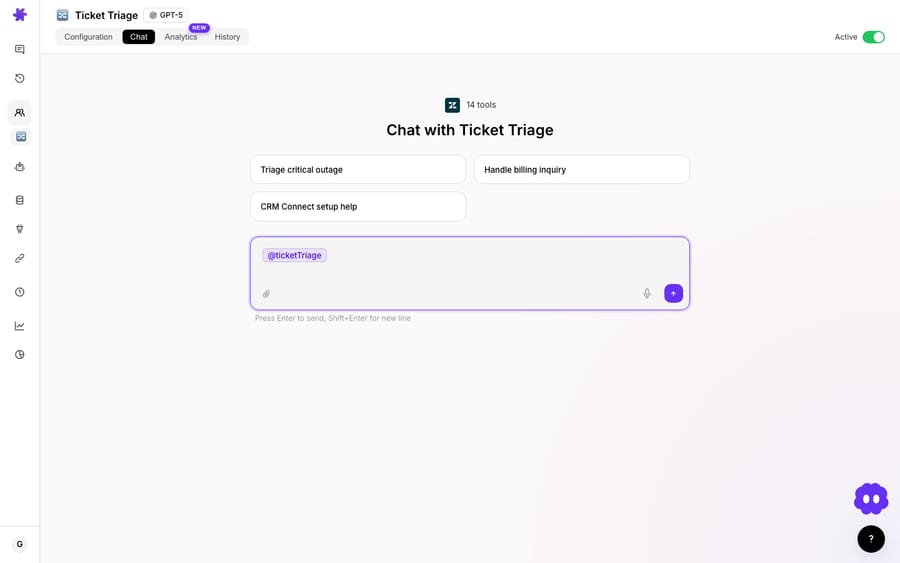
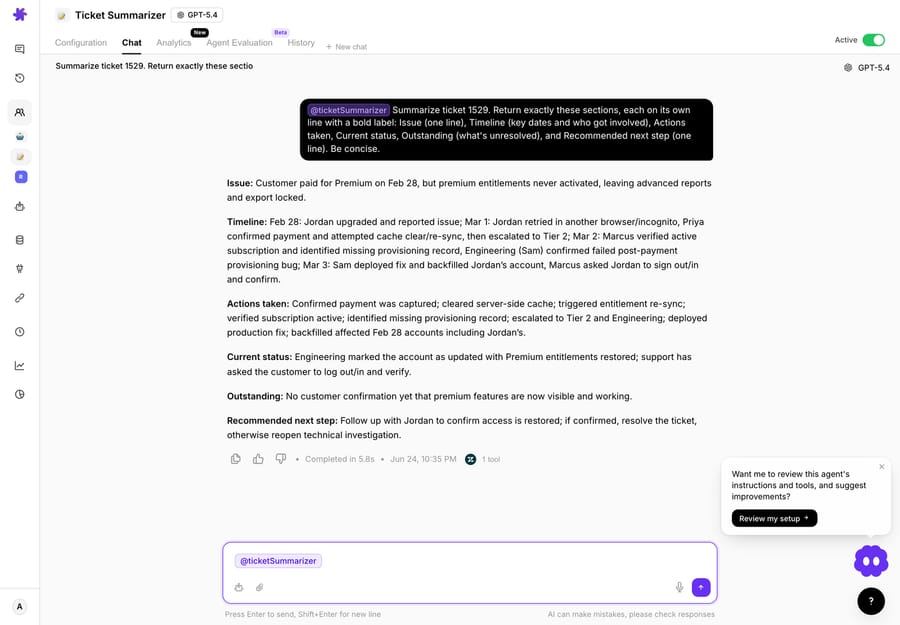
In Macha, interactive mode is Chat. You open an agent, ask it to do something, and watch it work — every tool call renders in real time so you can see what it read and what it's about to do. Read operations (looking up an order, summarizing a thread, searching your knowledge) just run.
The important part is what happens when the agent wants to write. Instead of executing, it surfaces a confirmation card describing the exact action and its arguments, and waits for you to approve or reject. Nothing leaves the building until you click.
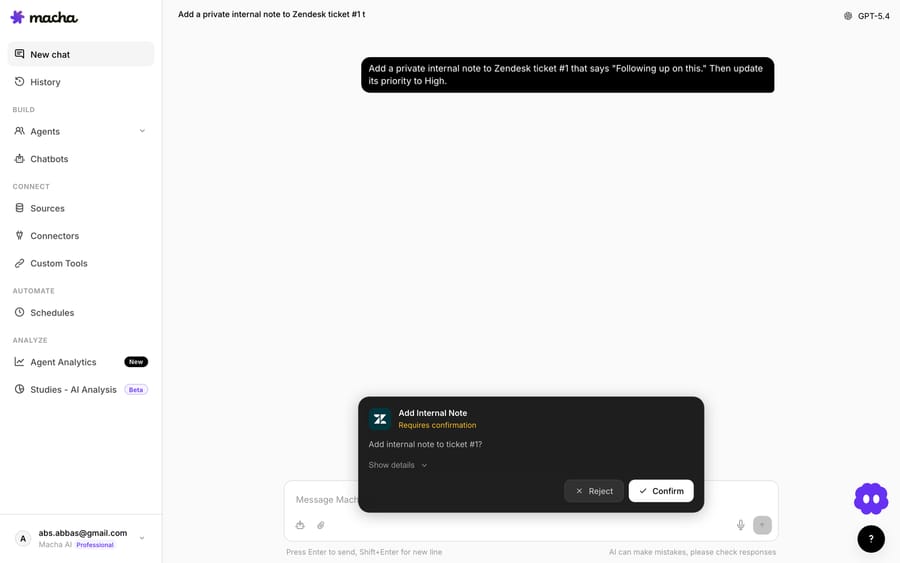
This is human-in-the-loop made concrete, and Macha leans into it for safety: sub-agents run strictly read-only during interactive chat, even when the same sub-agent is allowed to write when it runs from a trigger. The logic is that chat is where you're experimenting, so the blast radius of a mistake should be near zero.
Interactive mode is the right home for:
- Drafting and editing — let the agent write the reply, you tweak and send.
- Exploration and ad-hoc analysis — "summarize the last 20 escalations," "what's the common thread in today's bug reports."
- High-stakes one-offs — the refund that needs a judgment call, the account change you want to eyeball.
- Building trust in a new agent — run it interactively until its proposed actions are boringly correct, then let it off the leash.
How does autonomous mode work in Macha?
Autonomy in Macha is just an agent attached to a trigger — the agent and its tools are identical, only the thing that starts it changes. There are four trigger types, and choosing among them is most of the autonomy decision:
- Help desk events: a ticket or conversation created, updated, assigned or closed on Zendesk, Freshdesk, Gorgias, Front, HubSpot or Intercom. This is the workhorse for triage, routing, and auto-reply. Other connectors add their own events, such as a new Gmail or Outlook message or a new Jira issue.
- Slack events — an app mention or DM, for internal "where is my order" / "what's our policy" answers.
- Custom webhooks — a universal Macha webhook URL with a signing secret that any external system can POST to, no connector required.
- Scheduled (cron) — recurring runs for digests, syncs, and reports. Guardrailed to a minimum 1-hour interval, a 24-runs-per-day cap, and a limit of 3 concurrent runs per organization.
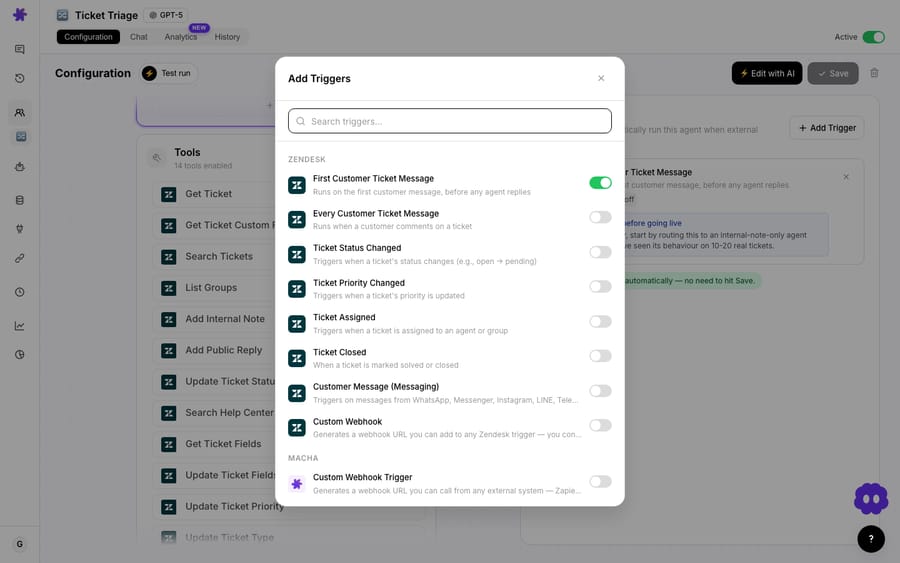
When an agent runs from a trigger, write permissions are on — the whole point is to act without a human waiting. A ticket comes in, the triage agent reads it, tags it, routes it, and (if it's a clean knowledge-base match) replies, all in seconds. The Macha use-case library is mostly autonomous patterns: triage and route by topic, auto-reply from KB articles, alert the team when a VIP submits a ticket, daily support metrics to Slack.

Autonomy without the runaway-train risk
"No human in the loop at the moment of action" does not mean "no controls." Macha's autonomous mode is wrapped in guardrails so that the absence of a real-time approver doesn't become the absence of oversight:
- Activation gates at build time. Turning on a high-impact tool (Add Public Reply, Update Ticket Status) or a high-volume trigger (New Ticket, Every Customer Message) pops a confirmation modal with a severity-themed warning, and each enabled tool keeps a persistent advisory card on the agent's config explaining how to use it safely. Loop-prone triggers on other connectors (Gmail "email sent", HubSpot "ticket updated") get the same kind of activation gate, which names the risk and asks you to confirm the scope. You approve the capability once, deliberately, instead of each action forever.
- Debounce. Event-driven triggers expose a debounce delay so a flurry of rapid updates collapses into a single run instead of firing the agent repeatedly. It's off by default for new ticket events (15 seconds for messaging, 10 for Slack DMs), and a bucket force-fires at 25 events so a noisy source can't hold the agent forever.
- Auto-disable. A trigger that fails 5 times in a row disables itself and emails you, so a broken connector or bad config can't loop forever.
- Full audit trail. Every autonomous run preserves the raw webhook payload and renders each tool call with a success/error result banner — so "what did the agent do at 2am" is always answerable after the fact. That's the on-the-loop posture: you supervise the record, not every keystroke.
Which mode wins, and how should you roll it out?
Neither — and that's the point. The teams that get the most out of AI agents don't choose a side; they route each task to the mode its risk profile demands, then graduate tasks from interactive to autonomous as confidence grows.
A healthy rollout usually looks like this:
- Start interactive. Build the agent, run it in chat, and watch it propose actions on real tickets. Approve or reject each write. You're calibrating, not deploying.
- Promote the boring wins. Once the agent's proposed triage/routing/KB-reply actions are consistently correct, attach a trigger and let those run autonomously.
- Keep the sharp edges in chat. Refunds, subscription changes, account edits, anything irreversible or wide — leave those requiring confirmation, or escalate them to a human queue.
- Supervise through the audit trail. Sample autonomous conversations weekly. Tighten instructions where the agent overreached; widen autonomy where it's been flawless.
Because it's the same agent in both modes, that progression costs nothing to rebuild — you flip how it's triggered, not what it is.
When shouldn't an agent run autonomously?
Autonomy is a tool, not a trophy. Resist it when:
- The action is irreversible and the cost of a mistake is high. Money movement, cancellations, and contract or account changes should keep a confirmation step or a human approver. Macha keeps these behind the chat confirm card by default for a reason.
- The task is novel or ambiguous. If you can't predict what the agent will do, you can't supervise it after the fact either. Run it interactively until it's predictable.
- You haven't watched it yet. "It worked in the demo" is not calibration. The interactive phase exists precisely so the first time an agent issues a public reply isn't also the first time you see how it writes.
- The blast radius is segment-wide. A single bad autonomous reply hurts one customer. A bad scheduled job that touches a list hurts hundreds. Prove those interactively first.
A reasonable rule of thumb from the oversight literature: actions that could affect a large group of customers or create meaningful financial exposure should require human review, calibrated to your own risk tolerance (Galileo, Trantor).
FAQ
Is an "interactive AI agent" the same as a chatbot? No. A chatbot answers in a chat window. An interactive agent can read your real systems, call tools, and propose write actions — it just waits for your approval before executing them. In Macha, that approval is the chat confirmation card.
Can the same agent run both autonomously and interactively? Yes — that's the model in Macha. You configure an agent once (instructions, tools, knowledge, sub-agents); chatting with it is interactive, attaching a trigger makes it autonomous. Its sub-agent runs are even captured identically in both modes.
How do I stop an autonomous agent from doing something risky? Several layers: high-impact tools and triggers require deliberate activation with advisory cards; you can keep irreversible actions behind confirmation; triggers debounce and auto-disable after repeated failures; and every autonomous run keeps a full audit trail. Calibrate by reversibility and blast radius.
Which plan do I need for autonomous triggers? Any of them. Event, webhook and scheduled (cron) triggers are on every tier, as is every other feature, with unlimited agents and seats. See the pricing page for current plans.
Does autonomous mode cost more than chat? No. Macha bills per ticket — one conversation, charged once however many messages, tool calls or drafts it takes — so the price is the same whether a human kicked the run off or a trigger did. The difference is who's watching, not the price.
How can you try both modes?
The fastest way to internalize the autonomous-vs-interactive distinction is to feel it: build one agent, chat with it to watch it propose actions, then attach a trigger and watch the identical agent run on its own. Start a free trial ($50 of usage, no credit card required), connect your helpdesk, and see Macha on Zendesk or the triggers and chat docs for the full walkthrough. More concept and capability deep-dives are on the Macha blog.
Written by Abbas (Customer Support & AI, Macha) · Reviewed by Ankeet Guha (Co-founder & CTO) · Published 2026-06-24 · Last updated 2026-09-24.






