Intercom
 Shopify
 Stripe
 Slack
Slack Notion
 Google Workspace
 Confluence

Choosing an AI Model for Support Agents: GPT-5 & GPT-5.4 Get Cheaper


Choosing an AI model for support agents used to be a trade-off between three things — capability, speed, and cost. On Macha it's now a trade-off between two: billing is per ticket, so the model an agent runs on doesn't change what you pay, whichever one answers. If you were rationing GPT-5.4 to a handful of high-stakes agents because it was expensive, that calculus is gone. What's left is the question worth asking anyway: which model actually does this agent's job best?

This post is the practical, decision-oriented version: what changed, how the OpenAI models stack up against the Claude Sonnet and Groq options Macha also offers, and — the part most teams care about — how to choose which model each of your support agents should run on now that the gap between "cheap" and "capable" has closed entirely.
A note on how Macha bills, because it matters here: you're charged per ticket — one thread between Macha and one person, charged once however many messages, tool calls or follow-ups it takes. The model an agent runs on doesn't change that number at all. So the June 17 cut was the last time model choice moved a bill; today it's purely a quality and speed decision.
The lineup
The whole OpenAI lineup, and where each one fits:
| Model | Where it fits |
|---|---|
| GPT-5.4 Mini (the default) | Fast, high-volume. Most workflows. |
| GPT-5 | The balanced middle. Nuanced replies at volume. |
| GPT-5.4 | Highest OpenAI capability. Strict, complex agents. |
GPT-5.4 Mini remains the default for new agents — it's fast, and fast is what a busy queue needs. The two models above it used to be rationed by price; they aren't any more.
For context on the trajectory: GPT-5.4 launched in Macha on April 23 as OpenAI's most capable model (1M-token context window), and was expensive enough to ration. Two rounds of price cuts later, Macha moved to per-ticket billing and took the question off the table entirely.
The broader Macha lineup also includes Anthropic's Claude Sonnet 4.5 and 4, and faster Groq-hosted options. All of them bill the same way: one charge per ticket, whichever one answers it.
What this actually buys you
Under per-ticket billing, the arithmetic that used to fill this section disappears:
| Model | Cost per ticket |
|---|---|
| GPT-5.4 Mini | about $0.40 |
| GPT-5 | about $0.40 |
| GPT-5.4 | about $0.40 |
That's the whole table. Pricing is $299 a month for 750 tickets and scales from there, about $0.40 a ticket on every tier, and tool calls and sub-agent delegation are inside the same ticket. The point isn't that the capable models got cheaper — it's that the budget argument for holding an agent back is gone entirely.
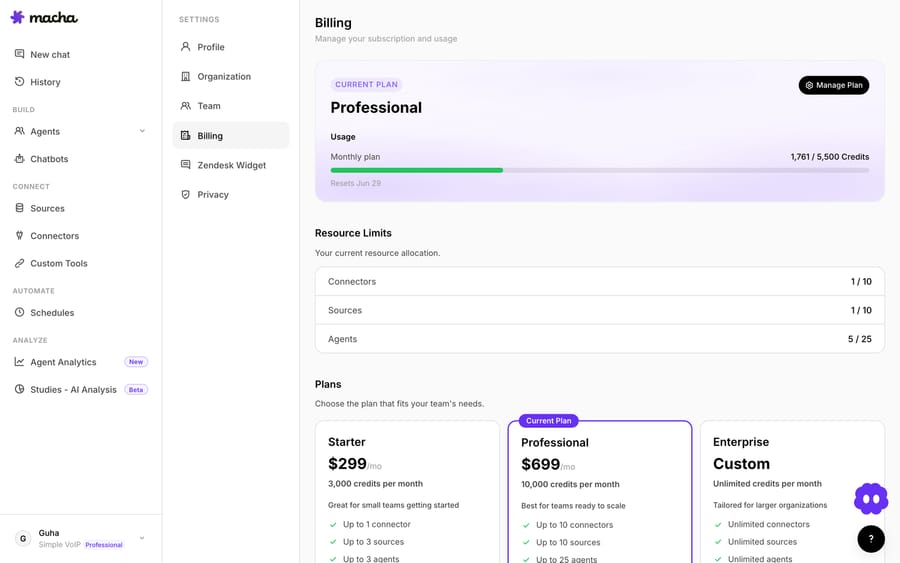
If you do run low, your monthly allowance isn't the only lever — a top-up persists across billing cycles and is spent automatically after the monthly allowance. There are no overages either: agents pause rather than billing on. See the pricing page for current tiers.
How to actually pick a model for a support agent
This is the question the price cut reopens, so let's answer it properly. The industry framing — borne out across model-selection guides from Microsoft's Foundry team and support-focused write-ups like Cobbai's LLM evaluation guide — is that you're trading off three things: capability, latency, and cost. There's no single best model; there's a best model for a given agent's job. Here's how we'd map Macha's three OpenAI options.
Default to GPT-5.4 Mini for the bulk of your volume
For most support work — answering "where's my order," explaining a policy, looking up an account, triaging and routing — GPT-5.4 Mini is the right call, and it's the default for a reason. It's fast, which is what your busiest agents actually need, and with a 400K-token context window it can hold long ticket histories and knowledge-base context without truncating. The consensus across support-automation research is that mini-class models are the best value for high-volume, latency-sensitive support — and that matches what we see. We wrote a deeper piece on exactly this: GPT-5.4 Mini for customer support.
Step up to GPT-5 when replies need more nuance
GPT-5 is the balanced middle: better at nuanced, judgment-heavy replies than Mini, and still quick enough to run at scale. Good candidates are agents that draft customer-facing prose where tone and reasoning matter — apology-and-remedy responses, technical explanations, anything where a slightly flat or literal answer would read poorly. There's no premium over Mini to justify any more; the only cost is a little latency.
Reserve GPT-5.4 for strict, complex, high-stakes agents
GPT-5.4 is the highest-capability OpenAI model in the platform, and its real edge over GPT-5 is instruction-following — agents with strict "do this exactly once" rules, complex branching logic, or many tools where the model has to reliably pick the right one in the right order. If you've ever watched a cheaper model skip a step or call a tool twice, that's the failure mode GPT-5.4 is built to avoid. It's the model for billing/refund flows, multi-tool runbooks, and orchestration agents that delegate to sub-agents — the places where a wrong action is expensive.
A common pattern is tiering: a Mini-powered front-line agent handles the routine majority and delegates the gnarly cases to a GPT-5.4 specialist sub-agent. That keeps the queue moving quickly and puts the careful thinking only where it's needed — and the whole chain is still one ticket. Because Macha lets each agent — and each sub-agent — set its own model, you can build that tier directly. The agents documentation covers per-agent model selection and delegation.
OpenAI isn't the only option: Claude Sonnet and Groq
If you've read any of the cross-provider model round-ups — the LLM API pricing comparisons that stack OpenAI against Claude, Gemini, and Llama — you'll know "choosing a model" is rarely an OpenAI-only decision. It isn't in Macha either. The three OpenAI models above are the most-used defaults, but the picker also includes Anthropic's Claude Sonnet (4.5 and 4) and Groq-hosted open models, and they earn their place for different jobs:
| Provider / model | Best at | Why reach for it |
|---|---|---|
| OpenAI GPT-5.4 Mini | Speed + broad capability | The default; best all-round fit for high-volume support, strong tool ecosystem |
| OpenAI GPT-5 / GPT-5.4 | Nuance + strict instruction-following | Customer-facing prose and complex, multi-tool runbooks |
| Anthropic Claude Sonnet (4.5 / 4) | Tone, empathy, long-document reasoning | Sensitive replies and agents that reason over long policies or 100-page manuals |
| Groq open models | Raw latency | Ultra-fast responses for simple, high-frequency lookups |
The industry pattern, borne out in support-LLM guides, is that mini-class OpenAI models win on all-round value, Claude leads on instruction adherence and long-context reasoning, and the fastest providers (Groq, and outside Macha, Gemini Flash or Llama) win when latency dominates. So if an agent's job is empathetic, sensitive handling — refund apologies, complaints, anything where tone carries the resolution — it's worth A/B testing Claude Sonnet against GPT-5 on a few real tickets before you commit. And if you have a high-frequency, dead-simple lookup agent, a Groq model can undercut even GPT-5.4 Mini on speed. The point isn't "always pick OpenAI" — it's that you match each agent to the provider that fits its job, with capability and latency, not budget, driving the choice.
A note on where the model is set
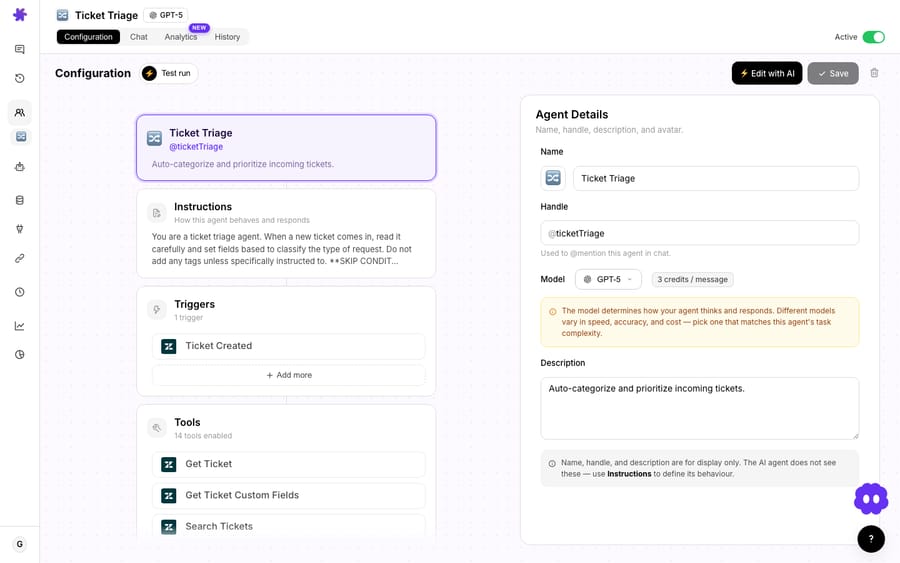
Worth flagging, because June 17 also tightened this: the model dropdown in the top-right of a conversation only changes the model for that one chat. It's there for quick experiments — try a reply on GPT-5.4, compare it to Mini, decide. If you want an agent to permanently run on a different model, that lives in the agent's configuration (and the org-wide default lives in Settings). The dropdown now shows a toast saying as much, so you don't accidentally think a one-off switch stuck. It's a small thing that prevents a real "why is my agent still on the old model" confusion.
Watch-outs and when not to reach for the expensive model
Cheaper top-tier models are not a reason to put every agent on GPT-5.4. A few honest caveats:
- More capable ≠ always better for support. For fast, friendly, high-volume chat, a lighter model is often the better customer experience because it's quicker — capability you don't need just adds latency. Don't upgrade an agent that's already answering correctly.
- Match the model to the cost of being wrong. A wrong refund or a mis-routed escalation is expensive in a way no model choice is. That's the axis to optimise, now that price isn't one.
- Vision and tooling vary by model. Image-reading on Zendesk attachments works on GPT-5.4 Mini and Claude Sonnet models; if an agent needs to read receipts or screenshots, check the model supports it before switching.
- You're not buying tokens. Macha's unit is the ticket, across every provider; the underlying token economics differ by model but never reach your invoice. Don't try to reverse-engineer an OpenAI bill from it.
- Test before you roll out. Use the per-conversation dropdown to compare a real ticket on two models before you change an agent's default. It's free to look.
The healthiest setup for most teams is still Mini almost everywhere, GPT-5 on the customer-facing agents that write a lot of prose, GPT-5.4 reserved for the strict/complex few — the difference now is that nothing about your bill argues against the second and third tiers.
FAQ
Does the model I pick change what I pay? No. Macha bills per ticket — one thread, charged once — whichever model the agent runs on. GPT-5.4 Mini remains the default because it's fast, not because it's cheaper.
Do I have to do anything to switch an agent up a tier? No — change its model in the agent's configuration and nothing else moves. There's no migration and no billing consequence.
Is a billed ticket the same as a resolved ticket? No. A ticket is one conversation — one thread with one person — charged once whether it ends resolved or handed to a human. Macha is automation and orchestration, so outcomes vary; the meter counts conversations, not wins.
Which model should most of my agents use? GPT-5.4 Mini for the high-volume majority, GPT-5 for nuanced customer-facing replies, and GPT-5.4 for strict, complex, or high-stakes agents. See the GPT-5.4 Mini deep dive for the default case.
Is OpenAI the only provider, or can I use Claude? Macha isn't OpenAI-only. The model picker also includes Anthropic's Claude Sonnet (4.5 and 4) — strong on tone, empathy, and long-document reasoning — and Groq-hosted open models for ultra-fast responses. For sensitive, tone-sensitive replies it's worth testing Claude Sonnet against GPT-5 on real tickets; for dead-simple high-frequency lookups, a Groq model can be the fastest option.
How do I change an agent's model permanently? In the agent's configuration card, not the conversation dropdown (which only affects the current chat). The org-wide default lives in Settings. The docs walk through it.
Try it
Macha runs your AI agents on top of the helpdesk you already use — Zendesk, Freshdesk, Gorgias, Front, Intercom or HubSpot — and lets you pick the right model for each agent's job. If you've been holding a smart agent back on cost, there's no longer a reason to. Start a free trial ($50 of usage, no credit card required), or read more about running Macha on Zendesk.
Written by Abbas (Customer Support & AI, Macha) · Reviewed by Ankeet Guha (Co-founder & CTO) · Published 2026-06-24 · Last updated 2026-06-24.
Resolve tickets automatically with AI agents
Macha's AI agents work on top of the help desk you already use — no code.