





 Shopify
 Stripe
 Slack
Slack Notion
 Google Workspace
 Confluence

How Do You Collect Customer Feedback Automatically After a Zendesk Ticket Is Solved?


The moment a ticket is solved is the best time to ask a customer how it went, because the experience is fresh and they're already in the thread. A Macha agent can make that ask automatically on every solved Zendesk ticket.
Key takeaways
- A Macha feedback agent runs on Zendesk's Ticket Closed trigger and uses three tools, Get Ticket, Add Public Reply and Add Internal Note, to ask for feedback in the thread.
- US Tech Automations reports that transactional surveys sent within 1-2 hours of the experience get 34% response rates, against 12% for surveys sent 48+ hours later.
- Zendesk's native CSAT survey sends a positive or negative rating by default and gives customers 28 days to respond, so the Macha agent complements it rather than replacing it.
- A feedback agent should skip requesters already asked in the last 30 days and route unhappy replies to a senior agent within 24 hours.
- Macha bills this agent per ticket, starting at $299 a month for 750 tickets, about $0.40 each, with no per-survey or per-response fees; the price includes setup by the Macha team and a dedicated success manager.

To collect feedback automatically after a Zendesk ticket is resolved, build a Macha agent on Zendesk's Ticket Closed trigger (it fires when a ticket is marked solved or closed) with three tools: Get Ticket, Add Public Reply and Add Internal Note. The agent reads what was resolved, posts one short, personalized feedback question in the thread, and logs "Feedback request sent" on the ticket. Timing is the reason to automate it: US Tech Automations reports that transactional surveys sent within 1-2 hours of the experience get 34% response rates, against 12% for ones sent 48+ hours later.
The catch is that "ask every customer for feedback the moment their ticket closes" is the kind of task no human reliably does. Agents close a ticket and move to the next fire, so feedback collection either gets bolted onto a weekly batch survey or doesn't happen. Macha is the AI agent layer that sits on top of the help desk you already run (Zendesk, Freshdesk, Gorgias, Front, HubSpot or Intercom), so the agent works inside Zendesk with no separate survey tool to wire up.
What does a post-resolution feedback agent do?
The use case is deliberately narrow: one trigger, three Zendesk actions:
| Step | Actor | What happens |
|---|---|---|
| Trigger | Zendesk | Ticket marked Solved (Ticket Closed trigger) |
| Read resolution | Macha | Get Ticket: pull the subject and thread so the agent knows what was solved (e.g. #6702: Product return processed successfully) |
| Send feedback request | Macha | Add Public Reply: a personalized check-in asking how the customer felt about the resolution |
| Log activity | Macha | Add Internal Note: "Feedback request sent" so the team has an audit trail on the ticket |
The output the customer sees is a single human-sounding message, not a robotic form blast:
"Hi Emily, your support request about returning your order has been resolved. We'd love to hear how we did. Your feedback helps us improve. Thank you!"
Because the agent ran Get Ticket first, the message references the specific thing that was resolved (a return, a refund, a login fix) instead of a generic "your ticket is closed." That personalization is the whole point: it reads like a person who was paying attention, which is what lifts reply rates.
It's worth being honest up front about what this is and isn't. This agent collects qualitative, conversational feedback in-thread: it's not a 1–5 CSAT widget with a dashboard. The two are complementary, and I cover how they fit together below.
How do you build the feedback agent in Macha?
1. Create the agent and connect Zendesk
If you haven't already, connect your Zendesk in Connectors. Then create a new agent and give it a single, tight job in its instructions, something like: "When a ticket is solved, read the resolution and post one short, warm public reply thanking the customer and asking for feedback on how we did. Keep it to 2–3 sentences, reference what was resolved, and never ask more than one question."
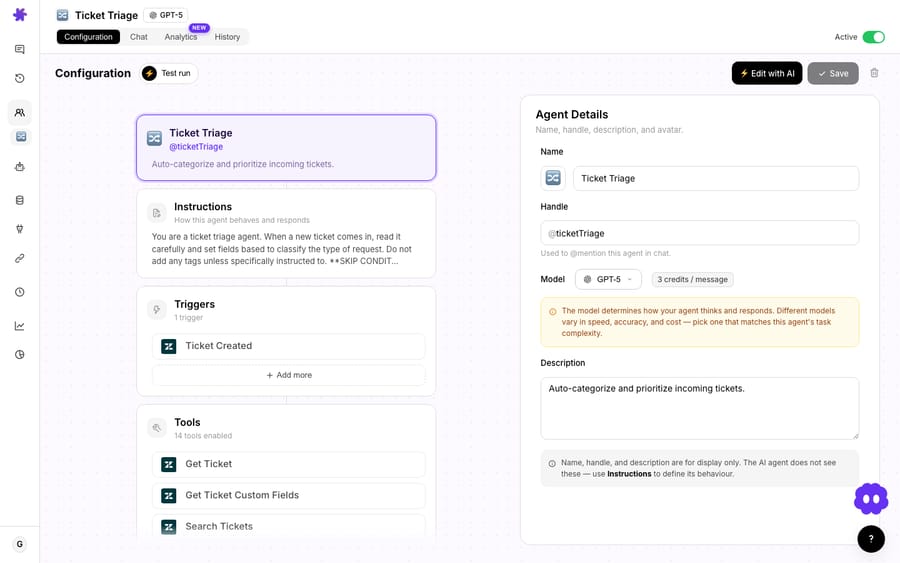
Scope matters here. Don't bolt this onto your big do-everything resolution agent: a dedicated feedback agent is easier to reason about, easier to pause, and won't accidentally fire its follow-up in the middle of an unresolved back-and-forth.
2. Add the trigger: Ticket Closed
Open the trigger picker and choose the Zendesk Ticket Closed trigger, which fires when a ticket is marked solved or closed. This is what makes the agent autonomous: it runs on its own when Zendesk reports the status change, with no human in the loop. If you only want solved tickets in one group or with one tag, use a Custom Webhook trigger instead and set those conditions in Zendesk's admin.
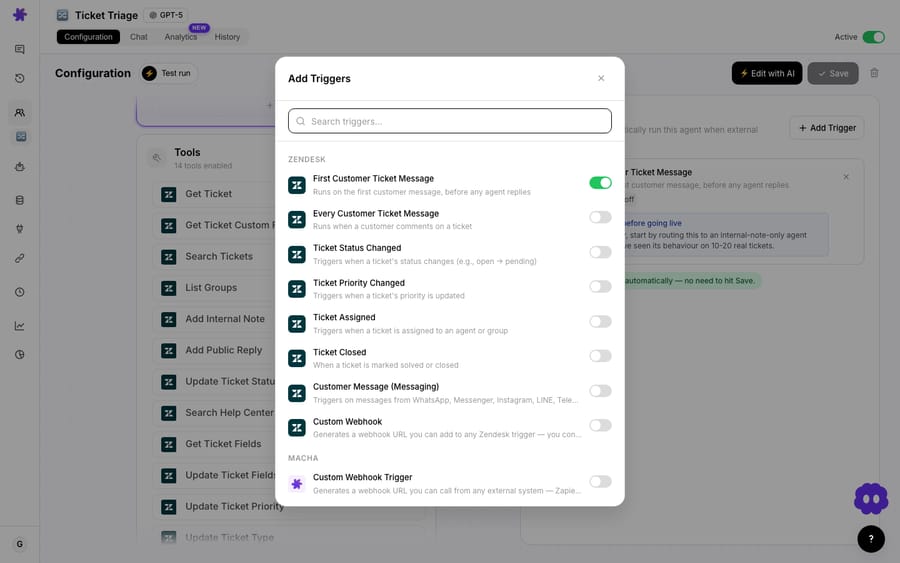
One setting earns its keep here: the Debounce chip. Every event-driven trigger in Macha lets you set a delay in seconds before the agent acts. For a feedback ask you generally want a small buffer: if an agent solves a ticket and then reopens it ten seconds later to add one more thing, you don't want a "how did we do?" message landing in between. A short debounce smooths out that flicker. (Debounce is hidden on clock-driven and universal webhook triggers, where it makes no sense.)
3. Add the tools: Get Ticket, Add Public Reply, Add Internal Note
The agent needs exactly three Zendesk tools:
- Get Ticket: so it can read the subject and resolution before writing anything.
- Add Public Reply: the customer-facing feedback message.
- Add Internal Note: the "Feedback request sent" log line.
When you enable Add Public Reply, Macha shows an activation confirmation modal and then a persistent advisory card on the agent page. That's by design: a tool that posts customer-visible messages is high-impact, and Macha makes you acknowledge it rather than letting it slip on silently. Read the advisory, confirm, and the agent can now reply on real tickets.
4. Test before you let it loose
Run the agent against a recently solved test ticket and read what it writes. Check three things: the tone matches your brand, it correctly references the resolved issue, and it asks exactly one question. Tighten the instructions until the output is something you'd be happy to send yourself, then turn the trigger on.
A nice safety detail: toggling the agent off later doesn't delete its Zendesk trigger or webhook: Macha sets them to inactive on Zendesk's side and flips them back to active when you re-enable, so you can pause feedback collection during, say, a known outage without rebuilding anything. And if you delete the agent entirely, it sits in a Trash tab for 30 days with all its config intact before it's gone for good.
How do you write a feedback request customers answer?
The automation is the easy part. Whether you get useful feedback comes down to the message and the timing:
- Keep it to one question. This is an in-thread reply, not a form, and every extra question is one more thing the customer has to answer by typing. The default message above asks one open-ended thing, which suits a conversational ask.
- Don't over-ask the same person. If a customer files five tickets in a week, five feedback asks is annoying. We'd cap it at about once a month per requester: gate the agent with an instruction like "only ask if this requester hasn't been asked in the last 30 days."
- Time it to the experience, not the calendar. Refiner advises sending a CSAT survey right after a resolved support ticket, while the experience is fresh, and the US Tech Automations figures above (34% within 1-2 hours, 12% after 48+ hours) show why. A solved-ticket trigger beats a Friday-afternoon batch send.
- Close the loop on bad answers. We'd give every unhappy reply a human follow-up within 24 hours, ideally from a senior agent. Because the feedback lands as a normal public reply on the ticket, an unhappy response simply reopens the thread in your existing queue, no separate inbox to monitor.
Does this replace Zendesk's native CSAT survey?
No. Zendesk already has a CSAT survey: a positive or negative rating by default, sent by an automation a set number of hours after a ticket is solved, with 28 days by default for the customer to respond. You can customize the question, rating scale and labels. So why run an agent too?
They do different jobs, and the honest answer is use both:
- Native CSAT gives you the number: a trended, reportable score you can put on a dashboard and tie to agents and teams. Keep it.
- The Macha agent gives you the texture: a warm, personalized, in-thread ask that references the specific resolution and invites an open reply. It's better at surfacing the why behind a score, and the personalization tends to pull responses from people who'd ignore a star widget.
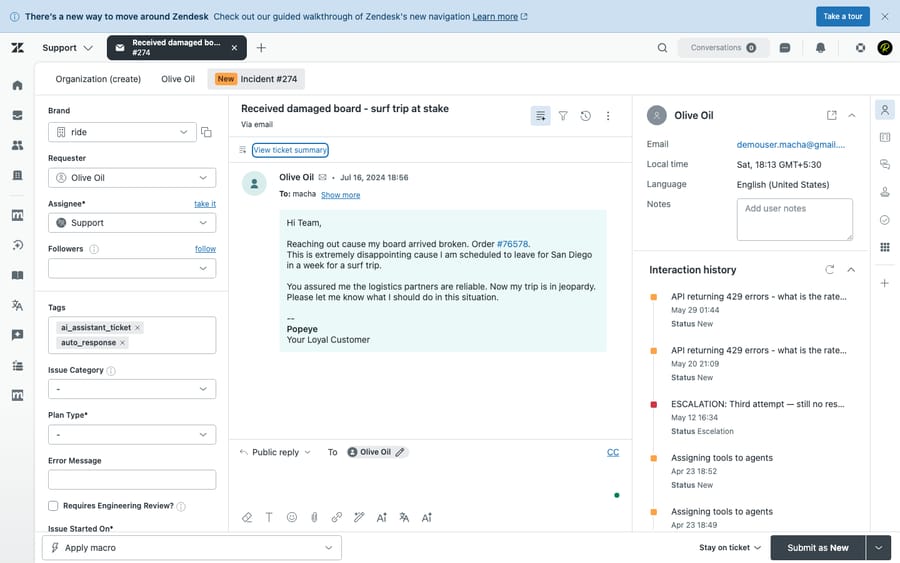
A pragmatic setup: let Zendesk's CSAT collect the quantitative rating, and let the Macha agent post the human follow-up that makes the customer feel asked-after. The agent's internal-note log even gives you a per-ticket record of which solved tickets got a personal touch.
When should you not ship this agent as-is?
This is a genuinely useful agent, but a few situations call for restraint:
- High-volume, low-touch queues. If you solve thousands of trivial tickets a day, a feedback ask on every single one is noise. Scope the trigger to a tag, a group, or ticket types where feedback is actually decision-useful.
- Tickets solved in error. Agents sometimes mark things solved to clear a view. A debounce delay helps, but if your team does this a lot, gate the agent on a condition so it doesn't thank people for "resolutions" that weren't.
- Repeat requesters. As above, without a "don't re-ask within 30 days" guardrail, your most active customers get the most spam.
- Public-reply visibility. Add Public Reply is customer-facing. Test the tone hard, and remember the activation modal is there precisely because this tool can be embarrassing if the instructions are sloppy.
- It's a request, not a survey instrument. If you need statistically clean, comparable scores across thousands of interactions, that's a CSAT/NPS tool's job. This agent is for warmth and qualitative signal, not a benchmarked metric.
If you outgrow per-ticket asks, Macha's scheduled triggers can run a recurring agent, for example, a weekly digest that reads the past week's solved tickets and summarizes the feedback themes. For most teams, the simple solved-ticket agent above is the 80/20.
How much does a feedback agent cost to run?
Like everything in Macha, this is billed per ticket, one conversation, charged once, however many steps the agent takes. A feedback ask rides on the ticket that was just solved: the Get Ticket read, the reply generation and the note all sit on the same thread, so they don't add a second charge. There are no per-survey or per-response fees layered on top. Pricing starts at $299 a month for 750 tickets, about $0.40 each. You don't have to build it yourself: on the trial and every plan, the Macha team sets the agent up on your help desk, tests it on a sample of your past solved tickets, and runs it in safe mode, with drafts as internal notes, until the feedback asks read right. The price includes that setup and a dedicated success manager who handles your changes afterwards: new categories, instruction changes, new tools. You can also build and test the whole thing yourself on a free trial ($50 of usage, no credit card required); see the pricing page for plan details.
FAQ
Does this replace Zendesk's CSAT survey? No, and it shouldn't. Native CSAT gives you a structured, reportable score. This agent adds a personalized, conversational follow-up that references the specific resolution. Run both: the survey for the number, the agent for the texture.
Will it ask the same customer repeatedly? Only if you let it. Add an instruction (or a trigger condition) to skip requesters who've already been asked within, say, 30 days, because over-asking the same person causes fatigue.
Can I customize the message? Entirely. The wording lives in the agent's instructions, so you control tone, length, language, and what it references. Keep it to one question for the best response rate.
What if a customer replies unhappy? Because the ask is a normal public reply, their response reopens the ticket in your existing queue, so unhappy feedback flows straight back to a human, ideally a senior agent, within your normal SLA.
Does it work on Freshdesk, Gorgias, or Front? The pattern is the same on any help desk Macha connects to (Zendesk, Freshdesk, Gorgias, Front, HubSpot or Intercom). This specific use case is built on Zendesk's Ticket Closed trigger and reply tools; on Freshdesk, for example, a Ticket Updated trigger on a status change does the same job.
How do I turn it off temporarily? Toggle the agent off. Macha sets its Zendesk trigger to inactive rather than deleting it, so re-enabling later is a single click, no rebuild.
How do you get started?
A post-resolution feedback agent is one of the fastest, highest-value things you can stand up on top of Zendesk: one trigger, three tools, a well-written prompt. Start a free trial ($50 of usage, no credit card required) and connect Zendesk. Wire up the Ticket Closed trigger yourself, or let the Macha team build the agent for you, which is included on the trial. Browse more use cases and the triggers documentation to see what else can run the moment a ticket changes state. If Zendesk is your home base, the Macha on Zendesk overview shows how the agent layer fits.
Written by Abbas (Customer Support & AI, Macha) · Reviewed by Ankeet Guha (Co-founder & CTO) · Published 2026-06-24 · Last updated 2026-09-24.






