





 Shopify
 Stripe
 Slack
Slack Notion
 Google Workspace
 Confluence

Can You Connect Multiple Accounts of the Same Tool to Macha? Multi-Instance Connectors Explained


Agencies, multi-brand companies and teams after an acquisition often run two or more accounts of the same help desk or payment tool. Macha connects each account separately and labels every tool by account, so an agent can act on the right one.
Key takeaways
- Macha multi-instance connectors, shipped March 8, 2026, let one workspace link two Zendesk accounts or three Stripe accounts, each with its own credentials and name.
- When a second instance of a connector type is connected, Macha automatically suffixes tool names and tags tool descriptions with the account so the model can tell accounts apart.
- The Composio-backed connectors added on August 24, 2026, including HubSpot and Gmail, also support multiple instances, such as two HubSpot portals side by side.
- In the worked example, a support agency connects five client Zendesk accounts and builds one specialist sub-agent per client, each holding only that client's tools.
- Macha sells one plan priced by ticket volume with unlimited agents on every tier, so connecting more accounts does not require a different plan.
Yes: Macha's multi-instance connectors let one workspace link more than one account of the same tool (two Zendesk accounts, three Stripe accounts, two HubSpot portals, a Shopify store per brand), and each account gets its own credentials and its own name. When a second account of a type is connected, Macha automatically suffixes the tool names and tags the tool descriptions with the account, so the AI never confuses one for another. The feature shipped on March 8, 2026, and the Composio-backed connectors added on August 24, 2026 support it too.
| Connector | How each instance authenticates |
|---|---|
| Zendesk | OAuth or API key |
| Freshdesk, Gorgias, Stripe, Shopify | API key |
| Front | API token |
| HubSpot, Intercom, Gmail, Outlook, Jira, Asana, Google Calendar | One-click OAuth via Composio |
A quick reminder on what Macha is, because it matters here: Macha is an AI agent layer that sits on top of the help desk you already use (Zendesk, Freshdesk, Gorgias, Front, HubSpot or Intercom) and wires in your commerce, knowledge and comms tools. It isn't a help desk itself. So "connect multiple accounts" isn't about logging into two inboxes. It's about giving your agents authenticated reach into several copies of the same system at once.
Why do teams end up with more than one of the same tool?
This is more common than the typical single-tenant onboarding flow admits. A few patterns we see often:
- Agencies and BPOs. A support agency manages five clients, each on its own Zendesk. The agency wants one place to build and run agents, not five disconnected logins.
- Multi-brand companies. A parent brand keeps a separate Shopify store and a separate Gorgias per sub-brand to keep catalogs, themes and reporting clean.
- Regional or legal separation. A business runs an EU Stripe account and a US Stripe account for tax, payout and data-residency reasons: same product, two ledgers.
- Post-acquisition reality. You bought a company, and it had its own Zendesk. Merging two production help desks is a multi-quarter project nobody wants to rush, so for now there are simply two.
- Separate inboxes and portals. A support@ and a billing@ Gmail, or two HubSpot portals, running side by side.
- Sandbox plus production. A test Zendesk instance alongside the live one, so agents can be validated before they touch real customers.
None of these are edge cases. They're the normal shape of a growing operation. Zendesk's own guidance on running one or multiple instances lists the upside of separate instances plainly: "Compartmentalization is easier." The question was never should these accounts exist. It's whether your AI tooling can keep up with the fact that they do.

How do multi-instance connectors work in Macha?
There are two pieces to the feature, and the second is the one that does the hard work.
1. Connect multiple accounts, each with its own credentials and name
When you add a connector, Macha doesn't treat the connector type as a singleton. You can add a second Zendesk, a third Stripe or a second HubSpot, and each instance is a fully independent connection with:
- its own credentials: every instance authenticates on its own (see the table above), so each one carries its own auth and its own permission scope; and
- its own name: a human-readable label you set, like "Acme EU Stripe" or "Client: Northwind Zendesk," so you can tell them apart at a glance.
That naming step isn't cosmetic. It's the handle everything downstream uses: the connectors list, the agent's tool picker, and the disambiguation the AI relies on.
2. Automatic disambiguation, so the AI knows which account to use
Here's the problem multi-instance creates. If you connect two Zendesk accounts, you now have two search_tickets tools, two update_ticket tools, two of everything. A model handed two identically named tools has no reliable way to choose between them, and that's how an agent ends up replying on the wrong account.
When Macha detects more than one instance of the same connector type, it automatically disambiguates:
- Tool names are auto-suffixed with the account, so the model sees distinct tools rather than two collisions.
- Tool descriptions are tagged with the account name, so the model has explicit context ("this one operates on Northwind Zendesk") when it decides which tool to call.
You don't configure any of this. Connect a second account and the suffixing and tagging happen on their own; connect only one and tool names stay clean and unsuffixed. An agent with reach into two Zendesks can then be told, in plain language, "handle Northwind tickets here and Acme tickets there," and the tool layer makes that instruction resolvable.

How do you build an agent across several accounts?
Because every instance is just another set of tools, building a multi-account agent is the same flow as any other Macha agent: you pick which tools (and therefore which accounts) an agent can touch. You can scope tightly:
- One agent per account: a dedicated agent for each client, brand or region, each given only that account's tools. Clean blast radius, easy to reason about.
- One agent across accounts: a single triage agent that can read from several accounts and route or answer, leaning on the disambiguated tool names to act on the correct one.
- A router with sub-agents: a front-door agent that delegates to per-account specialist sub-agents (Macha agents can call other agents as tools), which keeps each specialist's tool list short and its instructions focused.
What does this look like for an agency with five client Zendesks?
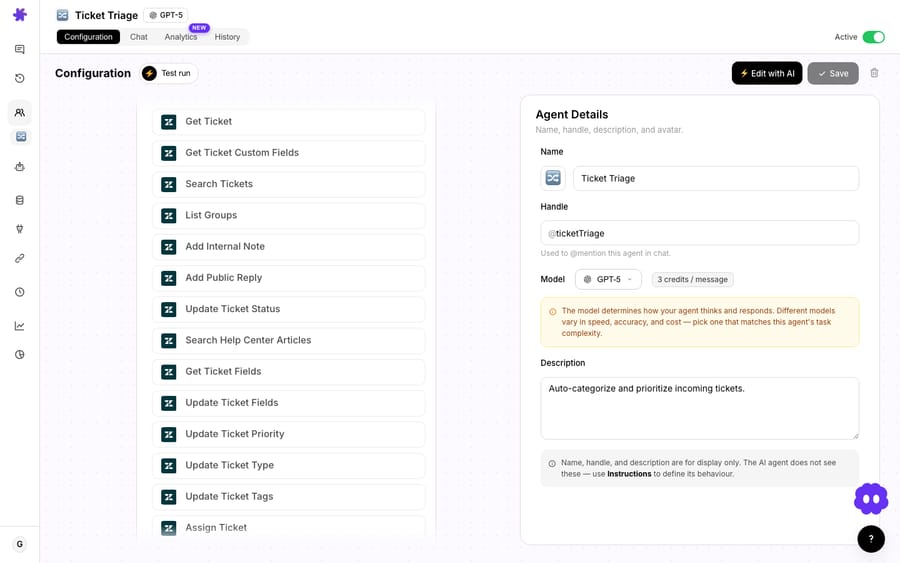
Picture a support agency. They connect five Zendesk accounts to one Macha workspace, naming each after the client. Macha suffixes every Zendesk tool per client and tags the descriptions. The agency then builds one specialist sub-agent per client (Northwind Support, Acme Support, and so on), each scoped to only its own client's tools and knowledge sources. A top-level router agent receives the work and delegates to the right specialist.
The payoff: the agency runs all five clients from a single control plane, agents can't accidentally cross client boundaries because each one only holds one client's tools, and onboarding a sixth client is "add a connector, clone an agent," not "stand up a new system." That's the difference between multi-instance as a platform capability and a spreadsheet of logins.
This is also where a layer above the help desk differs from help-desk-native AI. Zendesk's AI agents are configured inside a Zendesk account, and Zendesk's article on running multiple advanced AI agents covers routing several agents across messaging channels within that one account. An agency with five client accounts is working with five separate setups. Macha sits a layer above, so one workspace reaching several accounts is the normal case, not a workaround.
How do you keep several connected accounts healthy?
More accounts means more credentials to keep alive, and Macha's connector-management tooling earns its keep once you're running several:
- Test connection verifies a connector's credentials with a single click, across all connector types, so you can confirm each of your five Zendesks is actually authenticated before an agent goes live on it.
- Reconnect flow handles expiry without breakage: API-key connectors show a reconnect form when auth fails and validate credentials before saving, and OAuth reconnects keep the same connector ID, so no tools are stripped and no agents break. You re-auth one account without disturbing the other four.
- Failure alerts. When a connector's authentication breaks, the agents that depend on it are deactivated automatically and admins get an email, so a dead credential on one client doesn't produce silent failures.
- Token-refresh locking prevents OAuth refresh race conditions for Zendesk, Google and Shopify, which matters more when several instances of the same provider refresh tokens at once. For the Composio-backed connectors, Composio handles the OAuth handshake, token storage and refresh.
These aren't multi-instance features as such, but they're what make multi-instance survivable in production: every account is independently testable and independently re-authable.
When is multi-instance the wrong tool?
This feature solves a specific problem, and its edges are worth stating:
- It is not a merge. Multi-instance keeps your accounts separate and lets agents reach all of them. If your actual goal is to consolidate two Zendesks into one, that's a data-migration project, and multi-instance connectors won't do it.
- Credentials still need real scopes. Each instance authenticates independently, so each account needs an API key or OAuth grant with the permissions your agents require. Five clients means five sets of credentials to provision and rotate.
- Disambiguation helps the model; it doesn't excuse vague instructions. Auto-suffixing makes the right tool selectable, but an agent told "answer the ticket" with five accounts in scope can still pick wrong. For anything sensitive, prefer one account per agent (or per sub-agent) over one agent holding everything. Tight tool scoping is the real guardrail.
- Tool lists get long. Two accounts double the tools an agent could see; five multiply them by five. Long tool lists dilute model focus. The sub-agent pattern exists to keep each agent's tool list short.
- Connect as many as you need. Macha has one plan priced by ticket volume, with every feature and unlimited agents on every tier, so a fleet of accounts doesn't push you onto a different plan. See the pricing page for the current tiers.
Where do multi-instance connectors fit in Macha?
Multi-instance connectors are part of Macha's integrations layer: the same connectors that let an agent read a Shopify order or refund a Stripe charge, now usable more than once each. If you run a single account of everything, you'll never notice the feature is there; tool names stay clean and nothing changes. The moment you connect a second account of the same type, Macha switches into multi-account mode automatically. For the full connector walkthrough, see the docs, and if your stack is Zendesk-heavy, the Macha on Zendesk page covers the help-desk side.
FAQ
Can I really connect two of the same tool, like two Zendesk accounts? Yes. You can link multiple instances of the same connector: two Zendesk accounts, three Stripe accounts, two HubSpot portals, a Shopify store per brand. Each instance is an independent connection with its own credentials and its own name.
How does the AI know which account to act on? Automatically. When more than one instance of a connector type exists, Macha auto-suffixes the tool names with the account and tags each tool's description with the account name, so the model can tell the accounts apart and call the right one.
Do I have to set up the disambiguation myself? No. With a single account, tool names stay clean and unsuffixed; add a second account of the same type and Macha applies suffixing and tagging on its own.
Is this the same as merging two helpdesks into one? No. Multi-instance keeps the accounts fully separate and lets your agents reach all of them. Consolidating accounts is a data-migration project, which is a different thing entirely.
What's the cleanest way to run many accounts? Scope tightly: give each account its own agent (or sub-agent) so each one only holds one account's tools. A top-level router agent can then delegate to the right specialist, which keeps tool lists short and prevents cross-account mistakes.
Does each account need its own login or API key? Yes. Each instance authenticates independently: Zendesk via OAuth or API key; Stripe, Shopify, Freshdesk and Gorgias via API key; Front via API token; HubSpot, Intercom and the other Composio-backed connectors via one-click OAuth. Every account carries its own credentials and permission scope.
How do you try it?
Start a free trial ($50 of usage, no credit card required), connect your accounts, as many of each as you need, and check that each one passes Test connection before you give an agent its tools. More on the blog, or read the connector docs for the full setup.
Written by Abbas (Customer Support & AI, Macha) · Reviewed by Ankeet Guha (Co-founder & CTO) · Published 2026-06-24 · Last updated 2026-09-24.






