





 Shopify
 Stripe
 Slack
Slack Notion
 Google Workspace
 Confluence

How Do You Trigger an AI Agent From a Custom Webhook?


Macha agents can fire from a Zendesk trigger that calls a webhook Macha creates for you, or from any system that calls a universal Macha webhook URL. Both take a few minutes, and both need tight conditions to avoid loops.
Key takeaways
- Macha offers two custom webhook triggers: a Custom Webhook that a Zendesk trigger fires, and a universal Macha Custom Webhook that any external system can call.
- For the Zendesk flavor, Macha creates the webhook in your Zendesk automatically, and you build a Zendesk trigger under Admin, Triggers that notifies it.
- The universal Macha Custom Webhook trigger generates a unique URL and a signing secret, and the request payload reaches the agent as context.
- Pausing a Macha agent sets its Zendesk webhook to inactive and keeps the same ID, so a hand-built Zendesk trigger keeps working after the agent resumes.
- The standard loop guard for webhook triggers is to tag tickets the agent has processed and exclude that tag in the trigger conditions.

There are two ways to fire a Macha agent from a custom webhook: add the Custom Webhook trigger and point a Zendesk trigger at the webhook Macha creates in your Zendesk for you, or add the universal Macha Custom Webhook trigger, copy the URL and signing secret it generates, and have any system send HTTP requests to it.
| Situation | Use |
|---|---|
| Zendesk conditions should decide which tickets fire the agent | Custom Webhook (Zendesk trigger → Macha's webhook) |
| A system with no Macha connector should fire the agent | Macha Custom Webhook (URL + signing secret) |
Watch it
How do you set up a custom Zendesk webhook trigger?
Say an auto-classifier agent should re-classify a ticket on every new customer message, but only for tickets Zendesk's conditions select:
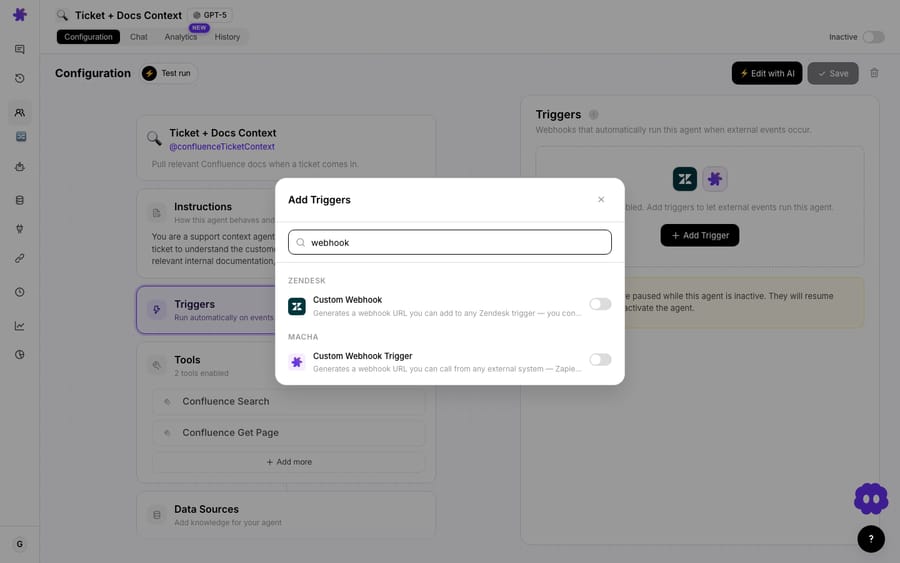
- On the agent, go to Triggers → Add Trigger, scroll down, and select Custom Webhook.
- Read the instruction it shows you. Macha has already created the webhook on your Zendesk instance. All you do is create a Zendesk trigger that fires it.
- Go to Zendesk → Admin → Triggers and create a trigger. Set the conditions (the tickets it should match) and add the action that notifies the webhook Macha created. Copy the payload from the setup modal into the trigger body, and include
ticket_idand ideallyticket_subject: Macha then titles each run in the agent's history with the ticket number and subject instead of a generic "Custom Webhook". - Test it by creating a ticket that matches your conditions, then open the agent's History tab to see the run and every step it took.
Zendesk's conditions now decide which tickets hit your agent, which is finer control than the built-in event triggers (ticket.created, ticket.comment_added, ticket.status_changed) expose. Freshdesk works the same way: Macha gives you a webhook URL and you build a Freshdesk automation rule that calls it. This pairs closely with stopping infinite loops, since you own the conditions.
How do you fire an agent from any other system?
For a system that isn't one of Macha's connectors at all, use the Macha Custom Webhook trigger:
- On the agent, go to Triggers, remove any event trigger you don't want, and add the Macha Custom Webhook trigger from the "Macha" group at the bottom of the list.
- Toggle it on. Macha generates a unique webhook URL and a signing secret. Copy both.
- Point your external system at the URL. Each request starts the agent, and the request's payload is passed in as context so the agent knows what happened. The signing secret lets you verify that incoming requests are genuine.
Anything that can send an HTTP request can now start your agent: Zapier, Make, GitHub, a custom backend or a cron job.
How do you stop a webhook trigger from overfiring or looping?
A custom webhook can fire on every customer message or every external event, so it's exactly the kind of trigger that can overfire or loop. Macha bills by ticket, so a trigger that matches tickets the agent shouldn't touch turns each of them into a billed ticket, and a loop keeps the agent busy on work nobody asked for. Two guardrails:
- Scope the conditions tightly in Zendesk or in your system, so only the right events reach the agent. Macha shows a warning on high-volume triggers; take it seriously.
- Prevent loops when the agent's own action could re-fire the trigger. The standard fix is to add a tag when the agent runs and exclude that tag in the trigger conditions, versioning the tag (
v1,v2) when you want to reprocess with new logic. Full detail in how to stop an agent from infinitely looping.
Frequently asked questions
What's a custom webhook trigger? A trigger fired by a webhook: either a Zendesk (or Freshdesk) rule you configure for fine control, or any external system calling a Macha webhook URL.
Do I have to create the webhook in Zendesk myself? No. Macha creates the webhook on your Zendesk instance automatically. You create the Zendesk trigger that fires it.
How do I fire an agent from a non-connector app? Add the Macha Custom Webhook trigger, copy the URL and signing secret it gives you, and point your system at the URL.
Why use a custom webhook instead of a built-in trigger? For finer control over which events fire the agent (through Zendesk conditions), or to trigger from systems Macha doesn't have a connector for.
Can this cause loops? It can if the agent's action re-fires the trigger. Scope conditions tightly and tag processed tickets, then exclude the tag, to prevent it.
Will pausing the agent break my Zendesk trigger? No. Pausing sets the webhook inactive and keeps its ID, so your Zendesk trigger still points at it when you resume. Only deleting the trigger in Macha removes the webhook.
Wire up a custom trigger: fire your agent exactly when you want. $50 of free usage, no credit card required. Start free.






