





 Shopify
 Stripe
 Slack
Slack Notion
 Google Workspace
 Confluence

How Do You Trigger an AI Agent From Any System With a Webhook?


Macha's custom webhook trigger gives an agent a unique URL and signing secret, so any system that can send an HTTP POST can fire it without a connector. That covers the long tail: monitoring tools, internal billing systems, Shopify Flow, GitHub Actions and cron jobs.
Key takeaways
- A Macha custom webhook trigger gives an agent a unique URL and a signing secret, so any system that can send an HTTP POST can fire it without a connector.
- Macha's trigger system, including custom webhooks with signing secrets, has been available since 1 March 2026 and is configured from an agent's Triggers tab.
- Macha rejects forged or tampered webhook requests by recomputing an HMAC with the shared signing secret, the same pattern Stripe and Zendesk use to sign their webhooks.
- Macha's Debounce chip covers Zendesk, Freshdesk, Slack and messaging event triggers and force-fires a bucket at 25 events, but is hidden on the unkeyed universal webhook.
- Pausing or trashing a Macha agent sets its webhook triggers to inactive while keeping the signing secret and config, so the sending system's URL keeps working after reactivation.

To trigger a Macha AI agent from a system with no connector, add a Custom webhook trigger on the agent's Triggers tab: Macha generates a unique URL and a signing secret, and any system that can send an HTTP POST can fire the agent by posting JSON to that URL. There is no connector, no integration to build and no polling, and the feature has been part of Macha's trigger system since 1 March 2026.
| Question | Answer |
|---|---|
| What fires the agent | An HTTP POST with a JSON body to the trigger's URL |
| Connector needed | No, for the sending system |
| Security | Signing secret; Macha recomputes an HMAC and rejects mismatches |
| Audit | Full raw payload saved on every autonomous conversation |
| Burst handling | Debounce on connector event triggers; hidden on the unkeyed universal webhook |
| Pause or trash the agent | Triggers go inactive; secret and config are kept |
| Cost | Billed per ticket, one conversation charged once |
The long tail is why it exists: a monitoring tool that pages you when a region goes down, an internal billing system, a Shopify Flow, a GitHub Action or a cron job will never get a native connector, but each can ring this doorbell.
What is a custom webhook trigger?
Macha agents run two ways. In chat, a person talks to them. Autonomously, a trigger fires them — and the agent works a ticket or an event with no human in the loop. Triggers are the autonomous half of the product, and the menu covers Zendesk ticket events, Freshdesk updates, Slack mentions, recurring schedules (cron), and the catch-all: custom webhooks.
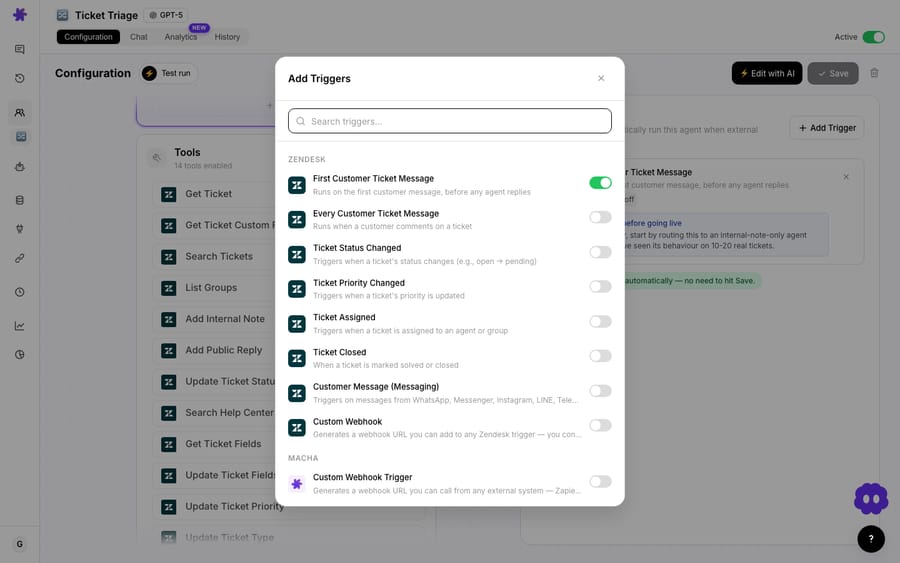
A custom webhook trigger is the escape hatch. Where a Zendesk trigger says "fire when a ticket is created," a custom webhook says "fire when this URL receives a POST." Macha generates a unique endpoint with a signing secret; you hand that URL to any external system; that system POSTs a JSON payload when its event happens; Macha verifies the signature, hands the payload to your agent as context, and the agent runs. The headline from the changelog says it plainly: a unique webhook URL with a signing secret for any external service — no connector required, works with any system that sends HTTP webhooks.
The thing that makes this more than a glorified endpoint is what the agent does next. The triggering system doesn't need to know how to fix anything — it just rings the doorbell. The agent reads the payload, decides what's going on, and then acts through whatever tools you've given it: post a reply, update a ticket, look up an order in Shopify, refund in Stripe, message a channel in Slack, write a row in Airtable. The webhook is the trigger; the agent is the brain and the hands.
How do you set up a custom webhook trigger?
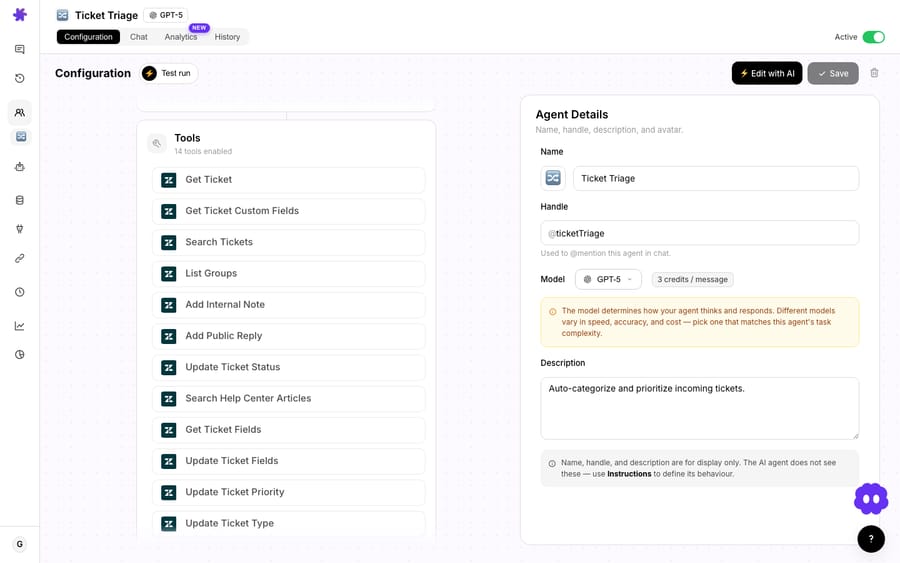
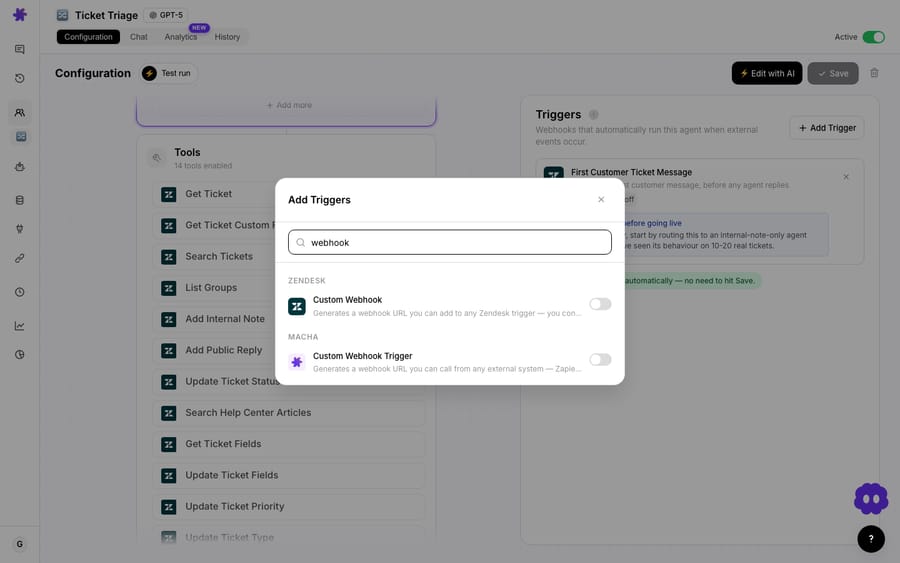
You add a trigger from an agent's Triggers tab, the same place you'd wire up a Zendesk or schedule trigger.
Pick Custom webhook and Macha generates two things:
- A unique URL — the endpoint your external system will POST to. It's specific to this trigger on this agent, so you can give different systems different URLs and revoke one without touching the others.
- A signing secret — a shared key used to verify that an incoming request genuinely came from the system you configured, and that nobody tampered with it in flight.
From there it's two paste operations. Copy the URL into your sending system's webhook settings. Copy the secret into the same system so it can sign its requests. Save. That's the whole setup — there's no OAuth dance, no API scopes to approve, no app to install on either side. The reason it works with anything is that it asks almost nothing of the sender: speak HTTP, send JSON, sign with the secret.
You can also describe the whole thing in plain language to Macha's AI agent builder — "fire this agent whenever our status page sends an incident webhook" — and it wires up the trigger, the URL, and the agent's tools for you, then shows them as clickable cards in the chat. The manual path above is what it's doing under the hood.
How does the signing secret keep the endpoint secure?
A naked webhook URL is a liability. If the endpoint just accepts any POST, then anyone who learns the URL — a leaked log line, a misconfigured proxy, a curious ex-employee — can fire your agent at will. At best that burns tickets off your monthly allowance. At worst it pushes a forged "refund this customer" event into a billing agent.
The signing secret is the fix, and it's the same pattern the serious webhook providers use. When your system sends a request, it computes an HMAC of the request body using the shared secret and includes that signature in a header — exactly how Stripe signs its webhooks (Stripe-Signature) and how Zendesk signs its webhooks (X-Zendesk-Webhook-Signature, a base64 HMAC-SHA256 of the timestamp plus the body). Macha recomputes the HMAC on its side and only runs the agent if the signatures match. A forged request with the wrong secret — or a real request someone tampered with in transit — fails verification and never reaches the agent.
This isn't table stakes everywhere. A webhook-security teardown by Codehooks reports that the Webhooks by Zapier trigger does not support signature verification, that Make lacks built-in verification, and that HMAC support in n8n is still a feature request, so teams either leave endpoints unauthenticated or hand-roll the check. Macha bakes the signed URL into the trigger from the start.
What happens when a system sends a burst of events?
Some systems are polite and send one clean webhook per event. Others are not: a CRM that emits five rapid updates as a record is saved, a monitoring tool that flaps. Fire an agent on every one of those and you've paid five times over to process what was really one event.
On Macha's event-driven connector triggers, debounce handles it. Any Zendesk or Freshdesk ticket event, Slack mention or DM, or messaging event shows a Debounce chip where you set a delay in seconds, and Macha batches the rapid-fire events inside that window before firing the agent once. The defaults are 0 (off) for new event types, 15 seconds for messaging and 10 seconds for Slack DMs. A safeguard force-fires a bucket once it holds 25 events, or after 10 times the debounce window, capped at 2 minutes, so a malformed source can't hold the agent forever.
The chip is hidden by design on cron schedules (clock-driven, not event-driven) and on the unkeyed, per-org universal Macha webhook, where there is no key to group events by. So if your custom webhook shows no Debounce chip and your source is chatty, collapse the burst upstream: send one webhook when the record is saved, not one per field change. Or, where the source is Zendesk or Freshdesk, use the native trigger, which does carry debounce.
What does the agent see, and how do you audit a run?
When the webhook fires, Macha hands the agent the payload as context — and it doesn't throw any of it away. Every autonomous conversation preserves the full raw webhook payload for audit and debugging. If an agent did something surprising, you can open that run and see the exact JSON that triggered it, byte for byte. That's the difference between "the agent went rogue" and "ah, the upstream system sent status: refunded when it meant status: refund_requested."
Macha also extracts the useful fields for display. Each connector's trigger definitions declare a contextSchema — which payload fields to pull out for the UI — so autonomous conversations show a connector icon, an event label, and a readable title in the sidebar and agent history instead of an opaque "Custom Webhook." For Zendesk and Freshdesk custom-webhook payloads, Macha now titles the conversation using the ticket_id and ticket_subject straight from the payload, so your history reads like real tickets rather than a wall of identical entries.
What can you wire up with a custom webhook?
Because the trigger asks so little of the sender, the use cases are basically "anything that can POST." A handful that come up often:
- Order events from Shopify Flow. Shopify Flow can send an HTTP request on
order createdorfulfillment failed; point it at a Macha webhook and an agent can proactively open a ticket, check the order, and draft an outreach — even though the event originated in a workflow tool, not a connector. - Payment failures from a billing system. A subscription system POSTs on a failed renewal; a billing agent reads the payload, looks up the customer, and opens a triaged dunning ticket.
- Incidents from your monitoring stack. Datadog, PagerDuty, or a status page fires on an incident; an agent posts a structured summary to a Slack channel and files the internal ticket.
- Anything internal. A homegrown admin tool, a GitHub Action, a cron script — if it can
curla URL, it can fan out into an agent that takes real action across your connected tools.
The pattern is always the same: the external system knows that something happened; the agent figures out what to do about it. You're not building integration logic in the sending system — you're letting it ring a bell.
What happens to the webhook when you pause or trash an agent?
Webhook triggers behave sanely when you turn agents on and off, which matters because the sending system holds a URL you don't want to invalidate by accident.
- Pause/resume is a soft toggle. Toggling an agent off sets its triggers to inactive rather than deleting them, and the signing secret and config are preserved. Toggle it back on and the same trigger resumes — the external system's URL keeps working untouched.
- Trashing an agent pauses, doesn't destroy. A trashed agent's triggers are paused so they stop firing, but their webhook secrets and config are kept. Restore the agent and the trigger config comes back; you re-enable when ready.
- Explicit deletes do tear down fully. If you actually delete a trigger, it's gone — that's the deliberate way to retire a webhook for good.
The principle: nothing silently breaks the contract with the system on the other end of the URL unless you explicitly ask it to.
When should you not use a custom webhook?
Custom webhooks let an outside system make your agent act. Keep that in mind:
- An autonomous agent acts without review. A webhook-fired agent runs end to end with no human gate, so be deliberate about which tools it holds. Macha shows activation confirmation modals and persistent advisory cards for high-impact tools (Add Public Reply, Update Ticket Status) for this reason — read them. Start an agent in a draft-only or read-only posture before you let it post publicly.
- Every fire counts against your tickets. A webhook trigger that runs an agent costs whatever that agent run costs — Macha bills per ticket, one conversation charged once however many steps it takes, whichever model the agent runs on. A chatty source can run up a bill; debounce it where the chip exists, or send fewer events upstream.
- Use the signing secret. Always. An unsigned endpoint is an open door. Treat the secret like a password, rotate it if it leaks, and never paste it into client-side code.
- If a native connector exists, prefer it. Custom webhooks are the escape hatch for systems Macha doesn't natively support. If you're triggering on Zendesk or Freshdesk events, use the native Zendesk trigger — it carries richer, structured context out of the box. Reach for a custom webhook when there's no connector to reach for.
- It's a trigger, not a transform. A webhook starts an agent; it doesn't reshape your payload first. If your sending system emits something genuinely cryptic, give the agent clear instructions on how to read it (or fix the payload upstream).
How does this compare to other webhook-triggered agents?
Webhook-triggered agents aren't unique to Macha — Relevance AI, Moveworks, MindStudio, and n8n all offer some flavor. What's worth comparing is the surrounding posture:
| Macha custom webhook | Typical no-code webhook trigger | |
|---|---|---|
| Connector required | No — any HTTP sender | No |
| Signed URL out of the box | Yes (signing secret + HMAC) | Often not built in |
| Raw payload audit on every run | Yes, preserved per conversation | Varies |
| Rapid-event debounce | Yes on connector event triggers; not on the unkeyed universal webhook | Rare |
| What fires | A tool-using support agent on top of your helpdesk | A workflow node |
The distinction that matters for support teams: Macha isn't a general workflow runner that happens to call an LLM. The thing your webhook fires is an agent that sits on top of your existing helpdesk and can take real, governed actions across your connected commerce and knowledge tools. The webhook is just the most universal way to start it.
FAQ
What can send a webhook to Macha? Anything that can make an authenticated HTTP POST — Shopify Flow, Stripe, a monitoring tool, a CRM, a GitHub Action, a cron script, an internal app. No connector or native integration is required.
Do I need a connector for the system that's calling the webhook? No. That's the entire point — the custom webhook trigger exists for systems Macha doesn't have a native connector for. The agent's own tools (Shopify, Stripe, Slack, Zendesk, etc.) still come from connectors, but the trigger needs nothing.
How is the endpoint secured? Macha generates a signing secret with each webhook URL. The sender signs each request (HMAC over the body) and Macha verifies the signature before running the agent, so forged or tampered requests are rejected.
What happens if my system sends a burst of events? On Zendesk, Freshdesk, Slack and messaging event triggers, set a debounce delay and Macha batches rapid events inside that window before firing the agent once. The Debounce chip is hidden on the unkeyed universal webhook, so for a chatty custom source, send one event per change upstream.
Does triggering an agent cost anything? Yes — a webhook fire runs the agent, and agent runs are billed per ticket: one conversation, charged once however many steps it takes, whichever model you choose. See the pricing page for current plans and tiers.
Will pausing the agent break the webhook? No. Pausing sets triggers inactive while preserving the secret and config; resuming brings the same trigger back so the external system's URL keeps working. Only an explicit delete tears the trigger down for good.
How do you get started?
If you've been blocked by "Macha doesn't connect to that system," custom webhooks are the answer: one signed URL, and any HTTP sender can fire a real agent. Start a free trial ($50 of usage, no credit card required, no time limit), open an agent's Triggers tab, and generate your first webhook — or read the triggers documentation for the full setup walkthrough. More on building autonomous agents is on the blog.
Written by Abbas (Customer Support & AI, Macha) · Reviewed by Ankeet Guha (Co-founder & CTO) · Published 2026-06-24 · Last updated 2026-09-24.






