





 Shopify
 Stripe
 Slack
Slack Notion
 Google Workspace
 Confluence

How Do You Post a Daily Support Metrics Summary to Slack? (No Dashboard Needed)


Posting yesterday's support numbers to Slack by hand takes a lead ten minutes every working day, and it stops when that person is out. A scheduled Macha agent reads the tickets and posts the digest instead.
Key takeaways
- A daily Slack support summary in Macha needs one agent with three parts: a scheduled trigger, Zendesk's Search Tickets action, and Slack's Send Message action.
- Zendesk's Slack for Zendesk Support integration creates tickets, adds comments and internal notes, and sends ticket notifications, but its documentation describes no scheduled digest or metrics reporting.
- Macha's scheduled triggers run at least 1 hour apart, cap at 24 runs per trigger per day, allow 3 simultaneous scheduled runs per organization, and disable themselves with an email after 5 consecutive failed runs.
- Macha bills the digest per ticket, from $299 a month for 750 tickets, about $0.40 each, and every plan includes setup by the Macha team and a dedicated success manager who handles changes.
- Geckoboard can post Zendesk KPI snapshots to Slack daily, weekly or monthly, but only after the dashboard widgets are built in that separate product.

To post a daily support metrics summary in Slack without building a dashboard, give a Macha agent three parts: a scheduled trigger (for example daily at 9:00 AM), Zendesk's Search Tickets action to read yesterday's tickets, and Slack's Send Message action to post the digest to a channel such as #support-daily. Macha sits on top of the help desk you already run (Zendesk, Freshdesk, Gorgias, Front, HubSpot or Intercom), and the Zendesk version below needs no BI tool and no copy-paste.
| Part | Macha setting | What it does |
|---|---|---|
| Trigger | Scheduled: a cron expression such as 0 9 * * *, minimum 1 hour apart | Starts the agent on a clock, not a ticket event |
| Read | Zendesk → Search Tickets (plus Get Custom Fields) | Counts created and solved tickets, pulls CSAT and topics |
| Write | Slack → Send Message | Posts the written summary to the channel you name |
What should a daily support summary contain?
The goal isn't a wall of numbers. It's the handful of metrics a support team actually steers by, posted in a format people read on their phone. A sample Macha digest (illustrative numbers) looks like this:
📊 Daily Support Summary, March 4 - Tickets created: 47 - Tickets solved: 52 - First response time (avg): 12 min - Resolution time (avg): 2.4 hours - CSAT: 94% - Top topic: Order tracking (18 tickets) ✅ Cleared backlog: 5 more solved than created
The difference between this and a raw stat dump is the last line. Because a language model writes the message, it can do the small interpretive step a human lead would do: notice that solved outpaced created and call it a cleared backlog, or flag that first response time crept up versus the norm. You define the tone and the metrics; the agent fills in the read. That's the part a static dashboard widget can't do.
How does a scheduled Macha agent build the digest?
Under the hood this is one of the simplest agents you can build in Macha. It needs exactly three things.
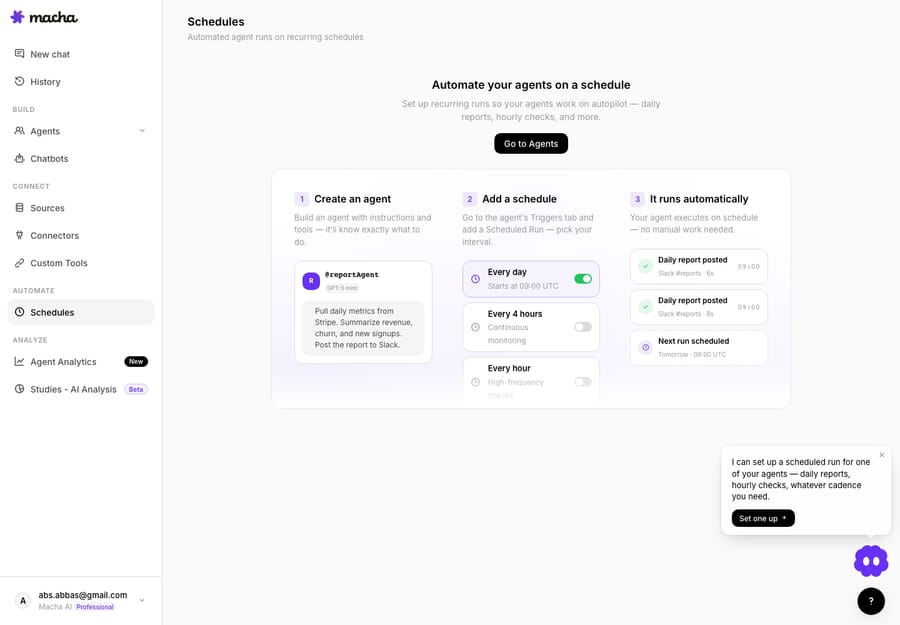
1. A trigger: Scheduled (daily at 9:00 AM). Macha supports cron-based scheduled triggers, so an agent can run on a recurring clock instead of waiting for a ticket event. You write the schedule as a cron expression: 0 9 * * * runs the agent at 9:00 every day, and 0 9 * * 1-5 limits it to weekdays. Scheduled triggers are included on every plan (pricing).
2. A read action: Zendesk → Search Tickets. The agent queries your helpdesk for yesterday's activity. Macha's Zendesk Search Tickets action accepts standard Zendesk search syntax: by created, solved, status, assignee, brand, or tag, so the agent can count what was created, what was solved, and bucket the top topic. (Macha can also read Get Custom Fields if your CSAT or category lives in a custom field.)
3. A write action: Slack → Send Message. Once it has the numbers, the agent composes the summary and uses Slack's Send Message action to post it to whichever channel you name. No thread or @mention needed: it's a fresh top-of-channel post each morning.
That's the whole flow: clock fires → read Zendesk → write Slack. You connect both tools once on the connectors page, and the agent holds the instruction for which metrics to pull and how to phrase the result.
Building it without writing config by hand
You don't have to assemble the trigger, tools, and instructions field by field. Macha's Sidekick builder lets you describe the agent in plain language, for example "Every weekday at 9am, pull yesterday's Zendesk ticket counts, average first response time, resolution time and CSAT, find the top topic, and post a summary to #support-daily", and it provisions the schedule, the Zendesk read tool, the Slack write tool, and the instructions for you. You review and adjust before it goes live.

Can the native Zendesk and Slack integration send daily metrics?
No. The official Slack for Zendesk Support integration works per ticket, not as reporting. Per Zendesk's documentation (checked 24 September 2026), it lets you create tickets from Slack, view and comment on tickets, add internal notes, respond to approval requests, and send ticket update notifications to channels. Zendesk also notes you cannot close tickets or edit ticket fields from Slack. The documentation describes no scheduled digest, metrics aggregation or reporting. (Zendesk docs)
So if you want a daily summary (counts, averages, CSAT, a topic breakdown), the native integration can't produce it. You're left with one of three options:
| Approach | What it takes | Trade-off |
|---|---|---|
| Native Slack-for-Zendesk | Built in, free | Per-ticket notifications only; no metrics, no daily summary |
| BI tool (e.g. Geckoboard) | Build dashboard widgets, then schedule Slack snapshots | Real metrics, but a separate paid tool and you design every widget first |
| Workflow builder (e.g. n8n) | Build and maintain a workflow with API calls + formatting | Flexible, but it's yours to debug; no AI-written narrative |
| Macha scheduled agent | One agent: schedule + read + write | AI-written summary with context; scheduled triggers included on every plan |
Geckoboard does this well: it can post Zendesk KPI snapshots to Slack on a daily, weekly, or monthly cadence, but it's a dedicated dashboard product you build widgets in first (Geckoboard says snapshots can go to Slack "daily, weekly or monthly"). (Geckoboard) A tool like n8n can compute resolution rates and SLA breaches, but you own the workflow and its maintenance. Macha's angle is different: it's an AI agent that reads and writes prose, so the output is a summary a person would write, not a chart snapshot, and it runs inside the same agent platform you're already using to triage and resolve tickets.
To be clear about positioning: Macha is not a replacement for Zendesk Explore or a BI dashboard. Explore is still where you slice six months of trends. The daily Slack digest is the lightweight, glanceable layer on top: the thing that keeps the team aligned between the deep-dive reviews.
What other scheduled digests can the same agent pattern cover?
Once the pattern clicks, the same scheduled-agent shape covers a lot of ground:
- Shift handoff at 5pm. Post an end-of-day summary plus the open/pending count so the next region picks up cleanly.
- Monday backlog brief. A weekly version that reports the weekend's accumulation and the oldest unsolved tickets.
- Per-team channels. Scope the Zendesk search to a group or brand and post each team's numbers to its own channel.
- Weekly refund report. A sibling agent that pulls Stripe refund data on Mondays: same schedule-and-summarize pattern, different source.
- Urgent-only relay. Not a digest at all, but the inverse: an event trigger that pings Slack the moment an urgent ticket lands. (See more in our use-case library.)
The point is that "read something on a schedule, summarize it, post it to Slack" is a reusable building block, not a one-off.
What limits and watch-outs apply to scheduled digests?
A daily metrics agent is low-risk: it only reads tickets and writes to one channel, but a few things are worth knowing before you rely on it.
- Scheduling guardrails are real. Macha's scheduled triggers run on a polling loop with deliberate limits: a minimum 1-hour interval, a cap of 24 runs per trigger per day, and at most 3 simultaneous scheduled runs per organization. A once-a-morning digest sits comfortably inside these, but you can't use this to post minute-by-minute updates, and you shouldn't want to.
- It auto-disables on repeated failure. If the agent's run fails five times in a row, say because Zendesk credentials lapse or the Slack channel is archived, the trigger disables itself and emails you. That's a safety feature, but it means a silently broken digest will stop, not spam. Check the email.
- Define "yesterday" carefully. Time zones matter. If your team is distributed, be explicit in the agent's instructions about which window "the previous day" means, so the counts line up with how people think about the day.
- Metrics are as good as your Zendesk hygiene. If CSAT isn't being collected, or topics aren't tagged, the agent can only report what's there. The summary surfaces gaps; it doesn't fix them.
- It draws on your plan. A scheduled run is agent work like any other, and the organization needs available usage before each run starts. A single daily post is trivial, but if you fan this out to twenty per-team channels, account for it. Macha bills per ticket (one conversation, charged once however many steps it takes), from $299 a month for 750 tickets, so a once-daily summary is cheap automation, but not free. See pricing for the tiers.
If you need a fully interactive analytics surface (drill-downs, custom date ranges, exportable charts), that's a dashboard job, not a Slack-digest job. Use Explore or a BI tool for that, and use the Macha agent for the daily nudge.
Why is a daily digest a good first Macha agent?
The daily digest is a small first agent, which is why it's a good one to start with. It touches the two things every Macha deployment uses (a helpdesk connection and an action tool), it's read-mostly so the blast radius is tiny, and it produces something the whole team sees every morning, which builds trust in the platform fast. From there, the same account can run agents that resolve and triage tickets; the digest just happens to be the one everyone notices first.
FAQ
Does Zendesk's built-in Slack integration send daily metrics? No. The native Slack for Zendesk Support integration handles per-ticket notifications and lets you create or comment on tickets from Slack, but it has no scheduled summaries, metrics aggregation, or reporting. A daily digest needs something that reads ticket data and composes a summary, which is what a Macha scheduled agent does.
What metrics can the summary include? Anything the agent can read from your helpdesk: tickets created and solved, average first response and resolution time, CSAT, backlog delta, and a top-topic breakdown. If a metric lives in a custom field, Macha can read that too.
How often can it run? On any cron cadence down to once an hour. Macha's scheduled triggers enforce a minimum 1-hour interval and a cap of 24 runs per day, so daily, twice-daily (open/handoff), or hourly are all fine.
What happens if a run fails? The trigger retries on its schedule, and if it fails five consecutive times it disables itself and emails you, so a broken digest goes quiet rather than spamming the channel. Re-connect the source and re-enable it.
Does it replace Zendesk Explore or a BI dashboard? No, and it's not meant to. Explore and BI tools are for deep, interactive analysis. The Slack digest is the lightweight daily layer on top that keeps the team aligned between those deeper reviews.
How much does it cost to run? Macha bills per ticket (one conversation, charged once however many steps the agent takes), from $299 a month for 750 tickets, about $0.40 each, so a single daily summary is negligible against a month's allowance. Setup is done for you on every plan: the Macha team builds and tests the digest agent, and the price includes a dedicated success manager who handles your changes afterwards, such as new metrics, new channels or instruction changes. See the pricing page for current plans and tiers.
Try it
If your mornings still start with a manual copy-paste from Explore into Slack, this setup retires the chore. Start a free trial ($50 of usage, no credit card required), connect Zendesk and Slack, and describe the digest you want, or read the docs for the full scheduled-agent walkthrough.
Written by Abbas (Customer Support & AI, Macha) · Reviewed by Ankeet Guha (Co-founder & CTO) · Published 2026-06-24 · Last updated 2026-06-24.






