





 Shopify
 Stripe
 Slack
Slack Notion
 Google Workspace
 Confluence

How Do You Log In to Freshdesk? Agent Login, Password Reset and SSO Troubleshooting


Freshdesk agents sign in through the Freshworks login page, while customers sign in on your support portal with separate credentials, and most login trouble comes from using the wrong one. When single sign-on locks people out, Freshworks documents a /login/normal bypass that, on Freshworks organization accounts, only Org Admins can use.
Key takeaways
- Freshdesk agents log in by clicking Login and then Are you an Agent? Login here, which sends them to the Freshworks sign-in page, while customers use your support portal.
- Freshworks documents a /login/normal bypass for SSO lockouts, but on Freshworks organization accounts only users with Organization Admin permissions can use it.
- SSO is configured in the Freshworks Neo Admin Center under Organization Dashboard, Security, Default Login Methods, an area only Org Admins can access, supporting SAML 2.0, OAuth 2.0, OpenID Connect and JWT.
- The default Freshdesk password policy requires at least 8 characters without the username, and policy changes take 4 to 8 hours to be implemented.
- A Freshdesk password policy cannot be set up while SSO is enabled, so once SSO is on, the identity provider owns the credential rules.

Freshdesk agents log in from your Freshdesk URL by clicking Login and then "Are you an Agent? Login here", which hands them to the Freshworks sign-in page; customers log in on your support portal with a separate set of credentials. If single sign-on is redirecting you somewhere broken, Freshworks documents a bypass at companyname.myfreshworks.com/login/normal, and on Freshworks organization accounts only Org Admins can use it.
| Who | Where they sign in | Where a password is reset |
|---|---|---|
| Agent, native login | Freshworks sign-in page (via "Are you an Agent? Login here") | Forgot Password on the Freshworks page, primary email only |
| Agent, SSO enabled | Your identity provider (Okta, Azure AD, Google) | In the identity provider, not Freshworks |
| Org Admin, SSO broken | /login/normal bypass URL | Native Freshworks credentials |
| Customer | Your branded support portal | Forgot Password on the portal |
Is the agent login different from the customer portal login?
The single most common Freshdesk login mistake is an agent trying to sign in on the customer portal page, or vice versa. They are separate systems of authentication.
Agents don't log in on the portal at all. Per Freshworks' password reset article, you go to your Freshdesk URL, click Login, then choose "Are you an Agent? Login here" — which redirects you to the Freshworks sign-in page. That redirect is the tell: agent identity lives in Freshworks (the account layer above Freshdesk), not in the help desk itself. On that page you enter your email and password, or use a configured social/SSO button.
Customers log in on your branded support portal — yourcompany.freshdesk.com (or your vanity domain) — where they see a "Log in to support portal" screen with email/password and any social sign-in you've enabled. This is a completely different credential store from your agents'. A customer password reset never touches an agent account, and vice versa.
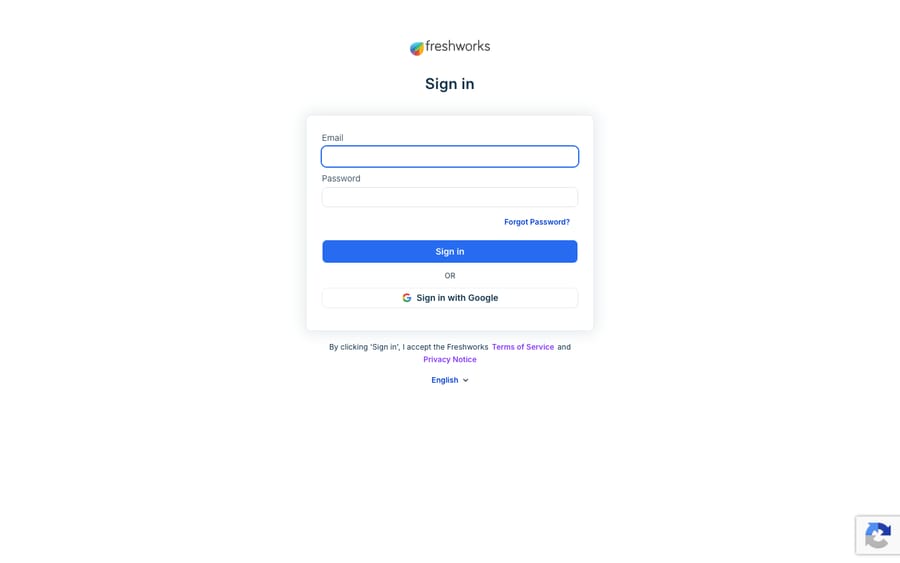
If your customers are the ones stuck at the door — bounced back to login, "invalid credentials," or an activation email that never arrived — that's a portal-side problem with its own fixes, which we cover in Freshdesk portal login issues.
How do you reset a forgotten Freshdesk password?
The reset flow is the same shape for both roles; only the starting page differs.
- On the correct sign-in page (Freshworks for agents, your portal for customers), click Forgot Password.
- Enter the primary email address on the account. This matters for SSO users especially — Freshworks only recognises the primary email, not a secondary or alias.
- Freshworks emails a password reset link. Open it and set a new password.
- Log back in with the new password.
If the reset email never arrives, check spam, confirm you used the primary email, and make sure the account actually exists as an agent or contact (a common cause is typing an email that was never invited). Only an admin can resend an agent invite or re-trigger activation for a contact.
One caveat that surprises people: if SSO is enabled on your account, the password-reset path may be irrelevant for agents, because their password lives with your identity provider (Okta, Azure AD, etc.), not with Freshworks. Resetting the Freshworks password won't help — you reset it in your IdP.
How do you get past an SSO redirect loop in Freshdesk?
Here's the failure mode that generates the most support tickets. You turn on SSO. From then on, the standard agent login redirects everyone to your identity provider — which is the point. But it also means that if your IdP misfires, or an agent isn't provisioned there, or you're an admin who needs in before SSO is fully working, the normal login simply won't accept native Freshdesk credentials. You get stuck in a loop.
The escape hatch is a URL Freshworks documents in its support article How can I bypass SSO login when I have it enabled?: append /login/normal to your Freshworks organization domain.
https://companyname.myfreshworks.com/login/normalThis bypasses the SSO redirect and presents the classic email-and-password form, where you enter valid Freshdesk credentials. Older accounts that predate the Freshworks organization layer use the same path on the help desk domain, yourcompany.freshdesk.com/login/normal.
The catch is who it works for. On accounts that run through a Freshworks organization, Freshworks' own SSO recovery article says the bypass is only possible for users with Organization Admin permissions, and Freshdesk community threads report the same behavior. So it's the move when:
- SSO was just enabled and an Org Admin is locked out mid-configuration.
- The IdP is down or misconfigured and an Org Admin needs in to fix it or switch login methods.
- One agent isn't in the IdP yet: the Org Admin gets in through the bypass and temporarily enables native login for that user, rather than the agent using the URL directly.
Keep this URL somewhere your Org Admins can find it before an SSO cutover, not after. Whether native login still works alongside SSO also depends on how your org's login methods are set; if password login is disabled entirely, the IdP is the only way in.
Where is Freshdesk SSO configured, and who can change it?
If you're setting SSO up rather than escaping it, know that the controls moved. SSO is no longer configured inside Freshdesk — it lives in the Freshworks Neo Admin Center. Per Freshworks' Single Sign-On in Freshdesk documentation, you navigate to Organization Dashboard → Security → Default Login Methods, and this area is available only to Org Admins. A regular Freshdesk admin can't change it.
Freshworks supports four protocols there — SAML 2.0, OAuth 2.0, OpenID Connect (OIDC), and JWT — so you can wire up Okta, Azure AD, ADFS, OneLogin, Google, and similar providers. SSO itself spans essentially every tier: Free, Growth, Pro, and Enterprise on current Freshdesk plans (plus the legacy Sprout/Blossom/Garden/Estate/Forest tiers and Freshdesk Omni's Growth/Pro/Enterprise). If you had SSO configured the old way inside Freshdesk, Freshworks asks you to reconfigure it in the Neo Admin Center and then disable the legacy setup. For a full walkthrough, see how to set up SSO in Freshdesk and the deeper conceptual piece, Freshdesk SSO explained.
Why can a password policy change lock people out?
Beyond forgotten passwords, two policy-driven states can leave someone unable to log in.
A password-policy change locked me out. Admins can tighten the password policy under Admin, Account, Security: minimum length, expiry, no-repeat history, and alphanumeric / mixed-case / special-character requirements (the default floor is 8 characters, and the password may not contain the username). When a policy change takes effect, logged-in agents are prompted to change their password for at least an hour, then logged out; logged-in customers are logged out. Freshworks notes that policy changes take 4 to 8 hours to be implemented, so a "wrong password" right after a change may just be timing.
Password policy and SSO don't coexist. A subtle but important limit: you cannot set up a password policy while SSO is enabled. That's by design — when SSO is on, your identity provider owns the credential rules, so Freshworks steps out of the way. If you need Freshworks-enforced password policies, they apply to native login only.
Here's a quick decision guide for the most common "can't log in" situations:
| Symptom | Most likely cause | Fix |
|---|---|---|
| Agent redirected away from login | SSO is enabled | Sign in via your IdP; an Org Admin can use /login/normal |
| Reset email never arrives | Wrong/secondary email, or no account | Use the primary email; ask an admin to re-invite |
| "Wrong password" right after a policy change | Policy still propagating (4 to 8 hours) | Wait, or have an admin confirm the new rule |
| Agent can't reset password at all | SSO owns the credential | Reset in your identity provider, not Freshworks |
| Customer stuck at portal, not agent | Portal-side auth issue | See the portal login troubleshooting guide |
What does login not solve, and where does an AI layer fit?
Freshdesk's login and SSO setup is standards-based. SAML, OAuth, OIDC, and JWT are the right protocols; the Neo Admin Center centralizes identity across Freshworks products; and the /login/normal bypass gives Org Admins a way back in. This is not a system that needs replacing.
But notice what login is: a gate, not a workforce. Getting your agents authenticated is table stakes; it does nothing about the queue waiting on the other side. Once your team is in, the real work — reading each ticket, understanding intent, drafting an accurate first reply, looking up an order status — is still entirely manual. Authentication solves who is working, never how much gets done.
That's the seam where an AI agent layer belongs, and it's worth understanding the broader category of AI agents for customer service before reaching for one. Macha is one such layer: it runs on top of the Freshdesk you already use as a native connector — it does not replace your help desk, your login, or your SSO. You connect Macha to Freshdesk with your subdomain and API key (a service-level connection, separate from how your human agents authenticate), and from there it reads and writes the same tickets your team does: drafting or posting grounded first replies, triaging by intent, and looking up order or account status through a custom tool that turns a REST API into something an agent can call. If you want to see that end to end, how to automate Freshdesk with AI walks through it.
Two honest boundaries worth stating plainly: Macha's connector is for Freshdesk specifically — not Freshchat, Freshservice, or Freshcaller — and billing is per ticket, not per resolution: one conversation, charged once however many steps it takes, starting at $299 a month for 750 tickets with setup by the Macha team included (the pricing page breaks that down). Keep Freshdesk as the source of truth for identity and access; layer an agent on top for the work that starts the moment login ends.
FAQ
How do agents log in to Freshdesk? Go to your Freshdesk URL, click Login, then choose "Are you an Agent? Login here." This redirects you to the Freshworks sign-in page, where agent identity lives — enter your email and password, or use your configured SSO/social button. Customers, by contrast, log in on your branded support portal, which is a separate credential system.
How do I reset my Freshdesk password? Click Forgot Password on the correct sign-in page, enter your primary email address (secondary emails won't work), and open the reset link Freshworks emails you. If SSO is enabled for agents, your password lives in your identity provider instead — reset it there, not in Freshworks.
Why does Freshdesk keep redirecting me to SSO and rejecting my password? Because SSO is enabled, and the standard login forwards everyone to your identity provider. To sign in with native Freshdesk credentials, for example when you're locked out during setup, an Org Admin can go to https://companyname.myfreshworks.com/login/normal (or /login/normal on the freshdesk.com domain for older accounts), which bypasses the SSO redirect as long as password login isn't fully disabled. On Freshworks organization accounts the bypass works only for Org Admins, who can then enable native login for other users.
Where do I configure SSO for Freshdesk? In the Freshworks Neo Admin Center, under Organization Dashboard → Security → Default Login Methods — and only an Org Admin can access it. Freshworks supports SAML 2.0, OAuth 2.0, OpenID Connect, and JWT across Free, Growth, Pro, and Enterprise plans.
Can any agent use the /login/normal bypass? Not on accounts that run through a Freshworks organization. Freshworks says the bypass there is only possible for users with Organization Admin permissions. If a regular agent is locked out by SSO, ask an Org Admin to sign in through the bypass and temporarily enable native login for that agent.
Can I add AI to Freshdesk without changing how my agents log in? Yes. An AI agent layer like Macha connects to Freshdesk as a native connector using a subdomain and API key — a service-level connection that's entirely separate from how your human agents authenticate. It runs on top of your existing Freshdesk, login, and SSO rather than replacing any of them.
Ready to put your logged-in team to work faster? Start a free trial of Macha with $50 of free usage, about 125 tickets, and no credit card.






