





 Shopify
 Stripe
 Slack
Slack Notion
 Google Workspace
 Confluence

Why Can't Customers Log In to the Freshdesk Portal? Causes and Fixes


When a customer can't sign in to your Freshdesk support portal, the cause is usually an unverified contact, a missing activation email, a non-primary email address or a contact SSO gap. Portal login runs separately from the agent sign-in your team uses, so each cause has its own fix.
Key takeaways
- The most common cause of Freshdesk portal login failures is an unverified contact, fixed under Customers, Contacts, Unverified contacts, then Send activation email.
- Freshdesk's API resends an activation email with a PUT request to /api/v2/contacts/{id}/send_invite, which returns 204 No Content when the invite is queued.
- Freshdesk portal login and password resets work from the contact's primary email, so a customer typing a secondary address fails to find their record.
- Freshdesk custom SSO policies for portals need the Pro or Enterprise plan, and each portal can have only one custom SSO policy attached.
- The Freshdesk SSO error 'not part of this organization' means the user isn't assigned in the identity provider or has no matching Freshdesk record.

Most Freshdesk portal login failures come from an unverified contact, and the fix is to send an activation email from Customers → Contacts → Unverified contacts → Send activation email. The other usual causes are an activation email that never arrived (resend it with PUT /api/v2/contacts/{id}/send_invite), a customer typing a non-primary email address, and a contact SSO setup that doesn't recognise the user.
| Symptom | Most likely cause | Fix |
|---|---|---|
| "No account" / can't log in, password page shown | Contact is unverified | Send activation email (Customers → Contacts → Unverified) |
| Never got the activation/verify email | Filtered, expired, or never sent | Resend via UI or PUT /contacts/{id}/send_invite |
| Forgot-password email never arrives | Wrong / non-primary email | Confirm the contact's primary email |
| "…not part of this organization" at SSO | User not provisioned in the IdP app or in Freshdesk | Assign the user in the IdP; make sure the Freshdesk record exists with the same email |
| Password box shown on an SSO portal | Portal not bound to SSO policy | Attach the correct custom SSO policy to that portal (Pro and Enterprise) |
Which Freshdesk login are you actually debugging?
Freshdesk has two separate sign-in surfaces, and confusing them wastes more troubleshooting time than anything else.
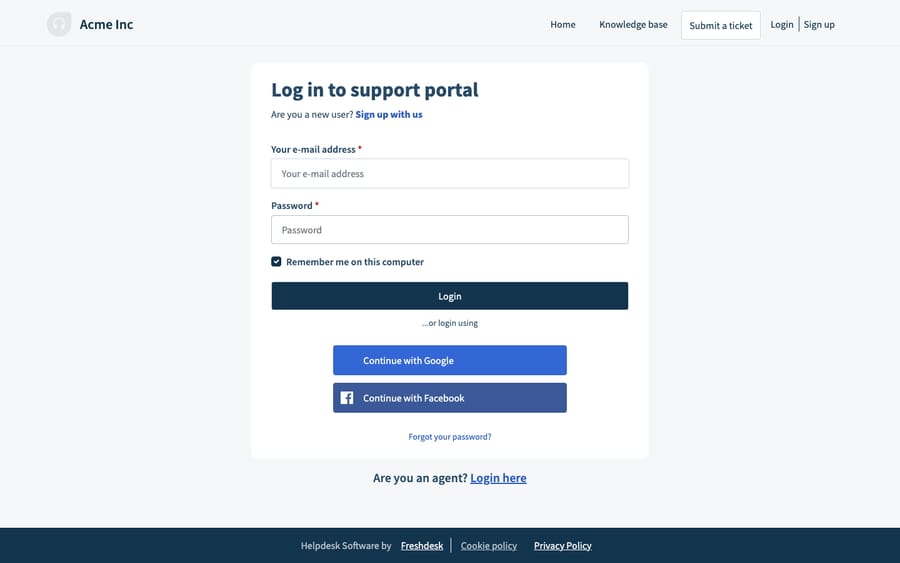
The agent sign-in page is where your support staff log in to work tickets. The customer support portal login is a separate, brand-able page (your logo, your colours) where end customers, which Freshdesk calls contacts, sign in to raise tickets and track their own history. A contact will never authenticate through the agent page, and an agent's credentials won't work on the portal. If someone reports a login problem, your first question is always: agent or contact? Everything below is about the contact side. For the agent side, see our Freshdesk login guide and troubleshooting.
Which login methods can a contact use?
Your portal decides how a contact is allowed to sign in, so confirm this before you chase anything else. Contacts can authenticate three ways:
- Freshworks login: an email address plus a password the contact sets themselves.
- Social login: Google or Facebook, if you've enabled it.
- Contact SSO: single sign-on against your identity provider (SAML, OAuth2, OpenID Connect or JWT), so contacts log in with your corporate credentials.
If a customer types a password on a portal that's configured for SSO only, they'll never get in, and the reverse is also true. Step one of any real login investigation is to open the portal and confirm which methods it offers.
Why can't an unverified contact log in?
This is the most common cause by a distance. When a contact record exists but the person has never confirmed their email and set a password, Freshdesk treats them as unverified, and an unverified contact can't log into the portal. A "no account here" message makes it feel like they don't exist at all.
The fix is an activation email, which carries a secure link the customer uses to set a password. Per Freshworks' How do I send an activation email to my customers documentation:
- Go to Customers → Contacts.
- Open the hamburger menu and choose the Unverified contacts filter.
- Tick the contact (or contacts) who can't log in.
- Click Send activation email.
The customer clicks the link, sets a password, and login works. The same article shows how to send the activation email automatically for new contacts: Admin → Workflows → Email Notifications → Requester notifications, then switch the user activation email on. If that notification was off when a customer signed up, they never got the first email, and that is usually the real root cause.
How do you resend activation emails in bulk?
Activation emails get filtered, land in spam, or sit unread until the customer forgets them. Resending one by one from the UI is fine for a handful of people, but after a contact import or a migration from another help desk you'll want to script it.
Freshdesk's REST API has a Send Invite to a Contact endpoint that (re)issues the activation email for a given contact:
curl -v -u YOUR_API_KEY:X \
  -X PUT \
  'https://YOURDOMAIN.freshdesk.com/api/v2/contacts/2004567890/send_invite'
A 204 No Content response means the invite was queued. To fan this out, pull the unverified contacts with the API's state filter, then loop:
# 1. list unverified contacts (100 per page is the maximum)
curl -s -u YOUR_API_KEY:X \
  'https://YOURDOMAIN.freshdesk.com/api/v2/contacts?state=unverified&per_page=100' \
  | jq -r '.[].id'

# 2. send_invite for each id returned above
Authenticate with your API key (under Profile settings → Your API Key) as the username and any string, such as X, as the password. Freshdesk's API rate limits still apply (trial accounts get 50 calls a minute), so throttle a large re-invite run rather than firing thousands of calls at once.
What if the customer uses the wrong email address?
A Freshdesk contact can carry several email addresses: one primary email plus extras (the API stores these as email and other_emails). Portal login and password resets work from the primary address. A customer who signs up, then emails you from a personal or aliased address, ends up with a mismatch: the address they type into the portal isn't the primary one on the record, so login or the "forgot password" flow quietly fails to find them.
Open the contact in Customers → Contacts, confirm which address is primary, and either tell the customer to use that one or promote the address they actually use.
Why does contact SSO say the user is not part of this organization?
Once contacts move onto single sign-on, a new class of failure appears, and it's usually a provisioning gap rather than a Freshdesk bug. The most reported symptom is an error at the SAML callback reading:
[email protected] cannot be logged in as this user is not part of this organization
In a Freshworks community thread on Azure AD, Freshworks traced this error to a user who had not been assigned to the Freshworks application in the identity provider, or who did not exist on the Freshdesk side. So check both ends: the user must be assigned in your IdP, and the email the IdP sends must match the record in Freshdesk.
Contact SSO is configured at the Organization level, not inside a single Freshdesk workspace. Freshworks' Single Sign-On in Freshdesk guide sends you to Organization dashboard → Security → Default Login Methods, an area only available to Org Admins. For per-portal control you log in with your Organization URL, open Security → Contacts, click Create New, pick the portals, enable the SSO Login toggle and choose your IdP (SAML, or OneLogin, Okta, Azure AD or ADFS via SAML). Per the custom SSO policies for portals docs, custom policies need the Pro or Enterprise plan, and a portal can have only one custom SSO policy. If SSO login is failing, the checklist is: (1) the user is assigned in the IdP, (2) the contact exists in Freshdesk with the matching primary email, and (3) the portal is bound to the correct SSO policy. Our Freshdesk SSO explained post walks through the full configuration.
One more SSO gotcha: toggling SSO on or off while a customer has a half-finished ticket open can break their submission mid-flow. Change login methods during quiet hours.
What can't Freshdesk's portal login fix, and where does an AI layer help?
Freshdesk's portal login is deterministic and well documented: verify a contact, use the primary email, bind the right SSO policy, and it works. It's also unforgiving in one way. The whole model assumes the customer wants an account, remembers they have one, and can complete the activation steps. Plenty won't. A shopper with a one-off "where's my order" question is not going to reset a password to ask it, and a contact who ignored their activation email six months ago is locked out until an agent steps in.
Some of the sharper controls are also plan- and role-gated: SSO configuration lives at the Org level and is reachable only by Org Admins, and custom per-portal policies need Pro or Enterprise. The agent fielding the login complaint often can't even see the setting that would fix it.
This is where an AI agent layer earns its place: not by replacing your portal, but by making the login wall matter less often. AI agents for customer service answer questions at the front door, before authentication comes up. Macha is one such layer: it runs on top of the Freshdesk you already use as a native connector, and it does not replace your help desk, your portal or your SSO. You connect it with your Freshdesk subdomain and API key. It answers common questions in chat and email, and through a custom tool that turns your order or account REST API into something an agent can call, it can look up "where's my order #4471?" without the customer signing in. (Macha's connector is for Freshdesk specifically, not Freshchat, Freshservice or Freshcaller. Macha bills per ticket, one conversation charged once however many messages it takes, starting at $299 a month for up to 750 tickets; see pricing, and how to automate Freshdesk with AI for workflow patterns.)
The division of labour: keep Freshdesk's portal and SSO as the front door for customers who need an authenticated account, and layer an agent on top so the ones with a quick question never have to knock.
FAQ
Why can a customer see the portal but not log in? Almost always because their contact record is unverified: they were created as a contact but never confirmed their email and set a password. Send them an activation email from Customers → Contacts → Unverified contacts → Send activation email, and login works once they complete it.
Why isn't the activation or password-reset email arriving? It's usually filtered or in spam, or the customer is using an email that isn't their primary address on the contact record. Confirm the primary email, then resend the invite from the UI or with PUT /api/v2/contacts/{id}/send_invite.
Where do I configure SSO for contacts? At the Organization level: Organization dashboard → Security → Default Login Methods (Org Admins only), with per-portal control under Security → Contacts as a custom SSO policy on Pro or Enterprise. A portal can have only one custom SSO policy attached.
What does "this user is not part of this organization" mean at login? Your identity provider and Freshdesk don't agree the user belongs. Make sure the user is assigned to the Freshworks app in your IdP and that a Freshdesk record exists with the same email the IdP sends.
Can I reduce portal login problems without replacing Freshdesk? Yes. An AI agent layer like Macha connects to Freshdesk as a native connector and answers common questions in chat and email, and can look up order or account status through a custom tool, so many customers get an answer without signing into the portal. It runs on top of Freshdesk and its login settings; it doesn't replace them.
Want fewer customers stuck at the login box? Start a free trial of Macha and connect it to your Freshdesk in minutes.






