





 Shopify
 Stripe
 Slack
Slack Notion
 Google Workspace
 Confluence

Front vs Gmelius (2026): Which Shared Inbox Fits a Gmail Team?


Gmelius puts shared inboxes inside Gmail from $25 a user a month, while Front is a standalone omnichannel app that most teams run on its $65 Professional plan. The right pick depends on whether your team wants to stay in Gmail or move into a dedicated workspace.
Key takeaways
- Gmelius suits Gmail-native teams that handle mostly email, while Front suits teams that need email, SMS, social and chat in one standalone app.
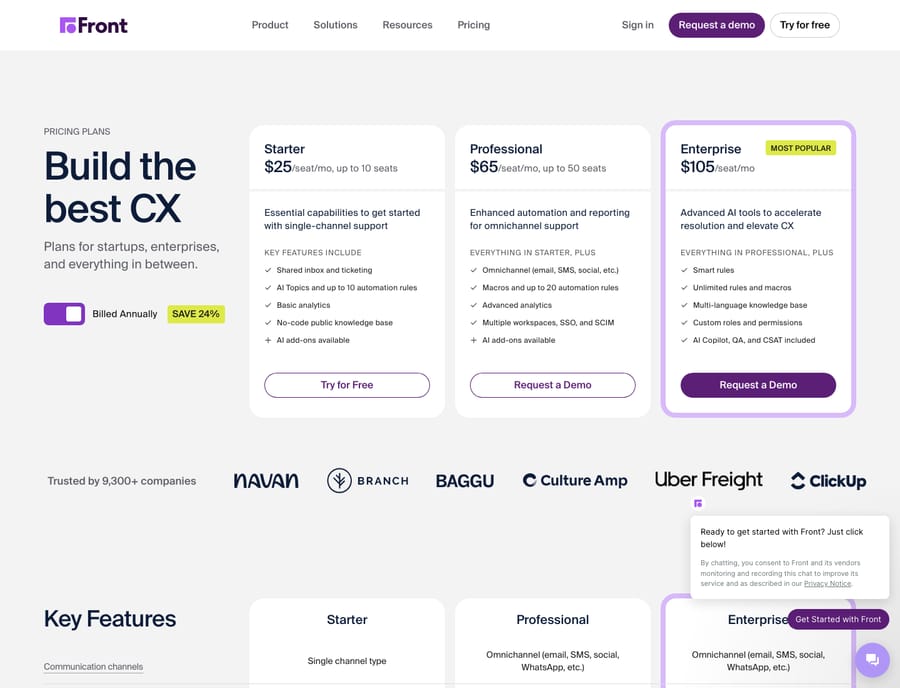
- Front prices Starter at $25, Professional at $65 and Enterprise at $105 per seat a month billed annually, and Starter is limited to one channel type.
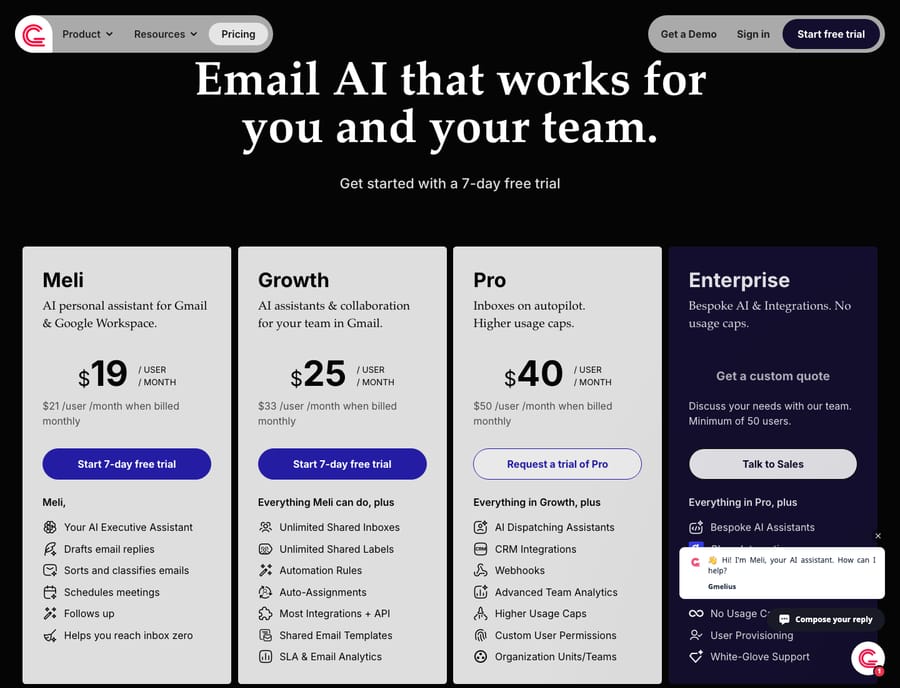
- Gmelius's cheapest Meli plan at $19 a month has no shared inboxes, so team features start on the Growth plan at $25 a user billed yearly.
- Gmelius runs only on Gmail and Google Workspace with no Outlook support, while Front works as a separate app with any email provider.
- Front includes AI Copilot, Smart QA and Smart CSAT only on Enterprise; below that they cost $20, $20 and $10 a seat a month as add-ons.

Pick Gmelius if your team works in Gmail and handles mostly email, because its Growth plan gives you unlimited shared inboxes inside Gmail for $25 a user a month billed yearly; pick Front if you need email, SMS, social and chat in one standalone app, which realistically means Front Professional at $65 a seat a month billed annually (both pricing pages, checked 24 September 2026). Gmelius runs only on Gmail and Google Workspace, while Front is a separate app that works with any email provider.
How do Front and Gmelius compare at a glance?
| Front | Gmelius | |
|---|---|---|
| Best for | Teams wanting a standalone, omnichannel support/ops cockpit | Gmail-native teams who never want to leave the inbox |
| Pricing entry | Starter $25/seat/mo billed annually (up to 10 seats) | Meli $19/user/mo yearly; shared inboxes start at Growth $25 |
| Collaboration / shared-inbox depth | Deep: assignment, comments, drafts, ticketing, analytics | Shared inboxes with assignment, notes, statuses and SLA analytics, inside Gmail |
| Automation | Rules engine (10, 20, unlimited by tier), macros, smart rules | Automation rules and auto-assignment (Growth+); AI dispatching and webhooks (Pro) |
| Channels | Starter: one channel type; Professional+: email, SMS, social, chat, WhatsApp | Email-first, Gmail-only (no Outlook) |
| Trial | 14 days | 7 days on Meli and Growth; Pro trial on request |
| Standout strength | Multichannel reach and reporting in a dedicated app | Shared inboxes and automation without leaving Gmail |
Prices and features checked 24 September 2026; check both vendors' pricing pages for current numbers.
How much do Front and Gmelius cost?
Sticker price is where these two tools look closest and behave most differently. Per Front's pricing page, Front runs Starter at $25 (up to 10 seats), Professional at $65 (up to 50 seats) and Enterprise at $105 per seat per month billed annually. Starter caps you at 10 automation rules and a single channel type. Professional lifts that to omnichannel plus macros and 20 rules. Enterprise adds unlimited rules and macros, smart rules, and includes AI Copilot, Smart QA and Smart CSAT, which cost $20, $20 and $10 a seat a month as add-ons lower down. Front's AI agent, Autopilot, is priced separately, starting at $0.05 a conversation. The practical read: most teams that pick Front for its collaboration and routing end up on Professional, so budget around $65 a seat rather than the $25 headline.
Gmelius reads cheaper, with an important asterisk. Per Gmelius's pricing page, the tiers are Meli $19, Growth $25 and Pro $40 per user per month billed yearly ($21, $33 and $50 billed monthly), plus a custom-quote Enterprise plan with a 50-user minimum. The catch is that Meli is an individual AI-assistant plan with no shared inboxes. The team functionality (unlimited shared inboxes and labels, automation rules, auto-assignments, SLA and email analytics) starts at Growth ($25), and AI dispatching assistants, CRM integrations and webhooks arrive on Pro ($40). So the honest floor for a collaborating team is Growth at $25, which lands right on Front's headline Starter price but inside Gmail rather than behind a single-channel cap.
Net: for a small Gmail team that mostly does email, Gmelius Growth is usually the cheaper path to a working shared inbox. For a team that needs omnichannel and heavier automation, Front's Professional tier is the more honest comparison, and it costs meaningfully more. Our Front pricing explained breakdown digs into the add-on gotchas tier by tier.
Which has the better shared inbox for team collaboration?
Both tools nail the fundamentals of a shared inbox: assign a conversation to a teammate, leave an internal note nobody outside the team sees, see who's replying, and track status. The difference is where that happens and how deep it goes.
Gmelius does it inside Gmail. Its plans list shared drafts, collision detection, notes and @mentions, assignments and team read statuses, and reviewers consistently praise how little the team has to relearn because it's still Gmail (G2 Gmelius reviews). For a Google Workspace shop, that "no new app to open" property is the whole pitch, and it's a real one.
Front takes you into a dedicated workspace. That costs you the familiarity of Gmail but buys you more: shared drafts multiple people can co-write, a proper ticketing layer, richer conversation history, and analytics on response times, CSAT and SLAs that go beyond Gmelius's email-activity reporting. If your shared inbox is really a support or operations queue with SLAs and reporting expectations, Front's dedicated model tends to scale further. Our Front shared inbox explained guide covers how that model works in practice.
How do their automation rules compare?
This is where the two tools' philosophies show. Front's automation is a first-class rules engine: When/If/Then triggers with conditions and stacked actions, capped at 10 rules on Starter, 20 on Professional, and unlimited (plus smart, branching rules) on Enterprise, according to Front's pricing page. It's built to route, tag, assign with round-robin, and escalate at volume.
Gmelius holds its own for a Gmail tool. Automation rules and auto-assignment arrive on Growth, with round-robin and load-balanced assignment on the feature list, and Pro adds AI dispatching assistants and webhooks for custom integrations. It also does something Front doesn't lean into: email follow-ups and an AI assistant that drafts, sorts and schedules, a nod to Gmelius's sales-and-productivity roots. For inbound support routing, Front's engine is deeper and more configurable. For a Gmail team that wants "auto-assign these and follow up on those," Gmelius covers it without a separate tool.
Which channels does each tool support?
The channel story is the cleanest dividing line. Front is omnichannel on Professional and above: email, SMS, social, live chat and WhatsApp land in the same workspace (Front pricing). Starter is limited to one channel type, and Front's native WhatsApp channel is a paid add-on billed at Meta's cost plus a 20% admin fee. Third-party research echoes that breadth, noting Front unifies email, social, SMS and chat while Gmelius stays close to Gmail (Front vs Gmelius on Secret).
Gmelius is email-first and Gmail-only. There's no Outlook support, and its strength is depth within Google Workspace plus integrations to tools like Slack and Trello, not a spread across social and messaging channels. If your customers reach you on Instagram, WhatsApp and SMS as well as email, that's a hard constraint in Front's favor. If email is almost all of your inbound and you're on Google Workspace, it simply doesn't matter.
Which is easier to roll out?
Gmelius wins the cold-start test for Google teams: it's a Chrome extension and Gmail add-on, so agents keep working in an interface they already know, and G2 reviewers repeatedly call out ease of use. The honest caveats are that setting up shared inboxes, aliases and rules "takes time, not five minutes," and some reviewers complain about slow email load times inside Gmail plus a mobile app that feels constrained next to desktop (G2 Gmelius reviews).
Front asks the team to adopt a new app, which is a bigger behavior change, but the payoff is a snappier purpose-built interface and a stronger mobile experience once people are in it. Front offers a 14-day free trial, against 7 days on Gmelius's Meli and Growth plans. Neither is a "flip a switch" deployment for a real team; both reward a proper rollout.
What are the pros and cons of each?
Front pros: omnichannel from Professional up; deep, configurable rules engine; strong analytics and ticketing; polished dedicated app and mobile experience. Cons: meaningfully more expensive once you're on Professional; Copilot, Smart QA and Smart CSAT are add-ons below Enterprise; leaving Gmail is a real change-management cost for Google-native teams.
Gmelius pros: lives inside Gmail so there's little to relearn; genuinely good shared-inbox depth (assignment, notes, SLA analytics); kanban board views; cheaper entry for small teams. Cons: Gmail-only with no Outlook; reported in-Gmail performance lag and a weaker mobile app; AI dispatching and webhooks gated to the $40 Pro tier; per-user pricing scales up fast at size.
Which should you choose?
- Pick Gmelius if your team lives in Google Workspace, email is the overwhelming majority of your inbound, and you want shared inboxes and automation without asking anyone to open a new app. It's the natural fit for small, Gmail-native support, ops and sales teams that value the low learning curve, and it's usually cheaper to get started.
- Pick Front if you need true omnichannel (SMS, social, WhatsApp, chat alongside email), a deeper rules engine, and reporting built for an SLA-driven support or operations queue, and you're willing to adopt a standalone app and pay Professional-tier prices for it. If you're weighing it against other standalone tools too, our best Front alternatives roundup and Front app review go wider.
Neither tool is objectively "better"; they're built for different rooms. The right question isn't which does more, it's whether your team wants to stay in Gmail or move into a dedicated workspace.
Can you add an AI agent on top of Front or Gmelius?
The choice above is about where your team works, not about how much of the work an AI can take off their plate. If you pick Front, Macha connects to it natively and sits on top as an AI agent layer: reading incoming conversations, drafting grounded replies from your own docs and data, and resolving the repetitive tickets before a human has to touch them. Macha runs on Zendesk, Freshdesk, Gorgias, Front, HubSpot or Intercom; Gmelius isn't on that list, so a Gmail-native team would lean on Gmelius's own AI assistants instead. Macha bills per ticket rather than per resolution, starting at $299 a month for up to 750 tickets.
To see how that plays out, read how AI agents work in customer service or how custom tools let an agent take real actions in your stack.
FAQ
Is Gmelius cheaper than Front? For a small team, usually yes. Gmelius's Growth plan ($25/user/mo billed yearly, checked 24 September 2026) includes shared inboxes, while Front's comparable functionality typically lands on Professional at $65/seat/mo. But Gmelius's cheapest Meli tier ($19) has no shared inboxes, so compare Growth to Professional, not headline to headline.
Does Gmelius work with Outlook? No. Gmelius is built for Gmail and Google Workspace and runs as a Chrome extension and Gmail add-on. If your team uses Outlook or Microsoft 365, Front (which is standalone and email-agnostic) is the workable option.
When does Gmelius add kanban boards? Gmelius lists kanban board views among its team collaboration features, which start on the Growth plan; its pricing page doesn't make the per-tier split clear, so confirm with Gmelius before you buy. AI dispatching assistants and webhooks are Pro additions ($40/user/mo billed yearly).
Is Front good for multichannel support? Yes, that's its strength. On Professional and above, Front unifies email, SMS, social, live chat and WhatsApp in one workspace, where Gmelius stays email-first inside Gmail.
Can I add AI resolution to either tool? On Front, yes: Macha connects natively and drafts or resolves routine conversations from your own knowledge, and Front also sells its own Autopilot agent. Macha doesn't connect to Gmelius, so Gmelius teams would use its built-in AI assistants.
Running Front and want the AI layer on top? Start a free trial of Macha.






