





 Shopify
 Stripe
 Slack
Slack Notion
 Google Workspace
 Confluence

How to Generate a Weekly Zendesk Support Report as a Spreadsheet Automatically (2026)


A Macha agent can pull a week of Zendesk tickets every Monday morning, compute volume, response times, CSAT and top topics, and deliver a formatted Excel file without anyone exporting a CSV. Here is what the report should contain, why Zapier and connectors stop at raw rows, and how the agent is built.
Key takeaways
- A Macha agent can generate a weekly Zendesk support report as a four-tab .xlsx file, with Summary, Tickets, Agent Performance and Topics sheets, using the Zendesk and File Tools connectors.
- The recommended setup runs the report agent every Monday at 9:00 AM on a scheduled trigger, and scheduled triggers are included on every Macha plan.
- Macha's built-in File Tools connector needs no API key and can create an Excel spreadsheet, a CSV, a PDF or a Word document.
- Zapier's Professional plan starts at $19.99 a month billed yearly for 750 tasks, but a Zendesk-to-Sheets Zap still produces a row log rather than a summary report.
- Macha bills per ticket however many steps the agent takes, starting at $299 a month for 750 tickets, about $0.40 each.

To generate a weekly Zendesk support report as a spreadsheet automatically, give one Macha agent the Zendesk connector and the built-in File Tools connector, a five-step runbook, and a scheduled trigger set to Monday at 9:00 AM; it then writes a four-tab .xlsx (Summary, Tickets, Agent Performance, Topics) and posts it where your team reads it. Nobody exports a CSV or fixes a broken formula.
The report itself is useful. The making of it is overhead: someone runs a saved view, exports, pastes into last week's template, recalculates resolution times and types up the top topics from memory. That's an hour a week, and it stops the week the template's owner goes on holiday.
Macha is the AI agent layer that sits on top of the help desk you already run (Zendesk, Freshdesk, Gorgias, Front, HubSpot or Intercom), so this isn't a new tool to migrate to. It reads from the same Zendesk you use today and writes a spreadsheet you can open in Excel or Google Sheets.
What belongs in a weekly support report?
A weekly support report exists to tell a lead, in one glance, how did the queue go last week and what changed? The metrics that earn their place:
| Metric | What it tells you | Where it comes from |
|---|---|---|
| Ticket volume | Total demand last week (and the week-over-week delta) | Count of tickets created in the window |
| Resolved / resolution rate | How much of that demand you actually closed | Solved or closed tickets ÷ volume |
| Avg first response time | How fast a customer hears back at all | First public agent reply minus ticket creation |
| Avg resolution time | How long a ticket stays open end to end | Solved timestamp minus creation |
| CSAT | Whether customers were happy with the help | Satisfaction ratings on solved tickets |
| Top topics | What's actually driving volume | Tags, categories, or AI-classified themes |
| Agent performance | Who handled what, and how it went | Tickets per assignee plus their resolution/CSAT |
That list lines up with how published frameworks define a good support report. Shopify's customer service report guide, for instance, builds around initial response time, first-contact resolution, ticket volume and CSAT. The hard part was never knowing which metrics to track. It's the weekly grind of assembling them.
Why don't the usual Zendesk-to-spreadsheet automations finish the job?
There's no shortage of ways to move Zendesk data into a spreadsheet. The catch is that almost all of them give you raw rows, not a report, and several need a second product or a developer to maintain.
| Approach | What you get | The catch |
|---|---|---|
| Manual export + template | Full control | An hour a week, breaks when the owner is out |
| Zapier → Google Sheets | A new row per ticket | A growing log, not a summary; you still need formulas and charts on top. Zapier's free plan allows two-step Zaps and 100 tasks a month; Professional starts at $19.99/mo billed yearly ($29.99 monthly) for 750 tasks |
| Coefficient / CData connector | Auto-refreshing Sheets/Excel data | You still build and maintain the pivot tables and the layout yourself |
| Custom API script | Total flexibility | Real code to write and own; one schema change and it's 9 a.m. firefighting |
| Native BI (Explore, Looker) | Dashboards | Lives in a separate tool; "send me the spreadsheet" is still a manual export |
Every one of these solves data movement. None of them does the part you wanted: read the week, do the arithmetic, write a clean multi-tab spreadsheet and hand it over without you in the loop. Zapier's incentive is visible in its pricing: it bills per task, so a per-ticket row log earns more the busier your queue gets, and the summary work still lands on you. An agent closes the gap because it can fetch, reason and produce a file in one run.
How does Macha build the report?
The whole thing is one Macha agent with two connectors and a schedule.
1. Connect Zendesk and File Tools
Macha reads tickets through the Zendesk connector and writes the spreadsheet through File Tools, a built-in connector with four actions: Create Spreadsheet (.xlsx), Create CSV, Create PDF and Create Document (Word). It needs no API key or external service. You connect Zendesk once (the same instance your team already works in), and File Tools is available immediately.
2. Give the agent its runbook
The agent's job is a short, ordered runbook. You can describe it in plain language and let the AI agent builder assemble the tool calls, then tighten the wording:
- Search tickets: query Zendesk for everything created in the last 7 days.
- Get ticket details: pull status, timestamps, assignee, tags and CSAT for each one so the math is real, not estimated.
- Compile metrics: volume, resolution rate, average first-response and resolution times, CSAT, top topics and a per-agent breakdown.
- Create spreadsheet: generate an
.xlsxwith separate Summary, Tickets, Agent Performance and Topics sheets via File Tools' Create Spreadsheet action. - Share file: post the report where the team reads it (a Slack channel, an email, or a link).
Because this is an agent rather than a fixed script, the "compile metrics" step is flexible. If you decide next month that you also want median resolution time, or a split by brand or channel, you edit one sentence of instructions instead of rewriting a query.
3. Put it on a weekly schedule
Add a scheduled trigger so the agent runs itself. The usual setup is every Monday at 9:00 AM, so the report is waiting when the team logs in. Scheduled triggers are included on every Macha plan.
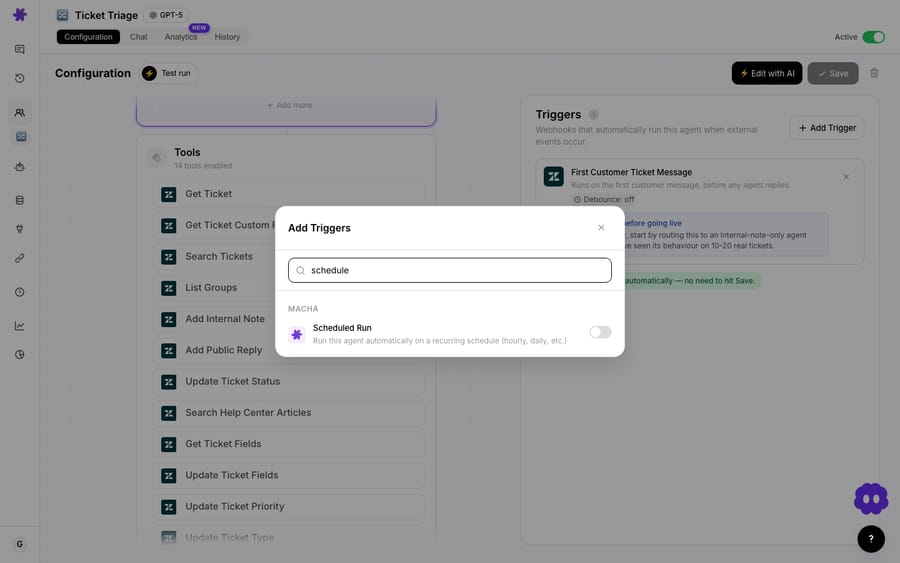
You can see and manage every recurring run from the schedules view, so it's obvious at a glance that the Monday report is live and when it last fired.
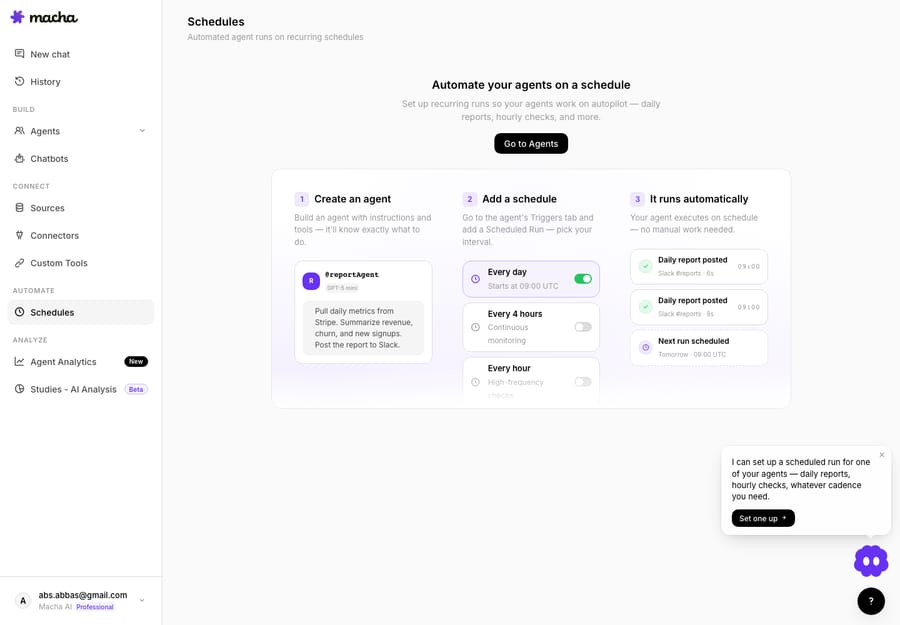
That's the entire build: two connectors, a five-step runbook, one schedule. Nothing to host, no pivot tables to maintain.
What does the finished report look like?
When the trigger fires, the agent does the work and posts a short summary alongside the attached file. One example run over a single week looked like this:
Weekly Support Report, Mar 17 to Mar 23 - Total tickets: 312 - Resolved: 298 (95.5%) - Avg first response: 8 min - Avg resolution time: 1.8 hours - CSAT: 96% - Top topics: Account access (42), Billing (38), Setup help (31) Full report attached as weekly-support-report-mar-24.xlsx with detailed breakdowns by agent, topic, and day.
The message is the headline; the spreadsheet is the detail. The .xlsx carries four tabs: a Summary with the top-line numbers and week-over-week deltas, a Tickets sheet with the row-level data behind them, Agent Performance broken out per assignee, and Topics ranking what drove volume. Anyone can open it in Excel or Sheets, sort it or pivot it further. It's a real file, not a screenshot of a dashboard.
The "top topics" line is worth a note. Because the agent reads each ticket rather than just counting tags, it can group themes even when tagging was inconsistent, which on most real Zendesk instances it is. If you'd rather lean on existing tags, instruct it to.
When should you not use an agent for this?
A few caveats:
- You need historical BI, not a weekly snapshot. If your goal is multi-quarter trend lines, cohort analysis and slice-and-dice dashboards, Zendesk Explore or a warehouse plus Looker is the right home. Macha's report is the recurring operational summary, not your analytics warehouse.
- A number feeds a contractual SLA. If a metric drives an SLA credit calculation, validate the agent's math against your source of truth before you trust it, as you would with any automated report.
- Volume is enormous and you want every ticket every week. Reading thousands of full tickets in one run makes for a long job. For very high volume, scope the agent to the fields it needs, or sample, to keep the run lean. See pricing for what each tier covers.
For the common case, a team that wants a reliable, formatted weekly report without building it by hand, this is the right fit. And because Macha already lives on top of your Zendesk, the same agents that resolve and triage live tickets generate the report, so the data and the automation share one home.
How much does an automated weekly report cost?
There's no separate reporting SKU. Macha bills per ticket, one conversation charged once however many steps the agent takes, starting at $299 a month for 750 tickets, about $0.40 each. The next tiers are $599 for 1,500 and $1,199 for 3,000. The weekly report runs on the same plan as the agents that answer your queue, and setup and monitoring by the Macha team are included. You can see the tiers on the pricing page, and you can build and test the whole flow on the free trial ($50 of usage, about 125 tickets, no credit card, no time limit).
FAQ
Can it write to Google Sheets instead of an Excel file? The native output is a generated .xlsx (plus CSV, PDF or Word) via File Tools, which opens directly in Google Sheets. If you need rows written into an existing live Sheet, connect Google Workspace and point the share step there instead.
What metrics can it include? Anything derivable from your tickets. Volume, resolution rate, first-response and resolution times, CSAT, top topics and per-agent breakdowns are the defaults. Because you instruct the agent in plain language, adding or removing a metric is an edit, not a rebuild.
Does this replace Zendesk Explore? No. Explore is your BI surface for deep, interactive analysis. This agent produces the recurring, shareable spreadsheet that lands in your team's channel every week without anyone exporting anything. They're complementary.
How is it triggered? A scheduled trigger, weekly on a day and time you set (Monday 9:00 AM is the common choice). You can also run it on demand when someone asks for an ad-hoc report.
Do I have to leave Zendesk? No. Macha is a layer on top of your existing help desk. It reads the same Zendesk your agents already use; you're not migrating data anywhere.
How do you set up your first report?
If the Monday report is currently a person and a fragile spreadsheet template, it's the cleanest thing to automate first: the requirements are obvious and the payback is immediate. Start a free trial ($50 of usage, no credit card required), connect Zendesk and File Tools, give the agent its five-step runbook, and put it on a weekly schedule. See the use-case library for more agent recipes, or the docs for the full build walkthrough.
Written by Abbas (Customer Support & AI, Macha) · Reviewed by Ankeet Guha (Co-founder & CTO) · Published 2026-06-24 · Last updated 2026-09-24.






