





 Shopify
 Stripe
 Slack
Slack Notion
 Google Workspace
 Confluence

How Do You Get a Daily Support-Metrics Summary in Slack Automatically?


Many support leads start the day by pulling yesterday's helpdesk numbers and typing a summary into Slack, and the ritual stops the moment they're off. A scheduled AI agent can read the tickets and post that summary every morning instead.
Key takeaways
- A daily support-metrics summary in Slack needs one Macha scheduled trigger plus two tools: Zendesk Search Tickets to read yesterday's tickets and Slack Send Message to post the card.
- Macha scheduled triggers enforce a minimum 1-hour interval, a cap of 24 runs per trigger per day, and a limit of 3 simultaneous scheduled runs per organization.
- A Macha scheduled trigger auto-disables and emails an admin after 5 consecutive failures, so an expired Zendesk or Slack token never fails silently.
- Scheduled triggers are included on every paid Macha plan but stay off during the $50 free trial, so teams can build and test the agent before switching the schedule on.
- A daily summary makes about 30 runs a month; budgeted as one ticket each, that is about 30 of the 750 tickets in Macha's $299 entry tier.

You get a daily support-metrics summary in Slack automatically by pointing a scheduled trigger at an AI agent with two tools: Zendesk Search Tickets to read yesterday's tickets and Slack Send Message to post the summary. With Macha the agent wakes up at 9:00 AM, pulls the previous day's numbers, formats them, and posts a clean card to the channel your team already reads. No dashboard to log into, no report to pull, no one to remember.
That morning summary is a fixed query against your helpdesk and a fixed message into a channel, which is why it doesn't need a human. Macha is an AI agent layer that sits on top of the helpdesk you already run (Zendesk, Freshdesk, Gorgias, Front, HubSpot or Intercom), so nothing here replaces your support stack; it automates the reporting on top of it.
| Question | Short answer |
|---|---|
| What you need | 1 scheduled trigger, a Zendesk Search Tickets tool, a Slack Send Message tool |
| How often it can run | Minimum 1 hour between runs, up to 24 runs per trigger per day |
| What happens if it breaks | Auto-disables after 5 consecutive errors and emails you |
| Plan availability | Included on every paid plan; off during the free trial |
| Price | From $299 a month for 750 tickets, about $0.40 each |
What does the daily Slack summary look like?
Here's the output we're aiming for, a single, scannable card in Slack every morning:
📊 Daily Support Summary — March 4 - Tickets created: 47 - Tickets solved: 52 - First response time (avg): 12 min - Resolution time (avg): 2.4 hours - CSAT: 94% - Top topic: Order tracking (18 tickets) ✅ Cleared backlog — 5 more solved than created
That's the shape of it: a handful of metrics that matter, plus a one-line read on the trend ("cleared backlog"). Because an AI agent composes the message rather than a static template, that closing line is generated from the actual numbers. On a rough day it might say "backlog grew by 9, created outpaced solved" instead. The summary reads like a teammate wrote it, because the agent reasons over the data instead of dumping it.
What does the agent need: which trigger and which tools?
Under the hood this is one of the simplest agents you can build in Macha. It needs exactly one trigger and two tools:
| Piece | What it is | What it does here |
|---|---|---|
| Trigger | Scheduled Run | Wakes the agent daily at 9:00 AM |
| Tool 1 | Zendesk Search Tickets | Pulls yesterday's tickets and their fields |
| Tool 2 | Slack Send Message | Posts the formatted summary to a channel |
Both Zendesk and Slack are first-class Macha connectors, so you authorize each once and the agent gets the relevant actions. The Slack connector's Send Message action is what lets the agent write into a specific channel; the Zendesk connector's Search Tickets action is how it reads yesterday's volume, statuses and satisfaction ratings.

You can browse the full action set on each connector's page (the Slack integration and the Zendesk integration) to see exactly which reads and writes are available.
How do you set up the scheduled trigger?
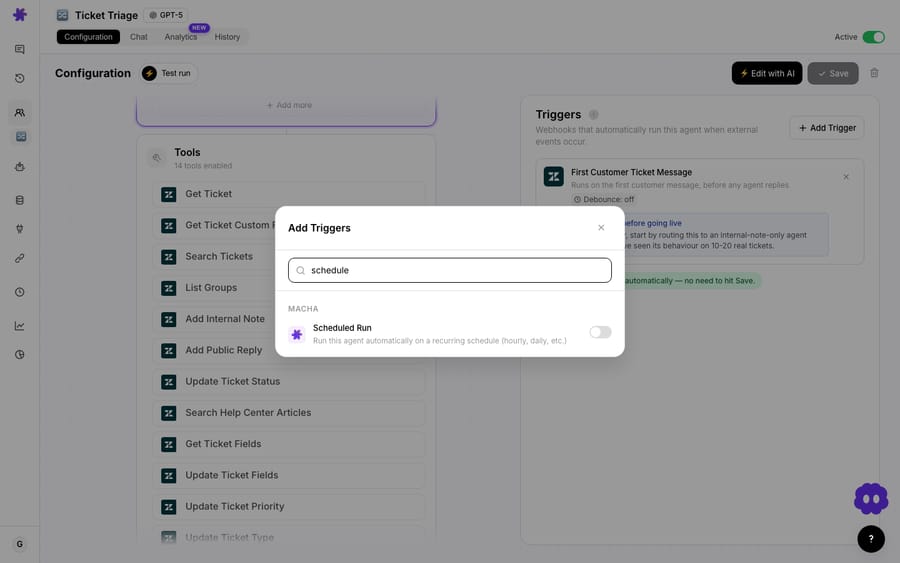
The interesting part is the trigger. Most Macha agents fire on an event: a new ticket, an updated priority, a Slack mention. A metrics summary is different: nothing happens to set it off. It runs on the clock. That's what Macha's scheduled triggers are for.
A scheduled trigger runs your agent on a schedule written as a cron expression, entirely independent of ticket activity. For a morning summary, that's 0 9 * * * (09:00 every day), pointed at the metrics agent.
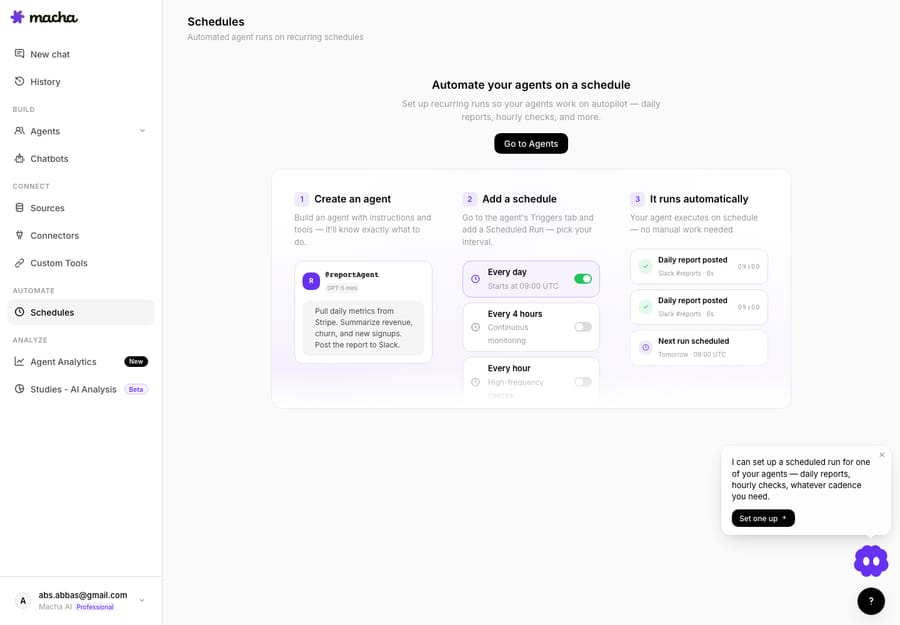
All of your scheduled agents live in one place, so you can see what's set to run, when it last fired, and toggle any of them off without touching the agent itself.
What guardrails stop a scheduled agent from misbehaving?
Scheduled execution is exactly where automation can go wrong: a runaway loop hammering your helpdesk API, or a broken agent quietly posting garbage for a week. Macha builds the guardrails in so you don't have to think about them:
- Minimum 1-hour interval. You can't accidentally schedule something every minute. A daily summary is well within bounds.
- 24 runs/day cap per trigger and a 3-run org concurrency limit. Even if you stack up several scheduled agents, they can't stampede.
- Auto-disable after 5 consecutive failures, with an email notification. If your Zendesk token expires or the channel gets archived, the trigger pauses itself and tells you. It doesn't keep failing silently.
- A 60-second scheduler check with stale-lock cleanup at 30 minutes, so a single hung run never blocks the next one.
- A usage check before each run, so a schedule can't run past your plan's allowance.
These aren't toggles you configure; they're defaults that ship with the feature. (One small UX detail: the debounce control that appears on event-driven triggers doesn't apply to scheduled triggers, because "debouncing the clock" makes no sense.)
Which plans include scheduled triggers?
Scheduled triggers are included on every paid plan, and agents are unlimited. The one exception is the free trial ($50 of usage, no credit card required): scheduled triggers stay off until you upgrade, so you can build and test the agent on the trial, then switch the schedule on once you're on a plan. A single daily-summary agent uses one trigger, which leaves room for the obvious companions: a weekly refund report or a trending-topics alert. See the pricing page for current plan details.
What should the agent's instructions say?
The trigger handles when; the agent's instructions handle what. This is plain-language configuration, not code. You're telling the agent something close to:
Every morning, search Zendesk for all tickets from yesterday. Report: tickets created, tickets solved, average first response time, average resolution time, CSAT, and the single most common topic. Post it to #support-daily as a short summary with one line on whether we cleared or grew the backlog.
Because the agent reasons over what it pulls back, you can ask for things a static report can't easily do: "flag CSAT in red if it dropped below 90%," or "call out the top topic only if it's more than 20% of volume." The agent decides per run, from the real numbers.
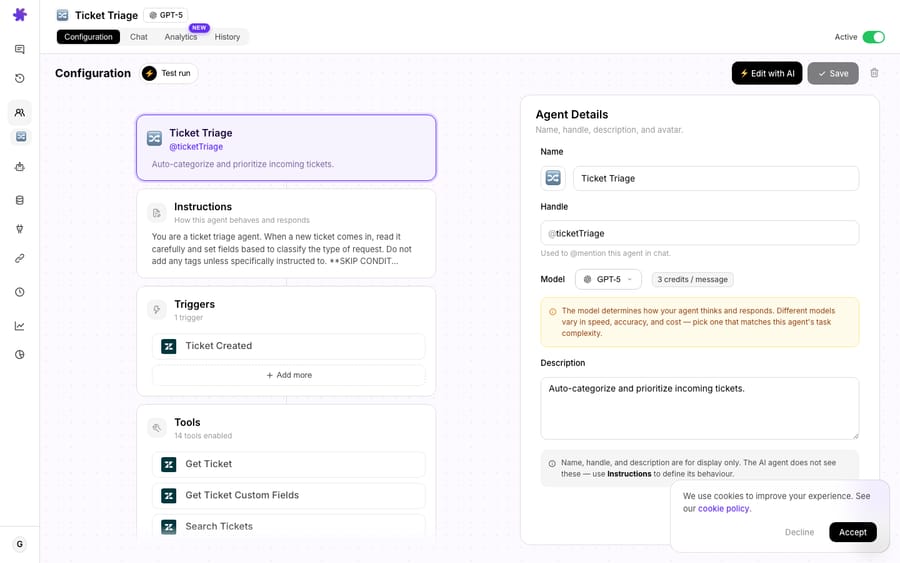
The metrics agent is exactly this shape: instructions that describe the summary, a Zendesk Search Tickets tool to read yesterday's volume, a Slack Send Message tool to post it, and the scheduled trigger from the section above wired in.
If you'd rather not write the instructions by hand, Macha can build the agent through conversation: describe the summary you want in the AI builder and it wires up the tools, the trigger, and the instructions for you, then you review before it goes live.
How much does a daily summary agent cost to run?
Macha bills per ticket (one conversation, charged once, however many steps the agent takes), and the model you pick doesn't change the price. Pricing starts at $299 a month for 750 tickets, about $0.40 each, with setup and monitoring by the Macha team included. A daily summary is a lightweight job (one read, a bit of reasoning, one write) and there are only about 30 runs in a month. The pricing page doesn't spell out how a scheduled run is counted, so budget each run as one ticket: about 30 of the 750 on the entry tier. For a recurring report that would otherwise eat a lead's time every single morning, the math is not close.
This use case is pure automation: Macha isn't resolving a customer ticket, it's producing a report. That's why per-ticket billing suits it. There's no per-resolution fee or outcome definition to argue about, and you're never charged per message, per step or per tool call.
How does this compare with native Zendesk, BI tools and workflow builders?
You have other ways to get numbers into Slack, and it's worth being straight about them:
- Native Zendesk → Slack triggers push individual ticket events into a channel ("ticket #123 updated"). This is real and well-documented: you add the Slack app to a channel, then build a ticket trigger that notifies the Slack integration. It's great for live awareness and useless for a daily roll-up, because triggers fire per event and don't aggregate or summarize.
- BI/dashboard tools like Geckoboard can schedule a snapshot image of a dashboard into Slack or Microsoft Teams, as many times a day as you set (Geckoboard's own docs walk through the setup). That works, but it's a picture of a chart, not a written summary you can read on your phone in two seconds, and it's another tool and subscription to run.
- Workflow builders like n8n or Zapier can stitch Zendesk → format → Slack on a schedule; n8n even ships a Zendesk ticket summarizer that runs daily at 10am and posts to Slack. The trade-off is that you build and maintain the workflow (the trigger, the formatting, the LLM node, the credentials) and keep it patched as APIs change.
Macha's angle is that the same agent platform already wired into your helpdesk for live ticket work also runs the report, and an AI agent, not a hand-built template, writes the summary. One system, and the prose adapts to the day. If you're standardizing on Zendesk specifically, the Macha on Zendesk page covers the rest of what the layer does.
When should you not use a scheduled Slack summary?
A scheduled Slack summary is useful, but it's not the right tool for everything. Be honest with yourself about these:
- You need real-time, not daily. If the point is to catch a spike as it happens (an outage, a flood of "can't log in" tickets) a once-a-day summary is the wrong shape. Use an event-driven trending-topics alert instead, which watches volume continuously and pings the channel when something jumps.
- You need deep, sliceable analytics. This is a glanceable roll-up, not a BI replacement. If you want to pivot CSAT by agent, by tag, by hour, across a quarter, that's a dashboard job (or a Macha Study over your ticket history), not a Slack one-liner.
- Your metric definitions are contested. "Resolution time" and "first response time" mean different things in different orgs (business hours? calendar hours? reopens?). Zendesk keeps its official reply-time metrics on a separate ticket-metrics record, not in search results, so an agent working from Search Tickets estimates timings from ticket timestamps. Check the first week's figures against Zendesk Explore and agree on the definitions before you anchor a daily ritual to them.
- The channel is already noisy. A daily post into a busy firehose channel gets ignored. Give it a dedicated, low-traffic channel (
#support-daily) so the summary actually gets read.
None of these are reasons to skip the agent; they're reasons to scope it right. For most teams, a single clean morning card in a quiet channel is exactly enough.
FAQ
What metrics can it include? Anything the agent can work out from Zendesk's Search Tickets results for a date range: tickets created and solved, satisfaction ratings, volume by tag or topic, backlog, and timing estimates from ticket timestamps. You define the list in the agent's instructions, and the agent composes the summary from what it pulls.
Can I change the time or frequency? Yes. Edit the trigger's cron expression, keeping at least 1 hour between runs and up to 24 runs a day. 0 9 * * * gives a morning card at 9:00 AM, 0 9 * * 1-5 skips weekends, and 0 9,17 * * * gives two a day.
Does it work with Freshdesk instead of Zendesk? The pattern is identical; you'd swap the Zendesk read for the Freshdesk equivalent. Macha connects to Zendesk, Freshdesk, Gorgias, Front, HubSpot or Intercom as helpdesk connectors, plus Slack for delivery.
What happens if it breaks, say my Slack token expires? The trigger auto-disables after 5 consecutive failures and emails you, rather than failing silently or spamming the channel. You fix the connection and re-enable it.
Is this a Zendesk replacement? No. Macha is an AI agent layer that runs on top of your existing helpdesk. The metrics still live in Zendesk; Macha just reads them on a schedule and writes the summary to Slack.
How much does it cost to run? Macha bills per ticket (one conversation, charged once however many steps it takes) from $299 a month for 750 tickets, about $0.40 each, whichever model the agent runs on. A daily summary is a single lightweight run. See pricing for plan details, and start a free trial ($50 of usage, no credit card required) to build one.
Can I run the schedule on the free trial? You can build and test the agent on the trial, but scheduled triggers stay off until you upgrade to a paid plan.
How do you get your first morning summary running?
If your team's day already starts with someone pulling yesterday's numbers by hand, this is the first agent worth building: small, safe, and immediately useful. Start a free trial ($50 of usage, no credit card required), connect Zendesk and Slack, build and test the metrics agent, then switch on the scheduled trigger when you move to a plan and let it post your support summary at 9:00 AM. The docs have the step-by-step, and there are plenty of other use cases (refund reports, VIP alerts, trending-topic warnings) that follow the exact same scheduled-agent pattern.
Written by Abbas (Customer Support & AI, Macha) · Reviewed by Ankeet Guha (Co-founder & CTO) · Published 2026-06-24 · Last updated 2026-09-24.






