





 Shopify
 Stripe
 Slack
Slack Notion
 Google Workspace
 Confluence

How Do You Set Up Your First Macha Agent? From Signup to a Tested Agent (2026)


Macha's onboarding is three steps: connect one tool, build one agent, and watch its runs appear in the dashboard. The trial is $50 of free usage with no credit card, and testing is where most of the real setup time goes.
Key takeaways
- Macha onboarding since September 1, 2026 is a linear sequence: connect one tool, build one agent, then start seeing the agent's runs in the dashboard.
- The Macha free trial is $50 of usage with no credit card and no time limit, enough to build and test an agent before paying.
- Multi-instance connectors, shipped March 8, 2026, let one Macha workspace link two Zendesk accounts or three Stripe accounts with tool names auto-disambiguated.
- Macha bills per ticket rather than per resolution or seat, starting at $299 a month for 750 tickets, about $0.40 each, whichever model the agent runs.
- Macha emails usage alerts at 50%, 80% and 90% of a plan's monthly tickets, and agents pause instead of charging overages when tickets run out.

Getting your first Macha agent running takes three moves: sign up with a work email (a $50 free trial, no credit card), connect one tool such as your help desk, and build one agent, after which its runs start showing up in the dashboard. That linear flow replaced the older three-screen setup wizard on September 1, 2026. The sequence itself takes minutes. Most of the real time goes into testing, so the agent you end up with is one you'd trust on a live ticket.
| Step | What you do | What you need |
|---|---|---|
| 1. Sign up | Create an organization with your work email | An email address; no card |
| 2. Connect one tool | Authorize your help desk (or another connector) | Admin or app-install rights on that tool |
| 3. Build one agent | Set instructions, tools, knowledge and model | A narrow first job, like order status |
| 4. Test | Run real-looking tickets and read the trace | Your ten hardest recent tickets |
| 5. Go live | Attach a trigger, or keep it in draft-reply mode | A decision on which actions a human approves |
What do you need before you sign up?
You can sign up with nothing but an email. The free trial is $50 of usage (roughly 125 tickets), needs no credit card and has no time limit, so you're not committing a card to look around. To get to a useful agent, have two things handy:
- Admin (or app-install) access to your help desk. Connecting Zendesk needs permission to authorize the connection. If you're not an admin, the connect step is the one place you'll need to loop someone in.
- A rough idea of the first job. Resist the urge to automate everything on day one. Start on high-volume, low-complexity tickets: order status, "how do I reset my password," shipping ETAs. Those are the tickets where an agent earns trust cheaply.
That's it. No knowledge-base migration, no data export.
How do you create a Macha account?
Head to the signup flow and create your workspace with your work email. There's no credit card on the trial, and you land in the dashboard with onboarding ready to run. The first onboarding chat is free and doesn't count against your trial.
A note on organizations: everything in Macha lives inside an organization (your workspace). Agents, connectors, knowledge sources, ticket usage and billing are all scoped to it, and you invite teammates into the same org later from Settings. Seats are unlimited on every plan. If you're evaluating for a team, create the org under a shared or work identity from the start so you're not migrating later.
What does the onboarding flow ask you to do?
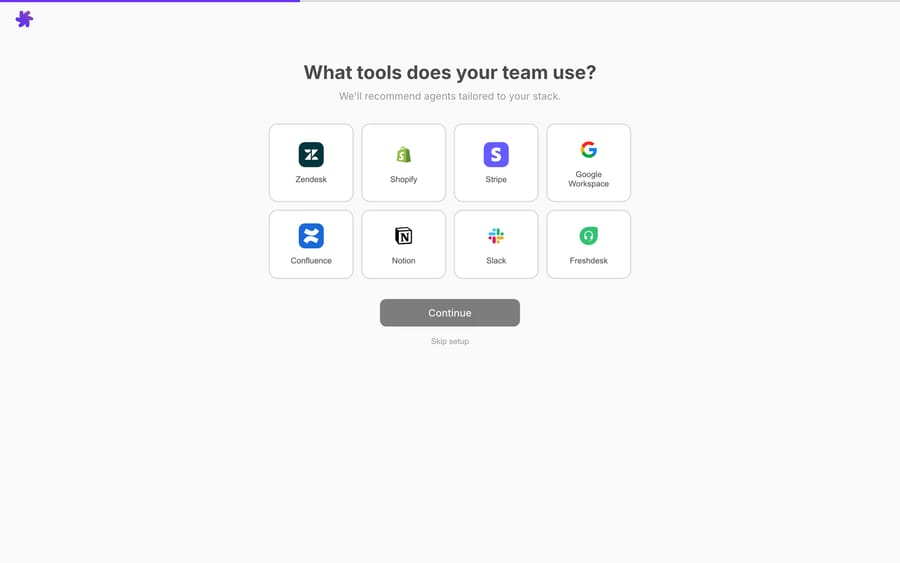
Onboarding is now a straight line of three steps: connect one tool, build one agent, start seeing runs. The multi-step wizard that launched on March 8, 2026 (select tools, pick a template, connect integrations) was retired in the September 1 update. If the onboarding chat's model returns nothing, you get a scripted next step instead of a blank bubble, so you don't stall halfway.
The point of the flow is the same as before: you finish onboarding with a working agent instead of a blank canvas.

Templates are still the shortcut worth taking on day one. Each comes with a sensible set of instructions, the right tools attached and a clear job: a ticket-triage agent that classifies and routes, a WISMO ("where is my order") agent, a draft-reply agent that writes a response for a human to approve. You can also describe the agent in plain English to Sidekick, the in-dashboard builder, and it assembles one for you. If you'd rather understand the building blocks first, the Agents docs lay out how a Macha agent is put together.
How do you connect your help desk?
The help-desk connector is what lets an agent work inside real tickets. Open Connectors, choose your help desk (Zendesk, Freshdesk, Gorgias, Front, HubSpot or Intercom), and authorize it.

For Zendesk, that single connection gives the agent actions, not just read access:
| Capability | What the agent can do |
|---|---|
| Read | Get full ticket details, search across all tickets, read custom fields with labels resolved |
| See | Analyze image and document attachments: screenshots, receipts, PDFs |
| Reply | Post public customer-visible replies or private internal notes |
| Act | Update status, priority, type, tags and custom fields; assign or route a ticket |
| Stay current | Sync the Help Center so the agent answers from your real articles |
Macha also supports multi-instance connectors (shipped March 8, 2026): if you run two Zendesk accounts or three Stripe accounts, you link each one separately and Macha auto-disambiguates the tool names so the agent knows which account to use. After authorizing, click Test connection and confirm the connector reports healthy before you build on it.
This is where the "layer on top" model becomes concrete. You're not migrating tickets into Macha. The agent reads and writes back into Zendesk in place, and your team keeps working in the same workspace it always has.
What should you configure on your first agent?
With a connector live, open the agent and make it yours. The configuration is plain language, not code.
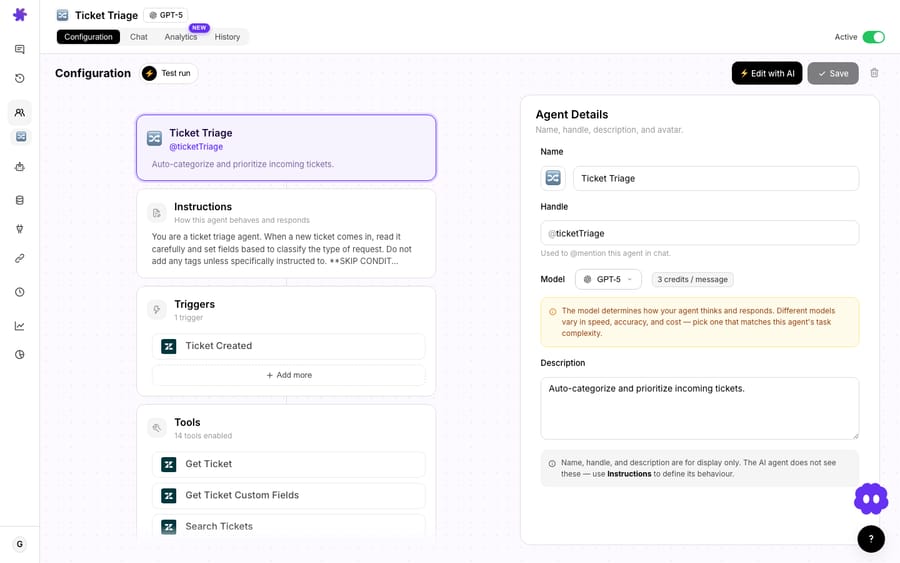
Four things to set, in order of impact:
- Instructions. Tell the agent its job, its tone and, most of all, its limits. "Answer order-status questions using the Zendesk order field and Shopify. If the customer asks for a refund, do not process it; add an internal note and tag
needs-human." Explicit boundaries are what make an agent safe to turn on. - Tools. The template attaches a starting set; trim or add. An agent should only hold the tools its job needs. Fewer tools means more predictable behavior.
- Knowledge. Point the agent at your help content. You can sync the Zendesk Help Center, or add PDFs, docs, Notion pages and Google Docs as live sources so the agent answers from current material, not a stale snapshot.
- Model. The model is set per agent in the agent details card, and it doesn't change what you pay. Macha bills per ticket (one conversation, charged once however many messages it takes), so pick a fast model for triage and reply work and save the heavier models for genuinely hard reasoning. See the pricing page for the tiers.
How do you test an agent before it touches customers?
Never point a fresh agent at live customers blind. Macha gives you a chat and test surface to run real-looking tickets through the agent and watch what it does: which tools it calls, what it would reply, where it hesitates. You can also run simulations that replay past tickets against the agent.

Run your ten ugliest tickets through it: the ambiguous ones, the angry ones, the edge cases. Tune the instructions until the agent does the right thing, including knowing when to hand off. This loop of test, read the trace, adjust the instructions is where five minutes of effort saves you a bad customer interaction later. When you're satisfied, attach a trigger so the agent runs autonomously on new tickets, or keep it in draft-reply mode where it writes and a human approves.

When should you not switch an agent to autonomous?
A confident agent doing the wrong thing is worse than no agent, so hold back in these cases:
- Money or account-state actions on day one. Refunds, cancellations, plan changes: start these in draft or internal-note mode where a human approves. Graduate them to autonomous only after you've watched the agent get them right.
- Thin knowledge. If your Help Center is thin or outdated, the agent inherits that. Spend the hour fixing your top-10 articles before blaming the model.
- A wide first scope. One template, one ticket type, one connector. The teams that get burned try to automate the entire queue in week one. Prove it on order status, then expand.
- Unwatched ticket usage. Billing is per ticket, and Macha emails usage alerts at 50%, 80% and 90% of your plan's monthly tickets. There are no overages: agents pause when the month's tickets run out, and you move up a tier or top up. A test-heavy first day barely registers, but a misconfigured autonomous trigger on a noisy webhook is the thing to watch.
How fast is "minutes," really?
Onboarding gets you a configured, testable agent in a few minutes, and that part is fair. Getting an agent you'd trust unsupervised on live tickets is a longer arc: a session of testing, a pass over your knowledge and a few days in draft mode. You don't have to do that part alone. Setup and monitoring by the Macha team is included on every plan: they build, test and watch your agents with you. The discipline of testing before trusting still matters, and it's worth it.
What should you build after the first agent?
Once your first agent is live, the natural next steps:
- Add a second connector, such as Shopify or Stripe, so the agent can look up real order and payment data mid-conversation. Browse the full set on the Macha for Zendesk page.
- Add a trigger so the agent runs autonomously on incoming tickets instead of only in chat.
- Build a sub-agent so your main agent can hand a specialist task to a narrower agent (also shipped March 8, 2026). A sub-agent handoff rides on the parent conversation's single charge.
- Read the rest of the docs and browse the blog for worked examples of agents in production.
FAQ
Do I need to leave my current helpdesk to use Macha? No. Macha is an agent layer that sits on top of Zendesk, Freshdesk, Gorgias, Front, HubSpot or Intercom. It reads and writes tickets in place, so there's no migration and your team keeps using the same help desk.
How long does setup actually take? Onboarding (connect one tool, build one agent, start seeing runs) gets you a working agent in a few minutes. Tuning it into something you'd run unsupervised on live tickets takes a few days of testing and knowledge prep, with the Macha team helping.
Do I need a credit card to start? No. The free trial is $50 of usage with no credit card and no time limit, so you can build and test an agent before committing.
What does an agent cost to run? Macha bills per ticket: one conversation, charged once, however many steps the agent takes to finish it and whichever model it runs on. Pricing starts at $299 a month for 750 tickets, about $0.40 each; see the pricing page for the tiers.
Can I connect more than one Zendesk (or Stripe) account? Yes. Multi-instance connectors let you link multiple accounts of the same type, and Macha auto-disambiguates the tools so each agent knows which account to use.
What's the safest first agent to build? A triage agent or a draft-reply agent on a high-volume, low-risk ticket type like order status. Keep money- and account-changing actions in draft or approval mode until you've watched the agent perform.
How do you start?
Start a free trial ($50 of usage, no credit card required), connect your help desk, build one agent and run your ten hardest tickets through it before you switch anything on. The Getting Started docs have the full reference if you want to follow along screen by screen.
Written by Abbas (Customer Support & AI, Macha) · Reviewed by Ankeet Guha (Co-founder & CTO) · Published 2026-06-24 · Last updated 2026-09-24.






