





 Shopify
 Stripe
 Slack
Slack Notion
 Google Workspace
 Confluence

How Do You Automate Account-Update Requests in Your Help Desk?


Requests to change a billing email, fix a name or correct an address are simple one by one, but each costs an agent two minutes of switching between the help desk and the billing system. Fifty a week adds up to a quiet tax that an AI agent can take over once it verifies the requester first.
Key takeaways
- A Macha agent automates account-update requests in five steps: trigger on the ticket, verify the requester against the billing record, write the change, reply, and solve the ticket.
- The OWASP Authentication Cheat Sheet says to require current credentials before changing sensitive data such as an email address, so email-change requests should keep a human or step-up gate.
- Macha's native Stripe connector offers Get Customer, List Payments and Get Payment for lookups but no Update Customer action, so field changes use a custom API tool.
- Custom API tools are included on every Macha plan and cover account writes a native connector does not expose, such as Stripe's update-customer endpoint.
- An account-update ticket that runs classify, verify, write and reply steps still counts as one ticket, about $0.40 on Macha's $299-a-month plan for 750 tickets.

You automate account-update requests with an agent that runs five steps on each ticket: trigger on the new ticket, verify the requester against the billing record, write the change through an API tool, reply to the customer, and solve the ticket, with a human gate on risky changes such as a new login email. Almost none of this requires human judgement. It requires verification and a write to a system of record, two things software does well. With a Macha agent the whole flow runs without an agent touching the ticket, and anything that smells risky stops for a person.
A quick framing note, because it matters: Macha is not a helpdesk. It's an AI agent layer that sits on top of the help desk you already run (Zendesk, Freshdesk, Gorgias, Front, HubSpot or Intercom) and connects it to the commerce and billing tools where the account data actually lives. You keep your helpdesk. Macha gives it hands.
What does an account-update request actually contain?
Before automating anything, it helps to break the request into its real parts. A typical account change is four steps stitched together:
- Intent: the customer asks for a specific, scoped change ("update billing email from old@ to new@").
- Verification: you confirm the person asking is allowed to make that change.
- The write: you update the field in your system of record (Stripe, your billing DB, your CRM).
- The close: you confirm back to the customer and resolve the ticket, leaving an audit trail.
Steps 1 and 4 are language. Steps 2 and 3 are tool calls against trusted systems. Macha agents are built to do exactly this combination (read intent, call tools, write replies), which is why this category of ticket is one of the cleanest things to hand off.
What does the automated workflow look like end to end?
Here's the shape of the agent we'll build, mapped to a real customer message: "I need to update my billing email from [email protected] to [email protected]."
| Step | Where | What happens |
|---|---|---|
| Trigger | Zendesk | New ticket created; classified as an account-change request |
| Verify | Zendesk + Stripe | Match the ticket's verified requester email against the customer record |
| Update | Stripe (custom tool) | Change the billing email on the customer object |
| Reply | Zendesk | Public reply confirming the change, in plain language |
| Resolve | Zendesk | Add an internal note for audit, set status to Solved |
This mirrors Macha's built-in Handle account update requests template: trigger on Ticket Created, Get Ticket and verify the requester, action the change, Add Comment, and Update Ticket. Let's build it.
1. Connect the systems that hold the truth
The account data you're updating doesn't live in your helpdesk. It lives in your billing or commerce system. So the first move is connecting both sides. In Macha, you add your helpdesk connector (Zendesk here) and your billing connector (Stripe) and test each connection until it verifies.
Macha's native Stripe connector reads the things you need for verification and lookup: Get Customer (by ID or email), List Payments and Get Payment. That covers steps 1 and 2 cleanly. (The write has an honest wrinkle, covered below.)
2. Decide your verification rule: this is the important part
The single most important design decision in this whole workflow is how you verify the requester, because changing a customer's email is a classic first move in an account takeover: whoever controls the email controls password resets (Experian Insights describes how fraudsters exploit that reset path). The OWASP Authentication Cheat Sheet says to require the account's current credentials before updating sensitive information such as a password or email address. An attacker who has compromised someone's inbox and emails your support team "please change my account email" is exactly the scenario you do not want to auto-approve.
So bake the rule into the agent's instructions. A sensible default:
- Auto-action only when the ticket arrives from a verified channel and the requester's authenticated email matches the email on the customer record, meaning the request comes from the account it's about.
- Require step-up or human review when the request asks to change the email itself, comes from an unverified address, or the requester doesn't match the record.
Macha agents follow natural-language guidance like this, and you tune the exact thresholds. "Verify the customer" isn't a checkbox. It's a policy you get to write, and the agent enforces it consistently on every ticket instead of relying on whichever human happens to pick it up.
3. Build the agent and give it the write
With connectors in place, you build the agent in the agent builder: describe the job in plain language and Macha scaffolds the trigger, the tools, and the instructions.

Now the honest wrinkle. Macha's native Stripe connector is mostly read oriented. Its write actions are Create Refund, Cancel Subscription and Create Payment Link; it does not ship an "Update Customer" action today. For the actual field change (updating the email on the Stripe customer object), you wire a custom API tool that calls Stripe's update-customer endpoint, and the agent invokes it like any other tool. Custom API tools are included on every Macha plan, and they're how you cover any write a native connector doesn't expose yet.

This is the pattern for any account write (address corrections in your commerce platform, name updates in your CRM, plan metadata in your billing system): native connector for the reads and the common writes, a custom tool for the long-tail field updates. It's a one-time setup, and the Macha team's included setup help covers it if you'd rather not wire it yourself.
4. Put a confirmation gate on the action
Reading data is safe. Writing data, and especially writing to billing, should never be fully silent. Macha lets you gate tool calls behind an explicit confirmation step, so a destructive or sensitive action surfaces a card that gets approved before it fires.
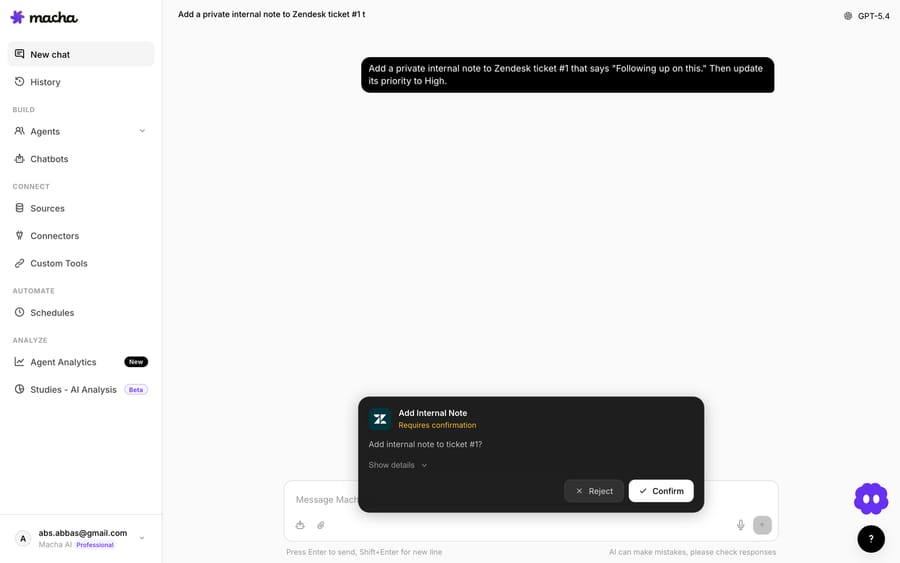
For an internal-facing agent this can be an agent-side confirm; for a fully autonomous flow you can let trusted, well-verified changes through and reserve the gate for the risky ones (email changes, mismatched requesters). Either way you get an explicit moment where the change is reviewable, which is also exactly what your audit and security teams will ask for.
5. Reply like a human and close the loop
Once the write succeeds, the agent posts a plain-language public reply and resolves the ticket using Zendesk's Add Public Reply, Add Internal Note, and Update Status actions. The internal note is the audit trail: what changed, from what, to what, and that verification passed.
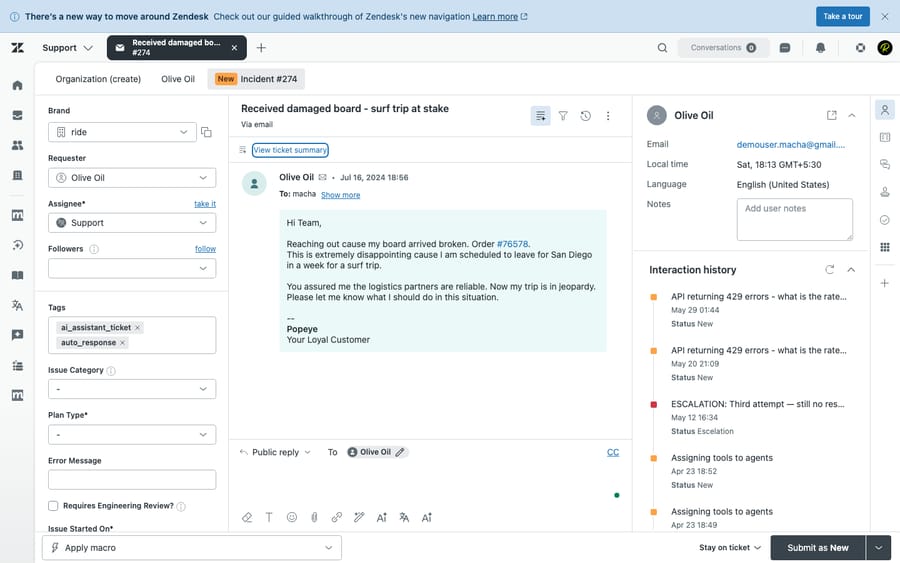
The customer sees something like: "Done. I've updated your billing email to [email protected]. All future invoices and receipts will go there. Anything else I can help with?" The ticket flips to Solved. No agent touched it.
What does a real account-update ticket look like when automated?
Putting it together on the original message:
Customer: "I need to update my billing email from [email protected] to [email protected]."
- Trigger: ticket created, classified as an account change.
- Verify: the ticket's authenticated sender is
[email protected];Get Customerconfirms that's the email on the Stripe record. Requester matches the account, so it passes the rule. Because the request is to change the email itself, your policy may still route this to a confirmation gate, which is sensible. - Update: the custom Stripe tool sets the customer email to
[email protected]. - Reply: public confirmation drafted and posted.
- Resolve: internal note logged (
email: old@ → new@, verified by sender match), status set to Solved.
Two minutes of agent work, done in seconds, consistently, with a clean trail.
How much does automating account updates cost?
Macha bills per ticket: one conversation, charged once, however many steps the agent takes to finish it. An account-update ticket runs through several steps (classify, verify, write, reply) and still counts as the one ticket, so the verification and the write cost nothing extra. Macha sells one plan priced by volume, from $299 a month for 750 tickets, about $0.40 each, up to $3,999 for 10,000, with no per-resolution fees, and setup and monitoring by the Macha team are included. Start with the free trial ($50 of usage, no credit card required) and see the real per-ticket cost on your own queue, or check the pricing page for the tiers.
When should you NOT fully automate account changes?
Automation here is genuinely good, but a few honest watch-outs:
- Email and recovery changes are high-risk. As above, treat a request to change the email itself as the riskiest variant. Keep step-up verification or a human gate on it. Auto-approving these is how account takeovers succeed.
- Mismatched requesters. If the person asking isn't clearly the account holder (different address, third party, "my assistant will email you"), don't auto-write. Route to a human.
- Regulated or high-value accounts. B2B accounts with contractual billing contacts, or anything under KYC or financial regulation, often should have a person in the loop. Scope the agent to consumer-style self-service changes and exclude the rest.
- Ambiguous or bundled asks. "Update my email and cancel my plan and refund me" is three intents, not one. Let the agent handle the clean single-field changes and escalate the messy bundles.
- No system of record to write to. If the "account" lives in a spreadsheet a human maintains, automate the draft and verification and leave the write manual until the data has a real API.
In short: automate the verified, single-field, low-risk changes, which is most of the volume, and deliberately keep humans on the edge cases. That's where this pays off without creating a security hole.
What other support tickets follow the same pattern?
Account updates are one tile in a wall of routine, tool-shaped support work Macha agents handle on top of your helpdesk, alongside subscription and billing questions, refund triage, order lookups, and address corrections. Each one follows the same spine: read intent, verify, call a tool, reply, resolve. Build one well and the rest are variations on a theme. If you're on Zendesk specifically, see how Macha runs on Zendesk; for the full agent-and-tools setup, the docs walk through connectors, custom tools, and triggers.
FAQ
Can Macha update a customer's email or address by itself? Yes. It reads the record via the native connector and performs the write, using a custom API tool for fields a native connector doesn't expose (like Stripe's customer-email update). You decide whether the write runs autonomously or behind a confirmation gate.
How does it verify the customer before making a change? You define the rule in plain language. The common default is to auto-action only when the request comes from the authenticated email that matches the account, and to require step-up verification or human review for email changes, unverified senders, or mismatched requesters.
Does this replace my helpdesk? No. Macha is an agent layer on top of Zendesk, Freshdesk, Gorgias, Front, HubSpot or Intercom. It uses your helpdesk's tickets, replies, and statuses; it doesn't replace them.
What if the request is risky or ambiguous? The agent escalates. You scope it to clean, single-field, verified changes and route anything outside that (bundled asks, mismatched identity, high-value accounts) to a human, with the context already gathered.
How is it priced? Per ticket, one conversation charged once however many steps the agent takes, from $299 a month for 750 tickets, about $0.40 each, not per resolution. Try it on your own queue with the free trial ($50 of usage, no credit card required); see pricing for the volume tiers.
Where should you start?
Pick the most boring, highest-volume account change in your queue, probably email or address updates, and build one agent for just that, with a verification rule and a confirmation gate. Start a free trial ($50 of usage, no credit card required), connect your helpdesk and billing tool, and let it clear the easy ones so your team can spend the day on the tickets that actually need a person.
Written by Abbas (Customer Support & AI, Macha) · Reviewed by Ankeet Guha (Co-founder & CTO) · Published 2026-06-24 · Last updated 2026-09-24.






