





 Shopify
 Stripe
 Slack
Slack Notion
 Google Workspace
 Confluence

How Do You Answer "Where Is My Order?" Inside Slack With Shopify Data?


Your team can ask a Macha agent in Slack about any Shopify order and get the status, tracking number and delivery estimate back in the same thread. It takes one App Mention trigger and two tools, and each lookup counts as one ticket, about $0.40.
Key takeaways
- A teammate can @mention Macha's bot in Slack with an order number, and the agent calls Shopify's Get Order action before replying in the same thread with status, tracking and delivery estimate.
- The Slack order-lookup agent needs one trigger, App Mention, and two tools, Shopify Get Order and Slack Reply in Thread, with Search Orders added for lookups by customer email.
- Macha bills each Slack order lookup as one ticket, about $0.40, and plans start at $299 a month for 750 tickets whichever model the agent runs on.
- Zipchat says automating order-status questions on the storefront reduces support tickets by 35 to 50%, a customer-facing job separate from internal Slack lookups by your own team.
- An order-lookup bot surfaces customer emails and addresses, so it belongs in internal support and ops channels, not open company-wide Slack channels.

To answer "where is my order?" inside Slack, a teammate types @macha what's the status of order #2041?, and a Macha agent calls Shopify's Get Order action and replies in the same thread with the fulfillment status, carrier, tracking number and delivery estimate. The setup is one Slack trigger (App Mention) and two tools (Shopify Get Order and Slack Reply in Thread). Nobody has to open Shopify admin, share a login, or wait on the one person who "knows where to look."
Macha is an AI agent layer that sits on top of the help desk and tools you already run. For this use case the relevant connectors are Slack and Shopify. You don't replace anything; your team just gets a faster way to ask.
What does the Slack order-lookup agent actually do?
The workflow is deliberately small: one trigger, two tools.
| Piece | Connector | What it's for |
|---|---|---|
| Trigger: App Mention | Slack | Fires when someone @machas the bot in a channel |
| Action: Get Order | Shopify | Looks up an order by number or ID: line items, fulfillment, payment, tracking |
| Action: Reply in Thread | Slack | Posts the answer back as a threaded reply, in context |
A real exchange looks like this:
Sarah: @macha what's the status of order #2041? Macha: Order #2041 for [email protected]: • 2x Blue Widget ($29.99 each) • Shipped via USPS, tracking #9400111 • Estimated delivery: March 7
There's no form and no slash-command syntax to memorize, and nobody leaves the thread where the question was already being discussed. The agent reads the mention, extracts the order number, calls Shopify's Get Order, and formats the reply. Because Get Order returns full line items, fulfillment status and payment status, not just a tracking string, the same agent can answer the follow-ups too: "was that paid?", "what was in it?", "which carrier?"
Why is internal, in-Slack lookup a separate job from a WISMO chatbot?
Search for WISMO tooling and nearly everything is a customer-facing storefront widget. Zipchat, eesel, Frontdesk, ResponseCX and the rest pull Shopify tracking to deflect tickets before they reach a human. Zipchat, for example, says automating order-status questions reduces support tickets by 35 to 50% (Zipchat, vendor figure). That's a real job, and a different one.
The other half of the problem is the questions your own team fires at each other all day. A success manager pings #cs: "can someone check order #2041, customer's emailing me." A warehouse lead asks if a rush order shipped. A founder wants to know where the angry VIP's package is before replying. Each one means somebody alt-tabs into Shopify admin, searches the order, copies the tracking, and pastes it back. That round-trip is small and constant, which is the worst kind of cost.
Tools for this internal side are thinner. The options are mostly slash-command order search (EZ Notify, which also pushes order notifications into Slack), Shopify's own internal "Spy" bot, or notification apps (Reporty, Sales Bot, Ting) that push alerts but can't answer an ad-hoc question. Macha's angle is that the same agent layer answers in conversation, by @mention in plain English, and the same Shopify and help desk connection can power your customer-facing replies too. You build the order-lookup capability once and point it at whichever surface needs it.
How do you build the Slack order-lookup agent in Macha?
You can do this two ways: describe it in plain language and let Macha's AI builder assemble the agent, or wire it by hand. Both end in the same place.
1. Connect Slack and Shopify
Add the two connectors from the dashboard. Slack uses OAuth (you install the Macha bot into your workspace and pick the channels it can see). Shopify connects with an API key and exposes order, product and customer lookups.

2. Set the trigger to a Slack App Mention
Create the agent and give it the App Mention trigger so it only acts when someone explicitly summons it, not on every message in a busy channel. (Slack's other trigger, Direct Message, works too if people prefer to DM the bot.)
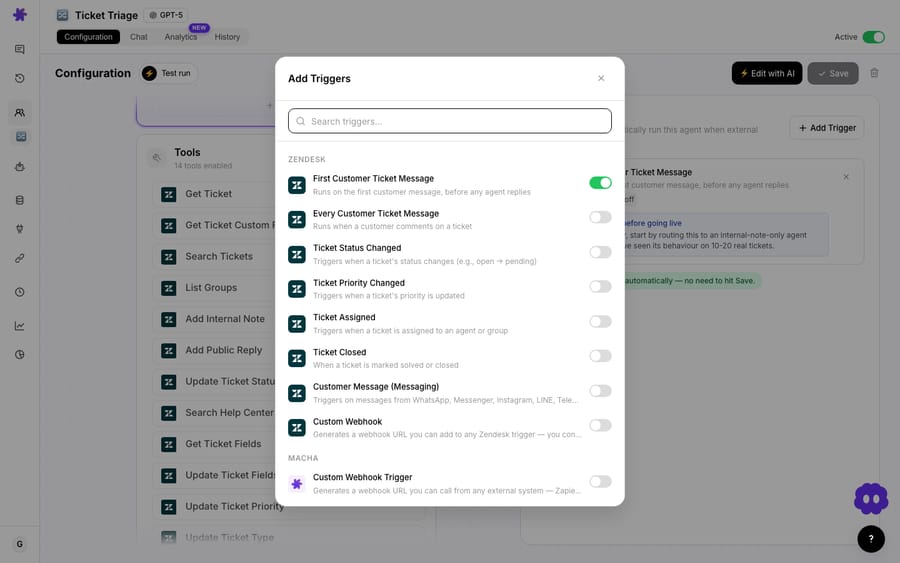
One detail worth knowing: event-driven triggers carry a debounce window (messaging events default to about 15 seconds), so a flurry of edits or a multi-line message resolves into a single run instead of firing repeatedly. You can adjust it on the trigger's debounce chip. For an order-lookup bot the default is fine.
3. Give it the Shopify and Slack tools
Add Shopify → Get Order and Slack → Reply in Thread. If you want the agent to handle vaguer asks like "where's the order for [email protected]?", add Search Orders too. It matches by customer email, fulfillment status, financial status or date range, so the agent can find the order before fetching its detail.

4. Write the instructions
Keep them tight. Something like:
You are an internal order-lookup assistant for the support team. When a teammate @mentions you asking about an order, identify the order number (formats like #2041 or 2041) or the customer email. Use Get Order, or Search Orders if only an email is given, then reply in the thread with: customer email, line items with quantities, fulfillment/shipping status, carrier and tracking number, and estimated delivery. If you can't find the order, say so plainly and ask for the order number or email. Never invent a tracking number.
That last line matters: an order-status agent should refuse to guess. If Shopify returns nothing, the right answer is "I couldn't find #2041, can you confirm the number?", not a made-up ETA.
5. Pick a model and test
Order lookup is a light reasoning task (read a mention, pull a record, format a reply), so a small model handles it well. The model choice doesn't change what you pay, because Macha bills per ticket: one thread with one person, charged once however many steps it takes. A single lookup is one ticket, about $0.40, with the Shopify call and the Slack reply both inside it. See pricing for how tickets map to plans.
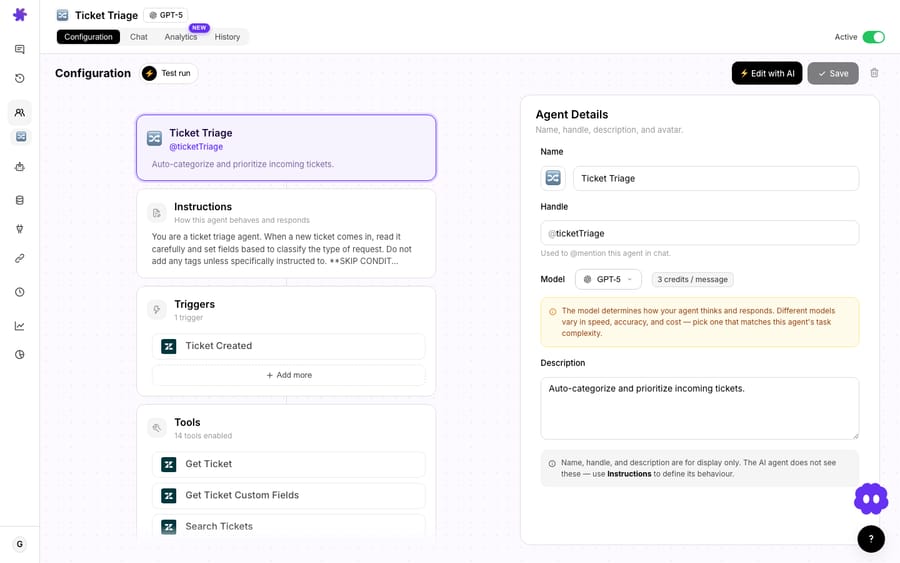
Run a test mention before you turn it loose: @macha status of #2041? in a private channel, confirm the reply format, then invite the bot into #cs or wherever the questions actually land.
How does Slack order lookup fit into a bigger support setup?
The order-lookup agent is a building block, not the whole picture. A few natural extensions:
- Same capability, customer-facing. Point the same Shopify Get Order tool at a customer-facing agent on your help desk so the public "where is my order?" tickets get auto-resolved with the same order data. Internal and external WISMO run from one connection.
- Escalation in reverse. Have a help desk agent relay urgent or VIP order tickets into Slack so the team sees them where they already work.
- Narrow sub-agents for safety. If you wrap order lookup as a sub-agent, give it only the read tools (Get Order, Search Orders). A lookup helper has no reason to hold a refund or cancel action.
When should you not use a Slack order-lookup bot?
This is a low-risk automation. It reads order data and posts a message; it doesn't refund, cancel or email customers. A few honest caveats still apply:
- It's only as fresh as Shopify. Tracking and "estimated delivery" reflect what Shopify holds. If your carrier or 3PL updates lag, the agent will faithfully report stale data. For real-time carrier events, layer in a tracking provider, not just Shopify.
- Channel scope and permissions. The Macha bot can read the channels you add it to. Don't drop an order-lookup bot, which can surface customer emails and addresses, into a wide-open company channel. Keep it in support and ops channels and treat order data as the customer PII it is.
- One order at a time. This pattern answers specific, identified orders. It is not a reporting tool. "How many orders shipped today?" is a different job (a scheduled report or a Study), not an
@mention. - You may not need a bot at all. If order questions are rare and one person owns Shopify admin comfortably, a Slack bot is overhead. The value shows up when lookups are frequent, spread across people, and interrupting someone who shouldn't have to switch context.
If your actual bottleneck is customers asking where their order is, build the customer-facing version on your help desk instead. The internal Slack bot is for your team.
FAQ
Does this replace a customer-facing WISMO chatbot? No. It's the team-facing complement: this agent answers your staff in Slack. The same Shopify connection can power a separate customer-facing agent on your help desk, so you're not choosing one or the other.
Can the agent look up an order by customer email instead of order number? Yes. Add Shopify's Search Orders tool, which matches by email, fulfillment status, financial status or date range. The agent finds the order, then calls Get Order for the full detail.
Does Macha replace Shopify or my help desk? No. Macha is an AI agent layer on top of the tools you already use, including Zendesk, Freshdesk, Gorgias, Front, HubSpot or Intercom. It reads from Shopify and acts in Slack through their connectors, and nothing gets migrated or replaced.
How much does each lookup cost? Macha bills per ticket: one thread with one person, charged once, however many steps the agent takes. A typical lookup is a single ticket, about $0.40. Pricing starts at $299 a month for 750 tickets, with setup and monitoring by the Macha team included. See pricing.
Is it secure to expose order data in Slack? Order data includes customer PII, so scope the bot to internal support and ops channels rather than open company-wide channels, and add it only where that data is appropriate.
Can I build it without configuring everything by hand? Yes. Describe the workflow in plain language and Macha's AI builder assembles the agent (trigger, tools, instructions and model) for you to review and tweak.
Want to try it? Connect Slack and Shopify, describe the order-lookup agent, and test it with one @mention. Macha's free trial includes $50 of usage with no credit card and no time limit. Start in the docs or see pricing.






