





 Shopify
 Stripe
 Slack
Slack Notion
 Google Workspace
 Confluence

How Do You Handle Subscription and Billing Tickets With a Stripe-Connected AI Agent?


Billing tickets like "why was I charged twice?" need the customer's real payment record, not a help-center article. A Stripe-connected agent reads that record on the ticket, drafts the answer, and only moves money inside limits you set.
Key takeaways
- A Stripe-connected Macha agent calls Get Customer and List Payments to pull a customer's real plan and payment history, then drafts a reply or resolves the ticket.
- Macha's Stripe connector exposes ten actions: Get Customer, Get Payment, List Payments, Get Charge, Get Subscription, List Subscriptions, List Invoices, Cancel Subscription, Create Refund and Create Payment Link.
- Stripe recommends restricted API keys for AI agents, so a billing agent should start with read-only lookups and gain Create Refund only after testing.
- In the worked example, a customer on Pro Monthly at $29/mo could switch to Annual Pro at $290/yr, saving $58, with the change at the next billing date.
- Macha bills per ticket from $299 a month for up to 750 tickets, about $0.40 each, however many Stripe lookups a billing ticket needs.
A Stripe-connected Macha agent handles a billing ticket by calling Stripe's Get Customer and List Payments actions to pull the customer's real plan and payment history, then drafting a reply for a teammate to approve or, for narrow cases like a confirmed duplicate charge, issuing the refund itself. A chatbot that only knows your help-center articles can tell a customer how refunds generally work; it can't tell this customer that their March charge succeeded on a Visa ending 4242 and their next renewal is the 1st. The difference is a live connection to your billing system.
This walkthrough builds that agent: it reads a subscription or billing ticket, pulls the customer's payment history and plan details, and either drafts an answer or resolves the safe, well-defined cases end to end. Macha sits on top of the helpdesk you already run (Zendesk, Freshdesk, Gorgias, Front, HubSpot or Intercom); the agent works your existing tickets rather than replacing your stack.
What can a Macha agent do in Stripe?
A billing answer is only as good as the data behind it. Stripe is where the truth lives (customers, subscriptions, invoices, charges, refunds), so the agent needs read access to that truth and, carefully, write access to act on it.
Macha's Stripe connector exposes ten actions an agent can call in natural language. From the integration definition:
| Stripe action | What the agent does with it |
|---|---|
| Get Customer | Look up a customer by ID or email and pull their profile |
| Get Payment | Retrieve one payment's full detail: status, amount, metadata |
| List Payments | List a customer's payments |
| Get Charge | Retrieve one charge's detail |
| Get Subscription | Retrieve one subscription's plan and status |
| List Subscriptions | List a customer's subscriptions |
| List Invoices | List a customer's invoices |
| Cancel Subscription | Cancel a customer's subscription |
| Create Refund | Issue a full or partial refund on a completed payment, with a reason |
| Create Payment Link | Create a Stripe payment link to send to the customer |
The first seven are read actions, the safe, high-volume backbone of billing support. The last three are write actions you gate deliberately (more on that below). Stripe connects with an API key, and because it's an action tool rather than a knowledge source, the agent calls it live when it works the ticket instead of searching a stale snapshot. The connector has no Stripe-side event triggers; agents start from a helpdesk ticket or a schedule.

You connect it once on the Connectors screen. After that, any agent you build can be granted some or all of those Stripe actions, and nothing more than you allow.
How does the agent answer a subscription question with real data?
Here's the canonical case, taken from Macha's "Handle subscription billing questions" use case. A customer (or an agent on their behalf) asks something that needs both billing data and policy knowledge:
"A customer wants to know if they can switch from monthly to annual billing. Can you check their current plan?"
A help-center bot can't answer this: it doesn't know the customer's plan, and the switch terms live in an internal doc. A Stripe-connected agent does it in three moves:
- Get Customer / List Payments (Stripe) → Customer is on Pro Monthly, $29/mo, active since Jan 2025.
- Search Pages (Notion) → Annual Pro is $290/yr (saves $58); plan changes take effect at the next billing date with pro-rated credit applied automatically.
- Draft the reply → a clean summary the agent can send with one click:
"The customer is on the Pro Monthly plan at $29/mo. Switching to annual would be $290/yr, a saving of $58. Per our plan-switching policy, the change takes effect at the next billing date and pro-rated credit is applied automatically. Want me to draft a reply with these details?"
That's the pattern: live billing facts from Stripe plus written policy from your knowledge base, fused into one answer. Most billing questions are some version of this, the data plus the rule. Macha combines Stripe for the data and a knowledge source (Notion, Confluence, Google Docs, or uploaded files) for the rule. Browse the full billing use-case library for the variations.
How do you build a billing agent in Macha?
You don't write code for this. You describe the agent's job and hand it the tools. Here's the Billing Escalations agent I set up on a test workspace.
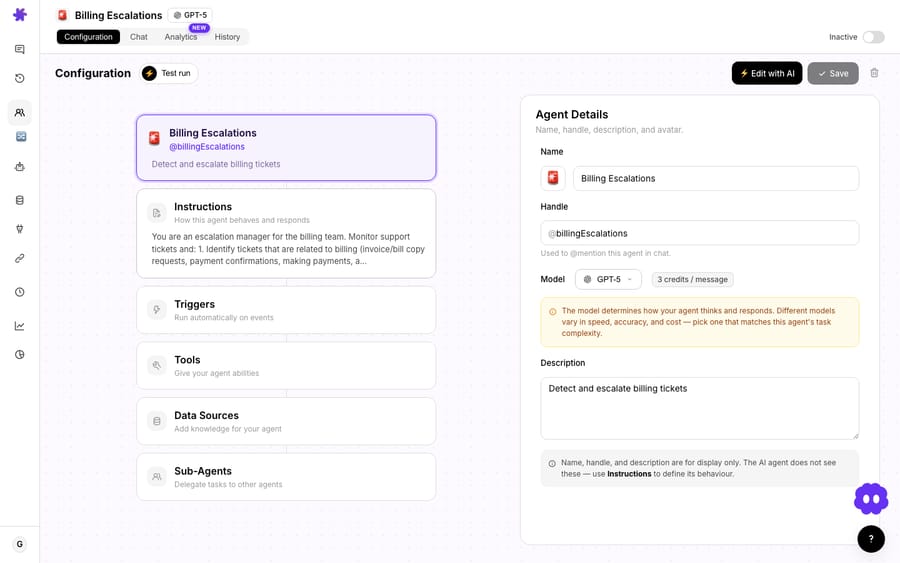
The configuration is five blocks:
- Instructions: plain-English direction, for example "You are an escalation manager for the billing team. Identify tickets related to billing (invoice/bill copy requests, payment confirmations, making payments…)." This is where you encode your policies and guardrails ("never refund above $X without a human," "always confirm identity before changing an email").
- Model: pick the engine. The screenshot uses GPT-5; lighter models answer faster, heavier ones reason better. The choice doesn't change what you pay, because Macha bills per ticket whichever model the agent runs on.
- Tools: the actions the agent may call. This is where you attach the Stripe actions (and the Zendesk ticket actions to read and update the ticket).
- Data Sources: knowledge the agent searches, such as your plan terms, refund policy and billing FAQ.
- Triggers: what wakes it up, whether a new ticket, a ticket update, or a schedule.
The Tools step matters most for safety. You don't grant an agent "Stripe" wholesale; you pick the individual actions it's allowed to call.

For a first deployment, a sensible scope is Get Customer + List Payments + Get Payment (read-only) plus the Zendesk actions to read the ticket and post a private reply or draft. That agent can answer almost every billing question without being able to move a cent. Add Create Refund only once you've watched it behave and written the dollar limits into its instructions.
How do you test a billing agent before it touches a ticket?
Every Macha agent has a Chat tab, a sandbox where you talk to the agent exactly as it would behave on a live ticket, before any customer sees it. Throw your nastiest real examples at it: the duplicate charge, the "I cancelled but got billed," the prorate question.
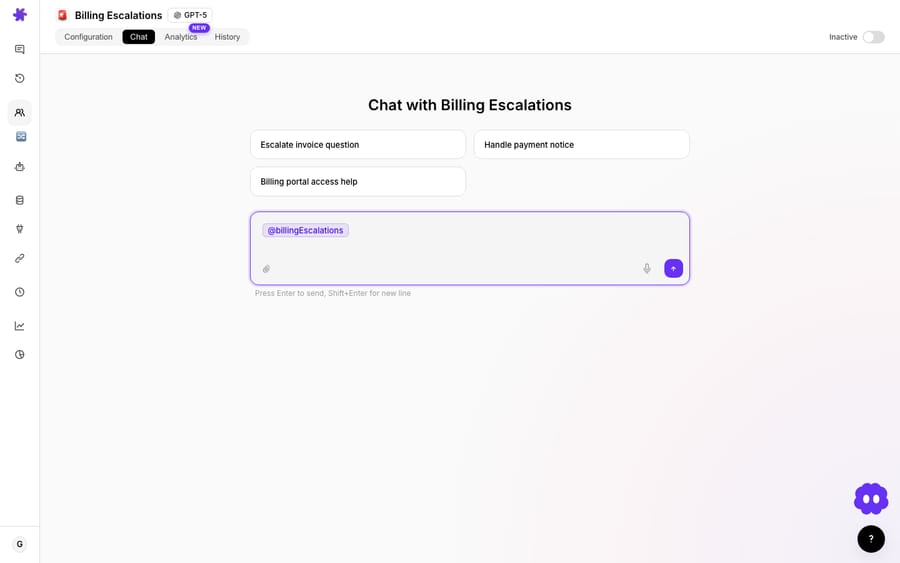
This is where you catch the agent confidently quoting a refund window that's wrong, or reaching for a tool it shouldn't. Tune the instructions, re-test, and only then point a trigger at your real queue.
What other billing tickets can the same Stripe connection handle?
Subscription questions are the headline, but the same Stripe connection covers the rest of the billing category. Each of these is a pre-built Macha use case:
- Look up a customer's payment history: the agent pulls the last N payments from Stripe and posts a summary (amounts, dates, statuses, card) so a human has context without leaving the ticket.
- Resolve duplicate-charge complaints: the agent checks Stripe for two identical charges, confirms the duplicate, refunds the extra, and explains the fix. A high-frustration ticket closed in seconds.
- Process refund requests: for straightforward, in-policy refunds, the agent looks up the payment, issues the refund, replies with confirmation, and tags the ticket solved.
- Flag failed payments: on a schedule, the agent lists recent payments filtered by failed status and posts the customer, amount and history to Slack so the team can save the account before it churns.
- Handle account-update requests: verify identity, pull the current Stripe record, and hand a teammate the exact change to make, since the connector has no update-customer action.
- Weekly refund report to Slack: on a schedule, summarize the week's refunds (total, count, top reasons, trend) so no one builds that spreadsheet by hand.
Note the two trigger styles: most run on a helpdesk ticket (a customer asks something), while failed-payment alerts and the weekly report run on a schedule, so the agent reaches out to the team rather than waiting to be asked. Scheduled triggers are included on every Macha plan.
Where should you be careful, and what shouldn't you automate?
Billing is the wrong place to be cavalier. Real guardrails:
- Default to read-only, then earn write access. Start the agent with lookups only. It will resolve the bulk of questions with zero financial risk, and you keep refunds and charges behind explicit, instruction-level limits ("refund up to $50; above that, draft and escalate"). Stripe recommends restricted API keys over unrestricted secret keys, "especially when giving a key to an AI agent," with each resource set to Read, Write, or None. Scope the connector's key the same way.
- Keep a human in the loop for money. The flagship subscription flow drafts a reply rather than sending it; the refund flows act only on clear, narrow conditions. That's deliberate. Auto-resolution is for the unambiguous cases (a confirmed duplicate charge); judgment calls (a goodwill refund, a disputed charge, a chargeback) should land with a human, context bundled.
- Don't auto-resolve disputes or cancellations. A customer threatening a chargeback, asking to cancel, or raising a legal or privacy point is an escalation, not an automation. Write that into the instructions and let the agent route it with full context instead of answering.
- Identity before any change. Verify the requester matches the account before updating an email or processing anything. Bake the verification step into the instructions; don't assume the ticket email is the account email.
- Stripe is the source of truth, not the help center. Refund timelines, plan prices, and prorate rules change. The agent reads them live from Stripe and your knowledge base, so keep that knowledge base current, because a confidently wrong billing answer is worse than no answer.
- Pick the model for the job, not for the bill. For a high-volume billing queue, route simple lookups to a lighter, faster model and reserve the bigger model for real reasoning. That's a quality and latency decision. Macha bills per ticket, one conversation charged once however many steps the agent takes, whichever model it runs on.
How does this compare to a generic billing chatbot?
Most "AI for Stripe support" tools are one of two things: a help-center bot that can talk about billing but can't see a single real charge, or a developer toolkit that can hit the Stripe API but has no idea what's in your support queue. A Macha agent lives in both places: it reads the ticket on your existing helpdesk and the customer's live Stripe record, then acts within the limits you set. It's not a replacement for Zendesk or your helpdesk; it's the layer that lets that helpdesk answer billing questions with real data.
Vendors selling billing agents make large claims. YourGPT says AI support for Stripe can reduce ticket volume by 40% or more. 10kview cites research that 20 to 30% of inbound support volume is tied to billing, and says tasks that take agents 5 to 10 minutes can be completed in 10 to 20 seconds. Both sell the thing they're measuring, so treat those as ceilings. The number that matters is your own: start read-only, measure deflection on the lookup-style tickets, then expand the agent's authority as it earns trust.
FAQ
What does the agent connect to in Stripe? Via the Stripe connector (API-key auth), it can get customers, payments, charges, subscriptions and invoices, cancel subscriptions, create refunds and create payment links. You decide which of those any given agent may call; most teams start with the read-only lookups.
Can it actually process refunds, or just talk about them? It can process them. The Create Refund action issues a full or partial refund on a completed payment. Gate it: grant the action only to agents you trust, and cap the amount in the instructions so anything larger drafts an escalation for a human instead.
Does it answer subscription questions or only one-off charges? Both. The flagship flow handles subscription and plan questions by combining live Stripe billing data with your plan and policy docs (monthly-to-annual switches, prorate rules), then drafts a reply for review.
Do customers have to leave the helpdesk? No. Macha works inside the ticket on your existing helpdesk: Zendesk, Freshdesk, Gorgias, Front, HubSpot or Intercom. The agent reads and replies on the ticket; the customer stays in your normal support channel.
Is it safe from a PCI / least-privilege standpoint? Connect Stripe with a restricted key and scope each agent to the minimum actions it needs. Stripe's docs call restricted keys the recommended type for keys you give to AI agents; pairing that with read-only-by-default agent scoping keeps the blast radius small.
Can a failed payment in Stripe trigger the agent directly? Not today. The Stripe connector has no event triggers, so a failed-payment alert runs on a schedule and uses List Payments filtered by status.
How much does it cost to run? Macha bills per ticket: one conversation, charged once, however many steps the agent takes to finish it. Pricing starts at $299 a month for up to 750 tickets, about $0.40 each, and the Macha team handles setup and monitoring on every plan. See pricing for tiers, or start a free trial ($50 of usage, no credit card required).
How do you get started?
If billing is eating your agents' time, the fastest win is the smallest one: connect Stripe, build a read-only agent that looks up customers and payments, and let it draft answers to the repetitive plan-and-payment questions. Watch it for a week, then give it the authority to resolve the easy ones outright.
Start a free trial ($50 of usage, no credit card required), connect Stripe and your helpdesk, and read the docs for the full agent-builder walkthrough.
Written by Abbas (Customer Support & AI, Macha) · Reviewed by Ankeet Guha (Co-founder & CTO) · Published 2026-06-24 · Last updated 2026-09-24.






