





 Shopify
 Stripe
 Slack
Slack Notion
 Google Workspace
 Confluence

How Do You Keep an AI Knowledge Base in Sync Across Every Source?


Support answers live in a Zendesk Help Center, a Notion wiki and a handful of Google Docs, and an AI agent is only as current as the copy it reads. Macha avoids the copy by reading those sources where they live, so an edit in the original tool reaches the agent without a re-upload.
Key takeaways
- Macha keeps an AI knowledge base current by reading Google Docs, Notion and Confluence pages live on every lookup and syncing Zendesk Help Center articles by webhook.
- Uploaded files and crawled websites in Macha are indexed snapshots, refreshed by re-uploading the file or clicking Resync, and a full-site crawl adds at most 200 pages.
- A 2012 McKinsey report put the average knowledge worker at roughly 1.8 hours a day, about 9.3 hours a week, spent searching for and gathering information.
- An NBER study of customer-support agents found an AI assistant raised issues resolved per hour by 14% on average and by 34% for novice agents.
- Every knowledge source is included on every Macha plan, and Macha bills per ticket from $299 a month for up to 750 tickets regardless of how many sources an agent reads.

Macha keeps an AI knowledge base current by reading each source where it lives: Google Docs, Notion and Confluence pages are read live every time an agent needs them, and Zendesk Help Center articles stay in step through a live webhook sync, so an edit in the original tool reaches the agent without a re-upload. The two source types that don't update themselves are uploaded files and crawled websites, which are indexed snapshots you refresh by re-uploading or clicking Resync (per Macha's Data Sources docs).
| Source | How it stays current | What you do when the content changes |
|---|---|---|
| Google Docs | Read live with the google_read_doc tool on every lookup | Nothing: edit the Doc |
| Notion | Read live with the notion_get_page tool on every lookup | Nothing: edit the page |
| Confluence | Live connector source (status badge: Live) | Nothing: edit the page |
| Zendesk Help Center | Indexed, kept in step by live webhook sync | Nothing: publish the article in Zendesk |
| Uploaded files (PDF, DOCX, CSV, XLSX, TXT) | Indexed snapshot | Delete the old file and upload the new one |
| Websites and single web pages | Indexed snapshot (crawl stops at 200 pages) | Click Resync on the source |
That copy-over step is where knowledge bases go stale. An agent confidently tells a customer about a 30-day return window that the business changed to 45 days last quarter, because the Help Center got updated and the AI's copy didn't. Multiply that across dozens of policies and three or four tools, and "we have a knowledge base" quietly becomes "we have several knowledge bases that disagree with each other."
Macha's answer is to connect each source of truth (Zendesk Help Center, Notion, Google Docs, Confluence) rather than maintain one canonical doc and hope everything else matches it. Edit the article in Zendesk, and the agents answering tickets work from the new version. No re-upload, no re-training, no drift.
Why does fragmented knowledge break AI support?
The fragmentation isn't a process failure. It's how teams actually work. Help Center articles are customer-facing and owned by support. Internal runbooks live in Notion because that's where the wiki is. One-off operational facts end up in Google Docs because that's where someone started typing. Each tool is the right home for its content.
The cost shows up when a human, or an AI agent, needs an answer and has to know which tool to look in. A 2012 McKinsey report pegged the average knowledge worker at roughly 1.8 hours a day, about 9.3 hours a week, spent searching for and gathering information. For a support team, that's time not spent resolving tickets. And the upside of fixing it is measurable: an NBER study of customer-support agents found that access to an AI assistant raised issues resolved per hour by 14% on average, and by 34% for novice and low-skilled agents.
But an AI agent only earns those gains if its knowledge is current. A grounded answer from a stale source is worse than no answer, because it's confidently wrong. So the real requirement isn't "load some documents into the AI." It's "keep the AI's knowledge identical to the live versions your team is editing, across every tool." That's a freshness problem, not an upload problem.
How does Macha keep each source in sync?
Macha's Sources page labels every source with one of two badges. Live means the content is pulled in real time from a connected app, so the agent always reads the current version. Ready means the content has been indexed and the agent searches that index. Your AI agents can use both kinds on the same agent.

The sources that keep themselves current:
- Zendesk Help Center: your published articles are indexed and kept in step by a live webhook sync, so the same content customers read in your Help Center is what agents answer from. Connect Zendesk and the Help Center sync is built in.
- Notion: connect your workspace over OAuth and the agent reads pages live with
notion_get_page, always getting the current content. Good for internal wikis, policies, and process docs. See the Notion integration. - Google Docs: pick specific documents through the Google Picker, and the agent reads them live with
google_read_doc, so an edit someone made a minute ago is what the agent sees. See the Google Workspace integration. - Confluence: added as a connector source, it carries the Live badge alongside Google and Notion, and the same connector can search spaces and read pages on demand.
The point of connecting sources rather than uploading files is exactly this: the source stays the system of record. You don't manage two copies. When someone edits the Notion page, you change nothing in Macha, and the next lookup reads the new text.
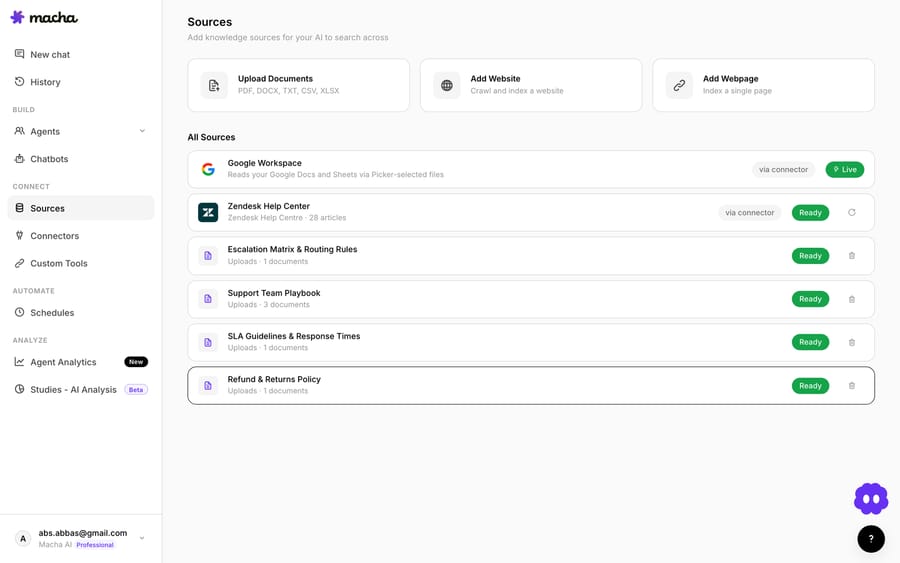
Why is a live read better than a scheduled sync?
A scheduled sync always has a gap: whatever changed since the last run is invisible until the next one. A live read has no gap to manage, because the agent fetches the document at the moment it needs it. When you add a Google or Notion source to an agent, Macha attaches the read tools for you (google_read_doc, google_read_sheet and google_list_drive_files for Google; notion_search and notion_get_page for Notion) and locks them while the source is linked, so nobody can remove the tool and silently cut the agent off from the document.
The trade-off is honest: a live read is a tool call, so it's best for documents that change often, such as pricing sheets, escalation matrices and on-call rosters. Content that rarely changes, like a policy PDF or a product manual, works well as an indexed source that the agent searches with search_knowledge and opens with get_document.
Can every agent share the same knowledge?
Yes. A source isn't locked to one workflow. Any agent you build can be pointed at it, so the agent triaging billing tickets and the agent answering shipping questions both draw on the same current facts. Each source row on an agent has a scope toggle: All documents, which picks up new documents as they're added, or Selected, which limits the agent to the documents you choose. Update the source once; every agent benefits.
How do you set up a knowledge base that stays current?
If you're starting from scratch, the sequence that works is:
- Connect your sources of truth. Zendesk Help Center for customer-facing answers, Notion or Confluence for internal policy and process, Google Docs for the operational details that live there. Connect what you actually maintain, not a doc nobody updates.
- Decide what's in scope. For Google Docs especially, pick the specific documents you trust via the Picker rather than dumping an entire Drive, and use the Selected scope on each agent. A tight, curated source produces better answers than a sprawling one.
- Keep fast-changing content in live sources. If a document changes weekly, host it in Google Docs, Notion or Confluence rather than uploading a copy.
- Point your agents at it. Attach the knowledge sources to the agents that need them, and the same current facts reach every workflow.
The discipline this enforces is healthy: because the source stays the system of record, your team keeps editing in the tools they already use, and the AI stays in step. There's no second knowledge base to maintain, which is the only kind of knowledge base that actually stays current.
Where won't syncing save you?
Live sources keep your AI faithful to what's written. They can't make bad sources good. A few honest limits:
- Garbage in, garbage out. If your Help Center article is wrong, your agent will now be reliably, promptly wrong. Connecting a stale Notion wiki doesn't fix the staleness; it embeds it. The prerequisite is that your sources are actually maintained.
- Uploads and websites are snapshots. Macha doesn't auto-refresh an uploaded file: if the original changes, delete the old version and upload the new one (up to 10 files at a time, each up to 20 MB). It doesn't watch websites for changes either: click Resync on the source to pull the latest pages, which also removes pages that no longer exist. A full-site crawl adds at most 200 pages.
- Some facts belong in a tool, not a document. For something that changes minute to minute, like a live outage status or an order's shipping state, the agent should call the system that holds it through a connector or a custom API tool rather than read a document about it.
- Scope discipline matters. Connecting everything is tempting and usually wrong. A focused set of trusted documents retrieves more accurately than a giant pile where the right answer competes with five outdated drafts. Curate.
Macha also connects to Confluence for writes, such as creating a page or adding a comment, and asks for confirmation before each one. None of these limits are reasons to keep copy-pasting between tools. They're reasons to be deliberate about which sources you trust, which is a much better problem to have than "which of our four knowledge bases is right."
Where does knowledge sync fit in Macha?
Knowledge is the foundation under everything else Macha's agents do. An agent that auto-replies from your Help Center, drafts responses from your Notion wiki, or answers policy questions for a customer is only as accurate as the knowledge behind it. Live sources are what make that knowledge match the versions your team maintains across Zendesk, Notion, Google Docs and Confluence, so the answers your agents give are the answers you'd give yourself today, not last quarter.
Macha is the AI agent layer on top of the help desk you already use (Zendesk, Freshdesk, Gorgias, Front, HubSpot or Intercom), and the knowledge base is shared connective tissue, not a replacement for your Help Center or your wiki. Your Zendesk Guide stays your Guide; your Notion stays your Notion. Macha makes sure the AI reading from them is never behind.
FAQ
Which sources can Macha keep in sync? Google Docs, Notion and Confluence are live connector sources that the agent reads at the moment it needs them, and Zendesk Help Center articles stay current through a live webhook sync. You can also upload documents or crawl a website, but those are indexed snapshots you refresh yourself.
Do I have to re-upload anything when a document changes? Not for live sources. Edit the Google Doc, Notion page, Confluence page or Help Center article, and the agent works from the new version. Uploaded files are the exception: delete the old file and upload the new one.
How often does the knowledge base sync? For Google Docs, Notion and Confluence there's no schedule to set, because the agent reads the current version on every lookup. Zendesk Help Center updates through webhooks. Crawled websites refresh when you click Resync.
Can multiple agents share the same synced knowledge? Yes. A source can be attached to any agent you build, with either All documents or Selected scope, so every workflow answers from the same current set of facts. Update a source once and all of them stay in step.
Does it cost anything to keep knowledge synced? Every knowledge source is included on every Macha plan. Macha bills per ticket, from $299 a month for up to 750 tickets: one conversation, charged once, however many sources the agent reads to answer it, so keeping knowledge current never changes what a conversation costs. Plan details are on the pricing page.
How do you try it?
Stale knowledge usually goes unnoticed until a customer quotes back a policy you changed months ago. Connect your sources once and let the agent read them where they live. Start a free trial ($50 of usage, no credit card required), connect Zendesk, Notion, and Google Docs, and read the Data Sources docs for the full walkthrough.
Written by Abbas (Customer Support & AI, Macha) · Reviewed by Ankeet Guha (Co-founder & CTO) · Published 2026-06-24 · Last updated 2026-06-24.






