





 Shopify
 Stripe
 Slack
Slack Notion
 Google Workspace
 Confluence

Uploaded Files or Live Data Sources: Which Should a Macha Agent Use?


Upload a file when the content is stable and you control when it changes, and connect a live Google Docs, Notion or Confluence source when it changes often and someone else owns it. The choice decides whether your agent answers from today's policy or a copy that went stale weeks ago.
Key takeaways
- Macha agents should use an uploaded file for stable content you control and a live Google Docs, Notion or Confluence source for content that changes and someone else owns.
- Macha injects only CSV and XLSX files of 2,000 rows or fewer directly into the prompt; PDFs, DOCX files and larger spreadsheets are chunked, embedded and searched on demand.
- Uploaded files in Macha never auto-refresh, so after an edit you delete the old file and upload the new one, up to 10 files at a time and 20 MB each.
- Website sources in Macha crawl up to 200 pages and refresh only when you press Resync, so a live connector source suits content that changes weekly.
- Scope filtering in Macha lets each agent read all documents in a source or a hand-picked selection, which keeps a billing agent away from internal engineering docs.

Upload a file when the content is stable and you control when it changes; connect a live Google Docs, Notion or Confluence source when the content changes often and someone else owns it. Pick wrong and you get the worst failure in support automation: an agent that answers confidently from a document that quietly went out of date three weeks ago.
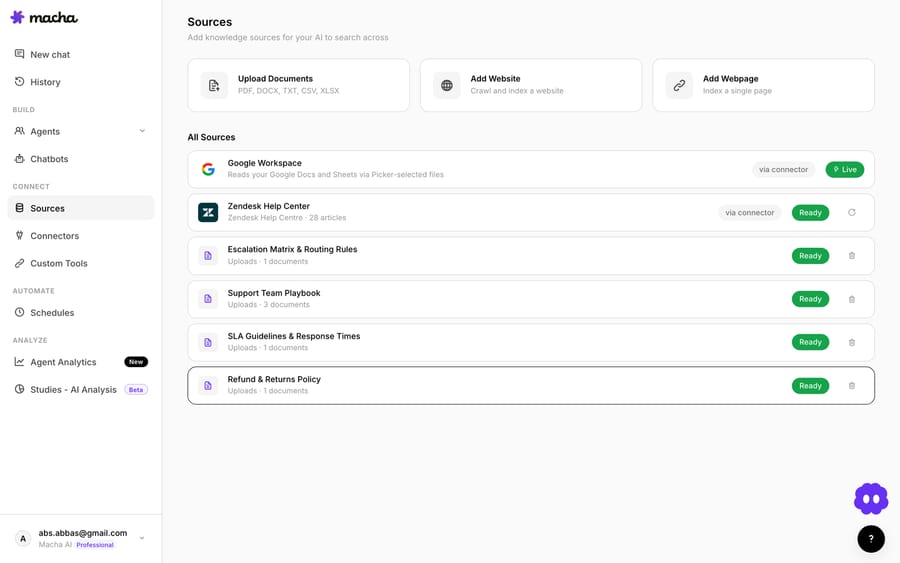
Both options arrived in Macha's Agent data sources release (changelog, Feb 22 2026), and both live on the same Sources screen next to website crawling.
| Source type | How the agent reads it | Stays current? | Best for |
|---|---|---|---|
| Uploaded file (PDF, DOCX, CSV, XLSX, TXT) | Spreadsheets of 2,000 rows or fewer are injected into the prompt; everything else is chunked and searched | No. Delete and re-upload after an edit | Manuals, finished policies, contracts, exports |
| Live source (Google Docs, Notion, Confluence) | Read live from the service every time the agent needs it | Yes, on the next read | Pricing, promos, rosters, runbooks others edit |
| Website or web page | Crawled (up to 200 pages), chunked and searched | Only when you hit Resync | Public help-center and marketing pages |

How does knowledge get into a Macha agent?
Uploaded files (a point-in-time snapshot)
You upload a PDF, Word document, spreadsheet, CSV or text file, up to 10 files at a time and 20 MB each, and Macha indexes it within seconds to a couple of minutes. What happens next depends on the file:
- Small spreadsheets are injected directly into the prompt. A CSV or XLSX file with 2,000 rows or fewer sits in the agent's context on every request. Nothing is retrieved or ranked, so there's no chance the relevant row gets missed. It's the most reliable form of "the agent just knows this."
- Everything else is chunked, embedded and searched on demand. PDFs, DOCX files and spreadsheets over 2,000 rows are split into segments and embedded. At question time the agent calls its search tool and pulls back only the chunks that match. That's classic retrieval-augmented generation, and it lets a 200-page manual fit a model that could never hold it all at once. Spreadsheet chunks keep about 75 rows each with the header row attached, so the agent always knows what each column means.
The defining property of an upload is that it's a snapshot. It reflects the file exactly as it was the moment you added it. Macha does not auto-refresh it: if the document changes next week, the agent keeps answering from the old copy until you delete it and upload the new version.

Live connector sources (always current)
The alternative is to connect a live source: a Google Doc or Sheet, a Notion page, or a Confluence page. Instead of copying the content into Macha, you point the agent at the document in the system of record, and it fetches the current version each time it needs it. When you add a Google or Notion source, Macha attaches the read tools for you (for example google_read_doc and notion_get_page), and the Sources list marks the source "Live" rather than "Ready". Edit the source, and the next ticket the agent handles already reflects the edit.
This is the lesson most RAG teams learn the hard way: when your index lags the source of truth, the agent doesn't know it's wrong. It answers from stale information with full confidence, and the customer has no way to tell. Live sources close that gap by design, because there's no separate copy to fall behind.
The third source type on the same screen is website crawling, for when your canonical answer lives on a public help-center or marketing page. "Add a website" crawls up to 200 pages; "Add a web page" indexes a single URL. Macha doesn't watch the site for changes, so press Resync after you update a page.
Which should I use: an uploaded file or a live source?
Here's the short version, then the nuance.
Upload a file when the content is stable and you own the cadence. Connect a live source when the content changes and someone else owns the cadence.
That one distinction, who controls when this changes and how often, settles most cases.
| Situation | Reach for | Why |
|---|---|---|
| Product manual, finished policy PDF, spec sheet | Uploaded file | Stable; re-uploading on the rare edit is cheap. |
| Pricing doc, promo calendar, shipping-cutoff dates | Live source | Changes often; staleness directly burns customers. |
| A small price list or SKU table the agent must never miss a row of | Uploaded spreadsheet (2,000 rows or fewer) | Injected whole into the prompt, so no retrieval gaps. |
| A long, sprawling reference (hundreds of pages) | Uploaded file (PDF or DOCX) | Chunked and embedded so it fits the model via search. |
| A Notion runbook your ops team edits weekly | Live source | The team already maintains it; the agent just inherits the edits. |
| A one-off CSV export, a contract, an archived report | Uploaded file | Frozen by nature, so a snapshot is exactly right. |
| Content that lives behind a public URL | Website crawl | No file to manage; a Resync picks up changes. |
A useful way to hold it: uploads optimize for control; live sources optimize for freshness and zero maintenance. When a wrong-because-stale answer is expensive (anything touching money, dates or eligibility), freshness wins. When the content is genuinely settled, the simplicity of an upload wins.
Why does "injected vs searched" matter?
This isn't a trivia detail. An injected spreadsheet is the most dependable knowledge you can give an agent: every row is in context on every call, so there's no search step to misfire. Once knowledge moves into chunk-and-search territory (every PDF, every DOCX, large spreadsheets and crawled websites), you inherit the classic RAG sensitivities. If a document is one 8,000-word wall of text, chunking can split an exception clause from the rule it modifies, and the agent may surface one without the other.
Two practical rules follow. For structured facts the agent must always get exactly right (a price table, a list of eligible SKUs), keep the spreadsheet under 2,000 rows so it's injected, or split a big one into smaller, focused files. For prose rules like escalation criteria, refund eligibility or brand voice, write a short, tightly-written doc rather than burying them in a giant catch-all, and put the most critical ones straight into the agent's instructions.
Can I limit which documents each agent sees?
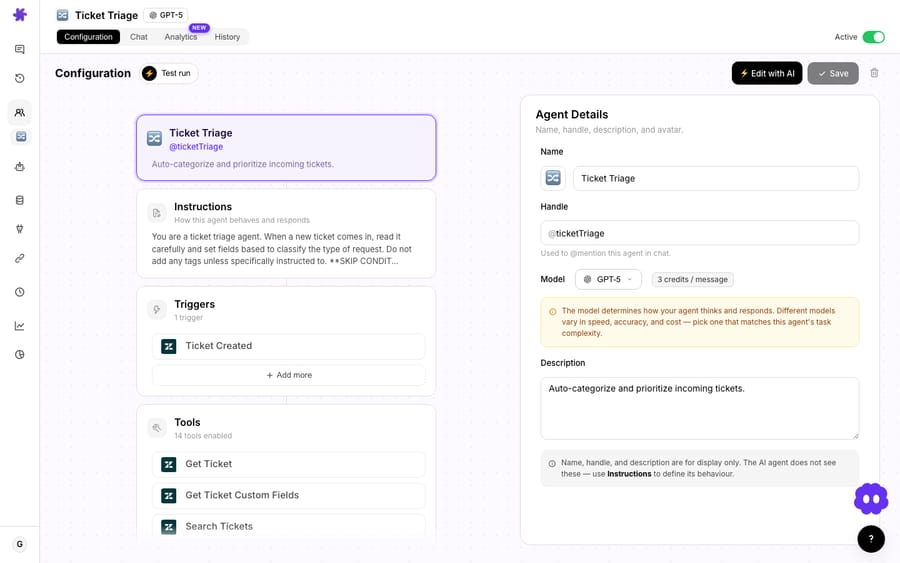
Yes. Whichever source type you choose, Macha lets you scope what an agent sees with a toggle on each source row: All documents (the agent also gains access to documents added later) or Selected (you hand-pick). Scope filtering works on uploads, websites, Google Docs and Notion pages, and it matters more than it sounds.
A billing agent doesn't need your entire engineering wiki. Feeding it everything dilutes search (more chunks competing) and risks the agent answering from a doc that was never meant for customers. Scope each agent down to the sources it should actually reason over, and both accuracy and predictability improve.
A common, clean pattern:
- Live source for the volatile, shared truth (pricing, promos, hours): one connected Notion page or Google Doc, scoped into every customer-facing agent.
- Small uploaded spreadsheets for structured facts one agent must never miss (its SKU list, its carrier cutoffs), scoped to only that agent.
- Large uploaded files for deep reference (the full product manual), available to the agents that need depth and left off the ones that don't.
When should I not use a live source?
Live sources are not a free win in every case:
- A live source is only as fresh as the document behind it. If the Notion page is itself out of date, "live" just means the agent is reliably wrong. Live reads don't fix governance; they make whoever owns the doc responsible for accuracy. The field consensus is blunt: a knowledge base without ownership is a liability, not an asset.
- It adds a dependency. A connected source relies on the connector and the external service being reachable at the moment the agent reads it. An uploaded file is already stored in Macha. For something that must be available even if an integration hiccups, an upload is the safer floor.
- A huge live doc is a poor home for a tiny critical fact. If the agent must never miss a one-line rule, don't bury it on page 30 of a sprawling live doc. Put it in the instructions or a small injected spreadsheet. Match the mechanism to how critical the content is.
- Snapshots can be a feature. For contracts, signed policies, or anything where you want the agent reasoning over the version as of a date, an upload is correct. You don't want it to change silently.
You also don't have to choose globally. You choose per piece of knowledge, and one agent can mix all three: an injected pricing spreadsheet, a searchable policy PDF and a live Google Doc FAQ. The skill is matching each one to the volatility and criticality of the content.
How do data sources differ from connectors and tools?
Data sources are knowledge: what the agent reads. Connectors and tools are what the agent does (look up a Shopify order, post to Slack, issue a Stripe refund). A good agent usually needs both: a live Notion policy source so it knows what the refund rule is, plus a Stripe tool so it can act on it. If you're wiring up the action side, the Notion and Google Workspace integration pages cover what those connectors can read and write, and the data sources docs walk through adding each source type step by step.
Adding a data source costs nothing extra. Macha bills per ticket, one conversation charged once, however many sources the agent reads to answer it, with every knowledge source included on the one plan (from $299 a month for 750 tickets). See the pricing page for the full picture.
FAQ
What's the actual difference between an uploaded file and a live source? An uploaded file is a point-in-time snapshot: the agent reads the content exactly as it was when you added it, until you delete it and re-upload. A live source (Google Docs, Notion or Confluence) is read from the service each time, so edits are reflected on the very next ticket with no re-uploading.
When should I upload a file instead of connecting a live source? When the content is stable (a finished policy, a product manual, a one-off export) or when it's a small structured table the agent must never misquote. CSV and XLSX files with 2,000 rows or fewer are injected whole into the prompt, which is the most reliable access you can get.
Do large files get handled differently? Yes. PDFs, DOCX files and spreadsheets over 2,000 rows are chunked, embedded and searched on demand, which is what lets a long manual fit a model that couldn't hold it all at once. Only small spreadsheets are injected.
Which tools can be live sources? Google Docs and Sheets, Notion and Confluence. Website crawling covers public URLs, but it refreshes only when you press Resync. Uploads accept PDF, DOCX, CSV, XLSX and TXT, up to 20 MB per file.
Can I limit which documents an agent sees? Yes. Scope filtering lets you include all documents from a source or hand-pick specific ones per agent, so a billing agent isn't reasoning over your engineering wiki.
Does adding a data source cost anything? No. Macha bills per ticket, for the conversations an agent handles, not for attaching knowledge. See pricing.
Does Macha re-crawl my website automatically? No. A website source stays as indexed until you press Resync on it, which also removes pages that no longer exist. Use a live source for content that changes weekly.
What's the one question to ask before adding a source?
Ask: does this content change, and does someone else control when? If yes, connect it live so the agent is never quietly wrong. If it's settled, or it's a small table the agent must reproduce exactly, upload it. Most real deployments use both, scoped tightly per agent. To try it on your own docs, start a free trial ($50 of usage, no credit card required), connect a Notion page or upload a policy PDF, and watch an agent answer from it. Then change the doc and watch the answer update.
Written by Abbas (Customer Support & AI, Macha) · Reviewed by Ankeet Guha (Co-founder & CTO) · Published 2026-06-24 · Last updated 2026-09-24.






