





 Shopify
 Stripe
 Slack
Slack Notion
 Google Workspace
 Confluence

How Do You Look Up a Shopify Order Without Leaving the Zendesk Ticket?


An agent mid-reply who needs to confirm what shipped usually leaves the ticket, searches Shopify, copies the tracking link and switches back, all for one fact. Macha replaces that with a plain-language request inside the Zendesk ticket that returns the order as a structured card.
Key takeaways
- Macha lets a support agent ask for any order number inside the Zendesk ticket and returns items, fulfillment status and tracking from Shopify's Get Order action.
- The native Zendesk Shopify app matches only the requester's email or phone number, so it cannot look up an order placed by a different customer.
- The native Zendesk Shopify app can refund and cancel the requester's matched orders, but it cannot read an order number from a pasted screenshot.
- In a captured live run, Macha made three tool calls and returned a structured order card with a $15.00 USD payment marked Succeeded in under six seconds.
- Macha bills the lookup conversation as one ticket however many records the agent pulls, about $0.40 a ticket from $299 a month, with setup and a dedicated success manager included.

With Macha, a support agent types "pull up order #3019" inside the Zendesk ticket and Macha calls Shopify's Get Order action, returning the customer, line items, fulfillment status and tracking as a structured card, without anyone opening a Shopify tab. The fix for tab-switching isn't another browser tab. It's letting the agent ask for the order in plain language, right inside the conversation.
This is the agent-assist version of order lookup. It keeps a human in the loop (the agent reads the result and decides what to send), which makes it a good first step before you trust an agent to auto-resolve order-status tickets end to end. Macha is an AI agent layer that sits on top of Zendesk and connects to Shopify. It's not a help desk you have to migrate to.
What changes when an agent asks for the order instead of searching?
| Without Macha | With Macha | |
|---|---|---|
| Where the agent works | Bounces between Zendesk and a Shopify tab | Stays in the ticket |
| How they find the order | Manual search by order number or email | Asks in natural language: "order #3019?" |
| What comes back | A raw Shopify admin page to read | A structured card: customer, items, status, tracking |
| Which order | Usually only the requester's matched order | Any order number the agent names |
| Next step | Copy/paste tracking by hand | Macha can draft the reply for the agent to approve |
The native Zendesk Shopify app already does part of this well. It matches the ticket requester's email address or phone number to their Shopify account and lists their orders by order number; expanding one shows the order date and value, customer notes, payment status, fulfillment status and shipment tracking numbers. Agents can also issue full or partial refunds and cancel orders from the sidebar (Zendesk help center, checked 24 September 2026). If all you need is the requester's own orders, it may be enough.
Where it stops is exactly where agents get stuck. It's identity-bound: it keys off the requester's contact details, and Zendesk's article describes no way to search for an arbitrary order, so a B2B agent fielding "can you check order #3019 for a customer of mine" is back to manual lookup. It also can't read an order number out of a pasted screenshot, and it can't draft the reply for you. The agent-assist pattern below closes those gaps.
How does a Macha order lookup work?
The whole interaction is one trigger, two tools, and a human checkpoint.
Trigger: a Zendesk ticket where the agent needs order context. In practice the agent invokes Macha in the conversation, through an internal note or the chat panel, and asks the question.
Tools the agent uses:
- Shopify → Get Order: "Look up an order by ID or order number with full line items, fulfillment, and payment status."
- Shopify → Lookup Customer: retrieve the customer profile and contact details (add Customer Orders for their order history).
If the customer doesn't have an order number to hand, Shopify → Search Orders finds orders by customer email, fulfillment status, financial status or date range.
You wire those up once when you build the agent. In Macha's tool picker you grant the agent only the Shopify (and Zendesk) actions it should be allowed to call and nothing more.

That's the security model in one screen: an agent can only do what its enabled tools allow. A lookup agent gets read actions (Get Order, Lookup Customer); it does not get refund or cancellation tools unless you deliberately add them.
Before any of that, both apps have to be connected to your Macha org, once: Zendesk by OAuth or API key, Shopify by OAuth.

What does a real lookup return?
Here's an actual Macha run, captured live in the chat, not a mockup. We asked the agent, in plain language, to pull up the latest order and return the details:
The prompt was "Look up the most recent successful payment and show the customer name, email, items, amount, and payment status." Macha made three tool calls and came back, in under six seconds, with a clean structured card:
Most recent order: - Customer: name and email (withheld here) - Items: Business Plan, AI Assistant for Zendesk - Amount: $15.00 USD - Payment status: Succeeded - Order ID: 23225355
Two things matter here. First, the agent asked in natural language and Macha resolved it: no manual search, no tab-switch. Second, the result is structured for a human to act on, not a dump of an admin page: every field the agent needs to answer the customer is right there, with the source tool and timing shown for trust.
One honesty note on this exact shot: it reads the order from Stripe, the billing tool connected in our demo org (Shopify isn't connected there). The pattern is identical for Shopify: point the same agent at Shopify → Get Order and the card carries line items, fulfillment status, and a tracking number instead of (or alongside) the payment detail. And because Get Order takes any order ID or order number, the agent can ask for order #3019 even when the person on the ticket isn't the buyer, the exact B2B case the email-matched native app can't handle.
Who approves the reply before it's sent?
Because this is agent-assist, Macha offers the next step rather than taking it. If the agent says "yes, draft it," Macha composes the customer-facing reply and hands it back for review. The agent approves, edits, or discards before anything is sent.
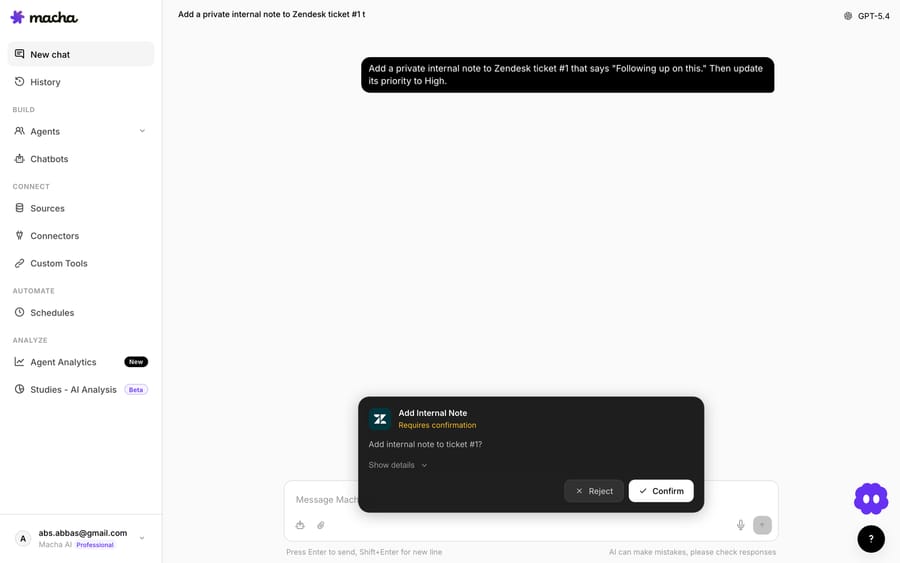
This approval gate is the whole point of the assist pattern. The agent stays accountable for what the customer sees, while Macha does the fetching, formatting, and first-draft writing. When you've watched a lookup agent be right a few hundred times, that's your signal to promote the workflow to a fully autonomous order-status agent.
Which support teams get the most from order lookup?
A few situations make this pattern punch above its weight:
- B2B and concierge support, where the person on the ticket is rarely the person who placed the order. Email matching fails here; "pull up order #X" doesn't.
- Order numbers buried in custom fields. Macha's Zendesk Get Custom Fields tool resolves field labels, so an agent can ask "look up the order in the Order # field" and Macha reads it off the ticket.
- Screenshots and receipts. Zendesk's Read Attachment tool gives the agent AI vision: if a customer pastes a photo of their order confirmation, Macha can read the number off it and then look the order up.
- Multi-order tickets. "Compare orders #3019 and #3022" is one prompt, not four tab switches.
Because Macha is the same agent layer across your stack, the lookup doesn't have to end at Shopify. The same conversation can pull a payment record from Stripe or a customer's recent ticket history from Zendesk, whichever tools you've granted.
When should you not use a lookup agent?
It would be dishonest to pretend this fits every team, so here's the contrarian read.
- If you only ever need the requester's own orders shown passively, the native Zendesk Shopify sidebar may already cover you, refunds and cancellations included. There's no reason to build an agent for a job a built-in accordion does. Macha earns its place when the agent needs to ask, act on arbitrary orders, or read attachments.
- It isn't free. Macha bills per ticket, and an agent-facing Copilot chat counts as one ticket just like a customer conversation does, however many lookups you make inside it. For high-volume "where is my order" tickets, the math often favors letting an autonomous agent resolve them outright rather than paying for a Copilot chat on top of the customer's own ticket. Assist is the stepping stone, not always the destination.
- Garbage in, garbage out on identity. Macha returns what Shopify has. If an order number is wrong or the store data is stale, so is the answer. The agent's review step exists partly to catch that.
- Permissions are on you. Grant a lookup agent only read tools. If you also enable refund or cancellation actions, keep the human approval gate firmly in place.
How do you set up an order lookup agent?
On the trial and every plan, the Macha team builds and tests this agent for you. Your part is connecting Zendesk and Shopify, and the steps below are what the build involves:
- Connect Zendesk and Shopify to your Macha org (a one-time connection each).
- Build an agent and, in the tool picker, enable Shopify → Get Order and Lookup Customer (add Shopify → Search Orders for lookups by email, and Zendesk → Get Custom Fields and Read Attachment if you want field/screenshot lookups).
- Give it a short instruction: "When an agent asks about an order, look it up in Shopify and return the customer, items, fulfillment status, and tracking. Offer to draft a reply."
- Test it on a real ticket, then let your team invoke it in the conversation.
The full walkthrough of agents, tools and connectors lives in the Macha docs.
FAQ
Does the order have to belong to the ticket's requester? No. The agent can ask for any order number. That's the main advantage over email-matched sidebar integrations, which only surface the requester's own orders.
Will Macha take actions, or just look things up? By default this pattern is read-only and assist-only: it fetches the order and offers to draft a reply, which the agent approves. You can grant action tools (like refunds) separately, but the human approval gate stays in place for anything customer-facing.
Can it read an order number from a screenshot the customer sent? Yes. With Zendesk's Read Attachment tool, Macha uses AI vision to read order confirmations, receipts, or product photos, then looks the order up.
Is this only for Zendesk and Shopify? Those are the connectors in this example. Macha runs on Zendesk, Freshdesk, Gorgias, Front, HubSpot or Intercom, and the same agent can also pull from Stripe, search past tickets, or use other connected tools in the same conversation.
How is it priced? The conversation the lookup happens in is billed as one ticket: one thread, charged once, however many records the agent pulls inside it. Macha has one plan priced by ticket volume, from $299 a month for up to 750 tickets (about $0.40 a ticket), with unlimited team seats. That price includes setup by the Macha team and a dedicated success manager who handles your changes after go-live; see the pricing page.
Can the native Zendesk Shopify app already refund or cancel orders? Yes, for the requester's matched orders. Macha adds lookups for any order number, screenshot reading and drafted replies.
How do you try it?
If your agents are still alt-tabbing to Shopify for one tracking number at a time, this is the smallest, highest-frequency win to automate first. Start a free trial ($50 of usage, no credit card, no time limit), connect Zendesk and Shopify, and the Macha team builds the lookup agent for you. Then watch how fast "pull up order #3019" replaces five minutes of tab-switching.
Written by Abbas (Customer Support & AI, Macha) · Reviewed by Ankeet Guha (Co-founder & CTO) · Published 2026-06-24 · Last updated 2026-09-24.






