





 Shopify
 Stripe
 Slack
Slack Notion
 Google Workspace
 Confluence

What Has Macha Shipped in 2026? A Feature-by-Feature Recap


In February 2026 Macha could answer a chat message from a few uploaded documents; by the end of June it built agents from a sentence, delegated to sub-agents, ran on schedules and analyzed thousands of tickets in one batch. This recap lists each release by date from the changelog, plus the headline releases since June.
Key takeaways
- Macha's AI Agent Builder shipped on April 3, 2026 and generates an agent's instructions, tools, triggers, sub-agents and model from a plain-language description.
- Macha added Gorgias and Front as native help desk connectors on June 23, 2026 with 15 tools each, and Intercom followed on September 17, 2026.
- Macha's Studies tool, released May 30, 2026, runs AI analysis across a batch of records in parallel, caps each run at 20,000 records and shows the cost first.
- Macha consolidated its model lineup on April 23, 2026 onto GPT-5.4, GPT-5 and GPT-5.4 Mini, then added GPT-5.6 Terra and GPT-5.6 Luna on July 27.
- Macha bills per ticket on one plan with every feature, from $299 a month for 750 tickets, about $0.40 each.

Between February 22 and June 23, 2026, Macha shipped four big things: the AI Agent Builder (April 3), sub-agents up to three levels deep (March 8 to April 9), Studies for batch analysis of up to 20,000 records (May 30), and Gorgias and Front as native help desk connectors (June 23). Every date below comes from the Macha changelog, grouped by capability so you can find the one you care about. A short section near the end covers what has shipped since June.
One piece of orientation frames everything below: Macha is an AI agent layer that sits on top of the help desk you already run. Today that means Zendesk, Freshdesk, Gorgias, Front, HubSpot or Intercom; in June it meant the first four. It doesn't replace any of them. It connects your commerce, knowledge and comms tools, and builds agents that resolve, triage and route tickets while taking real actions through those tools. Almost every release this year pushes on one of three axes: more ways to build agents, more places to connect them, or more control over what they cost and do.
What did Macha ship in 2026, theme by theme?
| Theme | What shipped | Headline dates |
|---|---|---|
| Building agents | Sub-agents → AI Agent Builder → AI Tool Builder → Custom API Tools | Mar 8 · Mar 30 · Apr 3–9 |
| Running them autonomously | Trigger system → scheduled (cron) triggers → per-event debounce | Mar 1 · Mar 22 · Jun 5 |
| Connecting more tools | Freshdesk → Shopify → Confluence → Gorgias + Front | Mar 15 · Mar 22 · Apr 9 · Jun 23 |
| Models & vision | Chat/image attachments → image vision on tickets → GPT-5.4 lineup → price cuts | Mar 1 · Apr 17 · Apr 23 · Jun 17 |
| Analysis & billing | Studies (batch AI) → Report view → billing controls | May 30 · Jun 5 · May 30 |
The sections below walk each theme in the order things shipped.
How did building an agent change in 2026?
The single biggest shift this year is how you create an agent. In February it was a configuration form. By April it's a conversation.
Sub-agents (March 8, expanded April 9). Agents can call other agents as tools. You build a specialist — a refunds agent, a shipping-status agent — and a coordinator delegates to it. By the April expansion this goes up to three levels deep with circular-reference prevention, and sub-agents gained write permissions in autonomous mode (they stay read-only in interactive chat for safety). In June, sub-agent runs became fully auditable in chat: each delegation produces its own nested, expandable conversation card showing the sub-agent's model, tools, every tool call and result, and the final reply.
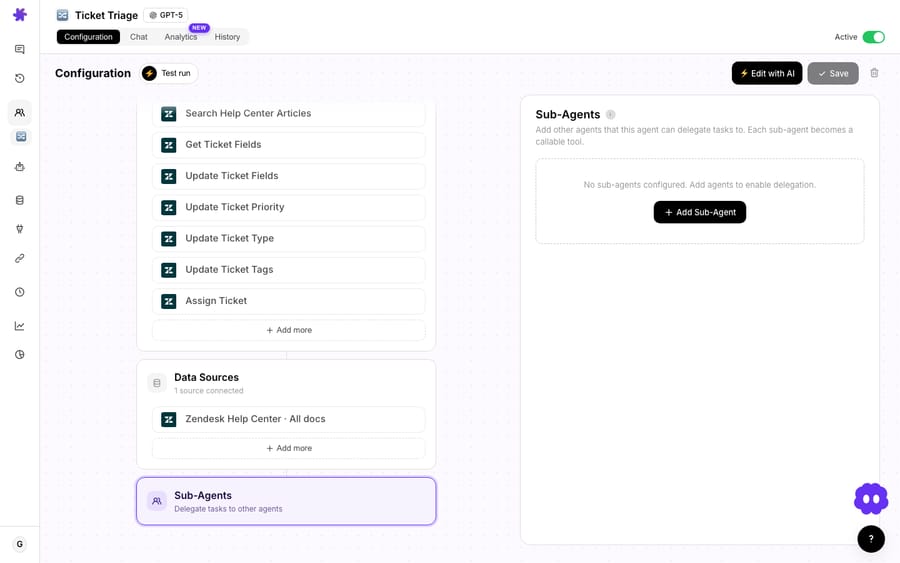
AI Agent Builder & Editor (April 3, hardened April 9). This is the headline. Describe what you need in plain language and Macha generates a fully configured agent — instructions, tools, triggers, sub-agent links, and model selection — and at launch it was available on all plans, including Trial. The builder is context-aware: it knows which integrations you've connected and suggests relevant configurations. Created agents, triggers, and tools show up as clickable artifact cards in the chat, so you can jump straight from the conversation into the thing it built. The same AI editor opens from any existing agent to change it by talking to it.

AI Tool Builder & Custom API Tools (March 30 → April 9). Agents stopped being limited to Macha's built-in connectors. Custom API Tools let you wire any REST endpoint — URL params, body templates, API-key / bearer / basic auth, credentials encrypted at rest. The AI Tool Builder does it conversationally: describe the API, paste credentials, and Macha discovers endpoints, tests them, and creates the tools, auto-marking POST/PUT/PATCH/DELETE as write operations that require confirmation. Tools group under named connectors with their own icons and brand colors.
If you only adopt one thing from the first half of 2026, the Agent Builder is it — it collapses the build step from "learn the form" to "say what you want."
Which tools and help desks did Macha add?
Macha's reach expanded steadily, and the connector list is the clearest signal of where it's heading.
- Freshdesk (March 15) — 15 tools covering the full ticket lifecycle (get/search, replies and notes, priority/status/tags/fields, assignment, contact search, KB articles), plus attachment text extraction from PDF, DOCX, XLSX, CSV, and TXT, and webhook triggers.
- Shopify (March 22) — OAuth connection with 7 tools: search products, look up and search orders, find customers, view discounts, and process refunds (with confirmation). This is the commerce layer that makes an order-status or refund agent real.
- Confluence (April 9) — 7 tools (search, read, list spaces, child pages, create, update, comment), with token-expiry monitoring that emails you 30 days before your Atlassian token lapses. Connecting it auto-creates a knowledge source, the same way Google and Notion do.
- Gorgias and Front (June 23) — two new helpdesk connectors, 15 tools each. Gorgias targets Shopify-native support teams; Front is shared-inbox-first with
@mentionsupport on internal comments. Both connect via API key under Connectors → Support with starter agent templates.
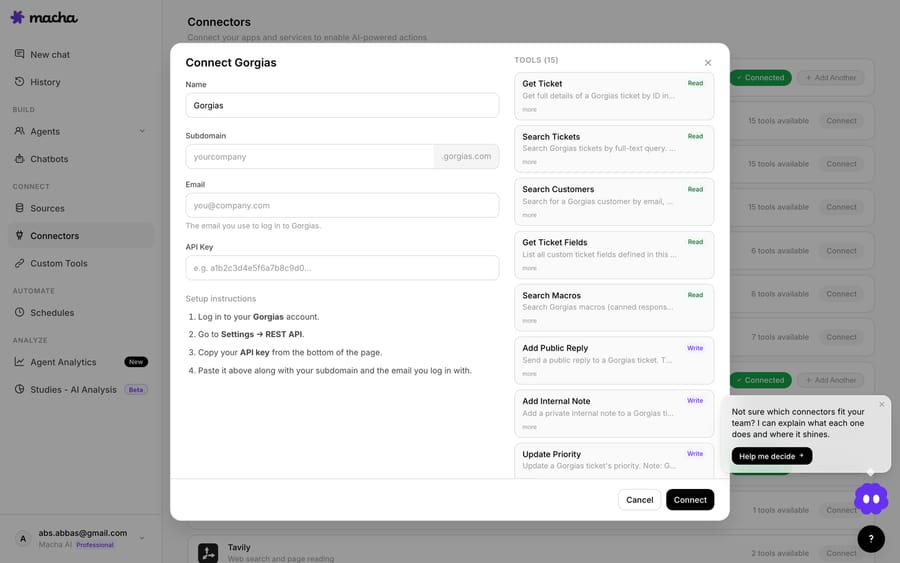
Underpinning all of this, April 9's Zendesk OAuth milestone matters: Zendesk approved Macha's global OAuth client, making OAuth the default for new Zendesk connections (replacing API-key auth) with automatic token refresh. And March 8's multi-instance connectors let you link several accounts of the same type — two Zendesk instances, three Stripe accounts — with automatic tool disambiguation so the agent knows which one to use.
The list kept growing after this recap's window: Intercom became a native help desk connector on September 17, 2026, and HubSpot joined it in September, bringing the help desk count to six. See the full list on the integrations page.
How do Macha agents run on their own?
An agent that only answers when you open a chat is a toy. The trigger system is what makes Macha operate on its own.
Trigger system (March 1). Agents run autonomously in response to external events — Zendesk ticket events, Freshdesk updates, Slack mentions, and custom webhooks — with configurable debounce to batch rapid events before firing.
Scheduled triggers (March 22, detailed April 9). Cron-based execution for agents that need to run on a clock — a daily backlog sweep, an hourly SLA check. Sensible guardrails ship with it: minimum 1-hour intervals, a 24-runs/day cap, org concurrency limits, and auto-disable after 5 consecutive failures with an email. Scheduled triggers are included in Macha's one plan today.

Custom webhooks (March 1 / April 9). A universal webhook URL with a signing secret that works with any system — no connector required. Test Run (April 9) closed the confidence gap: pull a real ticket, email, or document and watch the agent process it live before you turn it loose, with a simulation schema defined across all 14 connectors at the time.
Per-event debounce (June 5). Debounce used to be messaging-only. Now any event-driven trigger — Zendesk/Freshdesk ticket events, Slack mentions or DMs — exposes a debounce chip, with safeguards that force-fire a bucket at 25 accumulated events or a 2-minute cap so a malformed event stream can't hold an agent hostage.
A subtle but important June 5 fix: toggling an agent off no longer deletes its Zendesk Triggers — it deactivates them, preserving the resource IDs so any Zendesk Trigger you built in your own Admin Center keeps working across pause/resume cycles.
Which models do Macha agents run on?
The model story in 2026 is "more capable, then cheaper."
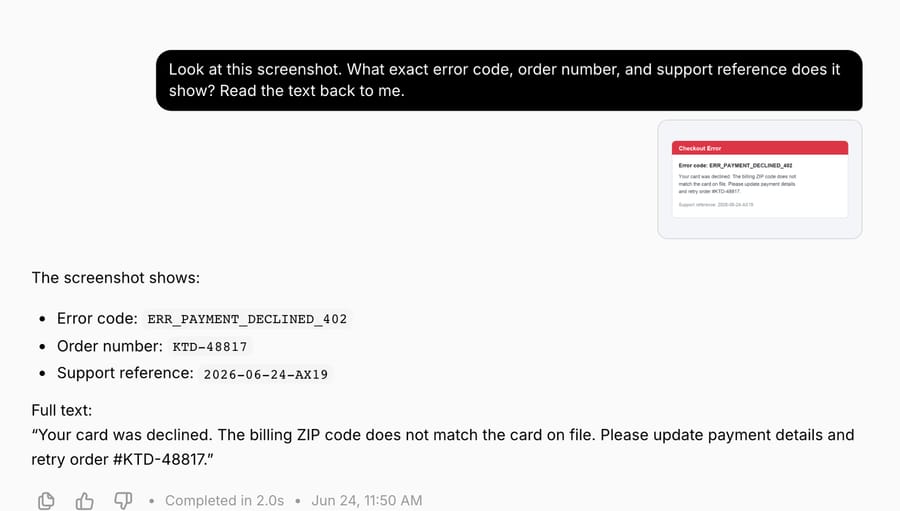
Image vision on tickets (April 17). When an agent hits an image attachment on a Zendesk ticket (JPEG, PNG, GIF, WebP), it downloads, encodes, and sends it to a vision-capable model — so it can read a screenshot, parse a receipt, or identify a product instead of asking the customer to describe it.
The new model lineup (April 23). Macha consolidated onto OpenAI's GPT-5 family: GPT-5.4 (OpenAI's most capable model, with a 1M-token context window per OpenAI), GPT-5 as the new default at the time (also 1M context; new agents now start on GPT-5.4), and GPT-5.4 Mini as the fast, cheap workhorse. Three older models — GPT-5 Mini, GPT-4o Mini, and o4-mini — were retired, with existing agents auto-migrated to GPT-5.4 Mini so nothing broke.
Price cuts (June 17). Two months later, running the premium models got cheaper — GPT-5 and GPT-5.4 both came down, while GPT-5.4 Mini stayed the fast default for most workflows. Billing has since gone simpler still: Macha bills per ticket — one conversation, charged once however many messages, lookups or drafts it takes — and the model an agent runs on no longer changes the price. See pricing for the live numbers.
What is Studies, and what does it cost to run?
Studies (May 30) is the year's standout new surface area — not an agent, but an analysis tool. Point it at a batch of records (Zendesk tickets to start), define typed columns the AI fills in (Yes/No, choice, number, text), and it processes the whole batch in parallel into a structured grid. Critically, it shows you the exact record count and the total cost before any run, charges only for records that successfully process, caps runs at 20,000 records, and can push the finished analysis into a Knowledge Source your agents then search.
The Report view (June 5) turned the grid into insight: stat callouts, bar charts for Yes/No and choice columns with counts and percentages, and histograms for number columns with min / mean / median / max — click any bar to drill into the matching records.
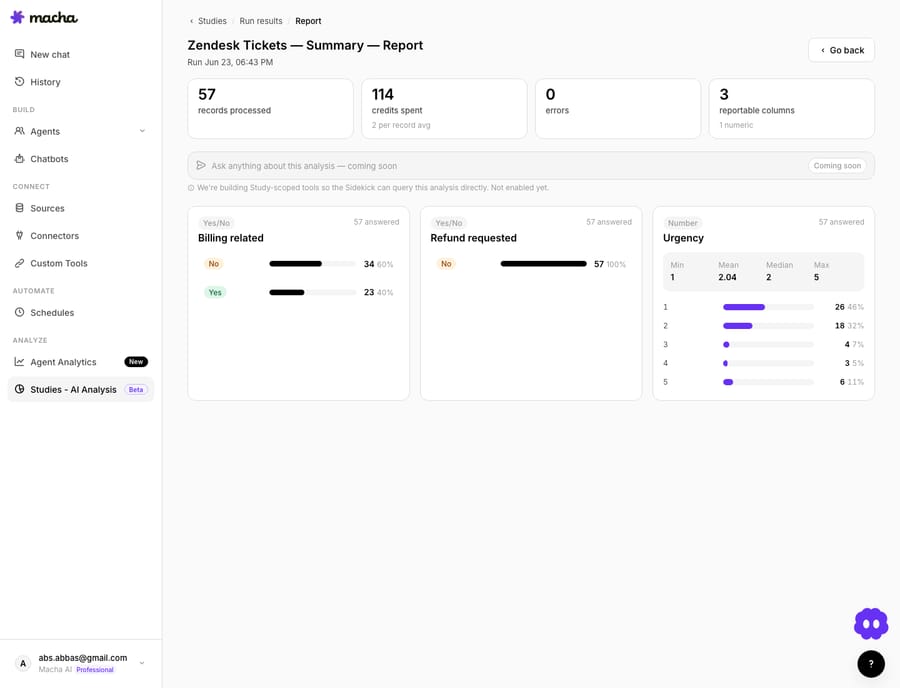
Studies and its Report view are included in Macha's one plan today. We did a full first-party walkthrough — a real 57-ticket run with the numbers — in our Studies deep-dive.
How did Macha pricing change in 2026?
Spending got more flexible and more transparent in 2026.
Top-ups (May 30). One-time top-ups on top of your monthly allowance, for months that run hot — they never expire and are used automatically once the month's included volume is spent, with idempotent webhook handling so a duplicate delivery can't bill you twice.
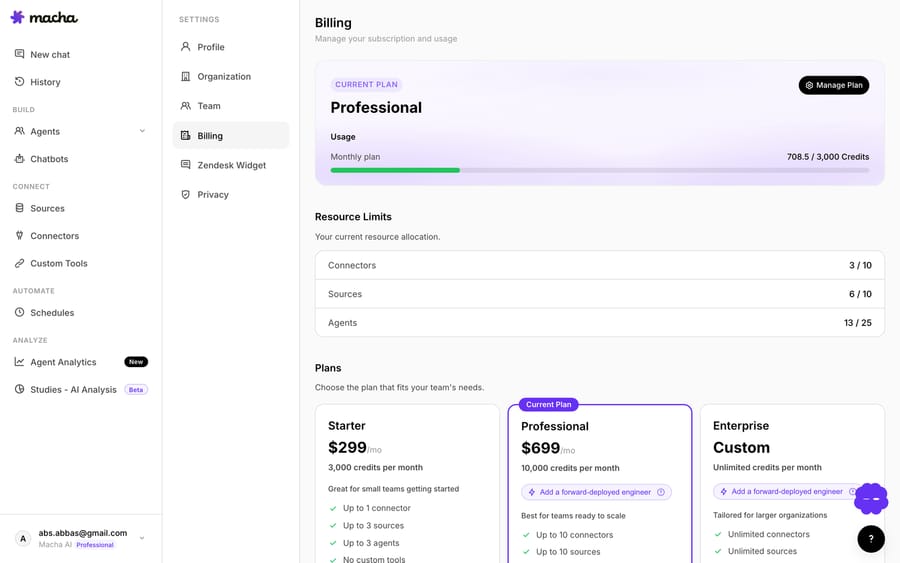
That sits on top of the billing foundation from February 22 (metered usage, alerts at 50/80/90%, in-app Chargebee checkout) and April 23's pricing reset (plans from $299/mo). On September 10, 2026 pricing moved to a single plan with every feature, priced only by ticket volume: $299 a month for 750 tickets, $599 for 1,500, $1,199 for 3,000, up to $3,999 for 10,000, and custom above that. A reliability fix on June 17 also made subscriptions recover automatically after a failed-then-retried card payment, instead of getting stuck in a past-due state.
What smaller fixes changed day-to-day use?
Not every shipment is a headline, but the small stuff is where daily friction lives:
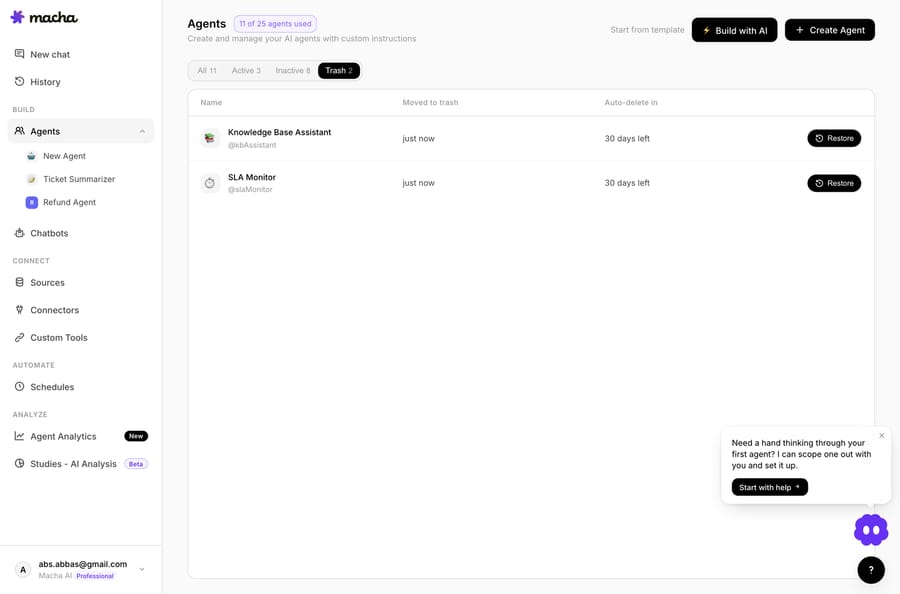
- Soft-delete agents (June 17) — deleting an agent now moves it to a 30-day Trash with one-click restore; triggers are paused (not destroyed) so a restore brings everything back intact.
- Onboarding & welcome chat (March 8 → June 23) — a 3-step guided setup, capped by a free welcome conversation that uses your connected tools to surface real recent tickets/payments and suggests next steps.
- Connector health (April 23) — connectors track a connected/auth-failed status, auto-deactivate affected agents on auth failure and email admins, with one-click test-connection and in-place reconnect flows.
- Agents-list columns (June 10) — model, tools, triggers, and sub-agent counts now scan at a glance from the table.
- GDPR & data controls (April 9) — 30-day scheduled account deletion, JSON data export (with secrets stripped), cookie consent, a 45-day conversation TTL, and AES-256-GCM encryption of credentials in logs.
What does this recap not promise?
A few honest caveats so you read the timeline correctly:
- Every feature is in the one plan. Since September 10, 2026, Studies, the Report view, scheduled triggers and the Agent Builder all come with Macha's single plan; only ticket volume changes the price.
- One genuinely "coming soon" item. The Ask Sidekick bar on the Studies Report (June 5) ships as a deliberately disabled preview — study-scoped Q&A isn't live yet, and Macha keeps it inert rather than risk a misleading answer. That's the only roadmap teaser in this whole recap; everything else above is shipped.
- Connectors are help-desk-and-tools, not everything. The native help desk connectors today are Zendesk, Freshdesk, Gorgias, Front, HubSpot or Intercom. Anything else you need, you reach through Custom API Tools — powerful, but it's a build step, not a one-click connector.
- This is "so far." The detailed recap covers February to June 2026. The next section lists the headline releases since then; the changelog has the rest.
What has Macha shipped since June 2026?
The pace held through the summer. The headline releases after this recap's window, per the changelog:
- July 27: two new OpenAI models, GPT-5.6 Terra (best quality) and GPT-5.6 Luna (faster mid-tier).
- August 24: six one-click OAuth connectors: Gmail, Outlook, Google Calendar, Jira, Asana and HubSpot.
- August 26: Claude Sonnet 5 replaced Claude Sonnet 4.
- September 9: Continuous Agent Evaluation, rubric-driven grading of every autonomous run with per-rule adherence tracking.
- September 10: one plan priced by ticket volume, from $299 a month for 750 tickets.
- September 17: a full Intercom help desk connector with conversation reads and writes, contact lookups and four autonomous triggers.
FAQ
What's the single biggest Macha feature of 2026 so far? The AI Agent Builder (April 3), which lets you create a fully configured agent — instructions, tools, triggers, sub-agents, model — from a plain-language description. It launched on every plan, including Trial.
Which helpdesks does Macha connect to now? Macha has six native help desk connectors: Zendesk, Freshdesk, Gorgias, Front, HubSpot or Intercom. Zendesk and Freshdesk came first, Gorgias and Front were added on June 23, 2026, and Intercom (September 17) and HubSpot followed in September. Macha layers on top of these; it doesn't replace them.
Did pricing change in 2026? Yes, more than once. April 23 reset plan pricing and the model lineup; June 17 cut what the premium models cost to run; September 10 moved everyone to one plan priced by ticket volume. Macha now bills per ticket — one conversation, charged once however many messages it takes — from $299 a month for 750 tickets, about $0.40 each. See the pricing page for current numbers.
What is Studies and when did it ship? Studies (May 30, Report view June 5) runs an AI analysis across a batch of records — define typed columns, get a structured grid plus charts, and pay only for records that process. It's included in Macha's one plan.
Where do I see the official, dated list? The Macha changelog is the source of truth and is updated continuously. This post is a curated recap of it through June 23, 2026.
What does the 2026 timeline add up to?
Read the dates end to end and a strategy shows up. The first quarter was about foundations — connectors, triggers, knowledge sources, billing. The second was about leverage: building agents by talking, delegating to sub-agents, analyzing the whole queue at once, and trimming what the work costs. Macha spent 2026 making it dramatically cheaper — in effort and in money — to put a capable agent in front of real tickets.
If you've been on the fence, this is a good moment to look again. Start a free trial ($50 of usage, no credit card required), connect the helpdesk you already use, and ask the Agent Builder to build your first agent — or read the docs for the full walkthrough.
Sources: OpenAI — Introducing GPT-5.4 · DataCamp — GPT-5.4
Written by Abbas (Customer Support & AI, Macha) · Reviewed by Ankeet Guha (Co-founder & CTO) · Published 2026-06-24 · Last updated 2026-09-24.






