





 Shopify
 Stripe
 Slack
Slack Notion
 Google Workspace
 Confluence

How Do You Choose an AI Model for Each Support Agent? GPT-5.4 Mini vs GPT-5 vs GPT-5.4


Most teams pick an AI model once at setup and never revisit it, even though the model is a per-agent setting you can change in seconds. In Macha the choice affects answer quality and speed, not the bill, because every ticket costs the same whichever model answers it.
Key takeaways
- Match each Macha agent to the smallest model that handles its job: GPT-5.4 Mini for triage and FAQs, GPT-5 for nuanced replies, GPT-5.4 for strict multi-step rules.
- OpenAI lists a 1,050,000-token context window for GPT-5.4 and 400,000 tokens for both GPT-5 and GPT-5.4 Mini, so only GPT-5.4 is the long-context tier.
- Macha bills per ticket, so an agent on GPT-5.4 costs exactly the same as one on GPT-5.4 Mini; model choice changes speed and answer quality, not price.
- A month of 4,000 tickets on any model mix lands in Macha's 5,000-ticket tier at $1,999 a month, about $0.40 a ticket.
- Macha retired GPT-5 Mini, GPT-4o Mini and o4-mini and moved every agent using them to GPT-5.4 Mini, while new agents start on GPT-5.4.

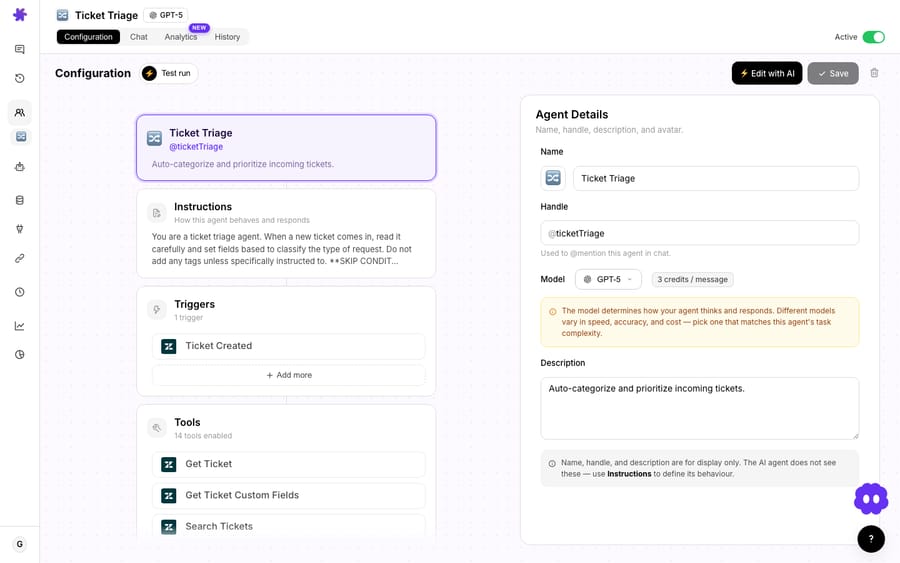
Pick the smallest model that handles an agent's job: GPT-5.4 Mini for triage, routing and FAQ answers, GPT-5 for nuanced replies with several tool calls, and GPT-5.4 (1,050,000-token context window) for strict multi-step rules and long ticket histories. In Macha the model is a per-agent setting, and the bill is the same whichever model you choose, because Macha charges per ticket. So the choice comes down to answer quality and speed, not cost.
Quick reminder on billing. Macha charges per ticket: one thread between Macha and one person, charged once however many messages, tool calls or follow-ups it takes. It is not per resolution and not per action. The model the agent runs on doesn't change it. See the pricing page for current tiers.
Which OpenAI models can a Macha agent run on?
The OpenAI ladder most teams work with has three core tiers: GPT-5.4 Mini, GPT-5, and GPT-5.4. It landed in two moves. First, we added GPT-5.4 as the top-capability OpenAI model and made GPT-5 the general-purpose model, and retired three older minis (GPT-5 Mini, GPT-4o Mini, and o4-mini), automatically migrating every agent that was on them to GPT-5.4 Mini so nothing broke. Then we moved to per-ticket billing, which took the price question off the table. Two newer models, GPT-5.6 Terra (labelled Best in the selector) and GPT-5.6 Luna, now sit above that ladder.
Here's where the three core tiers stand, with context windows from OpenAI's model pages:
| Model | Context window | Best for |
|---|---|---|
| GPT-5.4 Mini | 400K | High-volume triage, routing, classification, summaries, FAQ deflection |
| GPT-5 | 400K | The balanced workhorse: nuanced replies at volume, multi-step tool use |
| GPT-5.4 | 1.05M | Strict instruction-following, complex branching, long ticket histories, your hardest tickets |
The billing point matters more than it looks. Putting an agent on GPT-5.4 costs exactly what putting it on Mini costs: one charge per ticket either way. Same plan, same bill, and more room to put a capable model on the agents that earn it.
Which other providers does Macha offer besides OpenAI?
Macha is multi-provider, so "which model should this agent run on?" is a slightly bigger question than the OpenAI tiers. Alongside the GPT-5 family, Macha offers Anthropic's Claude (Sonnet 5 and Sonnet 4.5) and Groq-hosted open models (GPT OSS 120B and GPT OSS 20B, which replaced Llama 3.3 70B, Llama 3.1 8B and Mixtral 8x7B on 28 August 2026). The Agents table shows a provider icon next to each agent's model, so a mixed fleet is easy to read at a glance. If you've followed the wider 2026 model conversation, you'll recognise the usual shortlist for support: the GPT-5 family, Claude Sonnet, and a fast, cheap option like Gemini Flash or a Groq-hosted model. Independent roundups such as eesel's "which LLM is best for customer support" land on the same split: a strong general model for replies, a long-context model for document-heavy work, and a cheap model for volume.
The OpenAI tiers are the focus here for two practical reasons. First, GPT-5.4 is the platform default for new agents, and GPT-5.4 Mini is where the retired minis were migrated, so most teams already run one or both. Second, the three core OpenAI tiers map cleanly onto a small → balanced → frontier ladder, which makes them the easiest place to learn the per-agent trade-off before you start mixing in Claude for, say, long-document policy work. (Picking between providers, Claude vs GPT for tone and long context, is a deeper topic; here we stay inside the OpenAI ladder, where the capability steps are clearest.)
How should you pick a model for each agent?
The instinct to default everything to the smartest model is understandable and wrong. Independent support-LLM comparisons keep landing on the same architecture: route simple work to small models and reserve frontier models for the hard cases. Anthropic's own ticket-routing guide makes the same call: it recommends Claude Haiku 4.5, "the fastest and most cost-effective model in the Claude 4 family", for routing, and the larger Sonnet only when a classification needs deep expertise or complex reasoning. Cost analyses like CloudZero's LLM pricing comparison show why token-metered platforms care so much: the price spread inside one provider's lineup runs from 10x at Anthropic to 150x at OpenAI. The skill isn't picking the best model; it's picking the smallest model that still passes.
Macha makes that a per-agent decision instead of an account-wide compromise. A practical way to assign the tiers:
Put volume work on GPT-5.4 Mini
For the bulk of a real support queue (order-status lookups, password resets, "how do I…" FAQ answers, tagging and routing, ticket summaries), a fast mini model with a 400K context window is not a downgrade; it's the correct tool. It's also the quickest, which is what matters across thousands of tickets. If an agent's job is triage and deflect, move it here from the GPT-5.4 default.
Promote to GPT-5 when replies get nuanced
When an agent is composing customer-facing replies that need tone, judgment, and several tool calls chained together (pull the order from Shopify, check the refund window, draft the response), GPT-5 is the balanced pick. It's smart enough for the messy middle of your queue and still quick enough to run at volume. Many teams put their primary front-line resolution agent here.
Reserve GPT-5.4 for the hard 10%
GPT-5.4's edge is instruction-following under pressure: agents with strict "do this exactly once" rules, long runbooks, or complex branching logic where a smaller model occasionally colours outside the lines. Think a billing agent that must follow a precise refund-approval policy, or a multi-step escalation flow with conditional handoffs. Because it's the default, it's also the model to consciously move off for agents that don't need it.
Because the selector lives in each agent's config, your account can look like a sensible tiered system: a fleet of Mini-powered triage and FAQ agents feeding a couple of GPT-5 resolvers, with one or two GPT-5.4 specialists on the gnarly stuff. The Agents table shows a Model column so you can scan that distribution across your whole set at a glance, a fast way to catch the agent someone quietly bumped up "just to be safe."

Does a tiered model mix change the bill?
No. The "pick the cheapest model that passes" argument used to be an arithmetic one. On Macha it isn't any more. Take a month of 4,000 conversations: 2,800 triage, 1,000 front-line resolutions, 200 hard tickets. Put every one of them on GPT-5.4 and you pay exactly what you'd pay putting every one of them on Mini: 4,000 tickets, inside the 5,000-ticket tier at $1,999 a month, which works out to about $0.40 a ticket. Billing is per ticket, so the mix makes no difference.
What tiering buys you instead is speed. Running 2,800 triage decisions through a frontier model adds seconds to every one of them, and on a live queue that's the difference between an answer that feels instant and one that doesn't. The industry literature on model routing frames this saving in money because most platforms meter tokens; on a per-ticket plan the same routing pattern is still right, for latency rather than for the invoice.
When does the context window actually matter?
GPT-5.4 carries a 1,050,000-token context window; GPT-5 and GPT-5.4 Mini both carry 400,000 (OpenAI's model pages list 128,000 max output tokens for all three). For support work that difference is real, not a vanity spec. Context budget is what lets an agent hold a long Zendesk comment thread, the relevant knowledge-base articles, and the outputs of several tool calls at once without losing the thread. If your agents work tickets with very long histories, large attached documents, or chunky knowledge sources, GPT-5.4's larger window is a concrete reason to size up, separate from raw reasoning. For short, single-turn deflections you'll never get near 400K, and Mini is plenty.
Can you switch models for a single conversation?
Yes. The per-agent model is the durable setting, but in the dashboard chat you can switch models for a single conversation from the top-right dropdown. It's handy for spot-checking how a heavier model handles a specific thread before you commit an agent to it.
Macha shows a toast when you do this, clarifying that the change applies only to the current conversation and pointing you to Settings if you meant to change the org default. It's a small guardrail against the classic "I changed it in chat and wondered why nothing else updated" trap.
When should you not size up?
A few honest caveats so this doesn't read as "always pick the bigger model":
- Bigger ≠ better answers on easy work. On routing and FAQ deflection, GPT-5.4 will very often produce the same answer as Mini, more slowly. Reaching up there is pure latency, and the comparisons above make the same point. Size up only when you can name the failure a smaller model is making.
- Test before you standardize. Use a per-conversation override (or a Study) to see whether the smaller tier actually fails on your traffic before assuming it will. Often it doesn't.
- Billing is per ticket, not per turn. A chatty agent that takes six tool-calling turns to resolve a ticket costs the same as one that answers in a line. The reason to build the tighter one is the customer waiting on it, not the invoice.
- Retired models migrated automatically. If you were on GPT-5 Mini, GPT-4o Mini, or o4-mini, those agents are already on GPT-5.4 Mini, usually a straight upgrade, but it's worth a glance at any agent that depended on a specific older model's quirks.
- Above 10,000 tickets a month, pricing is custom, so the planning conversation is a different one, but the model decision is the same quality-and-latency call either way.
What's the short version?
The lineup isn't about a single "best" model. It makes the tiered approach that serious support-AI guides recommend easy to run: put GPT-5.4 Mini on the volume, GPT-5 on the resolutions, GPT-5.4 on the hard edges and the long threads, and let the per-agent selector keep each piece of your queue on the smallest model that still does the job. Macha sits on top of Zendesk, Freshdesk, Gorgias, Front, HubSpot or Intercom as an agent layer, so this model choice rides along with whatever helpdesk you already run.
Want to try it? Start a free trial ($50 of usage, roughly 125 tickets, no credit card required), build an agent, and switch its model from the config card, or read the model docs for the full per-agent and per-conversation behaviour.
FAQ
What's the fastest model in Macha, and is it good enough? GPT-5.4 Mini is the quickest OpenAI tier. For triage, routing, classification, summaries, and FAQ deflection it's not a compromise; those tasks sit well within a small model's range. Reserve bigger tiers for nuanced replies and strict multi-step logic.
What's the difference between GPT-5 and GPT-5.4? GPT-5 is the balanced general-purpose model with a 400,000-token context window. GPT-5.4 is the more capable of the two, with stronger instruction-following for agents with strict rules or complex branching, and a 1,050,000-token context window for long threads and documents.
Which model do new agents start on? GPT-5.4. You can change it per agent in the configuration card at any time.
How much does each model cost? The same: one charge per ticket, whichever model answers it, from $299 a month for 750 tickets. See pricing for current allowances.
Can different agents use different models? Yes. Model is a per-agent setting in the agent's configuration card, and the Agents table shows a Model column so you can see the distribution. You can also override the model for a single chat conversation from the top-right dropdown.
What happened to GPT-5 Mini, GPT-4o Mini, and o4-mini? They've been retired. Every agent that was on them was automatically migrated to GPT-5.4 Mini, so no configuration broke.
Written by Abbas (Customer Support & AI, Macha) · Reviewed by Ankeet Guha (Co-founder & CTO) · Published 2026-06-24 · Last updated 2026-09-24.






