





 Shopify
 Stripe
 Slack
Slack Notion
 Google Workspace
 Confluence

Can Macha Sub-Agents Write in Chat? Read-Only in Chat, Write in Autonomous Mode


Before an AI agent touches a help desk, support leaders want to know what it is allowed to do, because reading a ticket is harmless and posting a public reply or issuing a refund is not. Macha answers that by where the agent runs rather than with a single autonomy switch.
Key takeaways
- Macha sub-agents run read-only when a person is chatting with the parent agent, and gain write permissions to post replies and update tickets only when a trigger runs the agent.
- Macha shipped write permissions for sub-agents in autonomous mode in the April 3, 2026 release, alongside AI Agent Builder support for assigning sub-agents with circular dependency checks.
- Zendesk's Copilot auto assist requires agent approval before a suggestion reaches a customer, except for actions an admin pre-approves in a procedure, such as checking an order status.
- Macha classifies any tool call that posts, updates or deletes data, such as POST, PUT, PATCH or DELETE requests, as a write operation distinct from read-only lookups.
- Macha bills autonomous sub-agent runs per ticket from $299 a month for 750 tickets, about $0.40 per ticket, however many reads, writes or delegations a run takes.
In Macha, a sub-agent is read-only when you're talking to its parent agent in chat, and gains write permissions (posting replies, updating tickets) only when the agent runs autonomously from a trigger. The behavior shipped in the April 3, 2026 release as part of a set of sub-agent enhancements, and the Macha changelog still describes it that way today.
| Where the agent runs | Delegated sub-agent can | Parent agent can | Who's watching |
|---|---|---|---|
| Interactive chat (dashboard, Sidekick) | Read, look up, summarize, report back | Write only after you confirm each action | You, live |
| Autonomous mode (webhook, helpdesk event or schedule trigger) | Read and write: replies, status, tags, other tool writes | Read and write | Nobody in the run; you audit afterward |
The rest of this page covers why the line sits there, how it maps onto the standard agent-autonomy ladder, how to set it up, and where you should still keep a human in the loop.
What is a sub-agent in Macha?
Macha is an AI agent layer that sits on top of the helpdesk you already run (Zendesk, Freshdesk, Gorgias, Front, HubSpot or Intercom) and wires it to the tools where the answers and actions live (Shopify, Stripe, Notion, Slack, and the rest). You build agents that read tickets, find answers, and take real actions through those tools.
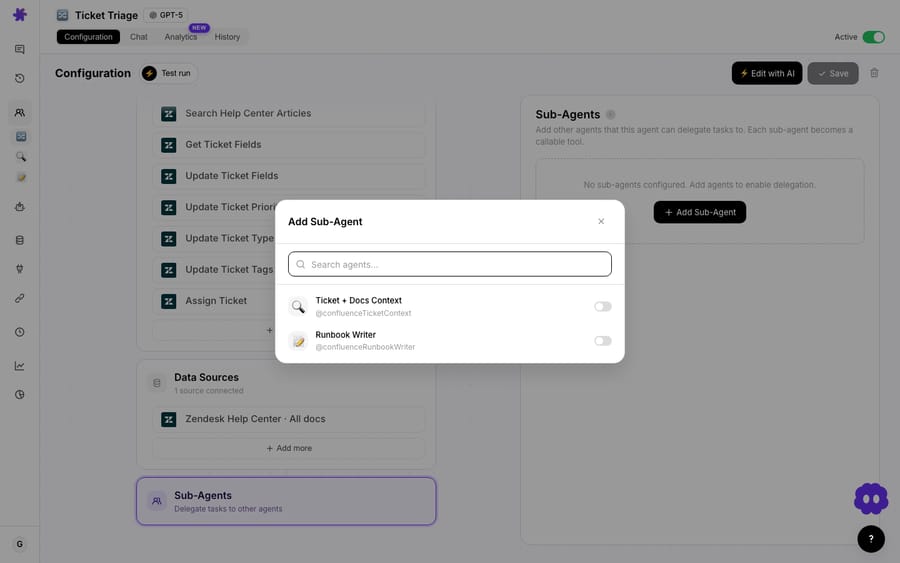
A sub-agent is how one agent hands work to another. Instead of cramming every skill into a single sprawling prompt, you build focused specialists — a billing agent, a shipping/WISMO agent, an escalations agent — and let a parent agent delegate to whichever specialist fits the ticket. It's hierarchical: the parent decides who handles what, the specialist does the narrow job it's good at, and the result comes back up. (Macha runs an automatic circular-dependency check so you can't accidentally wire agent A to call agent B that calls agent A.)
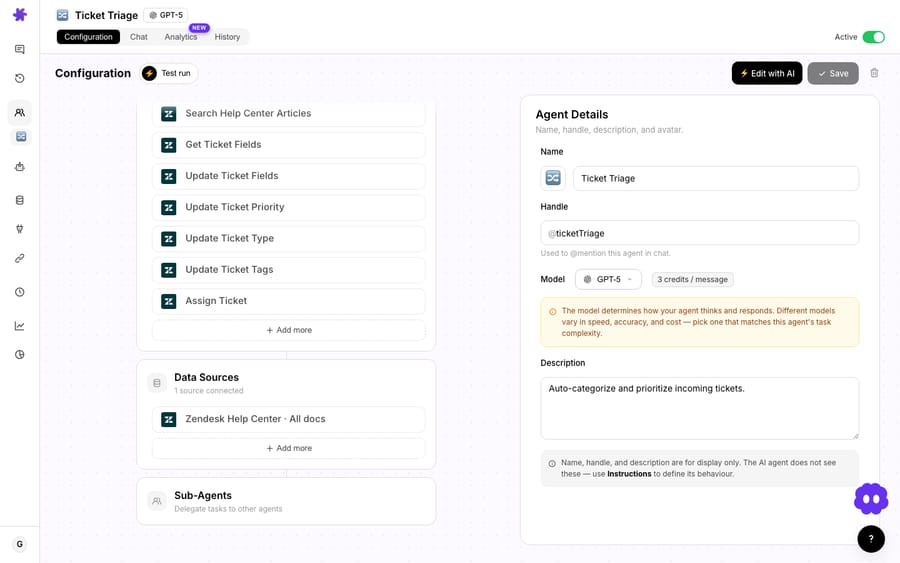
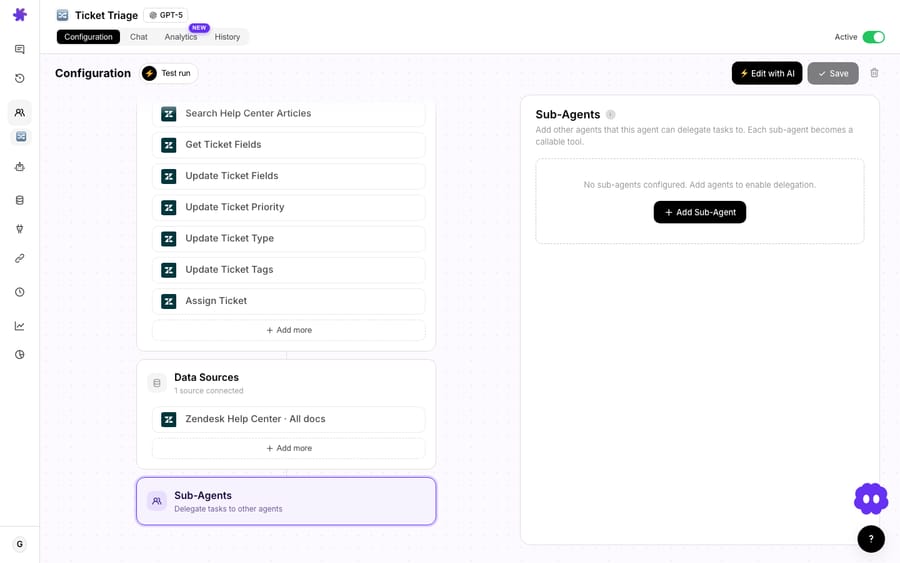
You assign sub-agents from a picker on the parent agent's configuration page. As of the same April release, the AI Agent Builder can also wire these up for you: describe the team you want in plain language and it assigns the right sub-agents (with the same circular-dependency safety check) while it builds.
Delegation is powerful precisely because the specialists can do real things. And the moment an agent can do real things, the permission question stops being academic.
Where does a Macha agent run, and when is a human watching?
The key to Macha's model is recognizing that an agent executes in two completely different contexts, and they carry different levels of risk.
1. Interactive chat. You're in the dashboard talking to an agent — testing it, asking it to investigate a ticket, building out a workflow with the Sidekick. A human is present and watching every step. This is exploration and supervision.
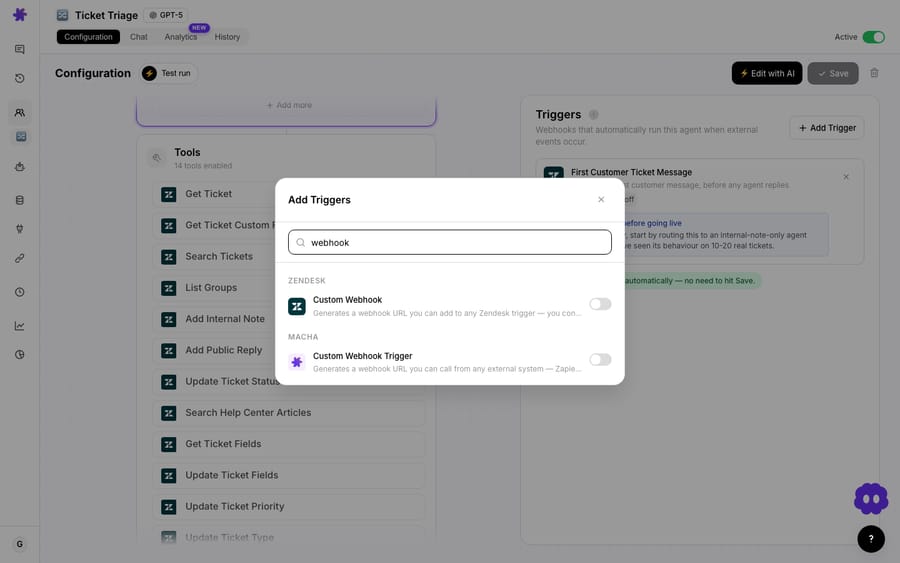
2. Autonomous mode (triggers). A trigger fires the agent automatically with no human in the conversation — a new Zendesk ticket lands, a webhook arrives, or a scheduled run kicks off overnight. This is production. The agent is expected to complete the job, not narrate it to someone who isn't there.
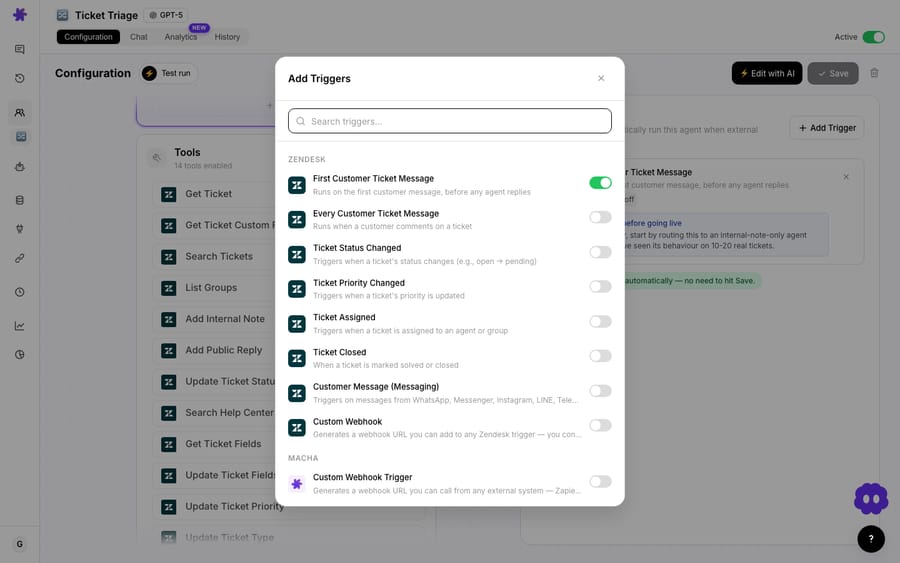
Triggers are what turn a passive, ask-and-answer agent into one that does work on its own schedule. A webhook trigger can run an agent the instant a ticket is created; a scheduled trigger can sweep the queue every morning.
Once you see those two contexts as genuinely different environments, the permission rule almost writes itself.
What exactly can a sub-agent do in chat versus under a trigger?
Here is the exact behavior from the April 3 release:
Write permissions in autonomous mode — Sub-agents can now execute write operations (replies, updates) when running via triggers. They remain read-only during interactive chat for safety.
Read that twice, because the two halves are doing opposite jobs on purpose.
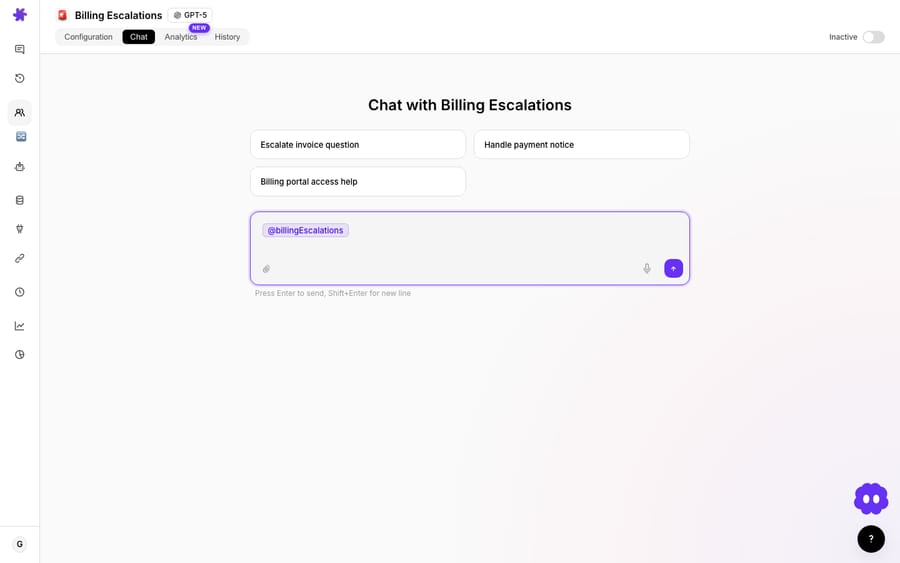
In interactive chat, a delegated sub-agent is read-only. When you're poking at an agent and it delegates to a billing specialist, that specialist can look up the invoice, read the order, summarize the account — but it cannot silently post a public reply to the customer or mutate a ticket out from under you. You're experimenting; the system assumes you don't want a side-effect you didn't explicitly ask for. The parent agent you're directly talking to still asks for confirmation before any write, but the delegated layer is held to read-only so a chain of delegation can't quietly turn into a chain of writes you never saw.
In autonomous mode, that same sub-agent can write. When the work arrives through a trigger, there's no human in the chat to approve each step, and the entire point of the run is to resolve the ticket — reply to the customer, update the status, set a tag. So Macha grants the sub-agent write permissions to execute replies and updates. The agent you configured, with the tools you chose, running the job you set it up to do.
The asymmetry is the feature. Chat is for supervised exploration, so it defaults to the safe, reversible end of the spectrum. Triggers are deliberate production, configured ahead of time by someone who decided this workflow should run on its own — so they carry the authority to finish the job.
Here's the read-only half in action. In an interactive chat session, a billing specialist looks up the account, pulls the invoice and subscription state, and reports back — a pure lookup, with no reply posted and no ticket field touched:
Why draw the line between chat and triggers?
It maps cleanly onto how the rest of the industry thinks about agent autonomy. The widely-cited permission ladder (MindStudio) runs from read-only → suggest → supervised execution → monitored autonomy → full autonomy, and the standard advice is to start any new agent at read-only or suggest until you trust its judgment, then promote it toward action. Macha bakes that progression into where the agent runs rather than making you manage it as a separate dial: chat is your low-autonomy proving ground, triggers are where vetted agents are allowed to act.
Here's the ladder mapped explicitly onto Macha's two execution contexts, so you can see exactly which rung each setup puts your agents on:
| Autonomy rung (industry ladder) | What the agent may do | Where it lives in Macha | Who's watching |
|---|---|---|---|
| Read-only | Look things up, summarize, report back — no side effects | A delegated sub-agent in interactive chat (hard-capped read-only) | A human, live in the chat |
| Suggest | Draft a reply or propose an action for a person to approve | The parent agent in chat — it asks for explicit confirmation before any write | A human, approving each write |
| Supervised execution | Take the action, but only on a human's go-ahead | First controlled trigger runs on test tickets you read afterward | A human, reviewing each run |
| Monitored autonomy | Act unattended; humans audit after the fact | A live trigger in production + analytics and evals (human-on-the-loop) | A human, auditing the log |
| Full autonomy | Act unattended with no routine review | A trigger with no review loop — reserve for reversible, low-risk work only | Effectively no one |
The headline rule — read-only sub-agent in chat, write-capable sub-agent under a trigger — is really just the two ends of this ladder made into a default. The middle rungs are still yours to choose: keep the parent in confirm-before-write mode, pilot triggers on test tickets, and wire analytics before you treat a workflow as truly hands-off.
It also reflects the dominant human-in-the-loop pattern in production support. The consensus across recent practitioner write-ups (Plivo, Trantor) is that increased autonomy must come with explicit, pre-defined boundaries on which actions an agent may take without a person present — not a blanket on/off switch. Zendesk's Copilot is one reference point: its auto assist suggestions "require agent approval before being sent to a customer," though an admin can pre-approve some actions in a procedure (checking an order status, for example) so auto assist runs them automatically and logs them in the ticket's events (Zendesk: About auto assist). Copilot costs $50 per agent per month on Suite Professional and above. Zendesk draws the line per action inside a procedure; Macha's model is graduated by context instead — a person supervises while you build and test in chat, then the agent earns the right to act unattended once you've wired it to a trigger you control.
And critically, write operations aren't a free-for-all even in autonomous mode. Macha marks write-capable tools — anything that posts, updates, or deletes (POST/PUT/PATCH/DELETE under the hood) — as write operations distinct from read-only lookups. That classification is what makes "read-only in chat" enforceable in the first place: the system knows which tool calls have side effects and which don't, so it can allow the harmless ones everywhere and gate the consequential ones behind the autonomous context.
How do you set up sub-agents and triggers, end to end?
Putting the model to work is three deliberate steps:
- Build your specialists. Create the narrow agents you want to delegate to — billing, shipping, escalations — each with only the tools its job needs. Give the billing agent your Stripe/Shopify read tools plus the reply tool; don't give it anything it has no business touching.
- Wire up delegation, then test in chat. Assign those specialists as sub-agents on the parent, and exercise the whole thing in interactive chat. Because delegated sub-agents are read-only here, you can watch the routing logic, read what each specialist would do, and tune prompts and guidance without any customer-facing side effects. This is your safe rehearsal.
- Attach a trigger when you trust it. Only once the delegation behaves do you add a trigger — a webhook on new tickets, or a scheduled sweep. That's the moment the workflow goes live and the sub-agents gain write permissions to actually resolve tickets. The promotion from "read-only rehearsal" to "writes for real" is a single, intentional act: attaching the trigger.
None of that activity is metered step by step. Macha bills per ticket — one thread with one person, charged once, however many steps the agent takes to finish it — from $299 a month for 750 tickets, so an autonomous run that reads ten things, delegates to two sub-agents and posts one reply costs exactly what a one-line answer costs. That keeps the cost of autonomy legible: giving a sub-agent more tools changes what it can do, not what you pay.
Where can this permission model bite you?
No permission system removes the need to think. A few honest caveats:
- "It worked in chat" is not "it works live." The read-only rehearsal is exactly that — a rehearsal. A sub-agent that looked right while read-only will, under a trigger, actually post replies and change tickets. Before you attach a production trigger, run a few controlled trigger executions on test tickets (or a sandbox helpdesk) and read what it really wrote. Don't promote straight from chat to your live queue.
- Tool scope still matters more than mode. The chat/autonomous split governs when writes are allowed, not what writes are possible. If you hand a sub-agent a refund tool, autonomous mode means it can issue refunds unattended. Scope each specialist tightly; the permission model is a backstop, not a substitute for giving agents only the tools they need.
- Autonomous ≠ unsupervised forever. "No human in the chat" is not "no human anywhere." Keep eyes on the work after the fact — Macha's agent analytics and evaluations let you audit what triggered runs actually did, and you should review them, especially in the first weeks. Human-on-the-loop replaces human-in-the-loop; it doesn't replace humans.
- High-stakes actions deserve an escalation path, not full autonomy. For anything destructive, irreversible, or financially sensitive, the safer pattern is to have the agent prepare the action and route it to a person — escalate, draft, or flag — rather than execute it unattended. Reserve full write autonomy for the reversible, high-volume, low-risk work where it pays off.
How does this fit the rest of Macha?
This permission model is one quiet expression of Macha's whole stance: an AI agent layer on top of your existing helpdesk, designed so you can grant capability incrementally instead of all at once. You build and rehearse safely in chat, and you promote agents to real, write-capable autonomy on your own terms by attaching a trigger. If you're running support on Zendesk, the Macha on Zendesk page shows how the agents and triggers slot into that workflow, and the docs walk through sub-agents and triggers in detail.
FAQ
Can a sub-agent post a reply to a customer while I'm chatting with the agent? No. Delegated sub-agents are read-only in interactive chat by design — they can look things up and report back, but write operations like replies and ticket updates are blocked until the agent runs autonomously via a trigger.
What counts as a "write operation"? Anything with a side effect: posting a public or internal reply, updating a ticket's status or fields, setting tags, or any tool that creates/updates/deletes data. Macha classifies these as write operations, separate from read-only lookups.
What is "autonomous mode," exactly? It's when an agent runs from a trigger — a webhook, an event in your helpdesk, or a schedule — rather than from a person typing in chat. There's no human in the conversation, so sub-agents are granted write permissions to complete the job.
Does the parent agent I'm chatting with also stay read-only? The parent asks for explicit confirmation before any write while you're in chat; the stricter read-only rule specifically protects the delegated sub-agent layer so a chain of delegation can't turn into unseen writes.
How much do autonomous write actions cost? Nothing on their own. Macha bills per ticket — one conversation, charged once, however many reads, writes and delegations the run takes — from $299 a month for 750 tickets, about $0.40 each. See the pricing page for the tiers.
Which plans include sub-agents and triggers? All of them. Agent building, sub-agents, triggers and tools are on every plan, with unlimited agents and seats — the tiers differ only in how many tickets a month they include. Check pricing for the specifics.
How can you try it?
The fastest way to understand the model is to feel it: build two agents, wire one as a sub-agent of the other, and watch how differently the system behaves in chat versus under a trigger. Start a free trial ($50 of usage, no credit card required), connect your helpdesk, and rehearse a delegation read-only before you ever let it write.
Written by Abbas (Customer Support & AI, Macha) · Reviewed by Ankeet Guha (Co-founder & CTO) · Published 2026-06-24 · Last updated 2026-09-24.






