





 Shopify
 Stripe
 Slack
Slack Notion
 Google Workspace
 Confluence

Read vs Write Tools: Why Do AI Agent Writes Need Confirmation?


Read tools look things up and change nothing; write tools send replies, change ticket status or issue refunds. Macha lets agents read freely and pauses every write for a human confirmation until you deliberately grant autonomous write access.
Key takeaways
- A read tool like Get Ticket changes nothing, while a write tool like Add Public Reply or create_refund changes something a customer sees, so Macha gates writes behind confirmation.
- Since the March 30, 2026 release, Macha's AI Tool Builder marks custom tools using POST, PUT, PATCH or DELETE as write operations that require confirmation.
- In Macha's interactive chat, an agent shows each proposed write and its arguments, such as a refund amount, and runs it only after you confirm.
- Since the April 17, 2026 release, enabling Add Public Reply or the Every Customer Message trigger in Macha raises an activation confirmation modal and leaves a persistent advisory card.
- Macha's Agent Simulations, added August 12, 2026, replay past Zendesk tickets with write tools stubbed so no reply reaches a real customer during testing.
A read tool looks something up and changes nothing (Get Ticket, Search Tickets, Get Order); a write tool changes something a customer or colleague can see (Add Public Reply, Update Ticket Status, create_refund), so write tools should pause for a human confirmation before they run. In Macha, custom tools built on POST, PUT, PATCH or DELETE are marked as writes automatically (March 30, 2026 release), and in chat every write waits for you to approve the exact action and its arguments.
The instinct is to grade tools by how smart they are. The more useful question is simpler: does this tool read, or does it write? Everything about how you trust an agent follows from that line: when it runs alone, when a human signs off, and what you log.
| Read tools | Write tools | |
|---|---|---|
| What they do | Retrieve data, no side effects | Create, modify, send, delete or move money |
| Macha examples | Get Ticket, Search Tickets, Search Help Center Articles, get_order | Add Public Reply, Update Ticket Status, Update Ticket Subject, create_refund |
| Custom tool default | GET | POST, PUT, PATCH, DELETE (marked "requires confirmation") |
| In interactive chat | Run inline, no prompt | Pause until you confirm the action and arguments |
| In autonomous runs | Run freely | Only if you enabled them, behind an activation warning |
| Cost of a misfire | A few wasted tokens | A wrong reply to a real customer, a closed ticket, or a refund |
Macha is an AI agent layer that sits on top of the help desk you already run (Zendesk, Freshdesk, Gorgias, Front, HubSpot or Intercom) and connects out to commerce and knowledge tools. Because Macha agents take real actions, such as posting public replies, updating tickets and issuing refunds through Stripe or Shopify, it draws the read/write line explicitly and puts a confirmation gate on the write side.
What is the difference between a read tool and a write tool?
Every tool an agent can call falls into one of two buckets:
- Read tools answer a question. They have no side effects: run one a thousand times and nothing in your world changes. Get ticket. Search tickets. Look up the customer. Fetch the order. Search the help center.
- Write tools take an action. They create, modify, send, delete or transact, and the effect is visible to someone outside your dashboard. Add a public reply. Update the ticket status. Change the subject. Issue a refund. Create a Confluence page.
You can see both kinds side by side the moment you assign tools to an agent. Macha's tool picker mixes pure look-ups (Get Ticket, Search Tickets, Search Help Center Articles) with real actions (Add Public Reply, Update Ticket Status) in one list:

Why do write tools need confirmation when read tools don't?
Because of reversibility and blast radius. A read tool that misfires costs you a few tokens. A write tool that misfires sends a wrong answer to a real customer, closes a ticket that should have stayed open, or moves money. The blast radius of a read is zero; the blast radius of a write is your customer's inbox.
This is the consensus pattern across agent frameworks, not a Macha quirk. AWS's guidance on human-in-the-loop confirmation for Bedrock Agents frames it as letting developers "decide which tools can be executed automatically and which ones should first be confirmed." WorkOS's AI agent access-control guide says that for destructive or high-risk actions you should "build in checkpoints where a human must confirm, and in some cases re-authenticate, before the operation proceeds." Cerbos's MCP-permissions guidance goes further: if a user only has read rights, the agent "should only see tools that perform read operations," and "write or admin-level tools should simply not be available." Its recommended stance is default deny: if a policy doesn't explicitly allow an action, the agent shouldn't take it. The shared principle: let agents do cheap, reversible work on their own, and ask before crossing a line that's public, financial or hard to undo.
How does Macha separate read and write tools?
Macha applies the read/write distinction in three places: when a tool is built, when an agent runs interactively, and when an agent runs autonomously. Each has its own default, and all three defaults lean toward asking.
1. Write tools are marked at build time
When you connect a REST API as a custom tool, Macha asks the one question that matters: is this a read or a write? The Create Custom Tool modal has an explicit Type toggle, Read or Write (requires confirmation), right next to the HTTP method:

You don't have to remember to flip it. Since the March 30, 2026 release, Macha's AI Tool Builder auto-detects the type from the HTTP verb: POST, PUT, PATCH and DELETE are marked as write operations that require confirmation, and GET stays a read. The web's own convention about what mutates state becomes your safety default. You can override it, but the system fails closed, toward asking rather than acting.
The built-in connectors carry the same metadata. The Shopify connector's create_refund shipped "with confirmation." The Confluence connector's page-create, page-update and comment tools are write operations requiring confirmation, while search and read-content tools run freely. Macha's native Zendesk tools follow suit: Update Ticket Subject validates the new subject (1 to 150 characters) and requires confirmation in chat mode before it touches the ticket.
2. In interactive chat, writes pause for you
When you chat with an agent in the dashboard's Chat tab, read tools stream their results inline. The agent fetches a ticket, looks up an order, searches your knowledge base and keeps going. The moment it wants to write, it stops and asks. You confirm the write operation before it executes, with the proposed action and its arguments in front of you.
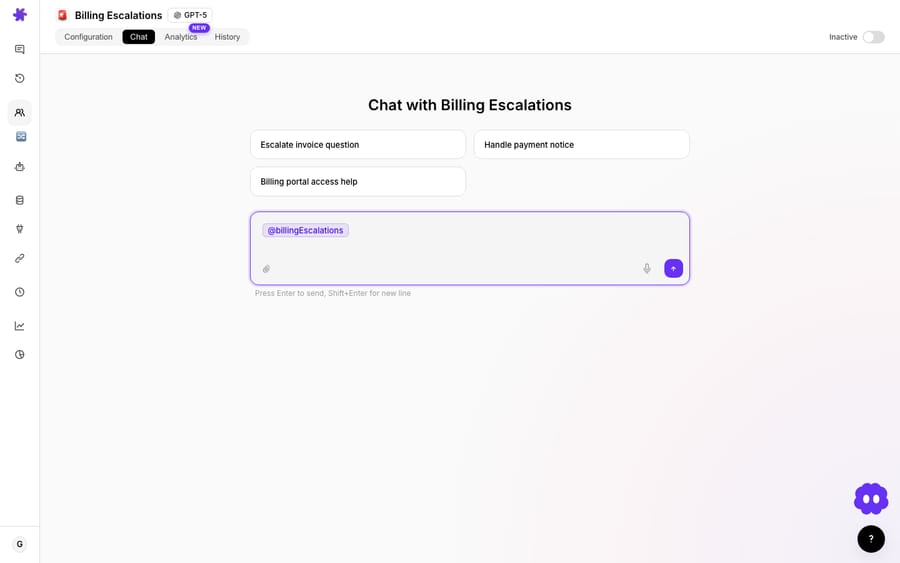
Because the proposed call is shown with its arguments, you approve the specific action (this reply, this refund amount), not a blanket permission.
This is the same tool-level human-in-the-loop pattern that Cloudflare's agent docs and Microsoft's Agent Framework describe: pause right before a risky function runs, let a human approve, reject or adjust, then continue. The agent does the thinking and assembling; you keep your hand on the trigger for anything that leaves the building.
3. In autonomous mode, the rules are stricter
Interactive chat has a human watching. Autonomous runs, where an agent fires on a new-ticket webhook or a scheduled trigger, do not. So Macha sets the defaults accordingly.
Sub-agents stay read-only during interactive chat; since the April 3, 2026 release they can execute write operations (replies, updates) when running via triggers, which you grant deliberately. The capabilities live in two places on the agent's configuration page: the Tools that decide what an agent can do, and the Triggers that decide when it fires. The Ticket Triage agent below has reads and writes enabled side by side:
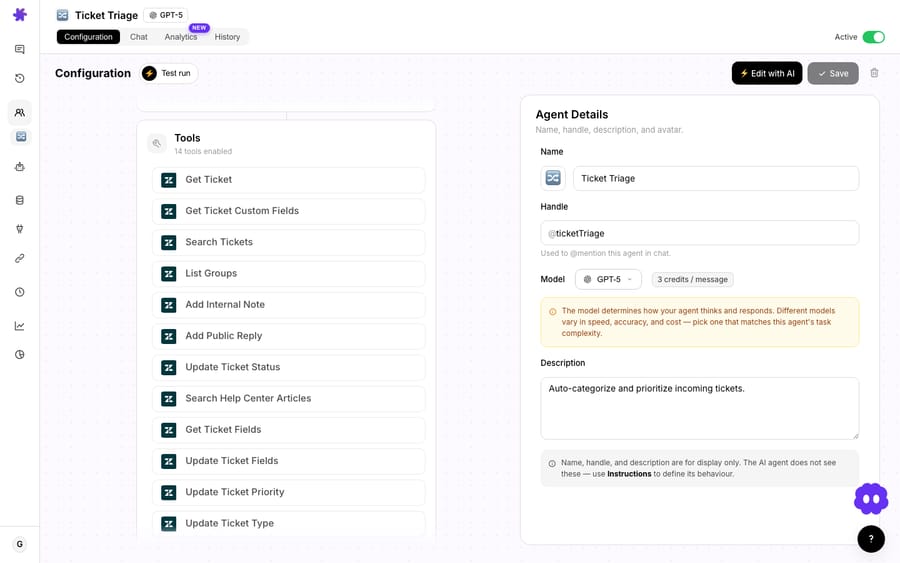
When you do turn on a high-impact capability, Macha makes you look at it. Since the April 17, 2026 release, toggling on a high-impact tool (Add Public Reply, Update Ticket Status) or a broad trigger (Every Customer Message, New Ticket) raises an activation confirmation modal, a severity-themed warning with its own confirm and cancel labels, so you can't enable "reply to every customer automatically" by reflexively clicking a switch. A broad trigger like Every Customer Message sits right next to narrower ones in the triggers picker:
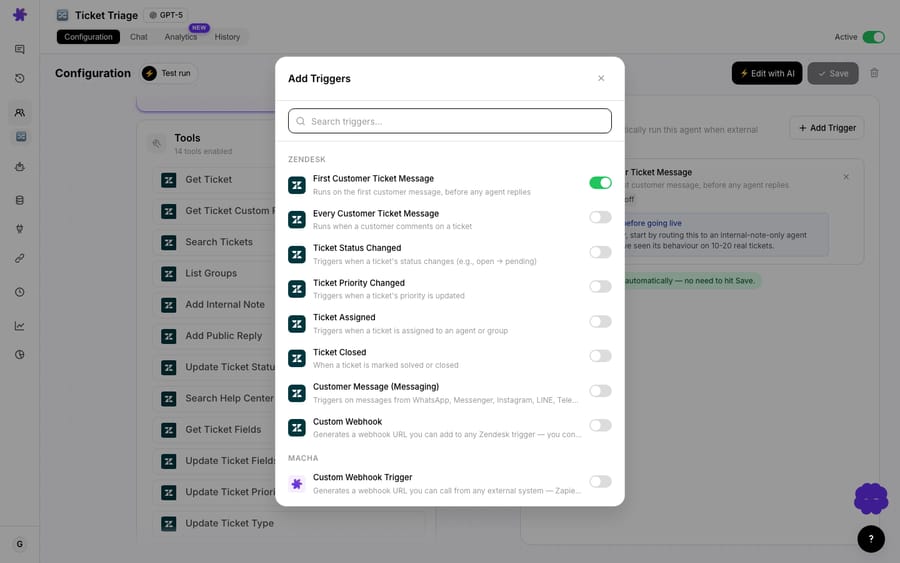
Once a capability is on, Macha keeps reminding you. Enabled tools and triggers display a persistent advisory card on the agent's configuration page: a short, always-visible note on how to use that capability safely. The warning doesn't vanish after setup; it lives next to the thing it's warning about.
Later releases extended the same idea. Since August 24, 2026, connectors with a loop-prone trigger (Gmail "email sent", HubSpot "ticket updated") show an activation gate at setup that names the risk and asks you to confirm the scope. And Agent Simulations (August 12, 2026) replay past Zendesk tickets through an agent with its write tools stubbed, so you can watch what it would write before any reply lands on a real ticket.
What does a confirmed write look like in a real run?
Picture a Shopify-connected agent handling "where's my refund?" tickets on Zendesk. A customer writes in. Here's the shape of a run:
- Read:
get_orderpulls the order by number. No confirmation; it's a look-up. - Read:
get_customer_orderschecks the customer's history for context. Still just reading. - Read: the agent searches your help center for your refund policy. Reading.
- Write:
create_refund. The agent has decided a refund is warranted. Stop. This is money leaving your account. In chat it surfaces a confirmation with the amount and order in view; as an autonomous capability it's something you enabled deliberately, behind an activation warning. - Write:
Add Public Replytells the customer it's done. Confirm, because this reply is going to a real person.
Notice the rhythm: the agent reads as much as it likes, and the only moments anyone has to slow down are the two that change the world. That's the point of the read/write split. It concentrates human attention where the risk is and nowhere else. You're not babysitting a search; you're signing off on a refund.
When do confirmations help, and when do they get in the way?
Confirmation gates are a safety tool, not a free lunch. A few honest caveats:
- Confirmations don't fix a wrong decision; they expose it. If your agent's instructions are bad, the gate just means a human now has to catch a bad refund every time instead of cleaning it up afterward. Use confirmations to learn what your agent wants to do, tighten the instructions, then loosen the gate.
- A gate on everything is a gate on nothing. If every step needs a click, reviewers go numb and rubber-stamp. Reserve confirmations for real writes: public replies, status changes, money, deletes. Let reads run. This is why Macha classifies by HTTP verb instead of gating everything.
- Autonomous write access is a deliberate decision, not a default. Letting an agent reply to every customer message with no human in the loop is sometimes the right call, but it's the setting Macha guards hardest, with an activation warning and a standing advisory. Earn your way there: run interactively first, watch what the agent asks to confirm, then promote it.
- Read tools aren't risk-free; they're side-effect-free. A read can still surface data the agent shouldn't act on, or pull a PII-heavy record into a transcript. The read/write line is about changes to the world, not data sensitivity, so scope your connectors and knowledge sources separately.
For most teams the right starting posture is: connect read-only, run in chat, build trust, and turn on autonomous writes one capability at a time. The Macha on Zendesk setup is designed to be walked exactly this way.
FAQ
What's the difference between a read tool and a write tool? A read tool retrieves information without changing anything (get a ticket, search orders, look up a customer). A write tool creates, modifies, sends, deletes or transacts, with a visible side effect outside the dashboard (post a reply, update a status, issue a refund). Macha gates the write side behind confirmations.
Does Macha confirm every action? No, only writes. Read tools run inline so the agent stays fast. Write tools pause for confirmation in interactive chat, and high-impact writes show an activation warning before you enable them for autonomous runs.
How does Macha know a custom tool is a write? You set a Read / Write type when you build it, and the AI Tool Builder auto-detects it from the HTTP method: POST, PUT, PATCH and DELETE are marked as write operations requiring confirmation, and GET is a read. You can override the default.
Can an agent post replies automatically with no human in the loop? Yes, if you choose to. Sub-agents are read-only in interactive chat and can execute writes in autonomous (trigger-based) runs. Enabling a high-impact tool or a broad trigger raises a severity-themed confirmation modal first, and a standing advisory card stays on the config page.
Can I test an agent's writes without touching real tickets? Yes. Agent Simulations replay past Zendesk tickets through the agent with write tools stubbed, so you see the replies and updates it would make without any of them reaching a customer.
Do confirmations cost anything? No. Macha bills per ticket: one conversation is charged once, however many tools the agent runs and however many confirmations you answer along the way. Plans start at $299 a month for up to 750 tickets; see the pricing page for every tier.
How should a team start with write tools?
Start with reads and earn the writes. The read/write line tells you, for any tool, how much trust the agent needs before it runs. Macha builds that line into every layer: auto-detecting write tools, pausing them in chat, and guarding autonomous write access behind explicit warnings.
To see it in practice, start a free trial ($50 of usage, no credit card required), connect your help desk read-only, and watch where your agent stops to ask. Or read the docs for the full tool and confirmation model, and browse the blog for more on building agents you can trust.
Written by Abbas (Customer Support & AI, Macha) · Reviewed by Ankeet Guha (Co-founder & CTO) · Published 2026-06-24 · Last updated 2026-09-24.






