





 Shopify
 Stripe
 Slack
Slack Notion
 Google Workspace
 Confluence

Why Did We Move SSE Streaming From fetch to XMLHttpRequest?


Most teams streaming Server-Sent Events are moving toward fetch with a ReadableStream, not away from it. In April 2026 we went the other way and replaced streaming fetch in Macha's agent chat with a plain XMLHttpRequest, because small tool-status events weren't reaching the screen on time.
Key takeaways
- Macha swapped fetch with ReadableStream for XMLHttpRequest in its agent chat's Server-Sent Events on April 23, 2026, after tool-call status updates stopped rendering in real time.
- Native EventSource can only issue GET requests and cannot set custom headers, which ruled it out for Macha's authenticated POST chat endpoint.
- The Streams API does not promise one read per server write, so compression, WebKit buffering and proxies can batch small SSE events with the final answer.
- XMLHttpRequest's onprogress handler fires repeatedly against a growing responseText, which delivered Macha's small tool-status events as they were sent.
- The April 9, 2026 release that let users simulate an agent against a real ticket depended on this live SSE streaming of tool calls.
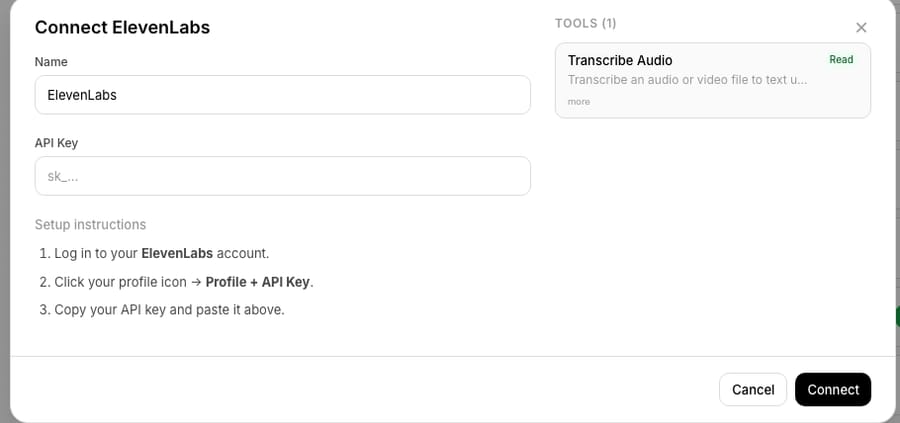
We moved Macha's agent chat from fetch + ReadableStream to XMLHttpRequest on April 23, 2026 because small Server-Sent Events, the "Using Transcribe Audio" tool-status lines, were being buffered between our server and the page and arrived in one batch with the final answer. XHR's onprogress handler fires against a growing responseText, and that delivered each status line when it was sent. We didn't do it for nostalgia. A feature operators rely on, watching an AI agent's tool calls happen in real time, was quietly broken for some of them. The server sent every event correctly; the events just weren't arriving on screen when they should. If you're streaming LLM or tool output to a browser, the same trap is waiting for you.
| Transport | POST + auth header | Small events on time | Our verdict |
|---|---|---|---|
EventSource | No (GET only) | Yes | Ruled out: our endpoint is an authenticated POST |
fetch + ReadableStream | Yes | Buffer-sensitive | Dropped: status events arrived late |
XMLHttpRequest | Yes | Yes, via onprogress | Shipped April 23, 2026 |
What broke in Macha's agent chat?
Macha is an AI agent layer that sits on top of your existing help desk (Zendesk, Freshdesk, Gorgias, Front, HubSpot or Intercom) and runs tools on your behalf: looking up an order in Shopify, pulling a charge from Stripe, transcribing a voicemail attachment, posting a reply to a ticket. When an agent works a conversation, the UI streams a live status log so a human can watch each step: "Using Get Order," "Using Transcribe Audio," "Drafting reply."
That status log is not cosmetic. It's the difference between an operator trusting the agent and an operator staring at a frozen spinner wondering if anything is happening. For a Macha agent running on Zendesk, the status line is the audit trail in motion.
The bug we shipped a fix for on April 23, 2026 was exactly this: tool-call progress wasn't showing during execution. The message would sit on "thinking," and then — pop — the finished answer would appear all at once, with the intermediate steps that were supposed to stream having never rendered. The server was emitting every SSE event on time. The browser just wasn't surfacing them until the response was effectively done.
How does SSE work, and why not use EventSource?
Server-Sent Events is a dead-simple streaming protocol: the server holds an HTTP response open and writes UTF-8 text in a specific shape — data: lines, optional event: and id: lines, separated by blank lines — flushing each chunk as it goes. The client reads the response incrementally and fires a handler per event. No WebSocket upgrade, no bidirectional complexity; it's just a long-lived HTTP response you read as it arrives.
The browser ships a native client for this, EventSource, and it's lovely — automatic reconnection, Last-Event-ID replay, the works. There's just one problem for an app like ours:
The nativeEventSourceAPI can only issue GET requests, cannot set custom headers, and can only pass input through the URL. Its constructor accepts one option,withCredentials.
Our agent chat endpoint is a POST. It carries an auth token in an Authorization header and a JSON body describing the conversation. None of that fits through EventSource. So like nearly everyone building authenticated streaming today, we'd reached for the standard alternative: consume the SSE stream ourselves with fetch.
Why were we using fetch + ReadableStream?
The Fetch API exposes the response body as a ReadableStream. You take a reader, pull chunks, decode the bytes, and split on the SSE delimiter. Roughly:
const res = await fetch("/api/agent/chat", {
  method: "POST",
  headers: { Authorization: `Bearer ${token}`, "Content-Type": "application/json" },
  body: JSON.stringify(payload),
});

const reader = res.body.getReader();
const decoder = new TextDecoder();
let buffer = "";

while (true) {
  const { value, done } = await reader.read();
  if (done) break;
  buffer += decoder.decode(value, { stream: true });
  // split buffer on "\n\n", parse each complete SSE event, dispatch it…
}
This is the textbook pattern, and on paper it's strictly better than EventSource: it does POST, it carries headers, and consuming a streamed response body this way is a shipped, broadly-supported platform feature — the approach web.dev's streams guide walks you through for reading data as it arrives. For most of our users it worked perfectly. The trouble is that "the bytes arrived" and "the bytes arrived promptly, one event at a time" are two different guarantees — and ReadableStream only ever promised you the first.
Why did fetch buffer our SSE events?
reader.read() does not resolve once per flush() on the server. It resolves when a layer somewhere between the server's socket and your JavaScript decides to hand you bytes. And there are several such layers, each with its own buffering rules:
- The compression layer. If the response is
gziporbrotliencoded, the compressor holds bytes until it has enough to compress a block efficiently. Your server can flush a tidy littledata: Using Transcribe Audio\n\nand the compressor will happily sit on it. SendingAccept-Encoding: identityto disable compression is a common diagnostic precisely because compression is such a frequent culprit. - WebKit's read behaviour. Safari/WebKit tends to hold the opening bytes of a streamed response before it surfaces anything to the page. High Performance Browser Networking puts the general rule plainly — "some browsers may release data immediately, while others may buffer small responses and release them in larger chunks" — and WebKit's own write-up on fetching bytes is the canonical reference for how it reads streamed bodies. (The exact byte threshold gets quoted around a kilobyte in the wild, but it isn't a documented constant, so don't hard-code your design around a magic number.) Short, fast SSE events — exactly the "Using X" status pings — can sit under that buffer and never paint until later traffic pushes it over the line.
- Intermediate proxies. Load balancers, CDNs, and reverse proxies between you and the browser can re-buffer a chunked response, coalescing many small writes into fewer, larger reads.
- No per-chunk guarantee, full stop. This is the root of it: the Streams API explicitly does not promise that one server write equals one
read(). A Bun maintainer puts it plainly in discussion #13923 — titled, plainly, "using ReadableStream as Response will not send each chunk one by one but in batches" — "Is never a guarantee that everything will be flush in a individual way (with any runtime)." Implementations are free to coalesce writes.
Put those together and you get our bug. The model's final answer was a big chunk of text, so it always blew past every buffer threshold and rendered. The little tool-status events in front of it were small, frequent, and — on the wrong combination of browser, compression, and network path — got swallowed into a later batch. They effectively arrived bundled with the final answer, which is the same as not streaming at all.
The maddening part is that this is invisible in development. On localhost, with no compression and no proxy, every event flushes instantly and the status log looks flawless. The buffering only bites in production, intermittently, depending on the user's browser and network. It's the kind of bug that earns a "works on my machine" and then three support tickets a week.
Why did XMLHttpRequest fix it?
XMLHttpRequest is the older API everyone loves to leave behind, but it has one property that, for incremental text, is rock solid: as the response streams in, responseText grows, and the onprogress (and onreadystatechange at readyState === 3) handler fires repeatedly with the data received so far. You don't manage a byte reader; you diff the new tail of responseText against what you've already parsed.
const xhr = new XMLHttpRequest();
xhr.open("POST", "/api/agent/chat");
xhr.setRequestHeader("Authorization", `Bearer ${token}`);
xhr.setRequestHeader("Content-Type", "application/json");

let seen = 0;
xhr.onprogress = () => {
  const fresh = xhr.responseText.slice(seen);
  seen = xhr.responseText.length;
  // parse complete SSE events out of `fresh` + leftover, dispatch each…
};
xhr.send(JSON.stringify(payload));
It keeps every advantage we needed fetch for — it does POST, it sets the Authorization header — while delivering the incremental text behaviour reliably across the browsers our customers actually use. In practice XHR's progressive responseText has been treated as the dependable substrate for HTTP streaming for over a decade; modern browsers share a consistent implementation of onprogress against a growing responseText. It is, ironically, the boring choice that just works.
The fix in the changelog reads like one line — "Switched from fetch ReadableStream to XMLHttpRequest for reliable SSE event delivery" — but that's the whole point. The reliability win came from choosing the API with the simpler, better-specified incremental-read behaviour, not the newer one.
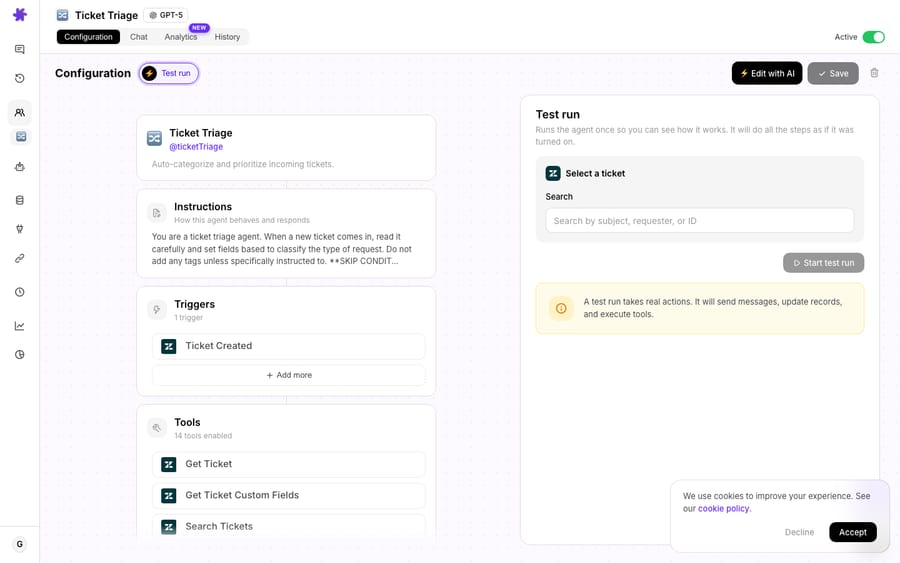
The fix mattered for a feature we'd shipped two weeks earlier. The April 9, 2026 release let you simulate an agent against a real ticket, email or document and watch it work in a test conversation with live SSE streaming, tool calls appearing in the status log step by step. That feature is only as trustworthy as the transport under it, and it was one of the places the lag showed.
Which should you use: EventSource, fetch or XMLHttpRequest?
There's no universally "best" choice here — there's the right tool for your constraints. Here's the honest comparison for streaming SSE-style output to a browser:
| EventSource | fetch + ReadableStream | XMLHttpRequest | |
|---|---|---|---|
| POST / request body | ❌ GET only | ✅ | ✅ |
| Custom headers (auth) | ❌ | ✅ | ✅ |
Auto-reconnect + Last-Event-ID | ✅ built-in | ❌ DIY | ❌ DIY |
| Incremental delivery model | Per-event (native) | Per-read() (may batch) | Growing responseText (per-progress) |
| Real-time small events | ✅ reliable | ⚠️ buffer-sensitive | ✅ reliable |
| Modern / future-facing | Stagnant | ✅ actively invested | Legacy but stable |
If your endpoint can be a plain GET with no auth header, native EventSource is still the least-code, most-robust option — use it. If you need POST and headers (most authenticated apps), you're choosing between fetch and XHR, and the deciding question is how sensitive is your UX to small, frequent events arriving on time. For a chat answer that streams as one growing blob, fetch is fine. For a status log of discrete tool calls, where each event is tiny and the whole value is the timing, XHR's progressive responseText removed an entire class of buffering bugs for us.
When should you not switch to XHR?
We'd be misrepresenting the trade if we sold this as a clean win. Reasons you might not follow us:
- XHR has its own warm-up quirk. Browsers don't reliably fire
onprogresson the very first byte — they wait until a little data has buffered, so the first events on a cold stream can still lag. The XMLHttpRequest onprogress chronicles catalogue these engine-by-engine quirks, and HPBN documents the same buffering variability. A few bytes of padding/comment at the start of the stream (: keep-alive\n\n) is a standard nudge. - You lose
fetch's ergonomics. NoAbortController(XHR usesxhr.abort()), no promise-native flow, no request streaming. If you've standardised onfetcheverywhere, a lone XHR is a wart in the codebase. fetchcan be made to behave —Content-Encoding: none(oridentity), explicitflush()after every write,X-Accel-Buffering: nofor nginx, and avoiding small events under WebKit's threshold will fix most buffering. We chose to switch transports instead of chasing every layer, but tuning the stack is a legitimate alternative.- Consider
@microsoft/fetch-event-source. If you wantfetch's power andEventSource-style event parsing plus reconnection, this library is the popular middle path. It doesn't escape the underlying buffering physics, but it removes the hand-rolled parsing.
The meta-lesson is the durable one: newer is not the same as more reliable. When a primitive's job is "deliver tiny things promptly," pick the API whose incremental-delivery contract is the simplest to reason about — and test it on a real network, behind real compression, in Safari, not just on localhost.
Why does streaming reliability matter for an AI agent platform?
Streaming reliability sounds like a back-office concern until you remember what these agents do. A Macha agent isn't just printing tokens — it's running tools that take real actions: issuing a Stripe refund, updating a Zendesk ticket's status, transcribing a customer's voicemail. Every one of those is real work inside a single billed ticket (one conversation, charged once however many tools the agent fires, from $299 a month for up to 750 tickets), and every one of them is something a human supervisor may want to see happen before it completes. A status log that lags makes the agent feel like a black box; a status log that streams makes it feel like a colleague narrating their work. That trust is the product.
FAQ
Why not just use EventSource? Because Macha's chat endpoint is an authenticated POST. Native EventSource only supports GET requests, can't send custom headers, and passes input only through the URL — so it can't carry our Authorization header or JSON body.
Is fetch + ReadableStream broken? No. It's a great, modern API and it's the right choice for plenty of streaming. Its incremental-delivery behaviour is just sensitive to buffering — compression, WebKit's tendency to hold small streamed responses, and intermediate proxies can batch small events — which broke our specific UX of many tiny tool-status events.
Does XHR work in all the browsers you support? Yes. Modern browsers share a consistent implementation where onprogress fires against a growing responseText. The main caveat is that the first onprogress can lag until a little data has buffered, which a small keep-alive prelude smooths over.
Will you go back to fetch later? Possibly, if we revisit the compression/proxy tuning end-to-end or adopt a fetch-based SSE library. The current call optimises for reliable real-time delivery with the least moving parts.
How do I see this streaming in Macha? Open a test conversation on an agent and watch the status log render each tool call as it runs. More walkthroughs live in the docs and on the blog.
What should you test before trusting a streaming transport?
We moved from fetch to XMLHttpRequest not because the new API is worse, but because, for streaming a flurry of small, time-sensitive events to every browser our customers use, XHR's progressive responseText is the simpler, more dependable contract. The events were always being sent — the job was making sure they showed up on time. If you're building streaming agent UIs, test on a real network behind real compression before you trust your transport, and send a burst of tiny events, not one big one, because a single large payload clears every buffer and hides the bug.
Want to watch agents stream their work on your own queue? Start a free trial ($50 of usage, no credit card required), connect your helpdesk, and run a test conversation — the status log is live.
Written by Abbas (Customer Support & AI, Macha) · Reviewed by Ankeet Guha (Co-founder & CTO) · Published 2026-06-24 · Last updated 2026-06-24.






