





 Shopify
 Stripe
 Slack
Slack Notion
 Google Workspace
 Confluence

How Do You Answer Common Questions in Slack with AI From Your Own Docs?


Every team has a short list of questions that never stop coming, like the enterprise refund policy or where the brand kit lives, and they get asked in Slack even though the answers are written down. An AI agent you @mention in Slack can search those docs and reply in the thread with the answer and a link to its source.
Key takeaways
- A Macha Slack answer agent needs three tools: Notion's Search Pages and Get Page to look things up, plus Slack's Reply in Thread to post the sourced answer.
- McKinsey's 2012 social economy research found knowledge workers spend about 1.8 hours a day, 9.3 hours a week, searching for and gathering information.
- ClearFeed's Slack helpdesk starts at $24 per agent a month or $40 a month usage-based, while Slite's AI answers in Slack need its Pro plan at $20 per user a month.
- Question Base prices its Slack answer agent from $5 per user a month billed annually, with a $1,000 two-month proof of concept.
- A Slack answer that includes a knowledge search, a clarifying question and a reply still counts as one ticket on Macha, about $0.40 on the $299-a-month plan, with setup by the Macha team and a dedicated success manager included.

To answer common questions in Slack with AI, connect Slack and Notion to Macha, write an agent that searches your docs, and fire it on the Slack App Mention trigger so it replies in-thread with a source link. The build uses three tools (Notion's Search Pages and Get Page, and Slack's Reply in Thread) and takes a few minutes if your docs already live in a connected tool. Instead of pinging a teammate, people @mention the bot, and it reads the thread, searches your connected documentation, and answers where the question was asked.
McKinsey's widely cited 2012 social economy research found knowledge workers spend about 1.8 hours a day, 9.3 hours a week, searching for and gathering information. The figure is old, but the pattern it describes is the one every ops lead knows: the answer is written down, and people ask in Slack anyway because asking is faster than hunting. A Slack answer agent claws some of that back because it meets people where they already are.
Below: the real build, what it does well, and the cases where you should not point it at a channel.
What are you building?
The workflow is deliberately small, with three moving parts:
| Piece | What it does | Tool |
|---|---|---|
| Trigger | Fires when someone @mentions the Macha bot (or DMs it) | Slack: App Mention / Direct Message |
| Knowledge | The docs the agent is allowed to read | Notion (live-synced), plus Help Center, Google Docs, websites, uploads; Confluence via its read tools |
| Action | Searches the docs and posts the answer back where it was asked | Notion Search Pages / Get Page → Slack Reply in Thread |
The result, from the team's point of view, is a Slack message and a fast, sourced reply:
@you: @macha what's our refund policy for enterprise customers? @macha: Enterprise refund policy: • Full refund within 30 days of purchase • Pro-rated refund for annual plans after 30 days • Custom enterprise agreements may have different terms, so check the customer's contract Source: Enterprise Refund Policy (Notion)
No one left Slack. No one DM'd the ops lead. The answer carries a citation, so the asker can verify it and the agent stays honest.
Why build it inside Macha instead of a single-purpose wiki bot?
If you only ever want a Slack-to-wiki Q&A bot, there are dedicated tools for it: Question Base, ClearFeed, Perfect Wiki, Slite, Notion's own AI in Slack. They're good at the one thing.
Macha is different in a way that matters once you've lived with a few of these: the Slack answer agent is one configuration inside the same platform that runs the rest of your support automation. The agents that triage your Zendesk or Freshdesk tickets, the agent that looks up Shopify orders, the chatbot on your storefront, and they all live in the same place, share the same knowledge sources, and run on the same per-ticket plan. You're not buying a fourth point tool; you're adding a Slack surface to the AI layer you already run.
And because these are real agents with tools, not a read-only search box, the same pattern extends past pure Q&A: an internal agent can answer and take an action (look up an order, summarize a ticket, pull a Stripe charge) when the question needs more than a doc lookup. (See the Slack integration and the full use-case library for the action-taking variants.)
How does it compare to dedicated Slack wiki bots?
To be fair, the single-purpose tools are good, and if a Slack Q&A bot is all you'll ever need, any of them will serve you. Here's where each one sits. Prices were checked on each vendor's own pricing page on 24 September 2026; check again before quoting.
| Tool | Best for | Knowledge sources | Unanswered → ticket? | Starting price |
|---|---|---|---|---|
| Question Base | Slack-native answer agent; saves good Slack replies back into an FAQ and learns gaps | Notion, Confluence, Google Drive, Zendesk, Intercom, Salesforce | Routes to a human | From $5/user/mo billed annually (from $6,000/yr); $1,000 two-month proof of concept (source) |
| ClearFeed | Support & IT ops running a helpdesk inside Slack | Notion, Confluence, Google Docs, SharePoint, GitHub, Zendesk, Freshdesk, Intercom | Yes: converts low-confidence questions into tracked requests | $24/agent/mo, or $40/mo usage-based for 10 channels / 100 tickets (source) |
| Slite | Teams whose docs already live in Slite | Slite docs; Pro adds search across 12+ tools (Slack, Google Drive, Jira, HubSpot and more) | Limited escalation | $10/user/mo billed yearly; AI answers in Slack need Pro at $20/user/mo (source) |
| Macha | The Slack answer agent plus your help desk ticket agents, storefront chatbot, and action-taking automations in one platform | Notion, Google Docs, Zendesk Help Center, websites, uploads, plus Confluence and help desk article search as tools; shared across every agent | Instruct it to defer to a human, or hand off to a ticket agent | Per ticket, from $299/mo for 750, setup and a dedicated success manager included; see pricing |
The honest trade-off: ClearFeed is purpose-built for Slack-as-helpdesk and Question Base is sharp at curating an FAQ from your threads. Macha doesn't out-bot them on that one surface. Its edge is that the same knowledge and the same plan also power the agents resolving your customer tickets on Zendesk, Freshdesk, Gorgias, Front, HubSpot or Intercom and the chatbot on your store. If Slack Q&A is a standalone need, a point tool is fine. If it's the fourth AI surface you're standing up, doing it inside one platform usually beats running four.
How do you build it, step by step?
The whole thing takes a few minutes if your docs are already in a connected tool. Start a free trial ($50 of free usage, no credit card required) and follow along.
1. Connect Slack and Notion
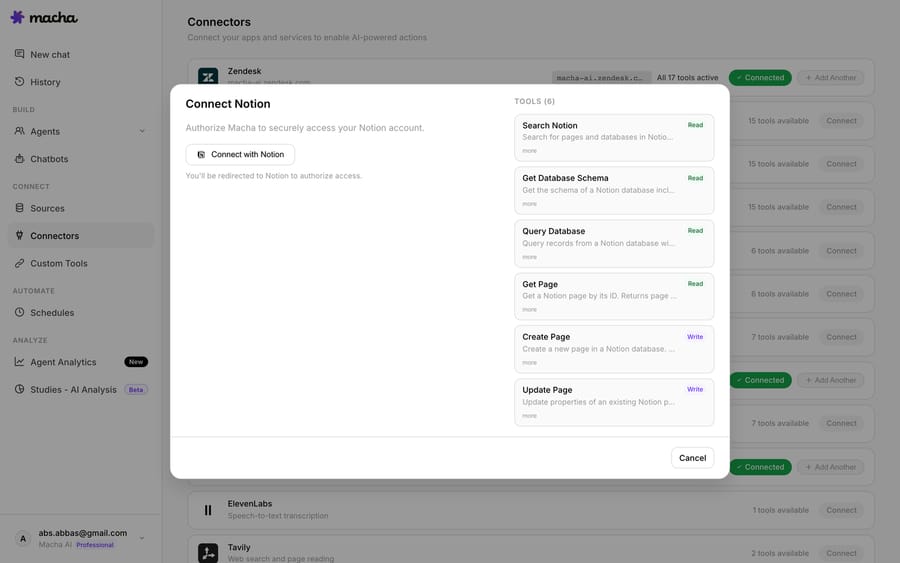
In Connectors, add Slack (OAuth; you'll approve the Macha bot into your workspace) and Notion. The Notion connector exposes the read tools your agent needs: Search Pages, Get Page, Search Databases, Get Database Entry.
2. Make your docs a knowledge source
Connecting Notion gives the agent tools to query it live, but for the common-questions case you usually also want Notion synced as a knowledge source: Macha indexes the pages so retrieval is fast and grounded, and it stays current as your docs change.

You're not limited to Notion. The same agent can read a synced Zendesk Help Center or Google Docs, a crawled website, or files you upload, and it can search Confluence pages through the Confluence connector's Search Pages and Get Page tools. So a single Slack bot can cover product docs and internal policy and the public knowledge base at once. See the Notion integration and data sources docs for the full list.
3. Write the agent
Create an agent and tell it, in plain language, what its job is. Macha agents are configured with natural-language instructions, not flowcharts:
"When someone @mentions me in Slack, read the thread to understand the question, search our Notion wiki and help center for the answer, and reply in-thread. Always include the source. If you can't find a confident answer in the docs, say so and suggest who to ask. Never guess."
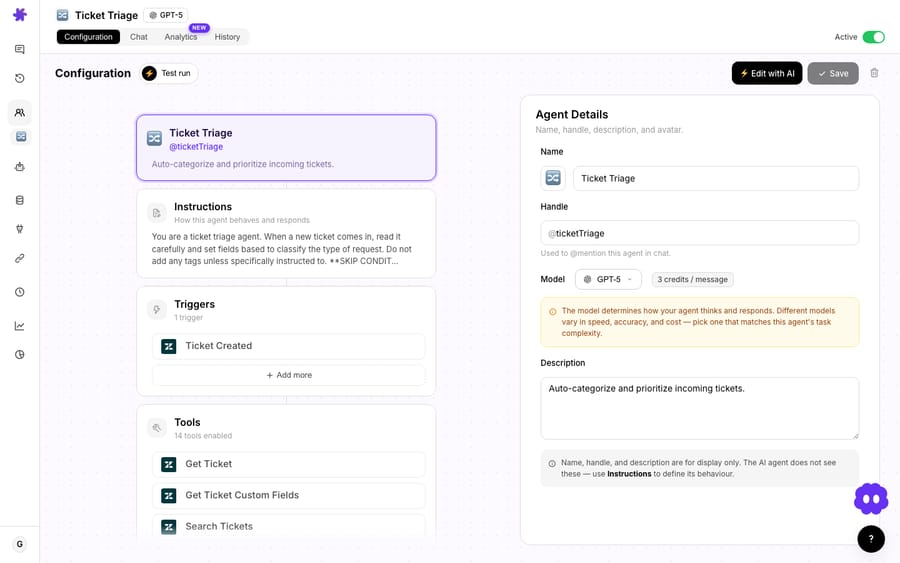
That last sentence is your hallucination guardrail. More on that below.
4. Give it the right tools
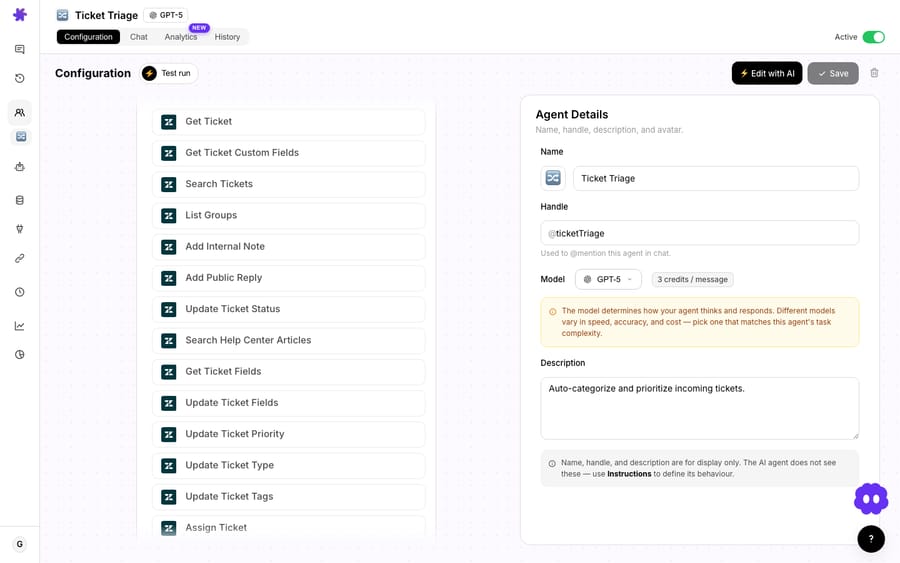
Grant the agent the tools it actually needs and nothing more: Notion's Search Pages and Get Page, and Slack's Reply in Thread. Scoping tools tightly keeps the agent predictable and its answers fast.
5. Set the trigger to App Mention
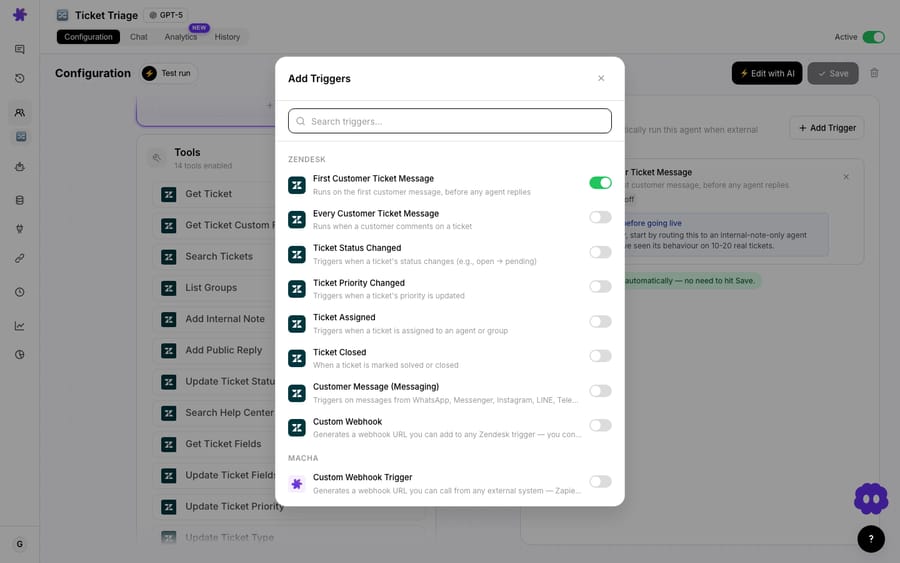
Pick the Slack App Mention trigger so the agent only wakes up when it's actually called. Add Direct Message too if you want people to ask the bot privately. Don't set it to fire on every message in a channel. That's noisy, and people stop trusting a bot that butts into conversations it wasn't invited to.
6. Test before you ship it
Run the agent against sample questions in the test panel and watch how it searches and what it cites. This is where you catch a too-broad instruction or a missing doc before the whole team sees a wrong answer.
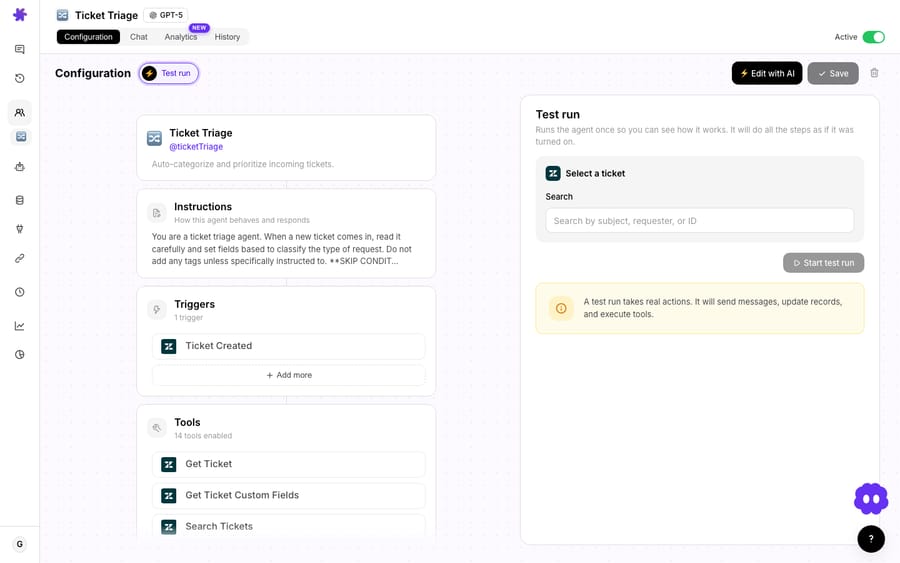
When it reads cleanly, point it at a single low-stakes channel first, such as #ask-ops or #it-help, then widen.
What is a Slack answer agent good at?
- Killing the repeat questions. Policies, process, "where do I find X," onboarding basics: anything that has a documented answer, the agent will field on the first ask.
- Answering where the question lives. No tab-switch to a wiki, no separate search tool. The reply lands in the same thread, so the context is preserved and others see it too.
- Staying current. Because Notion is live-synced, updating the doc updates the answer. There's no separate FAQ to maintain in parallel; the docs are the FAQ.
- Surfacing your knowledge gaps. When the agent regularly can't answer something, that's a signal a doc is missing or stale. Pair this with Macha Studies to analyze where it falls short and fix the source.
- Source links by default. Every answer points back to where it came from, which is what makes people trust it and what stops it from quietly making things up.
When should you not point it at a channel?
This is a sharp tool, but it's not magic, and a few situations call for restraint.
- Garbage in, garbage out. The agent is only as good as your docs. If your Notion wiki is contradictory or three reorgs out of date, the bot will confidently repeat the wrong thing. Clean the source first; an answer agent makes bad documentation more visible, not less harmful.
- Judgment calls and approvals. "Can I expense this?" or "Should we make an exception for this customer?" aren't doc lookups. They need a human with authority. Tell the agent to defer these, don't let it improvise policy.
- Sensitive or access-controlled knowledge. The agent can read whatever you connect. Don't sync HR records, comp data, or security runbooks into a knowledge source that a company-wide Slack bot can reach. Scope the docs to what's safe to broadcast in that channel.
- It's an internal answer agent, not your customer-facing front line. For end-customer questions, use a Macha chatbot on your site or a ticket-resolving agent on your Zendesk or Freshdesk helpdesk. Those have the right tone, escalation paths, and guardrails. This Slack pattern is for your team.
- Don't fire on every message. Keep it on App Mention / DM. An agent that reacts to all channel chatter is annoying and wasteful.
- Confidence over coverage. Instruct it to say "I don't have a confident answer in the docs, try @name" rather than stretch. A bot that admits the gap keeps its credibility; one that bluffs loses the room after the first bad answer.
What does it cost to run?
Macha bills per ticket: one conversation, charged once, however many steps the agent takes to finish it, never per question, deflection, or "resolution." A Slack answer that needs a knowledge search, a clarifying question and a reply costs the same as one that lands first time. Pricing starts at $299 a month for 750 tickets, about $0.40 each, and the model the agent runs on doesn't change that. Pick cheaper models for routine FAQ lookups and stronger ones where the question is gnarly, purely on the quality you need. Setup is done for you on the trial and every plan: the Macha team connects your knowledge sources and builds and tests the Slack agent, and the price includes a dedicated success manager who handles your changes afterwards, such as new sources, instruction changes or new tools.
Because the unit is a whole conversation, cost tracks the volume you handle, not the size of your team or an outcome definition you don't control. Plans and tiers are on the pricing page, and the trial is $50 of free usage, no credit card required, so you can measure your own channel's volume before committing.
FAQ
Does it work in DMs and private channels, or just public ones? Both. The Slack connector supports the App Mention trigger (any channel the bot is in, public or private) and Direct Message (one-to-one with the bot). For private channels, just invite the Macha bot in.
Where does the agent get its answers? From the knowledge sources and tools you connect. Notion is the common one here, but the same agent can read a Zendesk Help Center, Google Docs, a website or uploaded files, and search Confluence through its connector tools. It only knows what you've connected; it doesn't browse the open web unless you give it a search tool.
What happens when it doesn't know the answer? Whatever you tell it to do. The recommended instruction is to admit the gap and point to a human rather than guess. Requiring a source link in every answer is the practical guardrail: if there's no doc to cite, there's no answer to give.
Is this the same as a customer-facing chatbot? No. This pattern is for internal teams in Slack. For customers, use a Macha chatbot on your site or an agent that resolves tickets in your helpdesk: different surface, different tone, different escalation rules.
Can it answer from Confluence or Google Docs, not just Notion? Yes. Notion is the example because it's a clean live-sync source. Google Docs also sync as a live knowledge source, and Confluence is searched live through the connector's Search Pages and Get Page tools. Connect what you have; the agent works across all of it.
How is this different from a dedicated Slack wiki bot? The Slack answer agent is one config inside the same platform that runs your ticket agents, storefront chatbot, and action-taking automations, sharing knowledge sources and one per-ticket plan. It's an additional surface on the AI layer you already operate, not a separate point tool to buy and babysit.
Want to see the rest of the patterns? Browse Macha use cases, the Slack integration, or start a free trial ($50 of usage, no credit card required) on the pricing page.






