





 Shopify
 Stripe
 Slack
Slack Notion
 Google Workspace
 Confluence

How to Route Slack Questions to the Right Channel Automatically


An agent triggered by an @mention can read a misplaced Slack question, tell the poster which channel fits, and cross-post it there with a one-line summary. Slackbot automated messages and Reacji Channeler each cover part of that job, and this is where each one stops.
Key takeaways
- Routing Slack questions automatically works with a Macha agent on the App Mention trigger that replies in-thread naming the right channel and cross-posts the question with a summary and a link back.
- Slack's Reacji Channeler copies a message only when someone reacts with a chosen emoji, only between public channels, and without any summary or reply to the poster.
- Slackbot automated messages fire wherever the keyword appears and can't be limited to specific channels, so they can't redirect a question based on its topic.
- A Macha routing agent needs two Slack actions, Reply in Thread and Send Message, plus List Channels if it should discover public and private channels itself.
- One Slack routing decision counts as one ticket on Macha, about $0.40 on the $299-a-month plan for up to 750 tickets, with setup by the Macha team and a dedicated success manager included.

To route Slack questions to the right channel automatically, set up an agent that wakes on Slack's App Mention event, reads what the person asked, replies in the thread naming the channel that fits, and cross-posts the question there with a one-line summary and a link back. In Macha that is one trigger, a paragraph of plain-English instructions and two Slack actions: Reply in Thread and Send Message.
Slack's own options each cover part of the job. Here is how they compare:
| Option | What triggers it | What it can do | Main limit |
|---|---|---|---|
| Slackbot automated messages | A keyword or phrase | Posts a canned reply | Fires in every channel where the phrase appears; can't be limited to channels |
| Reacji Channeler | A person reacting with a chosen emoji | Copies the message to another channel | Public channels only; a human has to judge the topic and pick the emoji |
| Workflow Builder with AI | A workflow you define | Runs the branches you build | AI workflow building is on Business+ and Enterprise+; you maintain the branches |
| Macha agent | An @mention (App Mention) | Reads the topic, replies in-thread, cross-posts with a summary | Acts only when tagged; it's an AI judgement call |
The usual fix is a Slackbot automated message or a pinned "post billing questions in #billing-support" note. Both fail for the same reason: they assume the person already knows where to post. Slackbot's automated messages also aren't channel-aware. Slack's own guide says they post in channels and in your own DM wherever the keyword appears, and they can't be limited to specific channels, so you can't redirect based on what was asked.
Macha is an AI agent layer that sits on top of the tools you already use. For this use case the only connection you need is Slack itself.
What does a Slack routing agent actually do?
Here's the behavior we're building, in one example. Someone drops this into #general:
@macha I'm having trouble with my Stripe integration, payments aren't going through.
The agent replies in-thread, immediately:
This looks like a billing/payments question. You'll get the fastest help in #billing-support, and I've posted your question there for you. In the meantime, common causes for payment failures: expired card, insufficient funds, or API key misconfiguration.
Behind the scenes it cross-posts the original question into #billing-support with the context from the source message, so the billing team sees it in their channel with a link back. The poster gets pointed in the right direction and the question lands where it'll get answered, in one step, without a human triaging anything.
The mechanic underneath is the same one you can see Macha run in any Slack thread today: someone @mentions the agent, and it replies in-thread after reading the message and reasoning about what's being asked, including the follow-up.
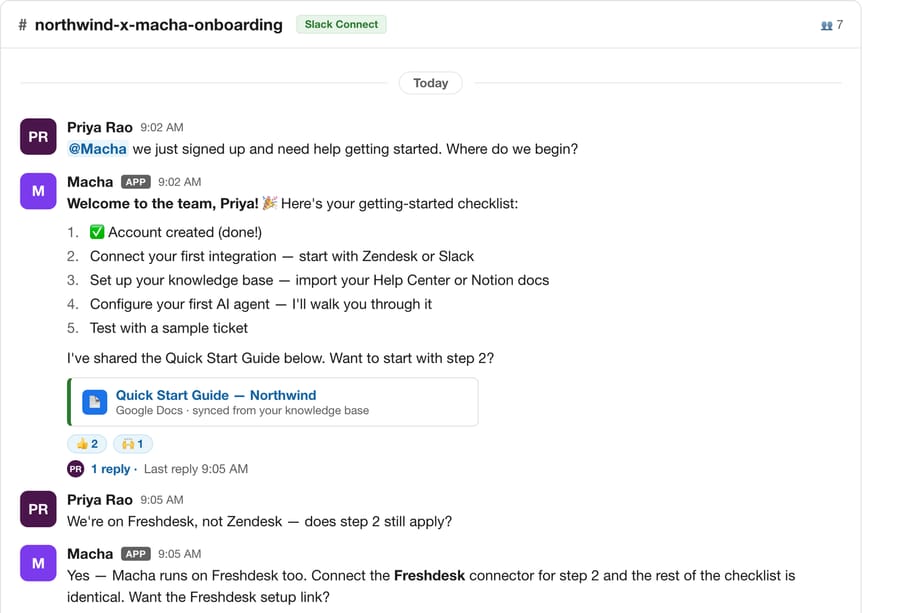
Routing points that same loop at a different outcome: instead of answering in place, the agent decides which channel the message belongs in and re-posts it there with context.
Three things make this better than a static rule:
- It reads meaning, not keywords. "Payments aren't going through" never says "billing," but the agent routes it correctly because it understands the topic.
- It's polite and self-service. It doesn't just bounce the message; it gives the person a head start while they wait.
- It closes the loop. The question is moved, not just commented on, so nothing falls through the gap between channels.
How do you build a Slack routing agent in Macha?
This is a single-trigger, single-agent setup, built from the use case described on the Slack integration page. You can have it running in well under an hour.
1. Connect Slack
Add Slack as a connector. It's a one-click OAuth connection: Macha installs the bot into your workspace so it can be @mentioned, read the threads it's tagged in, and post replies. Once connected, Slack shows up alongside your other tools in the connectors list.

The Slack connector exposes five actions: Send Message, Reply in Thread, List Channels, Get Channel Info and List Users, plus two triggers, App Mention and Direct Message. No knowledge source is required for pure routing, though you'll want one if you also want the agent to answer (more on that below).
2. Set the trigger to App Mention
The agent should wake up only when it's explicitly tagged. In the trigger picker, choose Slack's App Mention event. It fires whenever someone writes @macha in any channel the bot is in.
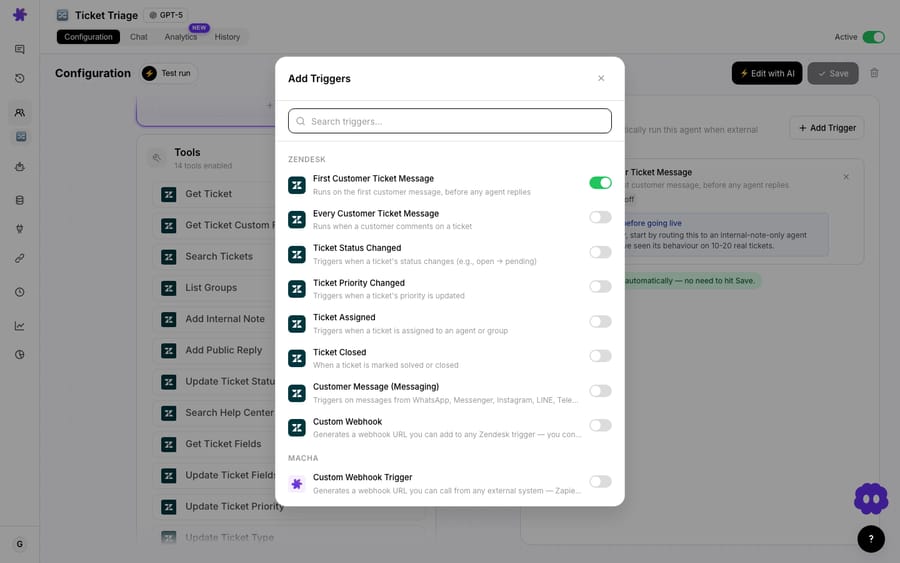
Using @mention as the trigger (rather than reacting to every message) keeps the agent quiet and predictable. People opt in by tagging it, so it never butts into conversations it wasn't invited to.
3. Give the agent its routing instructions
This is where the logic lives, and it's plain English, not a config tree. In the agent's instructions you describe your channels and when each one applies. Something like:
When someone @mentions me, read their message and decide which channel best fits the topic: - Billing, payments, invoices, refunds, Stripe → #billing-support - Bugs, errors, outages, "it's broken" → #engineering-help - How-to and product questions → #product-questions - HR, payroll, time off, benefits → #people-ops Reply in the thread telling the person which channel is best and that you've posted it there. Then cross-post their question to that channel with a one-line summary and a link back. If the question is genuinely ambiguous, ask one clarifying question instead of guessing.
Give the agent the Reply in Thread and Send Message actions, and optionally List Channels so it can discover channels itself instead of you hard-coding every name. That's the entire build: one trigger, a paragraph of instructions, two actions.
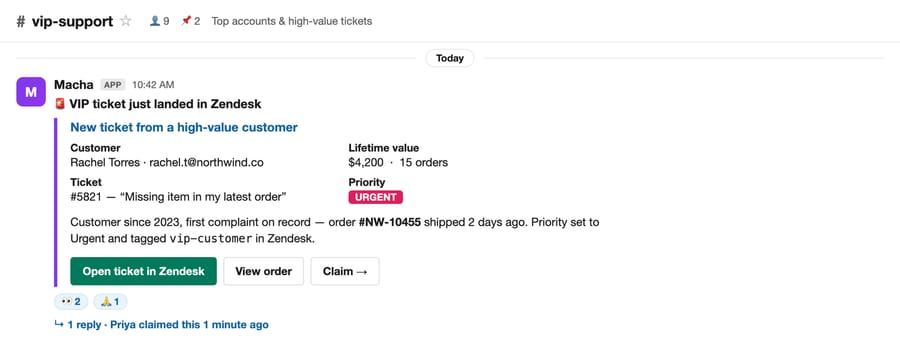
Send Message does the cross-posting. When the agent decides a question belongs in #billing-support, it uses Send Message to drop a structured post into that channel: not a raw copy-paste, but a summarized message the destination team can act on. Here's the same action posting a context-rich card into a target channel in a different Macha agent:
4. (Optional) Let it answer, not just redirect
Routing is the floor, not the ceiling. Macha agents can read connected knowledge, so you can attach a source (your Notion wiki, Confluence space, Google Drive or Zendesk Help Center) and tell the agent to attempt an answer first and redirect only when it can't. That turns the same agent into a first line of internal support: it answers what the knowledge covers and routes the rest to a human channel. This is the pattern behind the related use cases Respond to common questions via Slack and Auto-suggest knowledge base articles in Slack, and it's the in-thread answering you saw in the screenshot above.
What does a routing table look like?
For a typical product company, the instruction above maps to something like this. The exact channels don't matter; you describe intent in words, and the agent handles the fuzzy edges.
| Someone posts… | Agent reads it as… | Routes to |
|---|---|---|
| "Payments aren't going through" | Billing / payments | #billing-support |
| "The dashboard is throwing a 500" | Bug / outage | #engineering-help |
| "How do I export my data?" | Product how-to | #product-questions |
| "When does my PTO reset?" | HR / people | #people-ops |
| "Can someone look at the Q3 deck?" | Ambiguous | Asks one clarifying question |
Why not use Slack's built-in tools instead?
Slack has shipped useful automation. Slack's AI guide lists AI workflow building on the Business+ and Enterprise+ plans, and Slackbot can post automated messages on any plan. But there's a gap between those and topic-aware routing:
- Slackbot automated messages are keyword-matched and global. They can't tell "payments failing" from "page won't load," and the same response fires in every channel where the phrase appears.
- Workflow Builder routing still needs you to define the branches. You're building and maintaining the decision tree, and the AI features sit on the higher plans.
- Reacji Channeler moves messages, but blindly. Slack's Reacji Channeler app copies a message from one public channel to another when someone reacts with a chosen emoji. It copies the raw message with no summary and no reply to the original poster, and it only works between public channels. Someone still has to read the question, judge where it belongs, and remember the right emoji. The agent makes that judgement itself, replies to the poster, and cross-posts with a one-line summary and a link back.
A Macha agent reasons over the message itself, so a new topic doesn't need a new rule, and the same agent can answer, summarize, or pull from a knowledge base in the same pass. The trade-off is that it's an AI making a judgement call, which brings us to the watch-outs.
Macha isn't the only non-native option. Dedicated Slack answer-and-routing tools like ClearFeed, Question Base, and Thena also do topic-aware triage inside Slack. The difference is scope: those are Slack-first point tools, while a Macha agent is the same layer that resolves and routes tickets in your help desk (Zendesk, Freshdesk, Gorgias, Front, HubSpot or Intercom) and acts across commerce and knowledge tools. The Slack router and your support agents share one configuration surface rather than adding another vendor to wire up.
When should you be careful with automatic routing?
This pattern is useful, but there are setups where you should hold back or add guardrails.
- It only acts on @mentions. By design, the agent won't catch a misplaced question unless someone tags it. That keeps it quiet, but it means you should build the habit: pin a "tag @macha if you're not sure where to post" note. If you want it to watch a channel silently, that's a different (and more intrusive) build.
- Cross-posting can surprise people. Moving someone's message into another channel is a helpful default, but in sensitive contexts (HR, security, anything personal) you may want the agent to suggest the channel and let the person re-post themselves. Make that explicit in the instructions.
- Ambiguous questions are where bad routing happens. Tell the agent to ask one clarifying question rather than guess on low confidence; the worked instruction above does exactly this. A wrong route is worse than a "which of these is it?" follow-up.
- Don't route what should be a ticket. If a question is really a customer-facing support issue, the better destination is your help desk, not another Slack channel. Macha can do that too (see Relay urgent tickets to Slack for the inverse flow), but keep internal-routing and customer-support agents distinct.
- Channel sprawl undermines it. If your workspace has 200 overlapping channels, the agent's job is as hard as a human's. Routing works best when your channel list is reasonably clean to begin with.
How much does a Slack routing agent cost?
Macha bills per ticket: one conversation, charged once however many messages, lookups or hand-offs it takes. A routing decision is one short conversation, so it counts as one ticket. Pricing starts at $299 a month for up to 750 tickets, about $0.40 each, whichever model the agent runs on, with higher tiers priced by ticket volume. Setup is done for you on the trial and every plan: the Macha team builds and tests this agent for you, and the price includes a dedicated success manager who handles your changes afterwards, such as new channels, instruction changes or tuning. You can also build and test it yourself on the free trial ($50 of usage, no credit card required); see the pricing page for plan details. Every plan includes unlimited agents and seats.
FAQ
Does the agent read every message in the channel? No. It only acts when someone @mentions it, using Slack's App Mention trigger. It doesn't act on conversations it wasn't tagged in.
Can it route to private channels? Yes, as long as the Macha bot has been added to that private channel. The List Channels action returns the public and private channels the bot can access, and Get Channel Info lets the agent confirm a channel exists before posting. Reacji Channeler, by contrast, only copies between public channels.
Can it answer the question instead of just redirecting? Yes. Attach a knowledge source (Notion, Confluence, Google Drive, Zendesk Help Center) and instruct the agent to try answering first, then redirect only when it can't. See Respond to common questions via Slack.
What if it routes something to the wrong place? Tell it to ask a clarifying question on low confidence rather than guess. You can also refine the channel descriptions in the instructions any time. There's no rule syntax to learn, just plain language.
Do I need Zendesk or another help desk for this? No. This use case only requires the Slack connection. Macha layers on top of a help desk when you have one, but Slack-internal routing stands alone.
Can people DM the agent instead of tagging it in a channel? Yes. The Slack connector also has a Direct Message trigger, so you can give people a private way to ask "where should this go?" and have the agent reply with the right channel.
How do you get started?
If misfiled questions and channel noise are a daily tax on your team, this is one of the fastest agents to stand up. Connect Slack, point an App Mention trigger at a paragraph of routing instructions, and let the agent move questions to where they get answered. Start a free trial ($50 of usage, no credit card required), or read the Slack integration overview and the docs for the full setup.
Written by Abbas (Customer Support & AI, Macha) · Reviewed by Ankeet Guha (Co-founder & CTO) · Published 2026-06-24 · Last updated 2026-09-24.






