





 Shopify
 Stripe
 Slack
Slack Notion
 Google Workspace
 Confluence

Can Macha AI Agents Run on a Schedule? Scheduled Triggers Explained


Most Macha agents are reactive: a ticket, a message or a webhook wakes them up. Scheduled triggers cover the work no event starts, like the 9 a.m. summary, the Monday report and the hourly check for a spike.
Key takeaways
- Macha agents can run on scheduled triggers set hourly, daily or by a custom five-field cron expression, a setup added in the April 9, 2026 release.
- The minimum interval for a Macha scheduled trigger is one hour, and each trigger is capped at 24 runs per day.
- Macha polls for due schedules every 60 seconds and runs at most 3 scheduled jobs at once per organization, so simultaneous jobs queue.
- A Macha scheduled trigger that fails 5 consecutive times is disabled automatically and the account gets an email, rather than retrying indefinitely.
- Scheduled triggers are included on every Macha plan, which starts at $299 a month for up to 750 tickets, with no separate charge for the cadence.

Yes. Macha's scheduled triggers run any agent on a clock, hourly, daily or on a custom five-field cron expression, with a 1-hour minimum interval and a cap of 24 runs a day per trigger. Scheduled triggers first appeared in Macha's March 22, 2026 changelog, and the April 9, 2026 release added the hourly, daily and custom cron setup with its guardrails. A scheduled agent runs on its own, pulls live data from the tools you've connected, takes actions and reports back. No ticket required, and no human kicking it off.
| Question | Answer |
|---|---|
| Schedules available | Hourly, daily, or custom cron |
| Fastest interval | Once an hour |
| Runs per trigger | 24 a day at most |
| Plans | Every plan, no extra charge for the cadence |
| Good for | Daily summaries, weekly reports, hourly spike checks, knowledge syncs |
| Not for | Anything that must react in real time (use an event trigger) |
What is a scheduled trigger?
A trigger is the thing that decides when an agent runs. Macha already had event triggers: help-desk ticket events, Slack mentions and DMs, and universal custom webhooks. A scheduled trigger is a new kind of trigger keyed on the clock instead of an event. You attach it to an agent, give it a recurrence, and from then on Macha fires that agent on schedule.
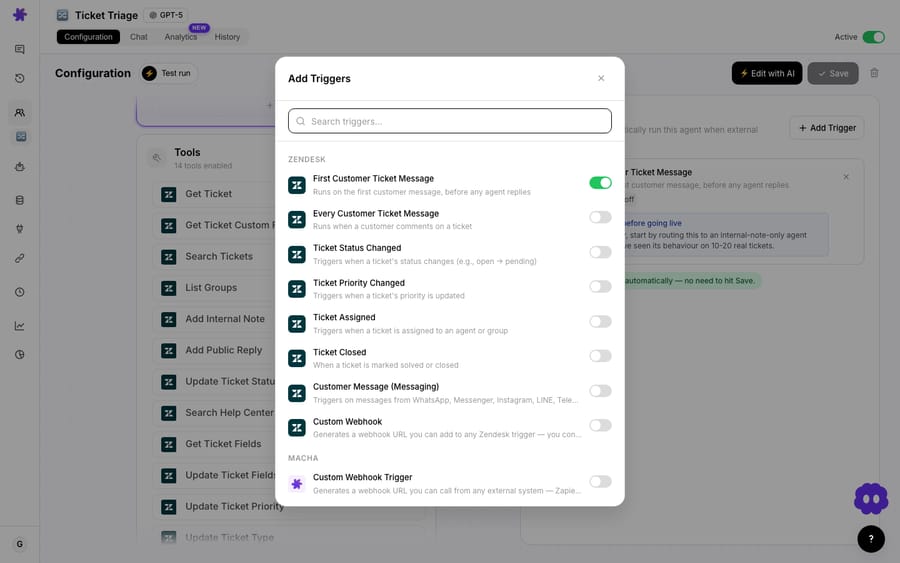
Under the hood it's a standard cron model. You set a scheduled trigger with a five-field cron expression: 0 * * * * for hourly, 0 9 * * * for daily at 9:00, or something more specific. The five fields are minute, hour, day-of-month, month, day-of-week, so 0 9 * * 1 reads as "minute 0, hour 9, every day-of-month, every month, day-of-week 1 (Monday)" — i.e. 9:00 a.m. every Monday. If you've ever scheduled a backup or a report, this is the exact mental model, now pointed at an AI agent.
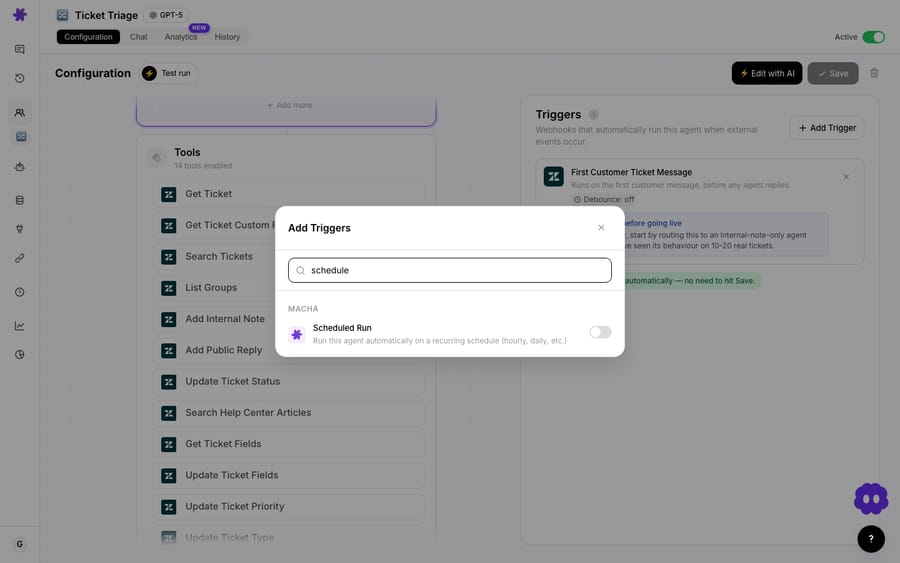
The important part is what the agent does when it fires. A scheduled run is a full agent run: it has its instructions, its model, its connected tools, and its knowledge sources. So "run every morning" isn't just a reminder — it's "every morning, go query Zendesk for yesterday's tickets, compute the numbers, and post them to Slack." The clock is the trigger; the agent is still the worker.
What guardrails stop a scheduled agent from running away?
A clock-driven agent that loops or fails silently is worse than no automation at all — it quietly churns through work nobody asked for or, worse, quietly stops and nobody notices. Macha ships scheduled triggers with guardrails baked in, and they're worth understanding before you build one.
| Guardrail | Value | Why it exists |
|---|---|---|
| Polling loop | 60 seconds | Macha checks for due schedules every minute, so a "9:00" job fires within the minute — you don't need sub-minute precision. |
| Minimum interval | 1 hour | The fastest a scheduled trigger can run is once an hour. Anything that needs to react faster than that should be an event trigger, not a scheduled one. |
| Daily cap | 24 runs/day | A hard ceiling per trigger, so a misconfigured schedule can't fire hundreds of times. |
| Concurrency | 3 per org | At most three scheduled runs execute at once for an organization, so a bunch of 9 a.m. jobs queue instead of stampeding your connected tools. |
| Auto-disable | 5 consecutive failures | If a trigger fails five times in a row, Macha disables it and emails you — a broken job stops burning runs instead of retrying forever. |
| Stale lock cleanup | 30 minutes | If a run hangs, its lock is released after 30 minutes so the schedule can recover on its own. |
Two of these deserve emphasis. The 1-hour minimum is a deliberate design line: scheduled triggers are for periodic work, not real-time work. If you want an agent to respond the instant a VIP ticket lands, that's an event trigger (new-ticket and ticket-updated triggers already do this); scheduled triggers are for the report that runs at 9, not the alert that has to fire at 9:01.
The auto-disable-on-failure behavior is the one that separates a toy scheduler from a production one. A scheduled agent that depends on a Zendesk token that later expires shouldn't keep firing into the void — it should stop and tell you. Five strikes and it's paused, with an email so a dead automation surfaces as a notification instead of a mystery.
What are scheduled agents good at?
The pattern that pays off is always the same: pull live data on a cadence, turn it into something a human reads, deliver it where they already look. Here are the recurring jobs that fit scheduled triggers cleanly, drawn straight from how teams use them.
Daily support summary in Slack
The flagship use. Every morning, an agent queries the previous day's Zendesk tickets — created, solved, average response time, CSAT, top topic — and posts a clean digest to a Slack channel. Leadership and the team start the day aligned on the numbers without anyone building a report.
📊 Daily Support Summary — March 4 • Tickets created: 47 · Tickets solved: 52 • First response time (avg): 12 min · Resolution time (avg): 2.4 hours • CSAT: 94% · Top topic: Order tracking (18 tickets) ✅ Cleared backlog — 5 more solved than created
That's two connected tools (Zendesk to read, Slack to write) and one schedule. See the full build in the daily support metrics summary use case. Because Macha sits on top of your helpdesk, the agent reads the same Zendesk you already run on — it isn't a separate analytics product you have to feed.
Weekly reports — to Slack or as a spreadsheet
Bump the cadence to 0 9 * * 1 and you get the Monday report. A weekly refund report agent lists the last seven days of Stripe payments, totals the refunds, ranks the reasons, and posts the trend to Slack. Or push it further: a weekly support report agent uses the File Tools connector to generate an actual .xlsx with Summary, Tickets, Agent Performance, and Topics sheets and shares the file — the manual Monday-morning spreadsheet, gone.
Hourly trend / spike detection
Set the cron to hourly (0 * * * *) and an agent can watch for problems. A trending-topics agent compares the last couple of hours of ticket volume against the baseline and pings Slack when something spikes — "Login issues" up 300% in the last 2 hours, customers reporting a "502 error" — giving you an early warning before a trickle becomes a flood. This is the practical ceiling of the 1-hour minimum, and it's plenty for catching emerging issues.
Keeping knowledge in sync
Less glamorous, equally valuable: a scheduled agent that re-syncs knowledge sources on a cadence — Zendesk Help Center articles, Notion pages, Google Docs — so your other agents are always answering from current content instead of last month's. Stale knowledge is one of the quietest causes of bad AI answers; a nightly sync trigger is the cheap fix.
When should you not use a scheduled trigger?
Scheduled triggers are a hammer, and not everything is a nail. Be honest about these:
- Anything that needs to be real-time. The 1-hour floor means a scheduled agent is the wrong tool for "reply the moment a ticket arrives" or "alert us within seconds of a failed payment." Those are event triggers — Stripe's
Payment Failedevent, Zendesk'sTicket Createdevent. Don't poll for what you can subscribe to. - High-frequency polling to fake real-time. Setting an hourly job to simulate live behavior burns through the 24-runs-a-day ceiling and still lags by up to an hour. If you're tempted to run something every hour to catch events fast, you want an event trigger instead.
- Jobs with no clear owner of the output. A daily summary nobody reads is just recurring noise. Point the output at a channel or person who acts on it, or don't schedule it.
- Work that legitimately runs longer than a tight window. Scheduled runs are for bounded jobs — pull, compute, deliver. A massive batch analysis belongs in Studies, Macha's bulk-analysis tool, not a recurring trigger.
And the cost reality: a scheduled run is billed like any other agent run — Macha bills per ticket, one conversation charged once however many steps the agent takes inside it, so putting an agent on a clock doesn't add a separate charge for the cadence. Pricing starts at $299 a month for up to 750 tickets, about $0.40 each, with setup and monitoring by the Macha team included. The 24-runs/day cap plus the 1-hour minimum exist precisely so a schedule can't surprise you.
Which plans include scheduled triggers?
Scheduled triggers are on every plan. Macha now sells one plan priced by ticket volume, so no tier locks them away. The caps that matter are the 1-hour floor and the 24 runs a day per trigger, which is the right place to put a ceiling since each clock-driven job runs unattended. Tiers are on the pricing page, and you can build and test the whole flow during a free trial ($50 of usage, no credit card required).
FAQ
What schedules can a Macha agent run on? Any five-field cron expression that fires at most hourly: 0 * * * * for hourly, 0 9 * * * for daily, or something specific such as 0 9 * * 1, which runs at 9:00 a.m. every Monday. The minimum interval is once per hour.
How fast does a scheduled trigger fire? Macha polls for due schedules every 60 seconds, so a job set for 9:00 runs within that minute. For anything that must react faster than hourly, use an event trigger instead.
What happens if a scheduled agent keeps failing? After five consecutive failures, Macha auto-disables the trigger and emails you, so a broken job stops running instead of retrying silently. Re-enable it once you've fixed the cause.
Do scheduled runs cost extra? No — a scheduled run is a normal agent run, billed the way every other run is: per ticket, one conversation charged once however many steps it takes. The cadence itself isn't a separate line item. A daily job runs about 30 times a month, and there's a hard 24-runs/day cap per trigger.
Which plans include scheduled triggers? All of them — every feature is on every tier, and the plans differ only in how many tickets a month they include. See the pricing page for current details.
Is this a replacement for my helpdesk's automations? No. Macha's scheduled agents run on top of the helpdesk you already use (Zendesk, Freshdesk, Gorgias, Front, HubSpot or Intercom; see Macha on Zendesk) — they read from and write back into it (and Slack, Stripe, Notion, Google), rather than replacing your native triggers and SLAs.
How do you put an agent on the clock?
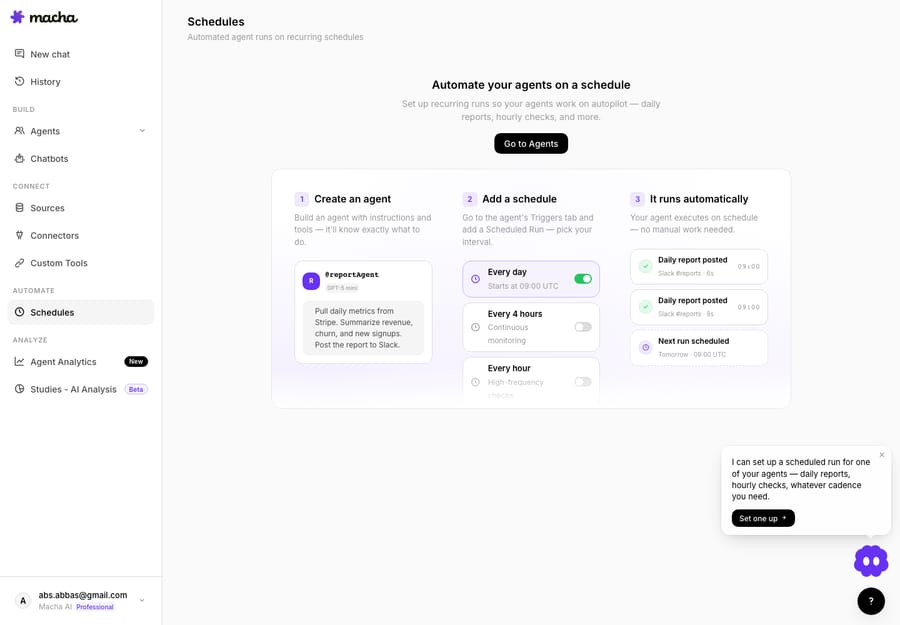
If there's a report you build by hand every Monday, a number you copy into Slack every morning, or a knowledge sync you keep forgetting, that's a scheduled trigger waiting to happen. Start a free trial ($50 of usage, no credit card required), connect your helpdesk, build the agent once, and give it a cadence — then read the triggers docs for the full setup. The work still gets done; you just stop being the one who remembers to do it.
Written by Abbas (Customer Support & AI, Macha) · Reviewed by Ankeet Guha (Co-founder & CTO) · Published 2026-06-24 · Last updated 2026-09-24.






