





 Shopify
 Stripe
 Slack
Slack Notion
 Google Workspace
 Confluence

How Can Support Agents Search Internal Docs Without Leaving the Ticket?


Support agents lose minutes on every tricky ticket hunting through Google Drive, a Notion wiki and old Slack threads for an answer someone already wrote down. McKinsey's 2012 study put searching and gathering information at 1.8 hours of the average knowledge worker's day.
Key takeaways
- Macha lets a support agent ask one question in the Copilot widget and get cited excerpts from Notion and synced Google Docs without leaving the ticket.
- Google Workspace in Macha has no Drive-wide search tool: Google Docs you pick in Google Picker are searched through the synced knowledge source, while Notion also offers live Search Pages.
- An NBER field study of 5,179 support agents found a generative-AI assistant raised issues resolved per hour by 14% on average and 34% for novice agents.
- A Macha Copilot session is billed as one ticket, about $0.40, however many document searches and drafts it takes.

Internal knowledge base search for support agents works when an agent can ask one plain-English question from inside the ticket and get cited excerpts back in seconds. With Macha, the agent asks in the Copilot widget, Macha searches your Notion workspace live and the Google Docs you have synced as a knowledge source, and drops the key passages into the conversation, all for one ticket charge of about $0.40 per session. You already wrote the docs; the fix is findability, not more documentation.
| Doc store | Synced knowledge source | Live tools | Best for |
|---|---|---|---|
| Google Docs | Yes: docs you pick in Google Picker stay in sync | Read Google Doc, Read Google Sheet (picked files only, no Drive-wide search) | Stable reference: SLAs, policies, runbooks |
| Notion | Yes: pages stay in sync | Search Pages, Get Page, Search Databases, Get Database Entry | Fast-moving wikis and long-tail pages |
A framing note, because it matters: Macha is not a wiki and not a help desk. It's the AI agent layer that sits on top of the help desk you already use, Zendesk, Freshdesk, Gorgias, Front, HubSpot or Intercom, and connects your knowledge and commerce tools to it. So this isn't "move your docs into another tool." It's "let an agent search the docs you already have, from inside the tool they already live in."
What does an internal doc search look like inside a ticket?
Here's the canonical flow. An agent is working a ticket about response-time commitments and needs the real numbers. Instead of going to find them, they ask Macha:
Agent: "Can you find our SLA terms for enterprise customers? I need to respond to a ticket about response times."
Macha searches the synced Google Docs knowledge and the Notion workspace, reads the most relevant hits, and replies inline:
Macha: Here's what I found: Enterprise SLA (from Google Docs, "Enterprise SLA Agreement v3"): • Critical issues: 1-hour response, 4-hour resolution • High priority: 4-hour response, 24-hour resolution • Normal: 24-hour response, 72-hour resolution Support Tiers (from Notion, "Enterprise Support Tiers"): • Enterprise customers get a dedicated Slack channel • Priority routing: tickets skip the general queue Want me to draft a reply using these details?
The agent reads two excerpts, confirms they're right, and is back to writing, with a citation to the source doc so they can verify, not just trust. That last line matters too: because Macha is an action-taking agent, the natural next step ("draft the reply") is one message away. The agent stays in control, and nothing is sent without their say-so.

The screenshot above shows Sidekick, the in-dashboard assistant where you set up the lookup agent; your support team then asks its questions from the Copilot widget or Chrome extension beside the ticket.
Why does search beat a static knowledge base?
A traditional internal knowledge base assumes the agent knows where the answer lives and what it's called. Real life isn't like that. The doc is titled "Enterprise SLA Agreement v3" but the agent searched "response time guarantee." The Notion page says "client onboarding" but the agent typed "customer setup." Keyword search misses all of it.
Macha's lookup over synced knowledge is semantic: it matches on meaning, not the exact string, so the agent can ask the way they'd ask a senior teammate. The distinction is well established: Elastic and Redis both describe keyword (lexical) search as literal token matching, ranking documents with methods like TF-IDF or BM25, while semantic search compares vector embeddings, numerical representations of meaning, so a query for "response time guarantee" can surface a doc titled "Enterprise SLA Agreement." Because Macha reads the documents and returns excerpts rather than a list of links, the agent gets the answer, not another results page to triage.
The payoff has been measured. In a field study of 5,179 customer-support agents, NBER researchers Brynjolfsson, Li and Raymond found that a generative-AI assistant raised issues resolved per hour by 14% on average, and by 34% for novice and low-skilled agents. Agent-assist vendor Bright Pattern reports 15 to 30% reductions in average handle time, which it attributes mostly to cutting the context-switching this use case targets. Surfacing the right internal answer at the moment an agent needs it is where that time comes from.
What are the two ways Macha can reach your docs?
This is the part most write-ups skip, and it determines accuracy and cost. Macha can connect the same Google Docs and Notion content in two ways, and good setups often use both.
1. As a synced Knowledge Source (the RAG path)
You connect Google Workspace or Notion as a live Knowledge Source. For Google, you choose the specific docs in Google Picker when you connect; for Notion, the pages you share. Macha indexes that content and keeps it in sync as the docs change, so when an agent asks a question, retrieval is fast, semantic, and grounded in what the doc says today, not a snapshot from last quarter.
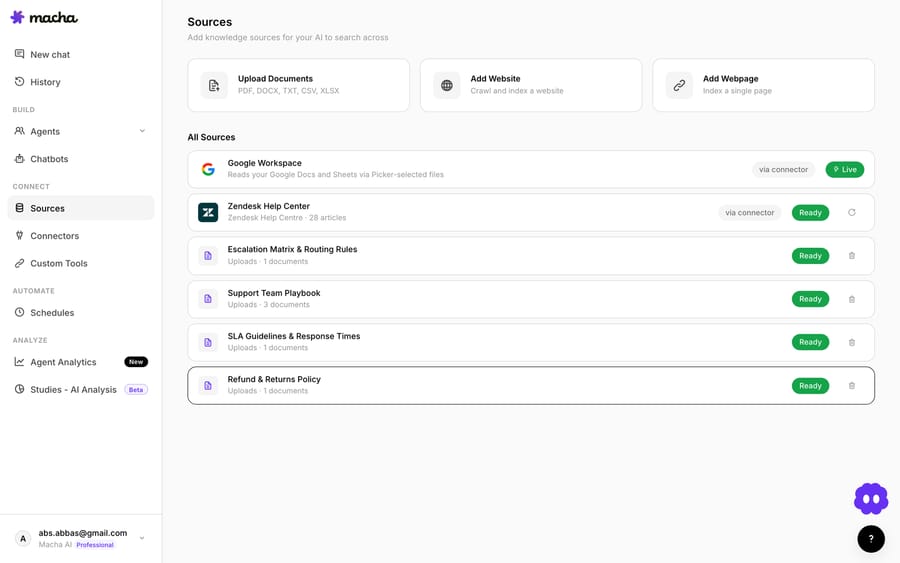
This is the right default for stable reference material an agent asks about constantly: SLA terms, policy language, troubleshooting runbooks, product specs. It's pre-indexed, so lookups are instant.

2. As live tool calls (the on-demand path)
The second path is direct access at request time, and here the two connectors differ. Notion exposes Search Pages and Get Page (plus database search), so an agent can run a fresh search across your workspace mid-conversation and pull content published five minutes ago. Google Workspace exposes Read Google Doc and Read Google Sheet: the agent can read a picked file in full at request time, but there is no Drive-wide search tool, so Google content is found through the synced knowledge source.
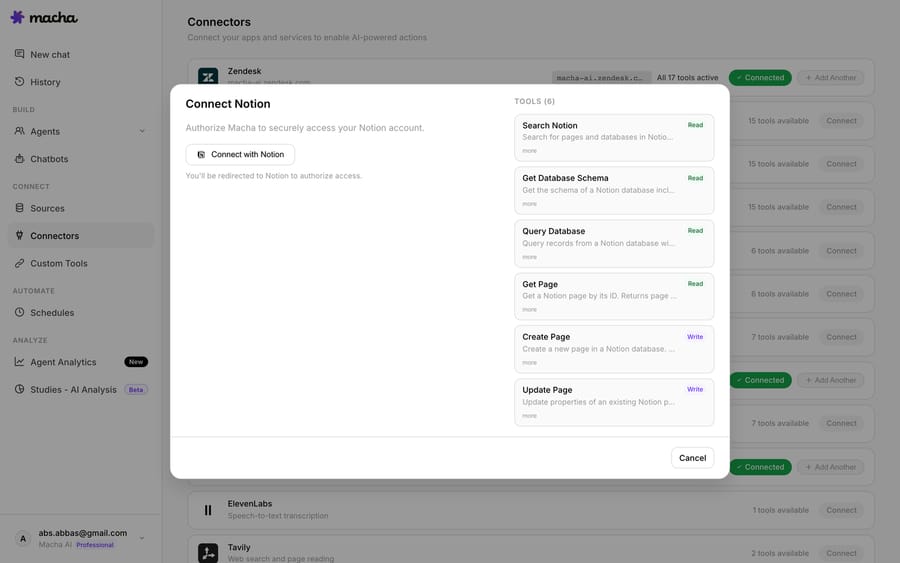
Live tools are the right choice for fast-moving or long-tail content: a Notion wiki that changes daily, or a spreadsheet the agent needs to read fresh. The trade-off is speed: a live call is only as fast as the upstream API.
The rule of thumb: sync your evergreen reference docs as a Knowledge Source for speed, and grant Notion's live Search/Get tools (or Google's read tools) for the long tail and the freshly published. Most teams run both.
How do you set up internal doc search?
You don't need to be technical, and the Macha team handles setup and monitoring on every plan. The shape is always the same:
- Connect your helpdesk. Macha attaches to Zendesk, Freshdesk, Gorgias, Front, HubSpot or Intercom, the place your agents already work. If you're on Zendesk, the Macha on Zendesk page walks through the install.
- Connect your doc stores. Authorize Google Workspace and Notion. For the synced path, add them as Knowledge Sources; for the on-demand path, enable their tools.
- Build the agent. Create an agent whose job is internal lookup, give it the knowledge sources and the live tools, and tell it in plain language how to behave: cite the source doc, return excerpts not summaries, ask before drafting a reply.
- Decide the trigger. This use case is most natural as on-demand assist: the agent asks whenever they're stuck, from the Copilot widget. You can also wire a ticket-update trigger or a custom webhook (say, when an agent adds a
needs-internal-infotag) so Macha searches proactively and leaves the findings as an internal note. On-demand keeps the agent in the driver's seat.
Full configuration steps live in the docs, and there are related patterns in the use case library, including drafting full replies using Google Docs context once the lookup half is solid.
When should a support team use agent-assist doc search?
Agent-assist lookup is the conservative, high-trust end of AI support, and that's a feature. A human reads every answer before it reaches a customer, so the failure mode isn't "wrong reply sent," it's "agent has to double-check," which they were going to do anyway. Use it when:
- Your answers live in internal docs that customers should never see verbatim (pricing logic, SLA terms, escalation rules).
- Agents handle varied, non-scripted questions where a canned macro won't cut it.
- You want the speed of automation with a human gate, so the agent stays accountable for what goes out.
What can go wrong?
- Garbage in, garbage out. Macha surfaces what your docs say. If "Enterprise SLA v3" contradicts "Enterprise SLA v2" and you never archived v2, an agent can get the wrong number with full confidence. The fix is the boring one: keep an owner and a review date on your reference docs.
- Permissions are yours to scope. Macha only reaches what you connect: the Google Docs you pick and the Notion pages you share. Be deliberate. You don't want a customer-facing agent able to surface board-deck commentary. Connect the support knowledge, not the whole company drive.
- It's assist, not autopilot. By design, this pattern keeps a human in the loop. If your goal is resolving tickets with no agent involved, that's a different agent (auto-resolve), with a different risk posture.
- Lookups aren't free, but they're flat. A Copilot session counts as one ticket, the same as an email ticket or a live chat: charged once, however many searches and replies it takes, whichever model it runs on. At about $0.40 the math is usually trivial next to the ninety seconds of agent time it saves. See the pricing page for current tiers.
How do you make sure agents can trust the answers?
The single most important habit to build into this agent: make it cite. When Macha returns "1-hour response, 4-hour resolution," the reply should name the source, "from Enterprise SLA Agreement v3," so the agent can click through and confirm in two seconds. An answer with a citation is a tool; an answer without one is a guess the agent has to verify from scratch. Put "always name the source doc" in the agent's instructions and keep it there.
FAQ
Which doc tools can Macha search? Google Workspace (Google Docs) and Notion, both as synced Knowledge Sources. Notion also has live Search Pages / Get Page tools; Google has live Read Google Doc / Read Google Sheet tools for the files you picked. If your runbooks live in Confluence, its connector has Search Pages and Get Page tools too.
Does this replace our knowledge base? No. Macha sits on top of the docs you already keep in Google Docs and Notion and on top of the help desk you already use. It doesn't ask you to migrate anything; it makes what you have findable from inside the ticket.
Will the agent send replies automatically? Not in this pattern. It surfaces internal information for a human agent and offers to draft a reply, but the agent confirms before anything is sent. If you want hands-off resolution, that's a separate auto-resolve agent you'd configure deliberately.
How fresh are the answers? A synced Knowledge Source re-indexes as your docs change, so answers reflect the current version. For Notion content that changes by the hour, grant the live Search Pages tool so the agent reads the workspace in real time.
What does it cost to run? It's per ticket: a whole Copilot session is one ticket, about $0.40, however many searches and replies it takes, and the model you pick doesn't change that. Team seats are unlimited, so there are no per-seat charges; see pricing.
Can I limit what it can see? Yes. For Google you pick the individual docs in Google Picker, and for Notion you choose which pages to share. Scope it to your support knowledge, not the entire company workspace.
How do you try it?
If your agents lose real time hunting for answers that already exist in Google Docs or Notion, this is one of the fastest wins Macha offers: low risk, human in the loop. Start a free trial ($50 of usage, no credit card required), connect your help desk and your docs, and let an agent ask the first question. Or read the docs for the full walkthrough.
Written by Abbas (Customer Support & AI, Macha) · Reviewed by Ankeet Guha (Co-founder & CTO) · Published 2026-06-24 · Last updated 2026-09-24.






