





 Shopify
 Stripe
 Slack
Slack Notion
 Google Workspace
 Confluence

How Do You Route Zendesk Tickets to a Group, an Agent, or Both? (2026)


Zendesk's triggers, omnichannel routing and skills route on metadata such as channel, tag and form field, not on what the customer wrote. An AI agent with List Groups and Assign Ticket reads each new ticket and routes it to a group, a specific agent, or both.
Key takeaways
- Since 2 May 2026, Macha's Assign Ticket tool routes a Zendesk ticket to a group, a specific agent, or both in one call, based on what the ticket says.
- List Groups returns every active Zendesk group with its ID, so an AI agent can turn a group name like Billing into the numeric ID Zendesk's API requires.
- Zendesk's omnichannel routing is on all Suite plans, but routing by skills and priority, plus SLA policies, needs Suite Professional or higher.
- Zendesk says round robin doesn't consider ticket complexity or expertise requirements, so Macha routes by fit to a group and leaves workload balancing inside the group to Zendesk.
- Macha bills per ticket rather than per seat, from $299 a month for 750 tickets, about $0.40 per ticket, whether the agent only routes a ticket or also answers it, with setup by the Macha team and a dedicated success manager included.

To route a Zendesk ticket to a group, a specific agent, or both by what the customer wrote, give an AI agent two tools: List Groups, which turns a group name like "Billing" into the numeric ID Zendesk's API needs, and Assign Ticket, which since 2 May 2026 accepts a group, an agent, or both in one call. Fire the agent on Zendesk's New Ticket event so it routes before any human reply. Native Zendesk routing still does the rest: triggers work on every plan, omnichannel routing is on all Suite plans, and routing by skills and priority needs Suite Professional or higher.
| Routing option | Decides on | Plan |
|---|---|---|
| Zendesk triggers | Channel, address, tag, form field | All plans |
| Omnichannel routing | Agent capacity and status | All Suite plans |
| Skills and priority routing, custom queues | Skills and priority set by rules | Suite Professional and up |
| Round robin | Even rotation | Doesn't weigh complexity or expertise |
| Macha Assign Ticket + List Groups | The words in the ticket | Any Zendesk plan; from $299/mo for 750 tickets, setup and a dedicated success manager included |
Every native option routes on metadata. None of them reads the sentence the customer wrote. Macha is an AI agent layer that sits on top of the Zendesk you already run: it reads each incoming ticket, decides what it's about, and calls Zendesk's own assignment API to route it. Below: how the two tools fit together, how to wire the trigger, where this beats trigger routing, and where a plain Zendesk trigger is the better choice.
How does Zendesk route tickets natively, and where does it stop?
It's worth being precise about the native options, because Macha is meant to complement them, not duplicate them. Per Zendesk's own routing and automation documentation:
- Triggers run on ticket create/update and can fire a Ticket > Group or Ticket > Assignee action, the classic "tickets to this support address go to that group."
- Omnichannel routing pushes tickets to available agents by capacity across email, messaging, and voice; it's on all Suite plans, but routing by skills, priority, SLA, and custom queues requires Professional or higher.
- Round robin distributes evenly through the agent pool: but, as Zendesk notes, it "doesn't consider ticket complexity or expertise requirements."
- Skills-based routing matches tickets to agent attributes, the closest native thing to content-aware routing.
It also helps to be clear on push vs. pull, because the two native models behave differently. Triggers and views are a pull model: a trigger drops the ticket into a group queue, and agents pull the next one off a shared view. Omnichannel routing is a push model: Zendesk assigns the ticket directly to an available agent based on their capacity, status, and (on Professional and up) their skills. Skills-based routing is the closest native thing to content-aware routing, but a "skill" is still a tag you attach with a rule, so it inherits the same problem: something earlier in the pipeline has to have already understood the ticket well enough to label it. Push gets work onto a person fast; pull keeps a team in control of what they take. Neither one reads the ticket.
The common thread: every native decision is made from structured signals. A trigger condition can check a tag or a form field, but it can't tell that "I was charged twice and need this fixed before my flight" is an urgent billing issue. You'd have to first apply a tag, which means another trigger, another keyword list, and the brittleness that comes with it. As eesel's Zendesk routing guide puts it, native rule-based routing "struggles with nuance" and gets unwieldy as volume grows.
Here's the split laid out plainly:
| Native Zendesk routing | Macha content-aware routing | |
|---|---|---|
| Routes on | Metadata: channel, tag, form field, agent capacity/skill | The actual words in the ticket |
| Model | Pull (triggers → group queue) and push (omnichannel → agent) | Reads the ticket, then calls Zendesk's assign API |
| Handles nuance | No: needs a rule/tag to exist first | Yes: classifies intent in natural language |
| Workload balancing | Yes: round robin, omnichannel capacity | No: routes by fit; hands off to Zendesk for balancing |
| Plan gating | Skills/priority/SLA/custom queues need Professional+ | Works on any Zendesk plan; bills per ticket (from $299/mo for 750) |
| Best for | Deterministic rules ("this channel → this group") | Decisions that depend on what the customer wrote |
So the honest framing is: use triggers for the routing you can express as a rule (this channel → this group), use omnichannel routing for workload balancing, and add an AI layer for the routing that depends on what the ticket says.
What do Assign Ticket and List Groups do, and why does "group, agent, or both" matter?
Macha's Zendesk connector exposes the full ticket toolset, read tickets and custom fields, post replies and notes, update status/priority/tags, plus the two we care about here. (You can see the complete list on the Zendesk integration page.)
List Groups is a read tool. It returns every active group in your Zendesk, "Billing," "Tier 2 Support," "Logistics," "VIP", with each group's ID. This exists because the AI thinks in names but Zendesk's API assigns by ID. List Groups is how an agent resolves "this is a billing ticket" into the numeric group ID the assignment call needs, without you hard-coding IDs that break the moment someone renames a team.
Assign Ticket is the write tool that does the routing. As of May 2 it accepts:
| You provide | Zendesk result |
|---|---|
| A group only | Ticket lands in that team's queue; whoever's on rotation picks it up |
| An agent only | Ticket goes straight to that named person |
| Group + agent together | Ticket is filed under the group and assigned to a specific person in it |
That third option is the one teams ask for most. In Zendesk's data model an assignee normally belongs to a group, so assigning a person and setting the group keeps reporting, SLAs, and views consistent, the ticket shows up in the group's queue and on the right agent's plate. Before this change you had to pick one; now a single Assign Ticket call does both. (Macha's Freshdesk connector has its own Assign Ticket and List Groups tools, and the Gorgias connector pairs Assign Ticket with List Teams, so the pattern carries across help desks.)
The split between a read tool and a write tool is deliberate. List Groups → reason → Assign Ticket is a clean, debuggable chain: you can see exactly which group the agent resolved to and why, instead of a black-box "it assigned it somewhere."
How do you build a routing agent in Macha?
Here's the actual build. The goal: every new ticket gets read, classified by topic, and routed to the right group, with a specific owner where it's obvious.
1. Connect Zendesk and give the agent the routing tools
After connecting Zendesk, open (or create) the agent that will own routing and add its tools. In the tool picker you'll add List Groups and Assign Ticket at minimum; most routing agents also get Get Ticket (to read the full thread), Update Priority, and Add Internal Note so they can leave a one-line "routed here because…" audit trail.

Keep the toolset tight. An agent whose job is routing doesn't need Add Public Reply: giving it only the tools the task requires makes its behaviour predictable and keeps it from "helpfully" answering a ticket it was only supposed to triage.
2. Write the instructions
The system prompt is where you encode your routing policy in plain English, the part a trigger can't do. A workable shape:
You triage incoming tickets. First call List Groups to see the available queues. Read the ticket. Decide which group best fits the customer's actual issue: billing/refunds → Billing; shipping/delivery → Logistics; bugs/errors → Tier 2. If the ticket names a previous agent or is a clear VIP, assign that group and the right agent. Otherwise assign the group only. If you're genuinely unsure, assign the General queue and add an internal note explaining why. Never reply to the customer.
Two things matter here. List Groups runs first so the agent routes against the groups that exist today, not a list baked into the prompt. And the explicit "when unsure" fallback means ambiguous tickets degrade gracefully to a human-reviewed queue instead of being force-fit somewhere wrong.
3. Add the trigger so it runs by itself
Routing only helps if it happens before an agent touches the ticket. In the agent's Triggers tab, add New Ticket, it fires on the first customer message, before any human reply, so classification happens at the front door.
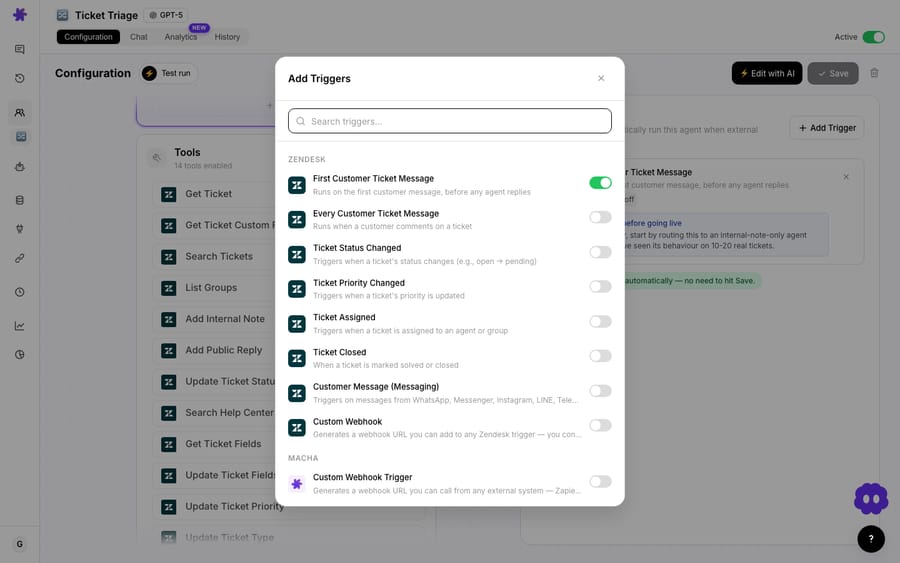
If you want surgical control over which tickets invoke the agent, say, only tickets on certain brands or forms, use the Custom Webhook trigger instead. It generates a webhook URL you attach to a native Zendesk trigger, so Zendesk's own conditions decide what fires the agent. That's the clean division of labour: Zendesk filters on metadata, Macha decides on content.
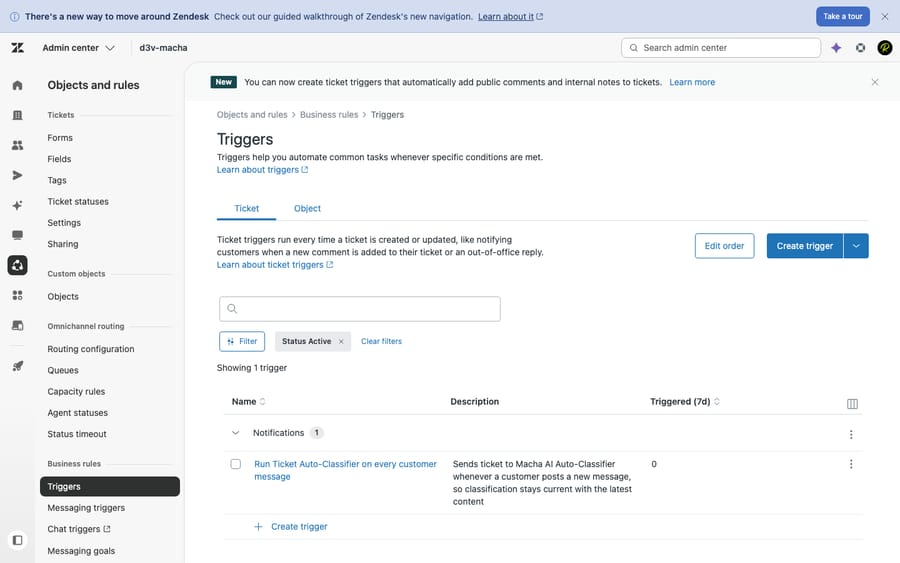
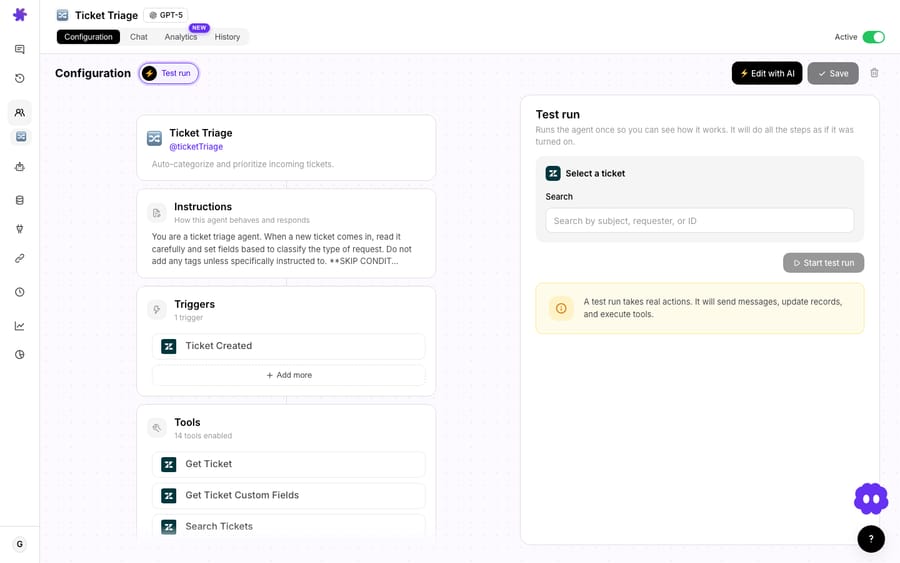
That's the whole loop: ticket arrives → trigger fires → agent reads it → List Groups → Assign Ticket. For most teams this is a five-minute build. Before you let it run unattended, open the agent's configuration and use Test run to fire it once against a real ticket: you'll see every step (the List Groups call, the reasoning, the Assign Ticket call) execute exactly as it would in production, then read the same trail in the History tab.
If you'd rather start from a worked template, the triage-and-route use case wires up exactly this pattern.
What does content-aware routing look like on real tickets?
Say three tickets land in the same minute:
- "I was double-charged for my June subscription and need a refund." → Agent calls List Groups, maps this to Billing, calls Assign Ticket with the Billing group. No obvious owner, so group only.
- "Where's my order? Tracking hasn't moved in 6 days. Sarah was helping me last week." → Maps to Logistics, and because the customer named a prior agent, Assign Ticket sets Logistics group + Sarah so continuity is preserved.
- "The dashboard throws a 500 every time I export." → Maps to Tier 2 Support, sets Update Priority to High (a 500 error is a real bug), assigns the group, and drops an internal note: "Routed to Tier 2: reproducible export error, flagged High."
Three tickets, three different routing shapes, group-only, group-plus-agent, and group-plus-priority-plus-note, all decided from the words in the ticket, with no tags or keyword lists to maintain. That's the practical difference between content-aware routing and rule-based routing.
When should you keep a native Zendesk trigger instead?
Content-aware routing is the right tool for content-dependent decisions. It is not always the right tool, and a deep-dive that pretends otherwise isn't worth much.
- If a Zendesk trigger already does it, keep the trigger. "Everything from [email protected] goes to the EU group" is a one-line native trigger that runs instantly and costs nothing. Don't pay Macha to reproduce deterministic rules: layer Macha on for the routing rules can't express.
- It costs money. A ticket the agent touches is a billed ticket, one conversation, charged once, about $0.40 at the entry tier. On very high, low-value volume, a native trigger may simply be cheaper. See the pricing page for the maths.
- Workload balancing is still Zendesk's job. Assign Ticket routes by fit, not by who's least busy. If you need even distribution within a queue, route to the group with Macha and let Zendesk's round-robin or omnichannel routing pick the individual agent. The two layers compose well: don't make the AI do load balancing.
- Garbage groups in, garbage routing out. The agent routes to the groups List Groups returns. If your Zendesk has twelve overlapping half-dead groups, tidy them first; clear, distinct queues make for clear routing.
- Watch it before you trust it. Run the agent in suggest/observe mode on real tickets and read the run history for a few days. Routing is high-leverage precisely because it's early in the lifecycle, which also means a confidently-wrong rule does damage at scale. Verify, then let it run autonomously.
How does AI routing fit with the rest of Zendesk?
The mental model: Zendesk owns the queues, the SLAs, and the workload mechanics; Macha owns the read-the-ticket-and-decide step that used to need a human. You're not ripping anything out. Triggers, views, omnichannel routing, and skills all keep doing their jobs: Macha just makes the first decision smarter, then hands the ticket back into Zendesk's machinery via the same APIs your agents use. If you want the broader picture of how the agent layer sits on Zendesk, the Macha on Zendesk page walks through it, and the Zendesk integration page lists every ticket tool, including Assign Ticket and List Groups, an agent can call.
FAQ
Can a Macha agent assign a ticket to both a group and an agent at once? Yes: since May 2, 2026 the Assign Ticket tool accepts a group, a specific agent, or both in one call. Setting both files the ticket under the group's queue and assigns the named person, keeping views and SLAs consistent.
Why is there a separate List Groups tool? Zendesk assigns by group ID, not name. List Groups returns every active group with its ID so the agent can resolve "Billing" to the right number at runtime, no hard-coded IDs that break when a team is renamed.
Does this replace Zendesk's native routing? No. Macha is an AI layer on top of Zendesk. Keep your triggers and omnichannel routing for rule-based and workload-based decisions; add Macha for routing that depends on what the ticket actually says. They run together.
What triggers the routing agent? Usually the New Ticket trigger, which fires on the first customer message before any agent replies. For tighter control, the Custom Webhook trigger lets a native Zendesk trigger decide exactly which tickets invoke the agent.
How much does AI routing cost? Macha bills per ticket, one conversation, charged once, whether the agent only routes it or goes on to answer it, from $299 a month for 750 tickets, about $0.40 each. There are no per-seat license fees, and the price includes setup: the Macha team writes the routing instruction from how your team already assigns tickets, maps it to your groups and tests it on a sample of your past tickets before it routes a live one. A dedicated success manager then handles your changes: new groups, new rules, instruction changes. See pricing for every tier.
Which Zendesk plan do I need for skills-based routing? Omnichannel routing is on all Suite plans (Team, Growth, Professional, Enterprise), but routing by skills and priority, and SLA policies, need Suite Professional or higher, per Zendesk's routing documentation.
How do you try it?
If your routing today is a wall of keyword triggers you're afraid to touch, this is the upgrade: route by what the ticket means, not by tags you have to maintain. Start a free trial ($50 of usage, no credit card required), connect Zendesk, give an agent the List Groups and Assign Ticket tools, and point the New Ticket trigger at it. Or connect Zendesk and let the Macha team build the routing agent for you, which is included on the trial and every plan. The Zendesk integration docs have the full setup.
Written by Abbas (Customer Support & AI, Macha) · Reviewed by Ankeet Guha (Co-founder & CTO) · Published 2026-06-24 · Last updated 2026-06-24.






