





 Shopify
 Stripe
 Slack
Slack Notion
 Google Workspace
 Confluence

How Do You Auto-Assign Zendesk Tickets to Groups and Set Ticket Types With AI?


A Macha AI agent can read a new Zendesk ticket, route it to the right group queue and set its ticket type in one pass, using three tools added on May 2, 2026. Here is how the tools work, how they sit alongside Zendesk's own triggers and omnichannel routing, and when a plain trigger is enough.
Key takeaways
- Macha's May 2, 2026 release added group routing to Assign Ticket plus two new Zendesk tools, List Groups and Update Ticket Type, so an agent can route and label a ticket in one pass.
- The Update Ticket Type tool sets one of Zendesk's four built-in types, problem, incident, question or task, without touching custom fields.
- Zendesk automations run once every hour, so Macha's agent sets the ticket type the moment it reads a new ticket instead of waiting for the next automation cycle.
- Zendesk lists omnichannel routing on every Suite plan from Team up and skills-based routing on Professional and above, and both can assign agents inside the group a Macha agent picks.
- Macha charges a six-call routing pass as one ticket, on a plan starting at $299 a month for up to 750 tickets, about $0.40 a ticket.

A Macha agent can route a Zendesk ticket to a group queue and set its type in one pass: it calls List Groups to find the queue's ID, Assign Ticket to route it, and Update Ticket Type to mark it problem, incident, question, or task. All three tools shipped in Macha's May 2, 2026 release. Before it, Assign Ticket could only target a named agent. Together they mean a Macha agent can read an incoming ticket, decide where it belongs, and put it there with the correct label before a human opens it.
This is the tactical walkthrough: what the three tools do, how to wire them onto an agent, and the watch-outs. The strategy-level case for AI routing over keyword triggers lives in our AI ticket routing in Zendesk post.
Which Zendesk routing tools did Macha add on May 2?
Three additions to the Zendesk connector, all aimed at triage agents:
| Tool | Type | What it does |
|---|---|---|
| Assign Ticket | Write | Assigns a ticket to a specific agent and/or routes it to a group queue. Previously you could only target an individual. |
| List Groups | Read | Returns every active Zendesk group with its ID, so an agent can resolve a group name ("Billing", "Tier 2 Support") to the ID the API needs. |
| Update Ticket Type | Write | Sets a ticket's type to problem, incident, question, or task, without touching custom fields. |
The headline change is group routing. Before this, an agent that wanted to hand a ticket off had to pick a specific person, which is brittle (people go on holiday, change teams, leave) and ignores how most support orgs work. Real teams route to queues: a billing group, a tier-2 escalation group, a returns group. Now an agent can route to the queue and let Zendesk's own assignment rules pick the human inside it.
How do you assign a ticket to a group in Zendesk without AI?
A routing agent writes to exactly the fields Zendesk already uses for group assignment; it doesn't replace them. So here's how that works natively.
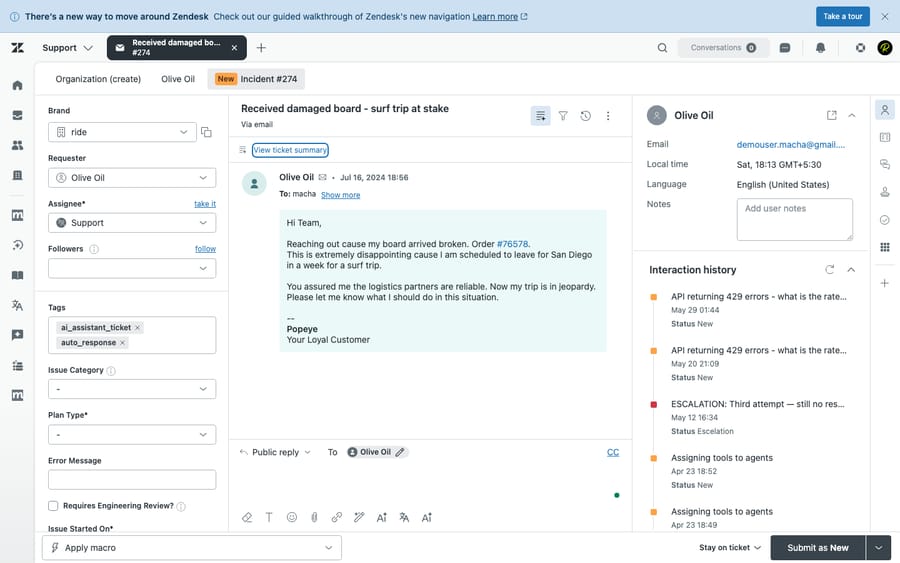
Manually, from the ticket. Open any ticket and use the Assignee control in the ticket sidebar. The first dropdown is the Group: pick a group (say, Billing) and the ticket moves into that queue. You can stop there, since leaving the individual assignee blank hands the ticket to the whole group, or also pick a specific agent inside the group.
Automatically, with a trigger. To route on autopilot, go to Admin Center → Objects and rules → Business rules → Triggers → Create trigger, set your conditions (channel, tags, the inbound address), then add the action Group → [your group]. Every ticket that matches drops into that queue the moment it's created or updated. This is Zendesk's standard, deterministic router, and it's available on every plan.
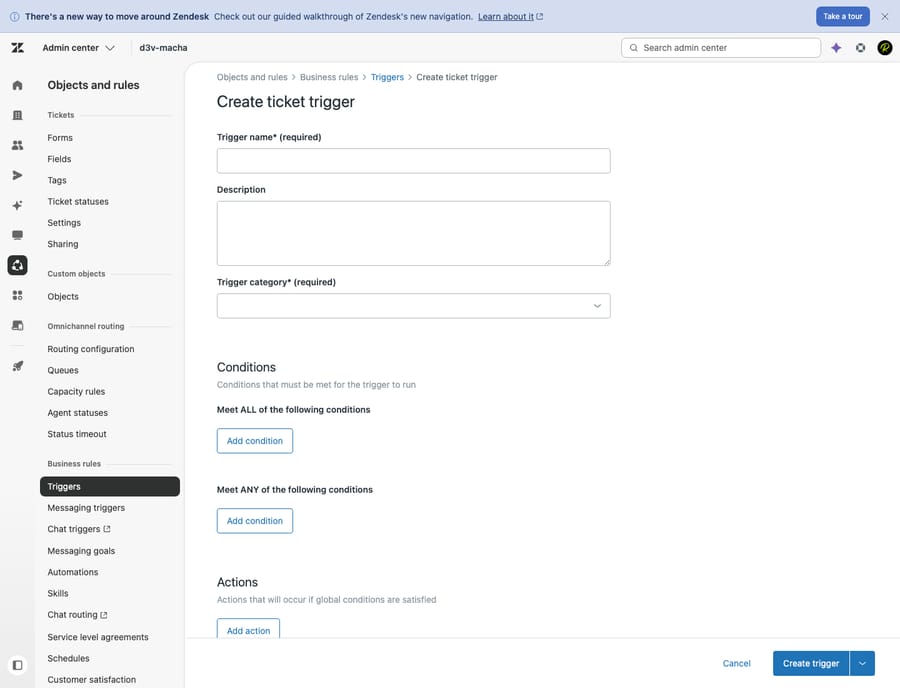
That trigger path is right when the rule is simple: anything to support+billing@ goes to Billing. It gets fragile the moment the decision depends on what the customer actually wrote, which is where a Macha agent comes in.
Why route to a group instead of a person?
Assigning to an individual is the wrong default for almost every automated workflow. A group queue is a load-balancer: every qualified agent sees it, whoever's free grabs it, and coverage doesn't collapse the moment one person is out. Native Zendesk has supported group-based routing through triggers for years, so routing to a group brings Macha's agents in line with how Zendesk admins already build.
The difference is how the decision gets made. A native trigger fires on conditions you spell out in advance: a tag, a subject keyword, the inbound address. That's fine for the clean cases and fragile for everything else. Keyword triggers can't tell an angry "I want my money back" from a neutral "can you explain this charge," and they misfire on an agent's own reply unless you scope them with conditions like Current user is (end user).
A Macha agent reads the whole ticket (subject, body, customer history, attachments via AI vision) and decides like a human triager would. Then it calls List Groups to find the right queue's ID and Assign Ticket to route it there. Semantic understanding picks the queue; the tool puts it in.
What do Zendesk's four ticket types do, and why set them?
Zendesk ships four built-in ticket types, and they change how tickets behave:
- Question: the requester wants information, not a fix.
- Problem: a defect in your product or service that's likely to hit other customers too.
- Incident: one customer's report of an existing problem. Incidents link to a problem ticket, and when you solve the problem, every linked incident is set to solved automatically, with the problem's solving comment added to each. (Zendesk's docs explain the relationship.)
- Task: work assigned to a specific agent, optionally with a due date.
Most teams never set type consistently because doing it by hand is tedious and doing it with automation is awkward. Zendesk automations run once every hour, at some point during the hour, not the instant a ticket arrives, and they can't create or link problem tickets on their own. With the Update Ticket Type tool, a triage agent stamps the type the moment it reads the ticket, in the same pass that routes it. A surge of "the checkout is broken" reports gets marked incident and pointed at the same queue; a "how do I change my plan" gets marked question and routed to tier 1. Clean types make your Explore reporting trustworthy and your problem/incident workflow usable.
How do you set up a Macha triage agent to route tickets?
The whole thing is one triage agent with a trigger and a short tool belt.
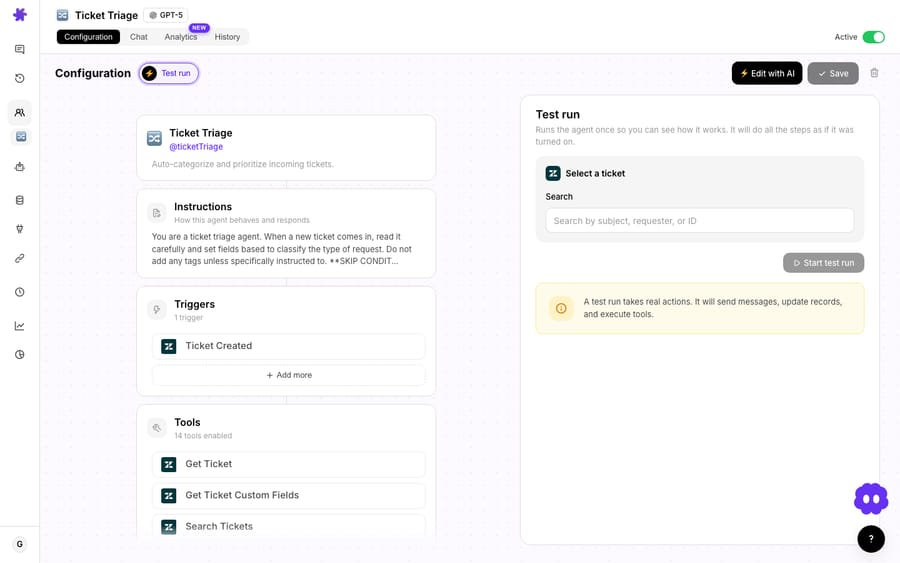
1. Fire the agent on every new ticket. Add a trigger so the agent runs on Zendesk's Ticket Created event. This is the autonomous path: no human in the loop, the agent acts the moment the ticket lands.
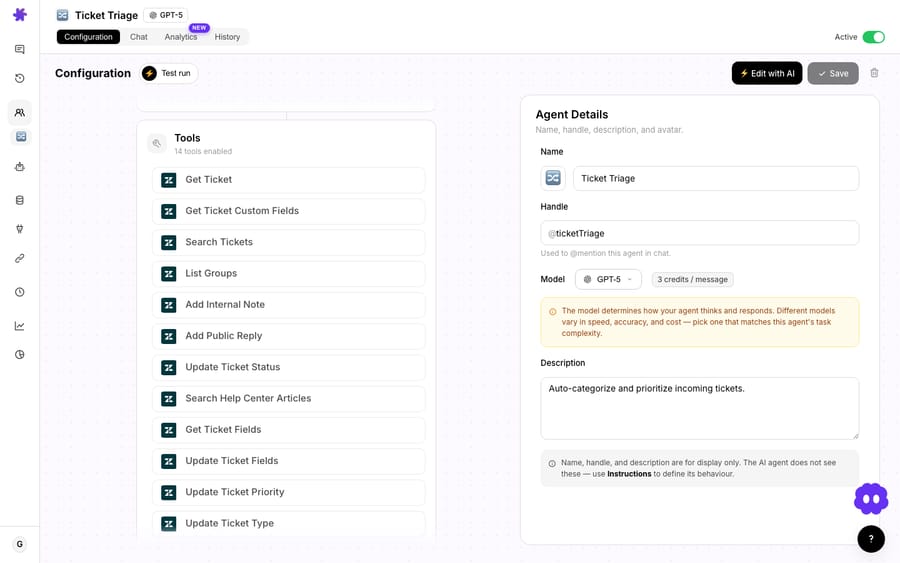
2. Give it the right tools. A routing agent needs to read before it writes. Enable Get Ticket and Get Custom Fields so it has full context, List Groups so it can resolve queue names, and the write tools (Assign Ticket, Update Ticket Type, and usually Update Priority and Update Tags) to act on its decision.
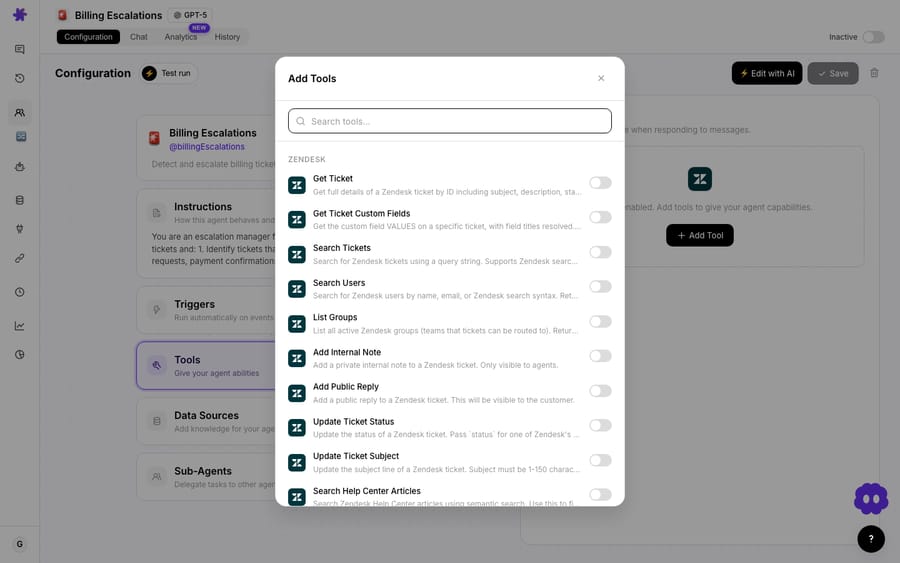
3. Write the routing rules in plain English. You describe your queues and the rules for each, the way you'd brief a new hire:
"Read the ticket. Use List Groups to find the matching queue. Route billing, refund, and invoice questions to the Billing group. Route anything mentioning an outage, error, or 'broken' to Tier 2 Support and set the ticket type to incident. Treat 'how do I…' tickets as type question and leave them in the default queue. If a ticket is angry or threatens churn, set priority to high and add the tag vip-review. If you're unsure, do not route. Leave it for a human."
That last sentence matters: a good triage agent knows when not to act.
4. Test before you let it loose. Run the agent against real past tickets in the builder and check its choices (right queue, right type, sane priority) before you flip the trigger live. Treat the first week as supervised: spot-check what it routed and tighten the instructions where it guessed wrong.
Macha's Test run does this. It runs the agent once against a ticket you pick and executes its real tool calls; the panel warns that "a test run takes real actions: it will send messages, update records, and execute tools." Point it at a billing complaint and you watch it call List Groups, then Assign Ticket to the Billing queue and Update Ticket Type, making the same writes it would in production.
What does a worked routing pass look like, and what does it cost?
Say you run three queues (Tier 1, Billing, and Tier 2 Support) and you want incidents flagged. The agent's loop per ticket looks like this:
- Get Ticket + Get Custom Fields → full context, including the order number on a custom field.
- List Groups → resolves "Billing" to its group ID and "Tier 2 Support" to its.
- Decide: this is a duplicate charge complaint → Billing.
- Update Ticket Type →
question(the customer wants an explanation, not a defect fix). - Assign Ticket → route to the Billing group; no individual assignee, so Zendesk's group rules pick the human.
- Update Priority →
highbecause the customer mentioned a chargeback.
Six tool calls, a few seconds, and the ticket is in the right queue, correctly typed and prioritized, before anyone's read it. All six calls happen inside one ticket, and Macha charges a ticket once however many calls it takes. Macha is one plan priced by ticket volume, from $299 a month for up to 750 tickets, which works out to about $0.40 a ticket (see the pricing page). Per-ticket billing means a thorough six-call pass costs the same as a lazy one-call pass, so there's no reason to trim the reads that make the routing accurate.
Does Macha replace Zendesk's omnichannel or skills-based routing?
No. Macha is a layer on top of the helpdesk you already run. Native triggers, omnichannel routing and skills-based routing handle the deterministic, capacity-aware parts of the job: assigning within a group, honoring agent status, balancing load. Zendesk's docs list omnichannel routing on every Suite plan from Team up, and skills-based routing on Professional, Enterprise and Enterprise Plus. Keep using them.
What Macha adds is the judgment layer in front of all that: reading unstructured tickets and deciding the queue and type the way a senior agent would, then writing the result back through the same Group and Type fields that your triggers and reports already depend on. A common pattern is to let a Macha agent set the group and type, then let Zendesk's omnichannel routing assign the individual agent inside that group based on status and spare capacity. The two compose cleanly.
When should you not use an AI agent for Zendesk routing?
- Group names must resolve. List Groups matches on your active Zendesk groups. If your instructions name a queue that doesn't exist (typo, renamed group), the agent can't route to it. Keep the names in your prompt aligned with Zendesk.
- Don't over-automate the ambiguous middle. The biggest mistake is forcing a route on every ticket. Tell the agent to leave unclear tickets for a human rather than guessing. A confident misroute is worse than no route, because someone has to notice and undo it.
- Type changes have side effects. Setting type to incident matters in Zendesk because incidents link to problems. If you're going to use incident/problem types, make sure your team works that pipeline; otherwise stick to question/task and avoid orphaned incidents.
- It writes to live tickets. Start supervised. Scope the trigger narrowly at first (one brand, or a subset of tickets), watch a week of decisions, then widen. Every action is logged, so audit is easy.
- Plain triggers are sometimes enough. If your routing really is "address X → group Y" with no nuance, a native Zendesk trigger is simpler and carries no AI cost. Reach for an agent when the content of the ticket, not its metadata, has to drive the decision.
FAQ
Can a Macha agent assign a ticket to a group instead of a person? Yes. As of the May 2, 2026 release, the Assign Ticket tool accepts a group, a specific agent, or both. Routing to a group queue is the recommended default for automated triage, since it survives people changing teams or being out.
How does the agent know my group IDs? The List Groups tool returns every active Zendesk group with its ID. The agent calls it to resolve a queue name in your instructions ("Billing") to the ID Zendesk's API needs, so you write rules in plain English, not raw IDs.
What ticket types can the agent set? The Update Ticket Type tool sets Zendesk's four built-in types: problem, incident, question, or task. It changes the native type field directly, without touching custom fields.
Does this replace Zendesk's omnichannel or skills-based routing? No. Macha is a layer on top of Zendesk. A good setup is to let the agent pick the group and type by reading the ticket, then let Zendesk's own routing assign the individual agent inside that group by availability or skill.
How much does a routing pass cost? Macha bills per ticket, not per action: a full triage pass is one ticket, charged once, however many tool calls it takes. Pricing starts at $299 a month for 750 tickets, about $0.40 each. See the pricing page for current plans.
Is it safe to run on a live queue? Yes, with the usual care: start with a narrow trigger scope, supervise the first week, and instruct the agent to leave ambiguous tickets unrouted. Every action is logged for audit.
Which Zendesk plans include omnichannel routing? Zendesk's help center lists omnichannel routing on Suite Team, Growth, Professional, Enterprise and Enterprise Plus. Skills-based routing needs Professional or above.
How do you start?
If your team still hand-sorts tickets into queues, this is the part to automate first: it's high-volume, repetitive for humans, and exactly the kind of decision an agent makes well. Start a free trial ($50 of usage, no credit card required), connect Zendesk, and build a triage agent with the Triage and route tickets by topic recipe. The full tool reference is in the docs, and the Macha on Zendesk page covers the rest of the connector.
Written by Abbas (Customer Support & AI, Macha) · Reviewed by Ankeet Guha (Co-founder & CTO) · Published 2026-06-24 · Last updated 2026-09-24.






